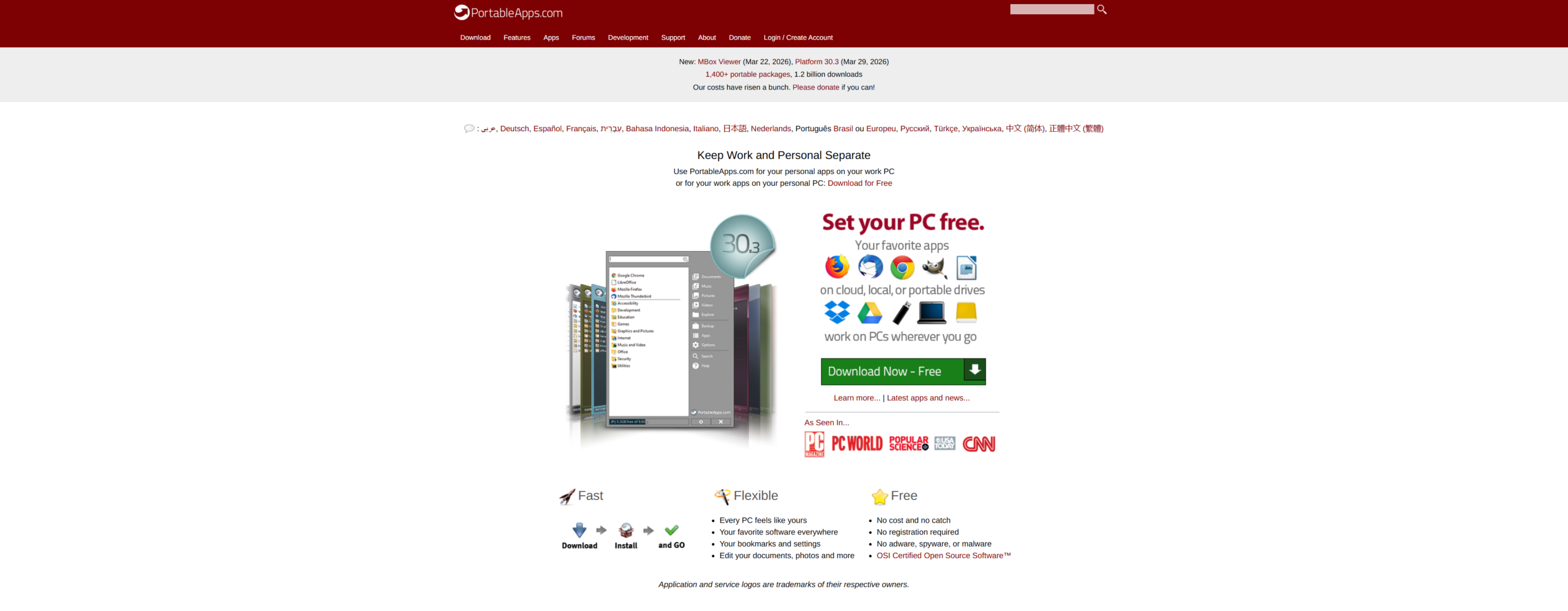
PortableApps.com belongs to a class of software that many people assume peaked with the USB stick. That assumption is wrong. The platform is still being actively maintained in 2026, with PortableApps.com Platform 30.3 released on March 29, 2026, and the site currently advertising more than 1,400 portable packages, over 500 “real” portable apps, and more than 1.2 billion downloads. The project describes itself as a fully open source and free platform, built to run from a synced cloud folder, a local PC, or a portable drive.
Table of Contents
That matters because PortableApps.com is not just a warehouse of ZIP files. It is a packaging format, a launcher system, an app menu, an updater, an installer, a backup utility, and a set of portability rules that try to solve a boring but stubborn problem: moving your software and your settings between Windows machines without turning every machine into a cleanup job afterward. The official format specification, launcher documentation, and support pages make that ambition very clear.
My verdict is simple: PortableApps.com is still one of the most useful Windows ecosystems of its kind, but its value only becomes obvious if you judge it by function, not by fashion. The site looks old. The menu feels old-school. The terminology can be dense. Yet the underlying system is more serious, more carefully maintained, and more practical than plenty of newer software that looks much slicker on first contact. That judgment rests on what the project publicly documents about its format, update flow, support model, release cadence, and app directory.
A problem PortableApps.com still solves better than most rivals
PortableApps.com starts from a definition of portability that is much stricter than “this EXE runs without setup.” Its own definition says a portable app should work from a USB drive, SSD, memory card, or synced cloud folder, survive drive-letter changes, stay self-contained, avoid interfering with locally installed software, and leave behind no registry entries or files except those Windows generates automatically.
That sounds obvious until you compare it with the average “portable” download scattered around the web. A lot of those packages are merely unpacked builds. They may launch from a folder, but they often still write settings into APPDATA, break when paths change, or assume a local install exists somewhere on the machine. PortableApps.com’s real strength is not that it offers portable software. It is that it tries to standardize what “portable” should mean. The format specification even allows temporary registry or local-file changes during use only if they are restored to their pre-run state on exit, and it explicitly requires the app to keep working as the drive letter changes between machines.
That standard matters more than the marketing. It is the difference between “I launched a browser from a folder once” and “I can carry a working environment between machines without redoing settings every time.” The specification also requires a clear directory model, with binaries in App, user data in Data, and support or source material in Other. The Data directory is meant to hold the user’s settings, configuration, and other content that a local install would usually scatter through APPDATA or profile locations.
PortableApps.com also solves a second problem that many people forget until they need it. A portable app on its own is helpful. A whole portable environment is far more useful. The platform is designed to live in one place, keep the apps together, update them together, and back them up together. The official feature page stresses that everything stays in one location, making install, update, and backup easier whether the suite sits on a removable drive, a synced cloud folder, or a local disk.
That is why the project still has a place in 2026. It is not chasing the latest desktop trend. It is serving a durable use case: shared PCs, work and personal separation, emergency kits, IT support drives, travel setups, lab environments, teaching rooms, privacy-minded browsing, and Windows users who do not want every tool welded into the host system. The homepage still leads with exactly that split-use idea, inviting you to keep personal apps on a work PC or work apps on a personal PC.
The first setup is cleaner than the old-school branding suggests
The actual installation model is one of PortableApps.com’s biggest strengths. The platform is built to install to the root of a portable drive, to a local PC, or to a synced cloud folder. The support page still recommends installing to the root of a portable drive, and the feature page says the installer can target Dropbox, Google Drive, local storage, or portable media. That flexibility is not a side note. It changes the whole character of the software.
A lot of people still hear the phrase “portable apps” and picture a flash drive hanging from a keychain. PortableApps.com is broader than that. The current platform download page describes it as a system for synced cloud folders, local PCs, and USB drives, while the About page repeats the same multi-location story. That means you can use it as a migration-friendly local toolkit even if you never touch a USB stick. For plenty of users, that is the smarter way to think about it.
Once installed, you launch the environment with Start.exe. From there, the platform menu becomes the control point for apps, updates, browsing the drive, and other housekeeping. The support docs say that the built-in app store is the easiest way to add software: open “Apps,” choose “Get More Apps,” sort by category, name, new apps, or recent updates, then install the selections. The platform can also install any .paf.exe package manually and place it in the right location.
That simplicity is easy to overlook because the interface does not perform modernity. It is functional rather than theatrical. PortableApps.com does not waste time pretending to be a new operating system. It is a launcher and manager, and it behaves like one. For people who are tired of electron-heavy wrappers around very simple actions, that restraint is a feature rather than a flaw.
There is another practical detail here that makes the platform more useful than random portable download directories. The app directory says there is no registration or login required, no shovelware, and no bundleware. In a part of the software world that is full of mirror sites, deceptive download buttons, and repackaged installers, that matters. The support page also says packages distributed through PortableApps.com have been checked for malware and viruses and have not been altered since the project checked them.
This is also where the first mild criticism appears. The install flow is straightforward, but the project’s language can be a little dense for newcomers because “Platform,” “Menu,” “Launcher,” “Installer,” and “Format” all mean different things. Once you understand the stack, it makes sense. On day one, it feels more technical than it needs to. That is not a fatal flaw. It is the cost of a mature project that has grown into a real ecosystem rather than a single app.
The menu feels dated until you notice how much work it does
PortableApps.com’s menu will not win design awards against polished launchers built for screenshots. Yet judged by actual utility, it is better than it first appears. The feature page says you can organize apps into folders, mark favorites, let the menu learn which apps you use most, and find apps through integrated type-to-find search. It can also search descriptions if that option is enabled. Release notes add always-ready search, hotkey launching, and multi-monitor position memory.
That mix sounds small until you use it the way the project expects. A portable environment grows fast. Once you have a browser, a text editor, an office suite, an archive tool, a graphics app, a password tool, diagnostics, and a few recovery utilities, the difference between a raw folder tree and a searchable launcher becomes huge. PortableApps.com earns its keep by reducing friction after the tenth app, not the first one.
Customization is broader than many people realize. The feature page documents bundled themes, multiple color choices, a personal image area in the menu, portable fonts, hiding the word “Portable” in app names, hiding splash screens, autostart options, showing installed apps in the store, app reports, beta-channel options, and other interface tweaks. The support page also documents per-app renaming, hiding icons, language changes, and a screen reader-friendly mode for the app store and updater.
That last point deserves more attention than it usually gets. The support docs state that most of the platform works with screen readers and keyboard navigation out of the box, and there is a dedicated option for screen-reader-friendly selection in the updater and app directory. That sort of setting tells you something important about the project’s priorities. PortableApps.com was built by people who expect the software to be used in real environments, not just admired in a promo video.
PortableApps.com in one glance
| What it gets right | Where it asks more from you |
|---|---|
| Strong app organization with folders, favorites, and search | The interface looks older than the underlying engineering |
| Serious portability rules instead of vague “portable” claims | Terminology can confuse first-time users |
| Built-in updater, backup tools, and app store | Some edge cases still need manual understanding |
| Wide catalog with open source and freeware options | External non-format apps lose part of the integration |
| Useful on USB, local disks, and cloud folders | You still need good habits with sync and safe removal |
That scorecard is the heart of the platform. PortableApps.com is not trying to feel luxurious. It is trying to stay dependable while moving between machines, folders, drives, and usage modes. If that is what you need, the old-school presentation stops mattering quite quickly.
The catalog is the real engine of the whole project
A launcher without a real catalog is just a shell. PortableApps.com avoids that trap. The directory currently advertises more than 1,400 portable packages, over 500 real portable apps, dozens of languages, beta, development, and legacy channels, and more than 1.2 billion downloads. It explicitly says the apps are free, legal, safe, fully portable, free of shovelware, and available without registration.
The size alone is not the interesting part. What matters is the spread. The directory covers browsers, office tools, graphics software, coding tools, accessibility apps, games, utilities, security tools, media software, and niche specialties that only become important when you suddenly need them. Even a quick scan shows projects like Firefox Portable, Notepad++ Portable, LibreOffice Portable, GIMP Portable, OBS Studio Portable, NVDA Portable, FileZilla Portable, Krita Portable, WinDirStat Portable, and plenty more in the same ecosystem.
That breadth changes the platform from “nice idea” to “usable system.” You do not need the directory to contain every app on Earth. You need it to contain enough of the right categories that the platform becomes self-sustaining. PortableApps.com appears to cross that threshold comfortably. The feature page says new apps are added every week, and the release/news pages show a very active stream of new packages and updates.
A particularly smart addition is the license filtering added in Platform 29.0. The changelog and release notes say the app store can filter freeware by personal, education, business, and open source use, and it can also hide freeware entirely to show only open source software. That is a small feature with real-world consequences, especially in schools, shared organizations, and semi-professional setups where license terms matter more than people think.
The platform also added compatibility filtering for operating-system edge cases and legacy app handling. The changelog says the app store can show only software that matches the current OS and offer legacy releases where needed. The project’s separate note on XP, Vista, and 7 support explains that the platform and updater still contain compatibility work for older Windows systems, including special handling for TLS issues on legacy machines.
That is the kind of detail you rarely get from casual portable software collections. PortableApps.com is not just indexing apps. It is curating a portable environment around them. The difference matters most when you are maintaining more than one machine, helping less technical users, or building a toolkit for unpredictable conditions.
There is a limit, though, and it is worth being blunt about it. The catalog is strongest when you stay inside PortableApps.com Format. The platform can add other standalone or portable apps placed next to the PortableApps directory and refresh their icons into the menu, but the support docs say those external apps may not meet PortableApps.com’s definition of portability, and their app data will not be included in data-only backups. They lose part of the platform’s real advantage.
Updating and trust are much better than the website design implies
PortableApps.com’s updater is one of the platform’s most valuable pieces. The feature page says the updater checks for updates whenever you start the platform and installs them without disturbing settings or saved files. The support pages describe that same flow as the recommended upgrade path for apps. Existing settings and data are preserved during upgrades, whether you update through the platform or manually install over an older copy.
That is the kind of feature you miss only after you leave it behind. Portable software gets annoying the moment updates become manual housekeeping. PortableApps.com understands that and treats updates as part of the platform rather than an afterthought. The project also documents manual recovery paths when an automatic platform update fails because of corruption, disk issues, network trouble, or a bug. You can reinstall the current platform over itself and keep going.
The trust story is also stronger than the dated visual presentation suggests. In 2022, the platform added SHA-256 hash support to the updater and app store. In late 2023, PortableApps.com says it removed legacy MD5 support entirely for app downloads and secondary online installer downloads, moving to SHA-256 verification only. The release notes frame that as a direct security improvement, not a cosmetic change.
That matters because portable software has always suffered from a trust problem. People worry about repackaged EXEs, stale mirror sites, and mystery bundles. PortableApps.com tries to answer that in several ways at once: official packaging, documented format rules, malware-check claims for app-store packages, and verified update/download flows. The support page even explains why an installer may show itself during an automatic install: silent mode is expected unless a license agreement needs approval or something is broken in the process visibility between platform and installer.
The platform’s backup tools help here too. The download page still advertises integrated backup and restore, while the support page says the bundled backup utility can save settings such as bookmarks, email, and preferences. Release notes repeatedly mention 7-Zip updates for backup, restore, and store operations, which tells you the backup path is not abandoned code.
This is not a perfect trust model. No software distribution system is. The project itself warns in its safe-portable-app-ing guide that portable applications can spread viruses between machines if you use them on untrusted systems. That warning is worth taking seriously because it cuts against the lazy fantasy that “portable” means “safe.” PortableApps.com is safer when it is disciplined. It is not magical.
Real portability is where PortableApps.com separates itself from random portable downloads
The most useful thing about PortableApps.com is also the least flashy: it takes portability seriously at the file-system level. The format specification spells out a clean package layout, a user-data area, launcher behavior, permissions rules, optional license handling, and host-PC modification requirements. The launcher docs go further, describing file and directory moves, registry handling, drive-letter updating, language switching, and other behaviors that ordinary users never see but benefit from every time an app survives relocation.
That gives the platform a kind of hidden professionalism. A normal user may only notice that their browser profile, editor settings, or office preferences followed them to another machine. Under the hood, the point is that the package was built to support that movement instead of treating it as an accident. The launcher examples explicitly include tasks like updating drive letters, moving directories, pruning registry trees, and preserving language behavior.
This is also why PortableApps.com has more claim to the word “platform” than many other software bundles. The project did not stop at collecting portable apps. It built tooling that helps create them. The PortableApps.com Launcher is described as a way to portablize apps without writing code, handling registry keys, command-line options, settings-file updates, and directory moves through simple configuration. The PortableApps.com Installer then packages those apps in the project’s format and integrates them with the platform.
That tooling has another benefit: it encourages consistency. A random publisher-provided portable ZIP may be perfectly fine, but it often behaves differently from the next one. PortableApps.com’s model tries to standardize naming, locations, menu integration, installer behavior, backup awareness, and update flows. Consistency is boring until you maintain twenty or fifty apps. Then it becomes the whole game.
There are still limits. The support docs are honest about them. Non-format apps can appear in the menu, but they may not be fully portable by PortableApps.com’s own definition, and data-only backup will not cover them. Some apps need .NET, and the platform checks that requirement before launch. Some tools require admin rights. Some license terms vary, which is why the newer license filtering exists in the first place.
That honesty improves the review rather than hurting it. PortableApps.com is not claiming that every executable dropped into a folder becomes perfectly portable by wishful thinking. It is saying something more believable: portability is engineering, and engineering has conditions. That is a much stronger position.
The weak spots appear once you leave the easy path
A serious review needs to say where PortableApps.com gets awkward. The first weak spot is presentation. The website, the menu, and parts of the documentation all feel older than the underlying engineering. Some users will interpret that as abandonment even though the release stream proves the opposite. That is a branding problem, not a maintenance problem, but it still matters because it shapes first impressions.
The second weak spot is conceptual sprawl. PortableApps.com has been around long enough to accumulate a real vocabulary: Platform, Menu, Launcher, Installer, Format, App Store, Backup, Suite, helper, legacy apps, advanced apps, and so on. None of those terms is unreasonable. Taken together, they can feel like learning the internal map of a small town. A newer project would probably flatten that language more aggressively.
There are also practical edge cases. The support docs say automatic installers should run silently, but if the platform cannot see the installer correctly, or if permissions, malware, drive errors, or platform state interfere, you may get visible prompts and have to troubleshoot. That is not common-path behavior, but it tells you the platform still lives in real Windows territory, with all the usual permissions and process weirdness that implies.
Sync scenarios need common sense too. The platform happily supports cloud folders and explicitly says it is designed for them, but that does not repeal the laws of storage latency and file synchronization. The project emphasizes safe eject behavior and warns that removing a drive while it is writing can lose data. Release notes also describe automatic app closing to help users finish syncing or eject cleanly. PortableApps.com supports mobility well, but it still expects you to behave like your data matters.
The macOS story is promising but not fully mature. PortableApps.com now offers a macOS Helper that can run the platform on Intel and Apple Silicon Macs, including from removable drives, and the project says initial macOS support arrived with Platform 25.0. At the same time, the helper page says the package is unsigned and requires quarantine removal, and the release notes admit that many apps work on macOS but not all. That is a real feature, not vaporware, yet it is still a side route rather than the project’s center of gravity.
There is another limit worth saying out loud. If you live on one well-maintained personal PC and want deep OS integration, local installers are often the cleaner choice. PortableApps.com shines when movement, separation, recovery, or containment matter. If you never move, never share, never troubleshoot, and never rebuild systems, its advantages shrink. That does not weaken the platform. It just tells you where its real territory begins.
The people who get the most from it are usually not the people who talk about it most
PortableApps.com is easy to misunderstand because it sounds like a hobbyist tool. Parts of its audience are hobbyists, but the strongest use cases are practical and often slightly unglamorous. Shared PCs. Work and personal separation. University labs. Field support. Teaching environments. Recovery kits. Travel drives. Locked-down environments where you cannot or should not install software broadly. These uses line up almost perfectly with the platform’s own positioning around portable devices, cloud folders, and keeping work and personal apps separate.
Students benefit because they can carry browser state, office tools, diagrams, notes, and utilities between home, campus machines, and borrowed computers. IT staff benefit because a curated portable toolkit travels well and does not turn every support job into a local install spree. Writers, developers, and researchers benefit because PortableApps.com makes it easier to preserve a toolchain as a foldered environment instead of an invisible pile of machine-specific state.
Privacy-minded users also get something useful here, though the topic needs care. PortableApps.com’s own definition says a portable app should not leave behind user files or registry entries other than Windows-generated traces, and the format requires host modifications to be restored on exit. That is far better than loose “portable” repacks. It is not a promise of anonymity, forensics invisibility, or immunity from malware on hostile machines. The safe-portable-app-ing guide explicitly warns about virus spread on untrusted systems.
Organizations with license sensitivity get extra value from the newer app-store filtering. The platform now distinguishes business, educational, personal, and open-source allowances for freeware, which makes it easier to avoid the lazy mistake of treating “free download” as the same thing as “safe to deploy everywhere.” That feature feels like it was designed by people who have seen real deployment headaches.
Less technical users can also benefit, though only if someone sets the environment up well. A curated PortableApps.com setup with a browser, office suite, PDF tools, password manager, archive tool, and a few utilities can be far easier to maintain than a chaotic Windows profile stuffed with one-off installers. The platform’s update model and backup support help there.
The people who probably need it least are the ones with a single personal PC, stable admin rights, and no interest in carrying settings between machines. They can still like it. They just will not feel its advantages with the same intensity.
A good PortableApps.com setup is deliberate rather than huge
One trap with PortableApps.com is treating the catalog like a buffet. The platform makes it easy to install one app or one hundred, and the feature page says exactly that. The result can be a bloated launcher full of software you never touch. The best PortableApps.com setups are small on purpose.
A sensible setup usually starts with a browser, a text editor, a password or secure-note solution, an archive tool, a document viewer, one communication tool, one image editor, one disk or file utility, and a couple of rescue tools you genuinely trust. After that, category sprawl tends to create noise faster than capability. The menu’s folders, favorites, hide controls, and renaming tools help keep things sane, but they cannot fix a bad curation habit by themselves.
Install location also matters more than many users realize. The support docs still recommend the root of a portable drive for removable setups. For local or cloud-based use, choose a location you will not keep moving casually. The whole point of portability is that the apps can move and path changes can be handled. It does not follow that constant relocation is healthy for sync speed, indexing, or backup discipline.
Backups should be part of the setup from day one. PortableApps.com includes integrated backup and restore, and the support page explicitly frames it around settings such as bookmarks, email, and preferences. That is the right mindset. The valuable part of a portable environment is rarely the binaries. It is the state you accumulated inside them.
If you need to carry multiple copies of the same app, the platform can do that too. The support docs say you can have up to ten copies of the same app and that the updater will apply updates to all copies. That is useful for separated profiles, testing, or teaching environments, though it is another feature that rewards careful organization more than casual experimentation.
The same goes for adding outside software. Yes, you can drop other standalone or “portable” apps next to the PortableApps directory and refresh them into the menu. No, you should not assume they get the same guarantees as native PortableApps.com Format packages. That boundary is one of the most important practical truths about the platform. Stay inside the format when you want the full benefit. Step outside it when you have a clear reason.
The final judgment after the novelty wears off
PortableApps.com is not a pretty idea. It is a durable one. The more you read the project’s documentation, release notes, format specification, support material, and catalog structure, the clearer the pattern becomes: this is a platform built by people who care about the messy details that determine whether portability is real or fake.
Its biggest strength is also the easiest to miss. PortableApps.com does not merely let you run software from a drive. It gives you a repeatable way to carry software, settings, updates, backups, and menu organization together across Windows environments, with documented rules for data layout and portability behavior. The launcher and installer tooling make that possible at scale.
Its biggest weakness is presentation. New users may bounce off the old-school design before they realize how much work the platform is doing for them. The secondary weakness is that the best parts of the project reveal themselves gradually. If you judge it only by the homepage or by one or two apps, you miss the point.
That is why my final rating is strongly positive. PortableApps.com remains one of the most useful and best-structured portable software platforms available for Windows users who actually need portability. It is not for everyone. It does not need to be. But for the people it serves well, it still does something rare: it turns a folder full of apps into a coherent, maintainable working environment.
FAQ
Yes. The platform’s official changelog and release news show current releases in 2026, including Platform 30.3 on March 29, 2026 and Format 3.9 on March 2, 2026.
No. The project explicitly supports installation to synced cloud folders, local PCs, and portable devices. Thinking of it only as a USB tool undersells what it can do.
The project’s format specification and definition of portable apps are stricter than that. Packages are supposed to remain self-contained, survive drive-letter changes, and restore temporary host changes on exit.
Yes. The menu can add external apps placed next to the PortableApps directory. The catch is that those apps may not meet PortableApps.com’s portability standard, and they do not get the same backup integration for data-only backups.
It takes safety more seriously than many mirror sites by checking packages, verifying downloads, and using SHA-256 hashing for updates and app-store downloads. That said, the project also warns that portable apps can spread malware between machines if you use them on untrusted systems.
Yes. The updater and manual upgrade flow are both documented as preserving existing settings and data. That is one of the platform’s core advantages.
Often yes, especially because the app store now includes license filtering for personal, educational, business, and open-source use cases. That makes selection more responsible than blindly downloading “free” software.
Partly. There is a macOS Helper that runs the platform on Intel and Apple Silicon Macs, including removable-drive use, but the helper is still unsigned and the project says many apps work there, not all of them.
Author:
Jan Bielik
CEO & Founder of Webiano Digital & Marketing Agency
This article is an original analysis supported by the sources cited below
PortableApps.com
Official homepage introducing the platform, its core use cases, and its current positioning around local, portable, and cloud use.
About PortableApps.com
Official background page covering the project’s scope, founding history, open-source model, and current scale.
What is a portable app?
PortableApps.com’s own definition of portability and the behavioral standards it expects from portable software.
PortableApps.com Platform Features
Official feature overview for the platform menu, app store, updater, search, themes, fonts, and customization.
Download PortableApps.com Platform 30.3 – Free App Store & Menu
Current download page for the Windows platform with feature and distribution details.
Portable App Directory
Official directory showing the size, breadth, and categories of the app catalog.
PortableApps.com Platform Support
Core support documentation for installing, updating, organizing, and troubleshooting the platform.
Portable App Support
General support documentation for using and upgrading portable apps while preserving settings and data.
.Net Support in PortableApps.com Apps
Official compatibility guidance for .NET-dependent portable apps across Windows versions.
Safe Portable App-ing
Official safety guidance on the risks of using portable software across trusted and untrusted machines.
PortableApps.com Format 3.9
The formal specification for package layout, portability behavior, permissions, and installer expectations.
PortableApps.com Launcher
Official overview of the launcher used to portablize software and manage portability behavior.
PortableApps.com Installer
Official overview of the packaging and installer system used for PortableApps.com Format apps.
PortableApps.com Platform Changelog
The platform’s release history and detailed change log across versions.
PortableApps.com Platform 30.3 released
Current release note for the latest platform update used in this review.
PortableApps.com Platform 29.3 released
Release note documenting multi-monitor support and related platform improvements.
PortableApps.com Platform 29.1.2 released
Release note describing license filtering, compatibility filtering, and search-related platform behavior.
PortableApps.com Launcher 2.2.8 released
Release note explaining the launcher’s continued development and its role in app portability.
PortableApps.com Platform 26.3 released
Release note covering the move to SHA-256-only verification for app downloads and related security work.
PortableApps.com Platform 26.1 released
Release note covering backup-related updates, better app handling, and macOS context.
PortableApps.com Platform 22.0.1 released
Release note documenting SHA-256 support in the updater and app store plus related security and stability changes.
Continuing Windows XP, Vista, and 7 Support
Official explanation of the platform’s legacy Windows compatibility work.
Download macOS Helper 1.2 + PortableApps.com Platform
Official macOS helper page describing current Mac support, limitations, and installation requirements.
PortableApps.com Platform 25.0 released
Release note introducing initial macOS support and clarifying its early scope.
PortableApps.com on SourceForge
Project profile reflecting distribution details, open-source status, and supported usage modes.