Google Search Console is easy to describe and surprisingly easy to misuse. People often treat it as a dashboard for rankings, a place to force Google to notice a page, or a warning light that only matters when traffic falls off a cliff. It is none of those things on its own. It is a diagnostic system for the relationship between your site and Google Search. It tells you what Google can discover, what it can crawl, what it can index, how your pages perform in Search, and where technical or policy problems are getting in the way. Google’s own documentation frames it the same way: Search Console provides information about how Google crawls, indexes, and serves websites, and it is meant to help site owners monitor search performance and fix issues that matter.
Table of Contents
It also helps to clear up one common misunderstanding right away. You do not need to sign up for Search Console in order to appear in Google Search. Google says most pages in its results are found automatically by crawlers rather than being manually submitted, and it explicitly notes that Search Console is not a requirement for inclusion. What the platform gives you is visibility into the process, not a special path around it. That difference matters, because it changes the way you use the tool. You stop looking for magic buttons and start looking for evidence.
Search Console as Google’s diagnostic layer
The cleanest way to think about Search Console is to place it between your site and Google’s search systems. It does not replace analytics, server logs, rank tracking, or site crawlers. It sits beside them and answers a different set of questions. Can Google discover your URLs? Which pages were indexed, which were not, and why? Which queries and pages generate impressions and clicks? Are there structured data, security, manual action, HTTPS, or crawl issues worth attention? The platform’s overview page itself is designed around this model: it surfaces search performance, recommendations, index coverage, and any enhancement or merchant-related information Google has associated with the property.
That makes Search Console unusually useful across roles. A business owner can use it as a periodic health check. A marketer can use it to find real queries and page-level opportunities. A site administrator can use it to watch for server, security, and indexing problems. A developer can use it to debug rendering, structured data, canonicals, and crawl behavior. Google’s documentation now groups reports by the kinds of people who tend to rely on them, which is a quiet admission that Search Console is not a niche SEO product anymore. It is a shared operating panel for anyone whose work affects discoverability.
A lot of frustration with Search Console comes from expecting certainty where Google only offers partial visibility. Google says it does not guarantee that it will crawl, index, or serve a page even when that page follows Search Essentials. That sounds harsh until you see the practical implication: Search Console is best used as a way to narrow unknowns, not remove them. It can tell you that Google knows a page, whether it was indexed, which canonical was selected, whether structured data was detected, whether a sitemap was processed, and whether clicks or impressions moved. It cannot promise rankings, traffic, or inclusion for every URL you care about. Search Console reduces ambiguity. It does not abolish it.
The gap between being online and being understood
A website can be live, fast, beautifully designed, and still be hard for Google to interpret. That gap is where Search Console becomes indispensable. Google’s explanation of how Search works starts with a fully automated crawler discovering pages, then evaluating, indexing, and serving them. At each stage, URLs can succeed, stall, or fall out for different reasons. A page might exist but not be linked well enough to be discovered. It might be blocked from crawling. It might be crawled but excluded because a better canonical exists. It might be indexed but not perform because the query-page match is weak. Search Console gives you separate places to inspect each of those failures.
That is why people who only look at clicks miss half the story. A page with zero clicks may have no query demand, weak titles, or poor competitive relevance. It may also be non-indexed, canonicalized away, blocked, redirected, or absent from the sitemap structure that should have helped discovery. Search Console is built to stop you guessing. The Page indexing report tells you whether pages are indexed and why not. The URL Inspection tool explains what Google knows about a single URL. The Performance report tells you what happened after a page made it into results. Without that separation, technical problems and content problems blur together, and you waste time fixing the wrong thing.
There is another subtle point worth keeping in view. Google says the vast majority of pages are found automatically and that there is no payment-based shortcut to more crawling or better rankings. Search Console supports that same worldview. The platform rewards sites that are technically legible, internally coherent, and worth indexing at scale. It is less useful as a tool for one-off vanity checks than as a system for seeing whether your site architecture, publishing workflow, and search appearance line up with the way Google actually processes the web.
Setup choices that shape your data
The first important Search Console decision happens before you open a report. It is the property type. Google gives you two main models: Domain property and URL-prefix property. A Domain property aggregates data across all subdomains, protocols, and subpaths for that domain. A URL-prefix property tracks only URLs that begin with the exact prefix you specify. That sounds like a small admin choice. It is not. It determines the scope of your data, your verification method, and the way teams end up interpreting the site.
For most established sites, a Domain property is the stronger default because it captures the whole picture. If your site exists across www, non-www, support subdomains, test subdomains that accidentally become public, or mixed protocols in legacy sections, a Domain property keeps those realities from disappearing into separate silos. Google’s documentation is clear that domain properties aggregate data from all subdomains, protocols, and subpaths, and that they require DNS verification. If you want the search truth about a brand domain, that broad scope is usually what you want.
URL-prefix properties still matter. They are the right choice when you want deliberate segmentation by folder, protocol, or environment. A multilingual site may want separate views for /france/, /ireland/, and /spain/. A team may want to isolate a subdirectory launch. A developer may need a property for a single subdomain. Google notes that URL-prefix properties include only URLs that start with the precise prefix entered, and that multiple methods can be used for verification. That flexibility makes them useful operationally, even when the Domain property remains the main source of truth.
Ownership verification deserves more respect than it usually gets. Google says verified owners have the highest level of permission and can access sensitive Search data and actions that affect the site’s presence in Search. Verification lasts only while Google can still confirm the token, and Google recommends using multiple verification methods so access is not lost when a tag, template, or file disappears. That is not bureaucracy. It is risk management. A site with one fragile verification method and one departing employee is one bad week away from losing visibility at exactly the moment it needs it.
Property setup at a glance
| Property type | What it includes | Verification |
|---|---|---|
| Domain property | All subdomains, protocols, and subpaths for the domain | DNS record verification |
| URL-prefix property | Only URLs that start with the exact prefix you add | Multiple verification methods are available |
This is the first setup choice that affects every report you will read later. Broad ownership and narrow analysis can coexist: many teams keep a Domain property for truth and add URL-prefix properties for focused workstreams. Google also notes that adding a property does not affect how your site appears in Search; it only activates tracking and reporting.
The dashboard now gives more than a health check
The old habit was to treat Search Console’s home screen as a place to glance at once a month and then leave. That is still partly right. Google itself says you do not need to sign in every day and that monthly checks, plus alerts when new issues are found, are often enough. But the dashboard has become more useful than a passive summary page. The overview screen now brings together search performance, recommendations, index coverage, enhancement data, and, where relevant, merchant-related information. It is less of a homepage and more of a triage board.
The newer surfaces matter here. The Insights report offers a simplified view of key metrics and traffic changes, with top and trending content, queries, countries, and traffic sources from Google Web Search and other Google properties. Google says it is being gradually introduced and may not be available to everyone, and that it replaces the older standalone beta experience. That tells you how Google wants more people to use Search Console now: not only as a technical panel, but as a content-performance workspace for site owners, marketers, and creators who may never open Crawl Stats.
Recommendations add another layer. Google describes them as actionable insights shown in the overview section when there is something interesting and worth attention. They may point to issues, opportunities, or configuration improvements. Importantly, Google says recommendations are optional and change over time. That makes them advisory, not authoritative. A good operator treats recommendations as prompts for investigation, not as a to-do list handed down from the algorithm.
Annotations may end up being more useful than recommendations for serious teams. Google now supports two types: system annotations, created automatically when data processing or reporting issues affect charts, and custom annotations, which you create to mark events on your property such as a feature launch or a bug fix. This is a simple feature with outsized value. When traffic shifts after a migration, content refresh, template release, or internal linking change, a custom annotation turns memory into evidence. It gives context to charts that would otherwise invite storytelling.
Performance data becomes useful when you stop staring at averages
The Performance report is the report most people open first, and it is also the report they most often read too quickly. Google describes it plainly: it shows important metrics about how your site performs in Google Search results and helps you see how traffic changes over time, where it comes from, and which queries are most likely to show your site. The report tracks clicks, impressions, click-through rate, and average position. It lets you switch date ranges and search types and group data by queries, pages, countries, devices, search appearance, and dates. That sounds familiar to anyone who has done SEO. The difference is in what the data is actually good for.
The report becomes useful the moment you stop treating sitewide totals as a verdict. Sitewide clicks can rise while your important commercial pages lose visibility. Average position can improve while revenue pages lose impressions because a blog post took off. CTR can fall for good reasons, including broader query coverage, more appearance in less branded searches, or new SERP features that change click behavior. The real work begins when you break the report apart. Google’s documentation pushes you toward that by centering dimensions and filters rather than a single headline score.
A small but useful detail in the current documentation is the 24-hour view. Google notes that when you choose the 24-hour view, the graph shows hourly data and includes preliminary data. That is a practical warning: very recent movement is useful for live monitoring after a deployment, major crawl fix, or indexation event, but it is not the same thing as settled reporting. People who panic over a few hours of volatility are often reacting to incomplete data rather than a real trend.
The report also now spans more than classic web results. Google’s overview of current reports shows Web Search, Discover, and Google News performance surfaces, with Discover and News available only when the property has enough traffic. Search type filters on the core Performance report also let you view web, image, video, and news results. That means Search Console is not just telling you whether pages rank. It is telling you where your search visibility lives. For publishers, ecommerce brands, video-heavy sites, and image-dependent content, that distinction can reshape editorial and technical priorities.
Queries, pages, countries, and devices tell different stories
One of the fastest ways to improve your use of Search Console is to stop asking one report to do every job. Query-level views tell you demand and relevance. Page-level views tell you which documents are absorbing that demand. Country-level views expose geographic mismatches, localization wins, or markets where your content is weak. Device-level views catch mobile-specific visibility problems that disappear in sitewide totals. Google’s own setup guide calls out these breakdowns directly, which is a hint about how the report should be read: not as a dashboard, but as a set of lenses.
Query data is where editorial judgment starts. It shows what users actually typed when your pages were shown. That matters because it breaks the illusion created by keyword research tools, category taxonomies, and brand assumptions. A product page may attract informational queries. A blog post may absorb transactional demand. A service page may appear for near-miss terms that deserve their own focused document. Search Console does not invent intent. It reveals the query-page pairings Google already considers plausible. That makes it one of the best sources for refining title tags, headings, supporting sections, internal links, and even future page inventory.
Page data is different. It helps you see whether your site architecture is concentrating visibility in the right places. If low-value archive pages collect the most impressions while money pages or evergreen explainers lag, you have a structural problem, not just a content problem. It may mean internal links favor the wrong templates, your canonicals are muddy, your thin pages are outcompeting better pages, or your metadata is sending mixed signals. Search Console does not explain all of that on its own, but it shows you where to look.
Country and device splits are often underused until something breaks. A mobile CTR drop can reflect layout or title truncation problems. A country-level impression gain without clicks can point to weak localization or mismatched search intent. A country-level decline after a hreflang change can hint at international targeting errors. Google’s Search Central documentation encourages combining Search Console with other tools, including Google Trends and Analytics, precisely because not every change in search data is a site problem. Some are seasonal or market-wide. Search Console tells you where the signal is strongest. Other tools help explain why.
Indexing reports reward clean site architecture
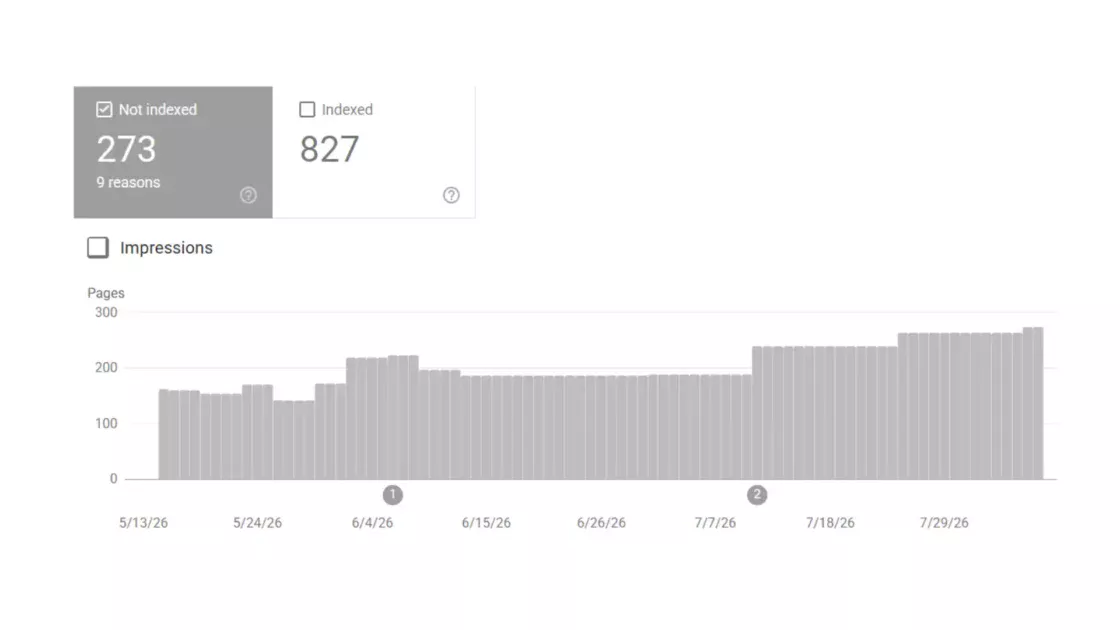
The Page indexing report is where Search Console stops being abstract. Google describes it as the place to see which pages Google can find and index and what indexing problems were encountered. For a lot of sites, this is the report that separates healthy growth from quiet technical debt. Publishing more pages does not mean adding more indexable value. The indexing report forces that distinction. It groups pages by status and exposes the reasons URLs were or were not indexed, with filters for all known pages, submitted pages, and unsubmitted pages.
The most useful lesson in Google’s documentation is not that non-indexed pages exist. It is that many non-indexed pages are perfectly fine. Google says duplicate or alternate pages generally should not be indexed, and that having a page marked duplicate or alternate is often a good sign because Google found the canonical page and indexed that instead. This is a helpful correction to the reflexive fear people have when they see big non-indexed counts. A large site with filters, faceted navigation, variations, and alternate versions should expect exclusion at scale. The goal is not “everything indexed.” The goal is “every important canonical indexed.”
The same report is also where architecture problems reveal themselves fast. Google highlights common reasons for large numbers of unindexed URLs: robots.txt blocks, duplicates created by filtering and sorting parameters, and redirects. The documentation explicitly notes that pages blocked by robots.txt are not necessarily prevented from being indexed through other means, and it points to noindex when the real goal is exclusion from Search. That distinction matters because many site owners still confuse crawl control with index control. Search Console will punish that confusion with ugly exclusion patterns.
Another practical limitation is worth remembering. The report does not show every affected URL. Google says the example table is limited to 1,000 rows, and indexed examples are also sample-based. That means you should use the report to identify patterns, not to assume you have a complete inventory of every affected page. On large sites, the right response is usually to fix the class of problem rather than obsess over individual examples.
Validation workflows are useful here, but only when used with discipline. The report tracks validation request status and issue-instance status across URLs, which helps after you fix a recurring problem. Still, validation is not a substitute for root-cause analysis. Clicking “Validate fix” on a broken template without changing the template is just optimistic button pressing. Search Console is better than that, and it expects you to be better than that too.
URL Inspection is where theory meets a single page
If the Page indexing report is where you spot classes of problems, the URL Inspection tool is where you deal with one URL at a time. Google says it shows what Google knows about a specific page and lets you test the live version of that page against many requirements for appearing on Google. That split between indexed knowledge and live testing is the reason the tool is so powerful. It lets you compare what Google currently has in the index with what the page looks like now.
This is also the place where many misunderstandings disappear. People often run a live test, see a clean result, and assume the page is fixed in Google. Google’s documentation is explicit that live test data is generated when you click Test live URL, that it is not as comprehensive as indexed information, and that Google does not use this information. That last point is critical. A successful live test proves the current page can be fetched and evaluated. It does not mean Google has reprocessed that page for ranking or indexing.
The right sequence is straightforward. Use the indexed result to see the current state. Compare it with the live test if you have changed something. If the live version is clean and materially different from the indexed version, then request indexing. Google’s instructions for single-page troubleshooting say exactly that: fix the problem, test the live URL again, and if the problem is fixed, request indexing to signal that the page has changed and is ready for another index attempt. The tool is not a ranking control panel. It is a diagnostic-and-resubmission workflow.
URL Inspection is also where canonicals stop being theoretical. Google’s report overview says the tool includes information such as the canonical selected for a page, rendering output, HTML, JavaScript issues, and more. For duplicate clusters, mobile/desktop variants, multilingual confusion, or pagination messes, that canonical information is often the difference between fixing the actual problem and fixing the one you assumed you had. You may prefer one URL. Google may choose another. Search Console tells you which reality is currently in force.
Sitemaps still matter, just not for the reason many people think
There are two bad positions on sitemaps. One says they are outdated and irrelevant because Google can crawl links. The other treats sitemap submission as if it guarantees indexation. Search Console’s documentation rejects both. Google says pages can be discovered without submitting a sitemap, but also says submitting one through Search Console may speed up discovery and gives you monitoring data about processing. The Sitemaps report itself exists to let you submit sitemaps, review submission history, and see errors Google encountered when parsing them. A sitemap is not a ranking boost and not an indexing guarantee. It is a discovery and monitoring layer.
That difference sounds small until you work on a large or fast-moving site. On those sites, the question is rarely “Can Google find any pages?” It is “Can Google find the right pages quickly, with enough context to crawl them efficiently?” A good sitemap acts like an editorial shortlist. It tells Google which URLs are real, current, and worth knowing about. The Page indexing report reinforces this logic by letting you filter submitted pages against all known pages and unsubmitted pages. That is powerful because it helps distinguish “Google found it somewhere” from “Google found it among the URLs I explicitly consider part of the site.”
Search Console is particularly useful when sitemap reality and index reality drift apart. Google’s documentation advises checking whether Google could process the sitemap, whether the sitemap is blocked by robots.txt, and whether the proper URL was submitted. If pages remain undiscovered or under-indexed, the sitemap report and indexing report together can tell you whether the problem is discovery, parsing, blocking, or page-level eligibility. Sitemaps do their best work when they are treated as a controlled feed of canonical URLs, not a dumping ground for every reachable address.
There is also a human benefit that gets overlooked. A clean sitemap discipline forces decisions about canonicals, duplicate inventory, faceted navigation, and publishing workflows. Search Console then reflects whether those decisions are coherent. That feedback loop is one reason sitemaps remain useful even for sites Google could probably find on its own. They reveal whether the site owner and Google agree on what the site actually is.
Crawl behavior becomes visible on large or messy sites
Crawl Stats is not a report everyone needs, and Google says that directly. The report is aimed at advanced users, and Google notes that if your site has fewer than a thousand pages, you should not need it or worry about that level of detail. That is refreshing. It also tells you when the report starts mattering: large sites, complex sites, or sites with obvious crawl inefficiency.
When it does matter, it matters a lot. Google says the report shows statistics about crawling history, including how many requests were made, when they were made, server responses, and availability issues encountered. That gives technical teams a way to link organic visibility problems to serving problems rather than guessing. If crawl activity drops, response errors spike, or certain URL patterns absorb disproportionate crawl, Search Console can make the pattern visible before indexing fallout fully lands.
This report is also where site quality and crawl efficiency meet. Google’s broader crawling guidance covers managing faceted navigation, large-site crawl behavior, and troubleshooting crawl errors. Search Console does not solve those issues by itself, but Crawl Stats gives you a place to observe their symptoms. A faceted ecommerce setup that spawns endless parameter combinations can burn crawl attention. A JS-heavy site with unstable responses can make rendering and retrieval more expensive. A migration with weak redirect logic can flood Googlebot with dead ends. Crawl Stats is what lets you move from “I think Google is struggling” to “here is the pattern of that struggle.”
One other limitation matters. Google says the report is available only for root-level properties, either Domain properties or URL-prefix properties at the root. That reinforces the earlier point about setup. If you configure Search Console too narrowly, some of the most useful advanced reporting simply never appears. A lot of Search Console maturity starts with seeing the site at the level Google sees it.
Structured data and video reports show search appearance, not just visibility
A site can be indexed and still leave search appearance on the table. That is the role of structured data and related reports. Google says it uses structured data found on the web to understand page content and other information about the world, and that valid structured data can make pages eligible for rich results. Search Console then provides separate reports for supported rich result types it detects on your property. The key word is “eligible.” Structured data does not force rich results. It makes them possible when content, markup, and policy conditions line up.
The Search Console side of this is practical rather than glamorous. Google says rich result reports show structured data and its validity, but they are not comprehensive; they display a sample of detected items to help assess quality. A report appears only if Google finds valid markup in the property and the markup is for a supported rich result type. That means the absence of a report can itself be information: maybe Google found no supported markup, maybe your implementation is broken, or maybe the markup does not map to a supported appearance.
Google’s structured data guidelines sharpen the technical boundaries. To be eligible for rich result appearance, structured data must not violate Search content policies or spam policies. Google says you can test technical compliance with the Rich Results Test and URL Inspection, recommends JSON-LD, and warns not to block structured-data pages with robots.txt or noindex. This is one of the clearest examples of Search Console’s broader value: the platform does not just tell you that markup exists. It forces you to connect markup, crawlability, indexability, and policy eligibility in one chain.
The Video indexing report applies the same logic to video-rich sites. Google says it shows how many videos are eligible for video features in Search and why other videos were not indexed. It also clarifies that the report tracks indexed pages containing indexed or non-indexed videos, not a simple count of every unique video on the site. For publishers, course platforms, media brands, and product sites with video, this is a strong reminder that video discoverability is not automatic just because a file or embed exists. Search Console will tell you whether Google can use it as a search feature.
Experience and security reports catch quality problems early
Search performance is never only about text relevance. Google’s reporting now includes Core Web Vitals, HTTPS, security issues, and manual actions, all of which affect whether a site feels trustworthy, usable, or even eligible to appear cleanly in results. These reports matter because they expose categories of problems that content teams often notice late, after rankings or user trust have already moved. Search Console is strong at turning invisible technical drag into visible operational work.
The Core Web Vitals report uses real-world field data, not lab simulations. Google says the report shows how pages perform based on real usage data, and it also notes that the data is combined across requests from all locations. That last detail is easy to overlook but important: a site may look fine in a fast office network and still perform poorly for real users in slower markets or on weaker devices. Search Console is especially useful here because it reflects lived conditions rather than controlled test runs.
The HTTPS report is more modest than many expect. Google says it shows how many indexed URLs are HTTP versus HTTPS, but it is not a comprehensive list of all detected items and only shows a sample to help assess implementation quality. That is a theme across Search Console: sample-based reports are there to expose patterns, not provide forensic completeness. Used properly, the HTTPS report helps find rollout gaps, mixed coverage, or lingering insecure URLs. Used badly, it becomes a false assumption that “only these few URLs have an issue.”
Security issues and manual actions are different and should stay different. Google says the Security issues report appears when a site is hacked or shows behavior that could harm visitors, such as phishing or malware. The Manual actions report, by contrast, covers issues tied to attempts to manipulate search results and can lead to some or all of a site not appearing in Search. Search Console is valuable here because it keeps policy enforcement separate from site compromise. That makes response cleaner. A hacked site needs containment and cleanup. A manual action needs policy repair and reconsideration.
Link data is directional, not a full backlink database
The Links report is one of the oldest features in Search Console and one of the easiest to overread. Google says it shows which sites link to yours, what link text is used, and internal link targets within your own site. That makes it useful, but only if you understand what it is not. It is not a complete backlink database, not a substitute for crawling the web independently, and not a perfect mirror of every external link that exists. It is a directional view of how Google currently summarizes your linking relationships.
That directional view is still practical. It helps you confirm whether the pages receiving the most links are the ones you expect, whether internal links concentrate authority around the right sections, and whether a suspicious domain is showing up among top linking sites. Google notes that top linking sites are shown by root domain, with subdomains omitted in that presentation. That is a helpful simplification for pattern recognition, though it also means you should not expect the report to behave like a forensic link graph.
The better use of the Links report is strategic. If a page you consider crucial has almost no internal link support, that is an architecture issue you control today. If your most-linked pages are old campaigns, dead-end resources, or off-strategy content, that tells you where legacy authority sits and where internal linking or content consolidation may be needed. If anchor text patterns look noisy or irrelevant, that can inform brand and content cleanup. Search Console does not make link analysis glamorous. It makes it grounded.
For teams used to third-party link suites, this is a useful discipline. Search Console will not show every link you want, but the links it does show are part of Google’s own reporting environment. That alone makes it worth checking before you form a theory about why a page or section is underperforming.
The reports you open when traffic breaks
Traffic drops are where Search Console proves whether it is a habit or an ornament. Google’s own guidance on debugging traffic drops starts with the blunt truth: a drop in organic search traffic can happen for several reasons, and it may not be straightforward to understand what happened. That is exactly right. A drop can come from seasonality, demand shifts, indexation loss, page experience issues, manual actions, security issues, changes in SERP appearance, or site changes that altered the query-page match. Search Console is useful because it lets you break those categories apart.
The first move is rarely heroic. Open the Performance report and split the change by page, query, country, device, and search type. Then check the overview page for concurrent issues or recommendations, the Page indexing report for spikes in exclusions or drops in indexed counts, and the Manual actions or Security issues reports if the drop is abrupt and severe. Google’s own report overview recommends exactly this kind of progression: use the overview page to catch dramatic dips or spikes, then open the deeper report to investigate. The point is not to explain everything instantly. It is to stop mixing unrelated causes into one story.
Search Console also helps keep you from blaming yourself for changes you did not cause. Google’s debugging guidance recommends using Google Trends alongside Search Console to investigate whether a traffic decline aligns with broader shifts in search interest. That matters because not every decline is a site failure. Sometimes demand moves. Sometimes news cycles move. Sometimes intent shifts under a topic category. Search Console tells you what happened to your pages in Google Search. It does not tell you whether the world stopped wanting that query.
This is where annotations become quietly powerful. A well-run team can mark migrations, major releases, design changes, robots rules, canonical shifts, content rewrites, and internal linking projects on charts. That does not prove causation. It does something almost as useful: it narrows the list of suspects. Search Console becomes much smarter when your operational memory lives inside it.
Migrations, removals, and other high-risk moments
Search Console is most dramatic during disruptive events: domain moves, content takedowns, major template changes, emergency deindexing, or a sudden need to hide something from results. These are the moments when loose understanding turns expensive. Google’s Change of Address tool exists for a specific case: moving a website from one domain or subdomain to another. It helps Google migrate search results from the old site to the new site, but only under defined conditions. You must be an owner of both properties using the same account, and the tool works only for domain-level properties, not path-level moves.
That constraint is useful because it forces precision. A Change of Address request is not the same thing as moving a section to a new folder, rewriting URLs, or consolidating content internally. Those cases rely on redirects, sitemap updates, and clean canonical signals rather than the domain-move tool. Search Console helps most when you respect the type of move you are actually making. Migrations fail less from missing buttons than from category errors.
The Removals tool is another place where category errors are common. Google says it lets you temporarily block pages from Google Search results on sites you own, manage SafeSearch-related information, and view removal history from owners and non-owners. Google’s starter guide adds an important operational detail: a successful removal request lasts only about six months, giving you time to remove the content permanently or make it properly inaccessible. That means removals are an emergency curtain, not a permanent deletion method.
The same logic applies to canonicalization mistakes. Google explicitly says not to use robots.txt for canonicalization and not to use the URL removal tool for canonicalization, because removal hides all versions of a URL from Search. Canonicalization is a signal-management problem, not a hiding problem. If you use Search Console without understanding that distinction, you can silence the wrong page instead of consolidating it.
Search Console works best with Analytics and the API
Search Console is strong at showing how a site appears and behaves in Google Search. Google Analytics is strong at showing what users do after they arrive. Google’s own documentation says using the two together gives a more comprehensive picture of how audiences discover and experience a website. That is not a polite suggestion. It is a practical rule. Clicks are not sessions. Impressions are not engagement. Search visibility and on-site value need to be read together.
Google also points out that Search Console and Analytics data will not match exactly because the tools use different metrics and systems. That mismatch is normal and should not trigger panic. Instead, compare patterns. Are search clicks rising while organic sessions fall because of consent, tracking, or attribution differences? Are impressions rising while on-site engagement weakens because the site is reaching broader but less qualified demand? Search Console gives you the front half of the story. Analytics gives you the back half.
For teams that need repeatable analysis, the API matters. Google says the Search Console API provides programmatic access to popular reports and actions, including search analytics, verified sites, sitemap management, and more. That is enough to move beyond manual dashboard work. You can build recurring exports, integrate performance analysis into reporting systems, monitor properties at scale, and connect Search Console data with business metrics that are not visible inside the interface.
This is where Search Console matures from a reactive tool into part of an operating stack. The UI is excellent for investigation. The API is better for repeated questions. Teams that do both well rarely treat Search Console as a place to “check rankings.” They treat it as one of the cleanest first-party signals available about how Google currently understands their site.
Search control starts with crawl and index control
A lot of Search Console confusion disappears once you separate crawl control, index control, and canonical preference. Google’s documentation makes these boundaries unusually clear. A robots.txt file tells crawlers which URLs they may access, and Google says explicitly that robots.txt is not a way to keep a page out of Google Search. If you want a page excluded from indexing, you should use noindex or protect the page behind authentication.
That distinction is one of the most important practical lessons in Search Console. Site owners often see URLs blocked by robots.txt in the Page indexing report and assume the problem is solved because Google cannot crawl them. Google’s own documentation warns that blocked pages can still be indexed in limited cases if Google learns about them from other signals. The reliable exclusion method is a noindex directive that Google can actually fetch. Search Console surfaces this exact contradiction again and again on troubled sites: pages blocked from crawling that still haunt the index status conversation.
Canonicalization is a third thing, separate from both. Google says canonicalization is the process of selecting the representative URL from a set of duplicate pages and provides several methods for signaling preference, ordered by their influence. It also warns not to send conflicting canonical signals across methods. Search Console becomes the verification layer here. The Page indexing report tells you when pages are considered duplicate or alternate. URL Inspection tells you which canonical Google selected. That is the bridge between what you intended and what Google accepted.
Teams that understand these three levers use Search Console more calmly. They know when to block crawling, when to block indexing, and when to consolidate duplication without hiding anything. Teams that blur them tend to create the same problems they later try to debug in Search Console.
A steady rhythm beats panic-driven SEO
Search Console works best as a habit, not as an emergency room. Google’s own starter guidance says you may only need to check in monthly unless there is an alert or you have made changes to the site. That is sensible advice, but only if the checks are deliberate. A good Search Console rhythm is not constant monitoring. It is consistent interpretation.
A practical rhythm looks like this without needing a rigid checklist. Review the overview page for broad shifts, alerts, and recommendations. Open Performance to see which pages and query groups moved. Scan Page indexing for new exclusion patterns or drops in indexed canonicals. Use URL Inspection on a few strategically important URLs after releases, rewrites, or migrations. Check sitemaps when publishing systems change. Open Crawl Stats only when the size or complexity of the site justifies it. Keep annotations current so chart context is preserved inside the tool.
The deeper value of Search Console is not that it tells you everything. It is that it tells you enough of the right things from Google’s side of the relationship. Very few platforms do that. Search Console shows you where the site is legible, where it is confusing, where it is weakly presented, and where Google is directly signaling a problem. For owners, marketers, developers, and editors, that is more than a reporting tool. It is the clearest way to see whether the version of your site you think you built is the version Google is actually processing.
FAQ
Google Search Console is used to monitor how a site appears in Google Search, including performance, indexing, crawl behavior, structured data, security problems, and manual actions. Google describes it as a tool that helps site owners understand how Google crawls, indexes, and serves their websites.
No. Google says you do not have to sign up for Search Console to be included in Google Search, and it also explains that most pages in search results are found automatically by crawlers rather than through manual submission. Search Console gives you visibility and diagnostics, not eligibility by itself.
Google says there is no need to sign in every day and that checking roughly once a month is often enough unless Google alerts you to a new issue or you have made significant site changes. High-change sites may review it more often, but panic-checking rarely adds value.
A Domain property is broader and includes all subdomains, protocols, and subpaths for the domain. A URL-prefix property includes only URLs that start with the exact prefix you add. For whole-site visibility, Domain properties are usually the stronger main setup; URL-prefix properties are useful for narrow analysis.
Verification proves you control the site and gives owner-level permissions in Search Console. Access can also be granted by an existing owner, but verified ownership carries the highest level of control. Google recommends multiple verification methods so access is not lost if a token disappears.
It shows clicks, impressions, CTR, and average position for your site in Google Search, and it lets you break that data down by queries, pages, countries, devices, search appearance, and dates. It is best for understanding which searches show your site and how visibility changes over time.
Yes, but only if your property has enough traffic for those surfaces. Google’s report overview says Discover and Google News reports appear only when the property has sufficient traffic there.
That is often normal. Google says pages blocked by noindex, duplicate pages, alternate versions, filter variations, and redirects may not be indexed, and that duplicate or alternate statuses can be a good sign because the canonical page was chosen instead. The real goal is to have important canonical pages indexed.
No. Google says robots.txt is not a way to keep a page out of Search, and the Page indexing report notes that a blocked page can still be indexed in some cases if Google learns about it elsewhere. Use noindex or access restrictions when exclusion from Search is the real goal.
It is best for troubleshooting a specific page. Google says it shows what Google knows about a URL and lets you test the live version of the page, which is especially useful when fixing indexing problems or checking canonicals, rendering, and page status.
No. Google says live test data is generated when you click Test live URL, is less comprehensive than the indexed information, and is not used by Google directly. It shows what the current page looks like now, not what Google has already updated in Search.
It tells Google that the page changed and is ready for another indexing attempt after you have fixed an issue. Google recommends using it after a successful live test when the problem has been resolved. It is a resubmission signal, not a guarantee of immediate indexation.
Yes. Google says pages can be discovered without a sitemap, but submitting one may speed discovery and lets you monitor processing and parsing errors in Search Console. Sitemaps work best as a curated list of important canonical URLs.
It shows Google’s crawling history on your site, including request counts, timing, server responses, and availability issues. Google says it is aimed at advanced users and that sites with fewer than about a thousand pages usually do not need this level of detail.
Yes. Search Console provides rich result reports for supported markup it finds, and Google says those reports show structured data validity and sample-based findings. Google also recommends using the Rich Results Test and URL Inspection to check technical compliance.
A manual action relates to violations meant to manipulate Google Search and can lead to some or all of a site being omitted from results. A security issue relates to harmful behavior such as hacking, malware, phishing, or unwanted software that could endanger users. Search Console separates these because the fixes are different.
No. Google says the tool temporarily blocks pages from Google Search results. Its own getting-started guidance says a successful request lasts only about six months, which gives you time to remove the content permanently or make a lasting change on the site.
No. The Links report is helpful, but it is not a complete backlink database. Google presents top linking sites and pages in a summarized way, often grouped by root domain, which makes the report useful for pattern recognition rather than exhaustive link auditing.
Google says the two tools together give a more complete picture of how people discover and experience your site. Search Console shows search visibility and clicks, while Analytics shows what users do after arrival. Their numbers will not match exactly because they use different metrics and systems.
It matters when you want repeated analysis, reporting at scale, or integration with other data systems. Google says the API gives programmatic access to popular reports and actions, including search analytics, verified sites, sitemap management, and more.
Author:
Jan Bielik
CEO & Founder of Webiano Digital & Marketing Agency
This article is an original analysis supported by the sources cited below
About Search Console
Google’s official overview of what Search Console is and why site owners use it.
How To Use Search Console
Search Central’s current guide to getting started and using Search Console strategically.
Search Console’s overview page
Official documentation for the main dashboard and the reports surfaced there.
Reports at a glance
A compact map of current Search Console reports, tools, and their intended uses.
Add a website property to Search Console
Google’s documentation on Domain properties, URL-prefix properties, and setup scope.
Verify your site ownership
Official guidance on verification methods, ownership status, and permission implications.
Performance report Search results overview and basic setup
Google’s explanation of the core performance metrics, filters, and dimensions.
Page indexing report
Official documentation for indexing states, exclusions, validation, and common causes.
Inspect and troubleshoot a single page
Google’s guide to using URL Inspection for indexed and live page diagnosis.
Sitemaps report
Official explanation of sitemap submission, history, and processing errors.
Removals and SafeSearch reports tool
Google’s documentation for temporary removals and related request history.
Core Web Vitals report
Official guide to field-data-based performance reporting in Search Console.
HTTPS report
Google’s explanation of HTTPS coverage reporting and its sample-based nature.
Manual actions report
Official documentation for manual action notices, impact, and follow-up.
Security issues report
Google’s guide to harmful-site detections such as hacking, malware, and phishing.
Links report
Official explanation of internal and external link reporting in Search Console.
Crawl Stats report
Google’s documentation on crawl-history reporting for larger or advanced sites.
Change of Address tool
Official instructions for domain and subdomain migration reporting in Search Console.
Insights report
Google’s description of the newer simplified performance view inside Search Console.
Recommendations in Search Console
Official explanation of actionable recommendations surfaced in the dashboard.
Search Console annotations
Google’s guide to system and custom annotations on Search Console charts.
Rich result report overview
Official documentation for Search Console’s supported rich result reports.
Video indexing report
Google’s guide to video feature eligibility and video indexing reasons.
Search Console API
Google for Developers overview of API access to Search Console data and actions.
Debugging drops in Google Search traffic
Search Central guidance on investigating organic traffic declines with Search Console.
In-Depth Guide to How Google Search Works
Google’s official explanation of crawling, indexing, and serving.
Robots.txt Introduction and Guide
Search Central’s documentation on robots.txt and what it does not do.
Block Search Indexing with noindex
Google’s official guidance for excluding pages from indexing with noindex.
How to specify a canonical URL with rel canonical and other methods
Search Central documentation on canonical signals and duplicate handling.
Intro to how structured data markup works
Google’s explanation of how structured data helps Search understand content.
General structured data guidelines
Official eligibility and quality requirements for rich-result markup.
Schema Markup Testing Tool
Google’s Rich Results Test entry page and structured-data testing guidance.
Using Search Console and Google Analytics Data for SEO
Google’s documentation on combining Search Console and Analytics for fuller analysis.
| Citing this article? Brief excerpts are welcome. Please credit Webiano.digital, name the author where stated, and include a link to https://webiano.digital and to this original article. Full or substantial republication requires prior written permission. Read our Copyright and Content Use Policy. |
This article was prepared with the assistance of artificial intelligence tools. The content underwent expert human review, and Webiano Digital & Marketing Agency assumes editorial responsibility for its final version and publication.