KasperskyOS is often misunderstood because the name looks familiar. A security company builds an operating system, publishes a Community Edition SDK, supports QEMU, Raspberry Pi 4 Model B, Radxa ROCK 3A, C, C++, Rust, file systems, networking examples, and developer tooling, and people naturally reach for the nearest known category. Linux is that category. It is the default mental model for anything that runs on embedded hardware and offers a developer kit.
Table of Contents
KasperskyOS is not another Linux distribution
That shortcut fails here. KasperskyOS is not Linux, not a Linux distribution, not a hardened Linux profile, and not a vendor fork of the Linux kernel. Kaspersky states the point directly: the KasperskyOS microkernel was developed by Kaspersky, written from scratch, and does not use Linux kernel code. Its “Why KasperskyOS” page goes even further, saying the kernel is not based on any existing project, “Linux or otherwise.”
The distinction matters because the word “Linux” does not only describe a familiar command line or a package ecosystem. In operating-system architecture, Linux means a specific kernel lineage, a specific development model, a specific system-call interface, a specific driver model, and a huge compatibility culture built around POSIX, GNU userland, distributions, container tooling, and commodity hardware support. KasperskyOS may run developer examples from a Linux-hosted SDK, and it may expose some familiar concepts to programmers, but the operating system’s design center is different from the Linux design center. Linux grew into a general-purpose kernel used everywhere from cloud servers to phones to routers. KasperskyOS was built as a microkernel-based platform for secure-by-design embedded and cyber-physical systems.
The strongest way to understand the difference is to stop comparing desktop features and start comparing architectural promises. Linux gives developers a vast, mature, open kernel with an enormous hardware and software ecosystem. KasperskyOS gives system designers a much narrower but more controlled base, where processes, drivers, system services, and applications are supposed to interact only through regulated interprocess communication. Its architecture is shaped around “Cyber Immunity,” Kaspersky’s term for building systems whose critical functions continue under hostile conditions because the system is divided into isolated components and their communication is checked against security policies.
That is why “KasperskyOS is not Linux” is not a branding correction. It is the central technical fact needed to evaluate the system properly. If you expect a familiar Linux distribution with a Kaspersky security layer, you will judge it by the wrong criteria. If you expect an Android-like Linux derivative, you will look for a kernel ancestry that is not there. If you expect to install it on a laptop as a daily operating system, Kaspersky itself says that is not the current purpose. The platform is aimed at software and hardware systems with special cybersecurity requirements, especially embedded, IoT, industrial, thin-client, gateway, automotive, and similar controlled environments.
The useful question is not whether KasperskyOS can replace Linux on a normal workstation. It cannot, and it is not trying to compete on that battlefield. The useful question is what KasperskyOS changes when the security policy becomes part of the operating-system architecture instead of an add-on around a general-purpose kernel.
The source of the confusion
The confusion is easy to understand. KasperskyOS Community Edition is distributed as developer SDK packages. Developers may install the SDK on a Linux machine, run examples in QEMU, build images with CMake, use GDB, work with C or C++, and see terms such as ELF, POSIX, VFS, network stack, DHCP, DNS, NTP, MQTT, ext2, ext3, ext4, and Rust examples. Many of those words feel native to Linux development. The KasperskyOS 1.4 documentation says the SDK includes C/C++ compilers, source code generators, a GDB debugger, QEMU emulator, binutils, CMake, and other tools.
None of that makes the operating system Linux. A Linux host can be a development environment for a non-Linux target. QEMU can emulate many targets. GDB can debug many platforms. CMake can build software for many operating systems. ELF can be used outside Linux. POSIX-like interfaces can exist without a Linux kernel. Tool familiarity is not kernel identity.
Kaspersky’s own public explanation makes this point in practical terms. In an article answering whether a user can install KasperskyOS on a laptop, Kaspersky says the system is not currently an operating system for personal computers, so it cannot be used as the main OS on a PC or laptop. The article explains that a developer can run the Community Edition SDK and sample applications on a regular desktop or laptop where Linux is installed, or inside a virtual machine running Linux; Linux acts as the host environment while KasperskyOS runs in an emulated x86-based hardware platform through QEMU.
That detail is often where misunderstanding begins. Someone sees “Linux is required” or “install the SDK on Ubuntu” and concludes that KasperskyOS is a Linux distribution. The better reading is narrower: Linux is one supported development host, not the kernel that KasperskyOS runs. The target operating system remains KasperskyOS.
A similar confusion appears around POSIX. KasperskyOS documentation includes a POSIX support section, but its limitations page states that some POSIX interfaces are unimplemented, some are implemented with deviations from POSIX.1-2008, and some are stubs that return ENOSYS. It also says the KasperskyOS kernel does not transmit signals and that signals cannot interrupt the Call(), Recv(), and Reply() system calls used by libraries implementing the POSIX interface.
That is not Linux behavior dressed in a new logo. It is a compatibility layer bounded by a different kernel model. A POSIX-like surface does not prove Linux underneath. It only proves that the platform wants to make some software porting and developer workflows less alien.
The same point applies to open-source components. KasperskyOS Community Edition includes and adapts libraries and tools such as Boost, QEMU, CMake, Clang, Mbed TLS, libpcap, and other third-party components. The KasperskyOS Open Projects page lists adaptations of Abseil, protobuf, NGINX, PHP, Node.js, RabbitMQ-C, c-ares, Nmap, Samba, gRPC, BoringSSL, and additional examples.
A stack can contain open-source user-space software without inheriting the Linux kernel. BSD systems, RTOS platforms, proprietary embedded systems, and research microkernels can all host or port familiar libraries. The identity of the OS comes from the kernel, core architecture, security model, and interfaces that govern execution. On those points, KasperskyOS stands apart.
The kernel lineage decides the answer
Operating systems are not named by vibes. They are named by lineage, architecture, interfaces, and implementation. Linux distributions differ wildly in packaging, default desktop environment, init system, release cadence, support model, and target audience, but they share the Linux kernel. Ubuntu, Debian, Fedora, Arch, Alpine, Android, OpenWrt, and many embedded Yocto-based systems belong to the Linux family because they build on that kernel lineage.
KasperskyOS does not. Kaspersky says its microkernel was internally developed and is not based on Linux or any other existing project. The same page says Kaspersky rejected borrowed code in favor of security guarantees and that the microkernel, libkos, driver framework, input framework, and most drivers are proprietary to Kaspersky rather than based on existing projects.
That statement is unusually direct. Vendors often use careful phrases such as “based on open-source technology,” “Linux-compatible,” “Linux-powered,” or “built on a hardened kernel.” KasperskyOS documentation uses the opposite language. It says the kernel was written from scratch, does not use Linux kernel code, and is not a modification of an existing operating system.
Kernel lineage matters because almost everything else sits on top of it. A Linux kernel exposes Linux system calls, Linux driver APIs, Linux kernel subsystems, Linux security module hooks, Linux scheduling behavior, Linux memory management semantics, Linux namespaces, cgroups, eBPF, netfilter, procfs, sysfs, and a long list of kernel-level conventions. Linux distributions can rearrange user space, but they do not replace that kernel foundation without leaving the Linux category.
KasperskyOS exposes a different foundation. Its architecture page says applications and drivers interact with one another and with the kernel through the libkos library. That library queries the kernel through three system calls: Call(), Recv(), and Reply(), implemented through the IPC mechanism. The same documentation lists kernel subsystems around hardware abstraction, I/O management, physical and virtual memory, threads, scheduler, synchronization, IPC, the security-module interaction subsystem, object manager, ROMFS, process management, ELF loading, debug support, and power management.
Linux is also a kernel with subsystems, drivers, memory management, scheduler, process management, and system calls. The difference is not that one has these pieces and the other lacks them. The difference is the arrangement of trust. Linux’s historical design places a large amount of OS functionality inside kernel space. KasperskyOS pushes drivers, file systems, network protocols, and other system software outside the kernel context into user mode, then regulates interaction through IPC and security policy.
A Linux distribution can be hardened. A Linux kernel can be configured with SELinux, AppArmor, Landlock, seccomp, capabilities, namespaces, read-only filesystems, verified boot, and strict update controls. Those mechanisms matter. Yet they remain part of a Linux security architecture. KasperskyOS starts from a different kernel lineage and a different security architecture.
Microkernel design changes the trust boundary
Linux is usually described as a monolithic kernel. That phrase is sometimes misunderstood as an insult, but it is not. It describes a design in which many kernel services share the same privileged address space. Linux Kernel Labs explains that in a monolithic kernel there is no access protection between kernel subsystems, and public functions can be called directly between subsystems, even though modern monolithic kernels still keep logical separation between subsystems and drivers through internal APIs.
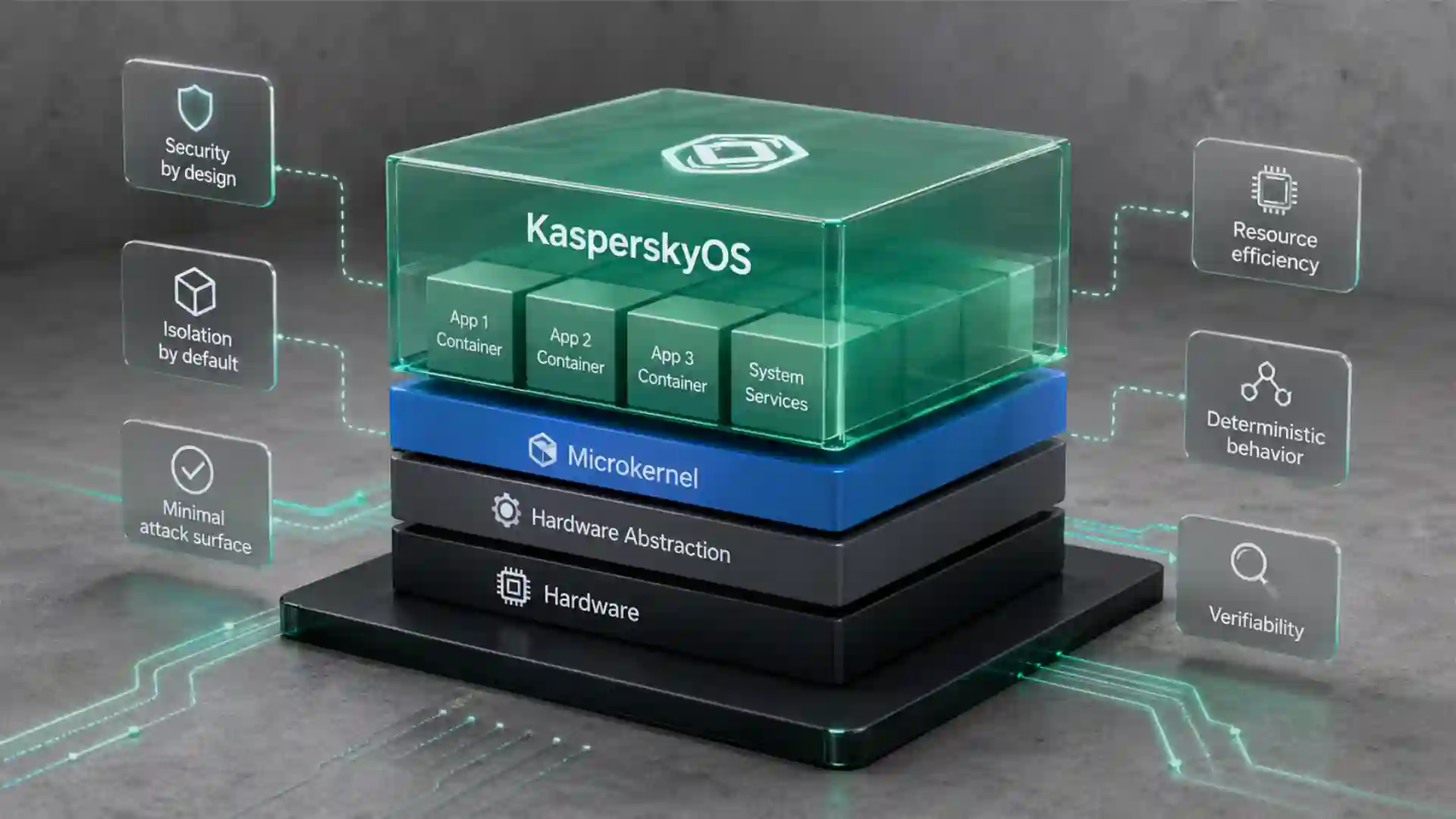
KasperskyOS is described as a microkernel operating system. Kaspersky’s documentation says the kernel provides minimal functions such as scheduling program execution, memory management, and input/output, while device drivers, file systems, network protocols, and other system software run in user mode outside kernel context.
That design is not cosmetic. A microkernel tries to make the privileged core smaller and move risky or changeable code outside it. If a driver or service runs in user mode, it can be isolated and subjected to communication rules. If the OS can force components to speak through controlled channels, the system designer gets more places to inspect, restrict, and reason about behavior.
This is why Kaspersky’s materials focus so heavily on attack surface and trusted code. The public microkernel page says only critical operation mechanisms are placed in the kernel, while less critical functions are ordinary applications. It argues that this arrangement reduces attack surface and makes it easier to check the kernel for errors and vulnerabilities.
Microkernel design also carries trade-offs. Linux Kernel Labs notes that microkernel architectures gain isolation but pay costs because operations that might be simple function calls in a monolithic kernel may require IPC and scheduling. It also notes that restarting a crashed service is not always easy because applications may depend on that service.
Those trade-offs explain why Linux became dominant in general-purpose infrastructure. Linux offers performance, hardware support, mature drivers, toolchains, and ecosystem depth across servers, desktops, mobile derivatives, network appliances, embedded boards, cloud workloads, and containerized infrastructure. KasperskyOS is not trying to beat Linux at being a universal kernel. Its bet is more specific: for certain high-security embedded and cyber-physical systems, a smaller trusted base and explicit communication control may matter more than broad compatibility.
KasperskyOS fits into a wider high-assurance systems tradition. The seL4 project, for example, also uses a microkernel approach. Trustworthy Systems describes seL4 as a secure embedded L4 microkernel that enforces isolation between trusted and untrusted components and carefully controls software access to hardware; it also notes that seL4 contains about 12,000 lines of C plus assembly and that the smaller trusted computing base enabled formal verification work.
KasperskyOS is not seL4, and the article should not imply identical proof claims. The comparison is useful because it shows the broader design logic. Microkernels are attractive in high-assurance contexts because they shrink and sharpen the trusted part of the system. KasperskyOS belongs to that architectural conversation, not to the family tree of Linux distributions.
Linux security is powerful but attached to a different architecture
Calling KasperskyOS “not Linux” does not mean Linux is weak. Linux has some of the most developed security mechanisms in mainstream computing. The Linux Security Modules framework supports security modules focused on access control. The kernel documentation says LSM provides the infrastructure for security modules and includes hooks at critical points in kernel code. The framework by itself does not add security; it supplies a structure for modules such as SELinux, AppArmor, Smack, and TOMOYO.
SELinux is a strong example. Red Hat’s SELinux architecture documentation describes it as a Linux Security Module built into the kernel, driven by a security policy loaded at boot. Security-relevant kernel-level operations are intercepted and checked against the loaded policy. If the policy allows the operation, it proceeds; otherwise, it is blocked.
That sounds similar to KasperskyOS at a surface level: security policy, allow or deny, kernel-level enforcement. The difference lies in the base arrangement. SELinux operates within Linux’s kernel architecture. KasperskyOS is designed around IPC control between isolated components from the start. Its Kaspersky Security System page says all IPC passes through the security module, where each interaction is checked against security policy and blocked if it does not comply. The page also says any interaction not explicitly allowed by policy is blocked under the Default Deny principle.
Linux has grown many security layers because it must support a vast range of workloads and legacy expectations. It needs to run databases, browsers, containers, network stacks, desktops, phones, routers, build systems, GPUs, filesystems, enterprise middleware, and decades of software assumptions. Its security mechanisms must coexist with that immense compatibility surface.
KasperskyOS narrows the problem. It is not built as a universal compatibility machine. It is built for controlled solutions where the developer or integrator can define the components and their allowed interactions. That difference makes the security model more architectural and less administrative. In a Linux system, security often becomes a mix of kernel configuration, distribution defaults, MAC policy, sandboxing, service hardening, filesystem layout, package provenance, update discipline, and operational controls. In KasperskyOS, the security policy is part of solution construction.
The comparison should be fair. Linux’s breadth is not an accident or a flaw. It is the reason Linux dominates many markets. KasperskyOS’s narrowness is also not a flaw if the target is a gateway, thin client, controller, or other special-purpose system where behavior can be specified tightly. Linux is a general-purpose kernel with powerful security extensions. KasperskyOS is a special-purpose secure-by-design platform where component interaction is the central object of control.
Kaspersky Security System is the real differentiator
The most important KasperskyOS concept is not the word microkernel alone. A microkernel gives the architecture a base. Kaspersky Security System gives that base its security grammar.
Kaspersky describes Kaspersky Security System as the mechanism that checks interprocess communication against security policies. All IPC passes through it. If interaction does not comply, it is blocked. Kaspersky says that even if a component is compromised, Kaspersky Security System is intended to eliminate or minimize possible damage. The same source says the architecture is based on MILS and FLASK concepts.
The design is important because it turns communication into the main enforcement point. In many systems, a compromised component can cause damage because it inherits too much ambient authority. It can call APIs, access files, reach devices, open sockets, or communicate with services in ways the designer did not intend. Hardening tries to reduce that freedom. KasperskyOS tries to make the allowed communication pathways explicit.
KasperskyOS documentation describes a solution as a set of components, with each instance running in its own process. Interactions between processes and between processes and the kernel are allowed or denied according to the solution security policy. The policy is stored in the Kaspersky Security Module, which makes decisions on whether to allow or deny interactions.
That makes the developer’s job more formal than ordinary application assembly. A KasperskyOS-based solution includes source code, build files, startup descriptions, IDL/CDL/EDL interface descriptions, and PSL policy files. The Quick Start Guide says a solution CMake project includes source files, build scripts, CMakeLists.txt, init.yaml, security.psl.in, *.psl, *.idl, *.cdl, and *.edl files.
The alphabet soup matters. Interfaces and component descriptions are not just documentation. KasperskyOS uses formal descriptions to generate code and security modules. The IPC control documentation says the security module knows the structure of possible IPC messages because IDL, CDL, and EDL descriptions are used to generate its source code. Before delivery, the security module checks whether the IPC message matches the called endpoint method and whether the security rules allow the requested action. The kernel then executes the decision.
This is a different workflow from a normal Linux application where security policy may be written after the program exists, or applied by administrators using SELinux policy, AppArmor profiles, seccomp filters, service unit restrictions, container settings, file permissions, and network controls. KasperskyOS pushes the solution architect to describe allowed interactions as part of the system design.
That is the heart of the “not Linux” point. KasperskyOS treats the operating system as an enforcement architecture for predesigned communication. Linux treats the kernel as a broad general-purpose execution platform that can be hardened in many ways. Both approaches have value. They are not the same product category.
Default deny is not a slogan here
Default deny is an old security idea. In ordinary security writing, the phrase can become decoration. In KasperskyOS, it is tied to the operating-system interaction model. Kaspersky states that any interaction not explicitly allowed by the security policy is blocked. That principle underlies secure solutions based on KasperskyOS.
The difference between default allow and default deny is not subtle. In a default-allow system, the designer must find and close dangerous pathways. In a default-deny system, the designer must open only the pathways needed for the system’s purpose. For embedded or cyber-physical systems, that inversion can be decisive. A payment terminal, industrial gateway, vehicle component, thin client, or controller does not need arbitrary behavior. It needs a known set of behaviors performed reliably.
KasperskyOS’s IPC mechanism supports that model. Processes exchange IPC requests and responses. A client sends a request through Call() and waits. A server waits with Recv(), handles the request, and replies through Reply(). IPC channels must exist between processes. They can be created statically, usually by the initializing program, or dynamically between already running processes.
The security module sits inside that flow. The IPC control documentation says the kernel queries the security module each time a process sends an IPC message to another process. The security module checks message structure and policy. If delivery is rejected, the sender receives an error code through the return code of Call() or Reply(). It also checks IPC requests and IPC responses, not only one side of the exchange.
That is much more specific than “the OS has security.” KasperskyOS controls the conversation between components. If a compromised component attempts to speak to a component it should never reach, call a method it should not call, send a malformed message, or perform actions outside its policy, the operating system has a defined place to reject that behavior.
Of course, default deny is not free. It demands careful modeling. The system designer needs to know what each component should do, which endpoints it should expose, what methods it may call, and what data flows are legitimate. In a general-purpose desktop, that burden would be painful. In a controlled embedded system, it is often exactly the kind of burden security engineers want to make explicit.
Default deny also changes debugging and product evolution. A new feature is not just new code; it may require new IPC channels, new endpoint definitions, new policy rules, and new tests. That slows casual change but gives the architecture a memory of intent. In high-assurance environments, the friction is part of the security model.
Compatibility is selective, not inherited from Linux
Linux compatibility is often treated as a binary label. A system either “runs Linux software” or it does not. Real engineering is messier. Compatibility has layers: source-level compatibility, binary compatibility, POSIX compatibility, libc behavior, filesystem expectations, device model, networking behavior, process semantics, signals, threading, debugging, packaging, and deployment.
KasperskyOS does not inherit Linux compatibility because it does not use the Linux kernel. It may support selected APIs, selected file systems, selected network functions, and selected ported libraries, but those choices are curated. KasperskyOS Community Edition supports development in C, C++, and Rust, and it includes examples that demonstrate IPC, security policy control, file systems, networking, TCP sockets, DNS, DHCP, NTP, MQTT, and package handling.
The POSIX limitations page is one of the clearest signs that the system is not a Linux clone. It lists unimplemented interfaces, interfaces implemented with deviations from POSIX.1-2008, and stubs. It explicitly lists fork() as not implemented in the shown section, and says the kernel does not transmit signals.
That matters because Linux software often assumes fork(), signals, file descriptors, procfs behavior, dynamic linking conventions, shell environment details, socket behavior, and many other features. Some software can be ported by isolating those assumptions. Some cannot be ported without redesign. Some should not be ported because the software’s own behavior conflicts with a tightly specified security policy.
Kaspersky’s Open Projects page shows the intended direction: adapt popular components where they make sense. The page lists adaptations of libraries and applications for KasperskyOS Community Edition, including NGINX, PHP, Node.js, Samba, gRPC, BoringSSL, and others.
That is selective compatibility. KasperskyOS brings certain software patterns into its own architecture rather than becoming Linux to run them unchanged. The difference is important for buyers and developers. If a vendor says an appliance uses Linux, you can reasonably expect broad Linux tool familiarity. If a system uses KasperskyOS, you should expect a different build flow, different policy descriptions, different IPC rules, and a different security review process.
The Community Edition helps reduce the learning curve. It includes examples, source code, detailed explanations, instructions, and build tools. Kaspersky says CE is intended to help developers learn secure-by-design development principles, explore KasperskyOS as a platform, build prototypes mainly for embedded and IoT solutions, port applications or components, and explore software security issues.
That learning intent does not make it a hobby Linux distribution. It makes it a public entry point into a different OS model.
The developer workflow starts with the solution, not the machine
Linux developers often begin by thinking about a machine: install a distro, configure packages, add services, build the application, deploy it, harden it, monitor it. KasperskyOS developers are pushed to think in terms of a solution: components, processes, endpoints, IPC channels, security policy, startup configuration, build image, and target hardware.
The Quick Start Guide explains that examples in Community Edition each sit in their own directory and can be built using CMake. The build creates a solution image, and a cmake --target sim flow can run the image in QEMU. It also notes that examples can be built for Raspberry Pi 4 B or Radxa ROCK 3A, depending on the case.
A KasperskyOS-based solution is not just an executable installed into a running operating system. The documentation defines it as system software, including the KasperskyOS kernel and Kaspersky Security Module, plus applications integrated as part of the software/hardware system. Each solution component instance runs as a separate process.
That has practical consequences. Developers need to describe which processes exist at startup, how they connect, which endpoints are available, and what policy governs interaction. The project shape expresses the architecture. KasperskyOS projects include init.yaml for startup descriptions and PSL files for security policy. Those are not optional decorations around an ordinary app. They are part of the system’s composition.
The examples show this philosophy in miniature. The hello example demonstrates a basic solution. The echo example demonstrates interaction through IPC. The ping example demonstrates how a solution security policy controls IPC interaction, allowing only an alternating sequence of Ping and Pong calls. The file-system and network examples show how services such as VFS, TCP sockets, NTP, DNS, DHCP, and MQTT are represented inside this componentized model.
That matters for engineering culture. In Linux, developers may treat the operating system as a vast preexisting environment. In KasperskyOS, the environment is deliberately assembled. The solution boundary is part of the security boundary. You are not merely writing software for an OS; you are defining a controlled system in which the OS mediates the relationships among software parts.
This is also why KasperskyOS is attractive for embedded and IoT use cases but awkward as a general desktop OS. Desktop computing thrives on user-driven unpredictability: installing programs, plugging devices, opening documents from unknown sources, browsing arbitrary sites, updating drivers, running scripts, mixing tools, and changing preferences. KasperskyOS is built for systems where the permissible behavior can be described before deployment.
KasperskyOS and Linux compared in architecture
Architectural comparison at a glance
| Comparison point | Linux | KasperskyOS |
|---|---|---|
| Kernel lineage | Linux kernel family with open-source upstream development | Proprietary Kaspersky microkernel written from scratch |
| Kernel architecture | Commonly treated as monolithic, with many subsystems and drivers in privileged kernel space | Microkernel, with many services such as drivers, file systems, and protocols outside kernel context |
| Security model emphasis | Strong security extensions such as LSM, SELinux, AppArmor, Landlock, seccomp, namespaces, and capabilities | Explicit IPC control through Kaspersky Security System and solution policy |
| Compatibility goal | Broad general-purpose software and hardware ecosystem | Controlled embedded and cyber-physical solutions with selective component support |
| Development unit | Distribution, packages, services, applications, containers, kernel configuration | Solution image, components, endpoints, IPC channels, policy files, generated code |
| Default posture | Depends on distribution, configuration, MAC policy, service hardening, and operational discipline | Interactions not explicitly allowed by policy are blocked |
| Typical expectation | Run many changing workloads across many environments | Keep critical functions predictable under hostile conditions |
This table compresses the distinction, so it should not be read as a judgment that one model is “better.” Linux wins when breadth, ecosystem, hardware coverage, and general-purpose flexibility matter most. KasperskyOS makes sense when the system owner can specify a narrow set of critical behaviors and wants the operating system to enforce that specification.
Cyber immunity is an architectural claim
Kaspersky uses “Cyber Immunity” as a named approach. The phrase can sound like marketing until you read the mechanism behind it. Kaspersky defines the approach as building secure-by-design IT systems. Its technologies page says Cyber Immunity is achieved by splitting the system into isolated parts and controlling the interactions between them. It says most potential attacks on a Cyber Immune system are intended to be ineffective because the system continues to perform critical functions in an aggressive environment and does not allow an attacker to develop an attack.
The same page identifies three core ideas: domain isolation, control of interprocess communications, and minimizing the trusted code base. It states that KasperskyOS consists of a microkernel and the Kaspersky Security System subsystem, which together provide the base for Cyber Immune solutions.
For a technical reader, the useful interpretation is not “immune to every attack.” No serious system should be read that way. The useful interpretation is: the architecture tries to prevent compromise of one component from becoming compromise of the whole system. The OS enforces boundaries between components, checks their communication, and keeps the most trusted code smaller than in a broad monolithic design.
This aligns with broader systems security engineering. NIST SP 800-160 Volume 2 frames cyber resiliency as engineering systems that can anticipate, withstand, recover from, and adapt to adverse conditions, stresses, attacks, or compromises. KasperskyOS’s language is proprietary, but the underlying engineering concern is familiar: critical systems should keep doing the right things when parts of the environment are hostile or degraded.
Kaspersky’s enterprise page makes a strong claim that KasperskyOS enables products based on Kaspersky Cyber Immunity and that such products can perform critical functions in aggressive environments without additional applied security features. It also names Kaspersky IoT Secure Gateway and Kaspersky Thin Client as products based on KasperskyOS.
The phrase “without additional security features” should be read carefully. It does not mean no monitoring, no secure development, no supply-chain control, no updates, no hardware protection, and no operational security. It means the architecture aims to place security properties inside the design, rather than relying only on external antivirus, endpoint protection, or perimeter controls.
That difference is central to the Linux comparison. A Linux-based embedded device often starts with a general-purpose OS and then receives hardening: remove packages, disable services, add MAC policy, lock down filesystems, restrict network exposure, add update signing, monitor integrity, apply endpoint controls. A KasperskyOS-based device starts from a platform whose main design object is controlled component interaction.
Cyber Immunity is Kaspersky’s name for that design philosophy. Linux hardening is usually a different activity, even when it reaches strong results.
The role of MILS and FLASK
KasperskyOS documentation repeatedly mentions MILS and FLASK. These references place the system in a specific security architecture tradition.
MILS stands for Multiple Independent Levels of Security. KasperskyOS documentation says the approach is used when developing critical information systems, with software designed as components whose interactions are regulated by security mechanisms and whose trust levels may differ. FLASK, or Flux Advanced Security Kernel, is referenced as the architectural approach behind the division between interaction management and security decisions. KasperskyOS documentation says the Kaspersky Security Module makes allow or deny decisions and the kernel executes them.
Kaspersky Security System’s own page says its architecture is based on MILS and FLASK. It also says policy can combine multiple models, including finite-state and timed automata, Type Enforcement, role-based access control, and custom policy classes through PSL.
The comparison with Linux becomes interesting here because FLASK also belongs to the history of SELinux. The SELinux Project’s documentation lists “The Flask Security Architecture” among background papers explaining the security architecture SELinux embodies, and lists later work on integrating flexible security policies into Linux and implementing SELinux as a Linux Security Module.
So KasperskyOS is not outside the same intellectual universe as Linux security. It shares some conceptual ancestry with policy-driven systems such as SELinux. The difference is where the concepts are placed. SELinux is implemented as a Linux Security Module inside the Linux kernel framework. KasperskyOS uses a microkernel architecture with a Kaspersky Security Module integrated into IPC control.
That distinction is more than academic. A system built around Linux plus SELinux still inherits Linux’s broad kernel architecture, driver model, syscall surface, hardware ecosystem, and compatibility expectations. A system built around KasperskyOS starts from process isolation and IPC mediation as ordinary design conditions. The policy idea may be related, but the operating-system substrate is different.
Three system calls tell a lot of the story
The KasperskyOS architecture documentation makes a striking claim: libkos queries the kernel by executing only three system calls, Call(), Recv(), and Reply(), implemented by the IPC mechanism.
That does not mean the platform is simplistic. It means the kernel interface is intentionally narrow. Processes interact through message passing. The IPC documentation describes a client-server pattern: the client sends an IPC request with Call() and waits, the server waits with Recv(), handles the request, and answers with Reply(). IPC requests call methods of server endpoints and carry identifiers such as RIID and MID so the server can dispatch the method.
Linux takes a different path. Linux system calls are services offered by the kernel to user applications, and they trigger a user-to-kernel mode switch. Linux Kernel Labs describes the system-call dispatcher, system-call numbers, machine-word parameters, register use, libc wrappers, and special care needed when kernel code accesses user-space pointers.
The difference is not “three calls versus many calls” as a contest of elegance. It is a difference in OS structure. Linux exposes a broad system-call interface because the kernel itself provides many services directly. KasperskyOS uses synchronous IPC as the central mechanism for process-to-process and process-to-kernel interaction, then applies security policy at that communication layer.
This helps explain why KasperskyOS is not a Linux ABI. Linux applications expect Linux syscalls. Even when they call libc rather than issuing syscalls directly, the libc implementation expects kernel behavior underneath. A KasperskyOS port must respect KasperskyOS process, IPC, and policy semantics. The programming language may be familiar; the execution contract is not the Linux contract.
A narrow syscall model also affects auditing. If most meaningful interaction flows through a small number of kernel primitives and formal endpoint descriptions, the security system gets a concentrated point of control. That is attractive in high-assurance designs. It also shifts complexity into interface descriptions, generated transport code, security policy, and user-space services.
This is where KasperskyOS’s “not Linux” identity becomes most concrete. A user may never see the kernel, but the kernel interface shapes everything above it. KasperskyOS’s interface is built around controlled IPC. Linux’s interface is built around its broad syscall model and kernel service surface. Those are different worlds.
Drivers and services are treated differently
Drivers are a useful way to see the architectural split. In Linux, drivers are often part of the kernel tree or loaded as kernel modules. Linux has user-space drivers in some domains, but the common model gives many drivers privileged kernel access because they must talk to hardware and integrate with kernel subsystems. That model supports Linux’s broad hardware reach, but it also means driver bugs can be severe.
KasperskyOS documentation says the code of device drivers, file systems, network protocols, and other system software executes in user mode outside kernel context. Its architecture page adds that in KasperskyOS, a driver generally operates with the same level of privileges as an application.
This is a meaningful security choice. Hardware-facing code is often complex. Drivers parse device responses, handle interrupts, manage DMA, deal with firmware quirks, and interact with buffers under timing pressure. Moving drivers out of kernel context does not make them bug-free, but it can reduce the blast radius of a driver bug if the rest of the architecture enforces isolation.
KasperskyOS 1.4 shows that driver support is evolving in the Community Edition. The “What’s new” page says version 1.4 expanded supported drivers for Raspberry Pi 4 Model B with FrameBuffer, WiFi, Camera, and MBIM, and for Radxa ROCK 3A with PWM, PCIe, NVMe, Watchdog, WiFi, FrameBuffer, Camera, MBIM, and Bluetooth. It also added support for USB camera, USB modem, and SSD drive.
The Radxa driver documentation gives another clue about the platform’s learning purpose. It says Raspberry Pi 4 B drivers are delivered in binary format, while the SDK includes source code for some Radxa ROCK 3A drivers to study driver-development principles. Those source drivers reside in the platform SDK’s drivers directory and must be built before running examples that use them.
Linux users may read that and wonder why driver handling feels less automatic. The answer is architectural maturity and target scope. Linux has decades of driver accumulation and unmatched commodity support. KasperskyOS is not offering that breadth. It is offering a different design contract for specific hardware and solution classes.
If hardware coverage is the first requirement, Linux often wins. If controlling driver and service interaction is the first requirement, KasperskyOS becomes more interesting.
Embedded systems are the natural battleground
KasperskyOS is aimed at systems that behave more like appliances than personal computers. Kaspersky describes it as a microkernel operating system for internet-enabled embedded systems with special cybersecurity requirements. Its main public markets and examples include industrial automation, smart city systems, transport infrastructure, public sector infrastructure, IoT gateways, automotive gateways, and thin clients.
That target explains the architecture. Embedded and cyber-physical systems often have a smaller set of intended functions than general-purpose computers. A gateway routes, filters, translates, authenticates, logs, and updates. A thin client connects users to remote resources under controlled conditions. An industrial controller reads signals, runs control logic, sends commands, and reports status. A vehicle gateway mediates between networks and components. The system may be complex, but its allowed behavior can be described.
That makes default deny practical. If a component never needs to talk to another component, the policy should not allow it. If a network-facing component only needs a specific endpoint, it should not gain ambient reach inside the system. If a logging component only receives specific messages, it should not call control functions. The security model fits the appliance model.
Linux is also used heavily in embedded systems. It is often the right choice. Linux gives vendors broad hardware enablement, huge developer availability, mature networking, rich filesystems, proven stacks, container options, long-term support kernels, Yocto and Buildroot ecosystems, and extensive debugging tools. Many embedded products would be worse if forced away from Linux.
The KasperskyOS argument is narrower. Some devices are safety-adjacent, industrial, infrastructure-facing, exposed to hostile networks, or difficult to patch quickly. Some products have long field lives and expensive certification cycles. Some environments cannot assume that every vulnerability will be patched before adversaries exploit it. KasperskyOS is designed for vendors that want security properties built into the architecture of the device rather than layered around a broad kernel after the fact.
NIST’s systems security engineering guidance makes the general point that trustworthy secure systems require confidence in feasibility and correctness in concept, philosophy, and design, especially as systems become more complex and interconnected.
That is exactly where KasperskyOS wants to sit: at the design layer. It is not trying to become the default developer workstation. It is trying to be the OS under products where a security failure may affect business continuity, physical operations, or public infrastructure.
Community Edition is a learning and prototyping path
KasperskyOS Community Edition is important because it makes the architecture visible to developers outside Kaspersky’s commercial partnerships. The official documentation says CE is a publicly available version of the SDK designed to help developers master KasperskyOS application development principles. It includes sample applications with source code, detailed explanations, instructions, and tools for building applications. It supports C, C++, and Rust development.
The download page lists KasperskyOS Community Edition 1.4.0 as the latest release and provides separate downloads for QEMU, Raspberry Pi 4B, and Radxa ROCK 3A.
The 1.4 documentation shows active movement. QEMU support moved to a separate SDK. The release expanded supported drivers, added Dump Collector, added Kaspersky Control Flow Monitor, added terminal support through Toybox, restored some performance counters, expanded KPA package examples, changed some components, and updated third-party libraries and applications, including QEMU 9.2.4, clang 19.1.0, Boost 1.85.0, Mbed TLS 3.6.4, and others.
The critical changes page also shows that developers should not treat CE as a stable Linux-like distribution where old applications simply continue to run. Version 1.4 requires changes for some code written against 1.3. QEMU was moved to a separate SDK, some APIs were removed or replaced, and some header changes affect network and driver development.
That is normal for a specialized SDK but important for expectations. Community Edition is a way to learn the model, prototype solutions, and explore secure-by-design development. It is not a consumer OS release channel.
The current CE also reveals KasperskyOS’s bridge-building strategy. It supports Rust tools and examples, Visual Studio Code integration, GDB debugging, CMake builds, package management through KPA packages, and examples that developers can actually run. Those choices reduce the learning cost without changing the architecture underneath.
For teams evaluating KasperskyOS, CE should be treated as a technical literacy tool. It lets architects test the mental model: component boundaries, IPC, policy, generated code, target images, supported boards, and debugging. The decisive question is not “Does this feel like Linux?” The decisive question is whether your product can benefit from being expressed as a set of isolated components whose conversations are explicit and enforceable.
Open source components do not make it open-source Linux
KasperskyOS occupies an interesting middle ground. Its kernel and core platform are proprietary. Its SDK includes open-source tools and libraries. Its Open Projects page lists many adapted open-source components. It publishes developer documentation and examples. It supports common languages and tooling. None of that changes the kernel lineage.
Linux is open source at the kernel level. Its development happens in a public upstream with a global contributor base, public mailing lists, release candidates, maintainers, subsystem trees, and distribution ecosystems. That open development model is part of Linux’s strength. It enables broad review, broad hardware support, vendor collaboration, academic work, and enormous commercial reuse.
KasperskyOS is different. Kaspersky’s “Why KasperskyOS” page says the microkernel, libkos, driver framework, input framework, and most drivers are proprietary to Kaspersky and not based on existing projects.
That proprietary foundation has trade-offs. On the positive side, Kaspersky can keep tighter control over architecture, trusted code, policy language, certification work, commercial support, and product positioning. On the negative side, external review, community contribution, hardware enablement, and ecosystem growth are not the same as Linux’s open model. Organizations adopting KasperskyOS need to evaluate vendor trust, support terms, lifecycle commitments, code access, certification evidence, supply-chain requirements, and geopolitical procurement rules.
The open-source adaptations do matter, though. They show an attempt to reduce isolation from the broader software world. Developers may need serialization, TLS, RPC, web serving, scripting, diagnostics, scanning, logging, DNS resolution, and messaging. Ported libraries and examples make the platform more practical.
Still, using open-source components on top of a proprietary microkernel is not the same as being a Linux distribution. The architecture, kernel interface, policy system, and product lifecycle remain KasperskyOS-specific.
The laptop question has a simple answer
People ask whether they can install KasperskyOS on a laptop because the public Community Edition makes the system visible, and because “operating system” still carries a desktop association for many readers. Kaspersky’s answer is direct: KasperskyOS is not currently an operating system for personal computers, so users cannot use it as the main OS on a PC or laptop. They can try it through the Community Edition SDK on a Linux host or virtual machine, where KasperskyOS sample applications run in an emulated environment.
That is the right answer for ordinary users. KasperskyOS is not a replacement for Ubuntu, Fedora, Debian, Arch, Linux Mint, Windows, or macOS. It is not aimed at browsing, gaming, office work, creative software, workstation development, or daily personal computing.
For developers, the answer is more nuanced. You can use a laptop as the development host. You can install the SDK on a supported Linux environment. You can build and run examples in QEMU. You can target boards such as Raspberry Pi 4B and Radxa ROCK 3A through the relevant SDK packages. But the laptop is still the workshop, not the final identity of the OS.
This difference is common in embedded development. A developer may use a Linux workstation to build firmware for an RTOS. They may use Windows to flash a microcontroller. They may use macOS to build code for an embedded target. Nobody concludes that the target is Windows, macOS, or desktop Linux. The host is not the target.
The same distinction applies here. If your question is “Can I daily-drive KasperskyOS?” the answer is no. If your question is “Can I study KasperskyOS from a normal computer?” the answer is yes, through Community Edition workflows. If your question is “Can KasperskyOS be used in commercial products?” Kaspersky’s own product pages and market pages position it for cyber-immune gateways, thin clients, automotive gateways, industrial environments, smart cities, public-sector infrastructure, and similar systems.
That framing helps prevent a category error. KasperskyOS should not be reviewed like a Linux desktop distribution because it is not one.
The security benefit depends on system design quality
A secure-by-design platform does not remove the need for good design. It raises the standard for design evidence. KasperskyOS gives architects mechanisms: microkernel isolation, IPC mediation, policy specification, generated security modules, default deny, component separation, and a reduced trusted base. Those mechanisms still need correct modeling.
A policy can be too broad. A component can be overtrusted. A driver can mishandle data. A protocol parser can contain memory bugs. A supply-chain dependency can be vulnerable. A build process can be compromised. A product can expose management interfaces carelessly. A developer can weaken rules during debugging and forget to restore them. A vendor can ship poor updates. Architecture narrows failure paths, but it does not abolish engineering discipline.
KasperskyOS’s policy model may actually make bad assumptions more visible. If a system requires many components to talk to many other components with broad permissions, the policy will reveal that complexity. If a process needs more authority than expected, the architecture forces a conversation about why. If an update adds new channels, those channels must be described. That does not guarantee correctness, but it creates points for review.
KasperskyOS also introduces specialized knowledge risk. Linux skills are widespread. KasperskyOS skills are rarer. Teams need developers and architects who understand the policy language, build flow, IPC model, debugging model, supported hardware, and porting constraints. A system can be architecturally strong and operationally fragile if only a small number of engineers understand it.
Certification and assurance also require evidence. Kaspersky’s technologies page says Cyber Immunity principles are aligned with standards used by regulators and may reduce certification cost, but each product still needs its own assurance story.
For a buyer, the practical evaluation should include questions such as: Which critical functions must survive compromise of adjacent components? Which components are trusted? Which are untrusted? Which policies enforce those boundaries? What happens if a network-facing component is compromised? What updates are possible in the field? What logs exist for denied IPC? What evidence supports the system’s threat model? What support and lifecycle guarantees exist?
KasperskyOS can be a strong architectural base only when the solution architecture is honest, narrow, and testable. Treating it as a magic shield would betray the very engineering logic that makes it interesting.
The commercial meaning of not being Linux
For product companies, “not Linux” has business consequences. It affects hiring, supply chain, licensing, support, security review, procurement, certification, patch management, vendor dependence, and long-term maintenance.
Linux offers labor-market depth. Many embedded developers know Linux. Many security engineers understand SELinux, AppArmor, seccomp, kernel configs, Yocto, Buildroot, systemd hardening, containers, and network controls. Many vendors ship Linux board support packages. Many chipmakers release Linux drivers first. Many compliance and vulnerability management tools know how to scan Linux packages.
KasperskyOS changes those assumptions. A team adopting it must learn KasperskyOS-specific development. It must evaluate Kaspersky as a platform vendor. It must check hardware support early. It must plan for porting rather than assuming binaries run. It must build policy development into the product roadmap. It must understand how Community Edition relates to commercial offerings.
There are also licensing implications. Linux’s GPL kernel licensing creates obligations and freedoms that many companies already know how to manage. KasperskyOS’s proprietary core creates different contractual questions. Depending on the product and market, that may be an advantage or disadvantage. A company may prefer a vendor-managed proprietary platform for certified products. Another company may prefer open-source transparency and control.
Security operations also differ. Linux devices often plug into standard vulnerability management workflows: kernel CVEs, distribution advisories, package updates, SBOMs, container image scanning, and known hardening baselines. KasperskyOS products need their own lifecycle model. Open-source components used inside KasperskyOS still need vulnerability tracking, but the kernel and core OS path are vendor-specific.
The decision should not be ideological. The right question is whether the product’s risk model rewards architectural restriction enough to justify ecosystem trade-offs. For a cloud appliance needing broad Linux compatibility, the answer may be no. For a narrow industrial gateway where allowed behavior can be specified tightly and downtime is costly, the answer may be yes.
KasperskyOS is not Linux, and that makes it harder to adopt casually. It also makes it more coherent for the use cases it targets.
The strongest Linux comparison is hardened embedded Linux
The most serious comparison is not between KasperskyOS and a consumer Linux distribution. It is between KasperskyOS and a carefully hardened embedded Linux system.
A hardened embedded Linux product might use a minimal Yocto image, signed boot chain, read-only root filesystem, A/B updates, SELinux or AppArmor policy, seccomp filters, locked-down services, least-privilege users, cgroups, namespaces, hardware root of trust, watchdogs, integrity monitoring, encrypted storage, network segmentation, and a strict update process. That can be very strong.
KasperskyOS takes a different route. It asks the product to be composed as isolated components whose interactions are mediated by a policy-aware IPC system. Security is not only a layer on top of the product; it is part of how components are allowed to exist together.
The trade-off looks like this. Hardened embedded Linux preserves ecosystem benefits. KasperskyOS may provide clearer architectural control. Linux may reach hardware support faster. KasperskyOS may reduce trusted code and communication ambiguity. Linux may support more third-party tools. KasperskyOS may produce a tighter assurance story for narrow systems. Linux has more public scrutiny. KasperskyOS has a vendor-controlled security architecture.
Neither option should be caricatured. A poorly configured KasperskyOS solution is not automatically better than a well-hardened Linux appliance. A generic Linux image full of unused services is not automatically safer because Linux is open source. The engineering details matter.
For many organizations, the decision will be shaped by the product’s behavior profile. If the product must run many customer workloads, support arbitrary software, or integrate with a broad package ecosystem, Linux is the natural base. If the product performs a fixed mission and the security case depends on preventing lateral movement between known components, KasperskyOS deserves closer examination.
KasperskyOS is most persuasive when the desired behavior can be written down before deployment. Linux is most persuasive when the desired behavior must remain broad, changing, and ecosystem-driven.
The answer for developers evaluating the platform
Developers evaluating KasperskyOS should begin with a mental reset. Do not ask whether it has the same feel as a Linux shell. Ask whether the application can be decomposed into components with clear endpoints and communication rules.
Start with the threat model. Which component touches hostile input? Which component controls critical output? Which component stores secrets? Which component updates the system? Which component logs? Which component communicates externally? Which components should never talk? KasperskyOS rewards this style of thinking because the policy model needs those boundaries.
Then examine porting assumptions. Does the software use fork()? Does it expect Linux signals? Does it depend on procfs, sysfs, netlink, epoll behavior, Linux-specific ioctls, kernel modules, eBPF, namespaces, cgroups, or filesystem semantics? The POSIX limitations page is a warning against casual assumptions.
Next, inspect the SDK examples. They show the basic patterns: IPC, security policy, file systems, network stack, VFS separation, TCP sockets, DNS, DHCP, NTP, MQTT, Rust examples, and KPA package handling.
Then test hardware reality. Community Edition 1.4 separates QEMU and hardware SDKs, supports Raspberry Pi 4B and Radxa ROCK 3A packages, and includes different driver conditions per platform. Hardware support is not an afterthought in embedded systems; it is often the deciding constraint.
Finally, evaluate team fit. KasperskyOS development is closer to systems architecture than ordinary application packaging. The team must be comfortable with formal interface descriptions, generated code, policy files, build images, and a more explicit security design process. That may fit security-first embedded teams. It may frustrate teams that need quick software reuse above all else.
A developer who treats KasperskyOS as “Linux with extra security” will fight the platform. A developer who treats it as a policy-driven microkernel environment for controlled systems will ask better questions and get better results.
The answer for decision-makers and buyers
Decision-makers should care less about the label and more about risk allocation. Choosing KasperskyOS means choosing a security architecture and a vendor relationship. Choosing Linux means choosing ecosystem breadth and a different hardening path. Both decisions carry risk.
KasperskyOS may reduce certain classes of architectural risk. If the system is decomposed well, a compromised component should have fewer routes to expand the attack. If the policy is strict, unexpected IPC should be blocked. If the trusted base is smaller, there may be fewer privileged paths to audit. If the product fits a narrow mission, the architecture can express that mission.
KasperskyOS may increase other risks. Vendor dependence is higher than with Linux. Talent is scarcer. Hardware support is narrower. Some third-party software may require porting. Internal security teams may need new review methods. Public vulnerability intelligence may be less familiar than Linux CVE workflows.
Linux may reduce adoption risk. It is familiar, widely supported, well documented, heavily tested, and integrated into tooling. Linux may increase security design risk if a product ships with a broad general-purpose environment and then tries to harden it late. The difference often lies in discipline rather than technology alone.
A buyer should ask Kaspersky or an integrator for concrete evidence, not slogans. What is the component architecture? What security policies exist? Which interactions are denied by default? What happens during compromise of the network-facing component? What logs prove enforcement? What update mechanism exists? Which open-source components are included and how are they tracked? Which hardware platforms are supported? What is the lifecycle of the OS and SDK? What certification evidence exists for the specific product?
The best purchasing case for KasperskyOS is a product with known critical functions, known communication pathways, and a strong need to reduce lateral movement after compromise. The weakest case is a general-purpose device whose users expect arbitrary software and broad Linux compatibility.
A clear verdict without false drama
KasperskyOS is not Linux. The evidence is plain: Kaspersky says the kernel was written from scratch, does not use Linux kernel code, and is not based on Linux or any other existing project. Its architecture is microkernel-based, with drivers and services outside kernel context, IPC centered around Call(), Recv(), and Reply(), and a Kaspersky Security System that checks interprocess communication against solution policy.
The better comparison is not “KasperskyOS versus Linux” as if they were two desktop choices. The better comparison is between two security philosophies. Linux offers a vast general-purpose kernel and ecosystem that can be hardened deeply. KasperskyOS offers a narrower secure-by-design platform where the operating system is built around component isolation and controlled communication.
That difference cuts both ways. KasperskyOS gains clarity by refusing to be a general-purpose Linux clone. It also loses the huge compatibility and community benefits that come with Linux. The result is a platform that makes sense for some embedded and cyber-physical systems, not for every device and not for normal PCs.
The sentence “KasperskyOS is not Linux” should not be treated as a defensive correction. It is the reason KasperskyOS exists. A Linux-based Kaspersky OS would have entered a crowded field of hardened distributions and embedded security stacks. KasperskyOS instead makes a more radical claim: the operating system itself should be shaped around reducing trusted code, isolating components, and enforcing communication policy before attackers arrive.
For readers, engineers, and buyers, that is the real takeaway. Do not judge KasperskyOS by Linux expectations. Judge it by whether its architecture matches the system you need to protect.
Questions readers usually ask about KasperskyOS and Linux
No. Kaspersky states that KasperskyOS uses a proprietary microkernel written from scratch and that it does not use Linux kernel code. It is not a Linux distribution, Linux fork, or hardened Linux build.
Kaspersky’s public microkernel page says the KasperskyOS microkernel does not use Linux kernel code. Its “Why KasperskyOS” page says the kernel is not based on any existing project, including Linux.
The confusion comes from familiar developer tools and workflows. KasperskyOS Community Edition can be used from a Linux development host, uses QEMU, CMake, GDB, C/C++, Rust, and includes ported libraries. Those tools do not make the target OS Linux.
Not as a general Linux binary compatibility platform. Some software can be ported or adapted, and Kaspersky publishes open projects for selected components. Linux applications that depend on Linux-specific syscalls, signals, fork(), procfs, sysfs, kernel modules, or other Linux behavior may need redesign.
It supports selected POSIX-like interfaces, but the documentation lists limitations, deviations, and stubs. Some interfaces are not implemented, and the kernel does not transmit signals.
The core KasperskyOS microkernel and many core components are proprietary to Kaspersky. The platform uses and adapts some open-source libraries and tools, but that does not make the OS an open-source Linux distribution.
No. Kaspersky says KasperskyOS is not currently a personal-computer OS and cannot be used as the main operating system on a PC or laptop. A laptop can be used as a development host for the SDK.
Yes. KasperskyOS Community Edition is publicly available for learning, prototyping, and exploring secure-by-design development. The current download page lists Community Edition 1.4.0 packages for QEMU, Raspberry Pi 4B, and Radxa ROCK 3A.
The documentation says Community Edition supports development in C, C++, and Rust.
Linux is a broad general-purpose kernel commonly described as monolithic. KasperskyOS uses a microkernel design where drivers, file systems, network protocols, and other system software run outside kernel context and communicate through controlled IPC.
They are the three system calls used by libkos to query the kernel. They implement the IPC mechanism through which processes exchange requests and responses.
Kaspersky Security System is the policy-enforcement mechanism used in KasperskyOS. It checks interprocess communication against security policy and blocks interactions that do not comply.
Default deny means an interaction is blocked unless the system’s security policy explicitly allows it. In KasperskyOS, this applies to component communication, not only to network firewall rules.
That depends on the product design, threat model, configuration, support, and operational discipline. KasperskyOS offers a security-first architecture for controlled systems. Hardened Linux can also be very strong. The right choice depends on the use case.
Kaspersky positions Cyber Immune systems as secure by design and less dependent on added protective layers. That does not remove the need for secure development, updates, supply-chain control, monitoring, and product-specific assurance.
Kaspersky positions it for embedded and internet-connected systems with special cybersecurity requirements, including IoT gateways, thin clients, automotive gateways, industrial systems, smart city infrastructure, transport infrastructure, and public-sector use cases.
A company may choose KasperskyOS when the product has a narrow mission, known components, strict communication boundaries, and a need to limit damage from compromised components. Embedded Linux may be better when broad hardware support, broad software compatibility, and ecosystem depth matter more.
They should study the microkernel model, IPC mechanism, solution structure, endpoint descriptions, PSL security policy, Community Edition examples, POSIX limitations, and supported hardware packages.
No. SELinux is a Linux Security Module used within Linux. KasperskyOS has its own Kaspersky Security System and policy model. Both systems relate to policy-driven access control ideas, but they belong to different operating-system architectures.
KasperskyOS is a proprietary microkernel operating system built from scratch by Kaspersky for secure-by-design embedded and cyber-physical systems, with communication between components controlled by explicit security policy.
Author:
Jan Bielik
CEO & Founder of Webiano Digital & Marketing Agency
This article is an original analysis supported by the sources cited below
Microkernel
Kaspersky’s official explanation of the KasperskyOS microkernel, including the statement that it was written from scratch and does not use Linux kernel code.
Why KasperskyOS
Kaspersky’s overview of the project’s origins, microkernel claims, default deny model, and statement that KasperskyOS is not based on Linux or any existing project.
Kaspersky Security System
Official KasperskyOS technology page describing IPC policy enforcement, Default Deny, PSL, MILS, FLASK, and separation of security policy from business logic.
Technologies
Kaspersky’s Cyber Immunity overview explaining isolation, controlled interprocess communication, and minimization of the trusted code base.
KasperskyOS
Kaspersky’s product page positioning KasperskyOS as a microkernel OS for internet-enabled embedded systems with special cybersecurity requirements.
Cyber Immune operating system KasperskyOS
Enterprise page describing KasperskyOS-based Cyber Immune products, target solutions, and key technologies.
What is KasperskyOS and can I install it on my laptop?
KasperskyOS blog article explaining that KasperskyOS is not a PC operating system and that the SDK can be run from a Linux host or virtual machine.
About KasperskyOS Community Edition
Official Community Edition documentation describing the public SDK, supported languages, learning goals, prototyping use, and porting use.
The KasperskyOS Developer’s Quick Start Guide
Developer guide covering SDK tools, examples, CMake workflow, QEMU, project structure, and files used in KasperskyOS-based solutions.
What’s new
KasperskyOS Community Edition 1.4 release documentation covering SDK changes, driver additions, QEMU separation, third-party component updates, and new features.
Critical changes in version 1.4
Official notes about breaking changes from KasperskyOS Community Edition 1.3 to 1.4, including API and SDK changes.
Overview
KasperskyOS overview explaining the microkernel model, processes, endpoints, security policy, MILS, FLASK, and Kaspersky Security Module decisions.
KasperskyOS architecture
Architecture documentation describing libkos, the three system calls, kernel subsystems, IPC, HAL, VMM, object management, ROMFS, and related core architecture.
IPC mechanism
Official description of KasperskyOS IPC, including client-server roles, Call(), Recv(), Reply(), endpoints, and IPC channels.
IPC control
KasperskyOS documentation explaining how the security module checks IPC message structure and policy compliance before the kernel delivers or rejects messages.
POSIX support limitations
Documentation listing POSIX limitations, deviations, stubs, signal behavior, and unsupported interfaces such as fork().
Examples in KasperskyOS Community Edition
Official list of SDK examples covering basic solutions, IPC, policy-controlled interaction, file systems, networking, DNS, DHCP, NTP, MQTT, and Rust examples.
Dynamically creating IPC channels using the DCM system program
Documentation for the Dynamic Connection Manager system program and dynamic creation of IPC channels.
Building drivers for the Radxa ROCK 3A hardware platform
KasperskyOS Community Edition hardware documentation explaining driver source availability and build requirements for Radxa ROCK 3A.
Download KasperskyOS Community Edition
Official KasperskyOS download page listing Community Edition 1.4.0 packages for QEMU, Raspberry Pi 4B, and Radxa ROCK 3A.
Open Projects
KasperskyOS page listing adapted open-source libraries, applications, and examples for KasperskyOS Community Edition.
Introduction
Linux Kernel Labs introduction explaining kernel roles, system calls, monolithic kernels, microkernels, and design trade-offs.
Linux Security Modules
Linux kernel documentation explaining the LSM framework, security hooks, security modules, and its role as infrastructure for access-control modules.
Linux Security Module Usage
Linux kernel administrator documentation describing LSM usage, selectable security modules, and examples such as SELinux, Smack, TOMOYO, and AppArmor.
The Linux kernel user-space API guide
Official Linux kernel documentation page listing user-space APIs, system calls, security-related interfaces, devices, I/O, and other Linux interfaces.
System Calls
Linux Kernel Labs material explaining Linux system call implementation, user-to-kernel transitions, syscall dispatch, and user-space access checks.
SELinux Architecture
Red Hat documentation explaining SELinux as a Linux Security Module driven by security policy loaded at boot.
Presentations and Papers
SELinux Project reference page listing papers on FLASK, SELinux design, Linux Security Modules, and related security architecture history.
SP 800-160 Vol. 2 Rev. 1, Developing Cyber-Resilient Systems
NIST publication page describing cyber resiliency engineering and systems designed to anticipate, withstand, recover from, and adapt to adverse conditions.
SP 800-160, Systems Security Engineering Guideline
NIST page describing systems security engineering and the importance of secure design in complex connected systems.
The seL4 microkernel
Trustworthy Systems page describing seL4 as a secure embedded microkernel with isolation, controlled hardware access, a small trusted base, and formal verification work.
| Citing this article? Brief excerpts are welcome. Please credit Webiano.digital, name the author where stated, and include a link to https://webiano.digital and to this original article. Full or substantial republication requires prior written permission. Read our Copyright and Content Use Policy. |
This article was prepared with the assistance of artificial intelligence tools. The content underwent expert human review, and Webiano Digital & Marketing Agency assumes editorial responsibility for its final version and publication.