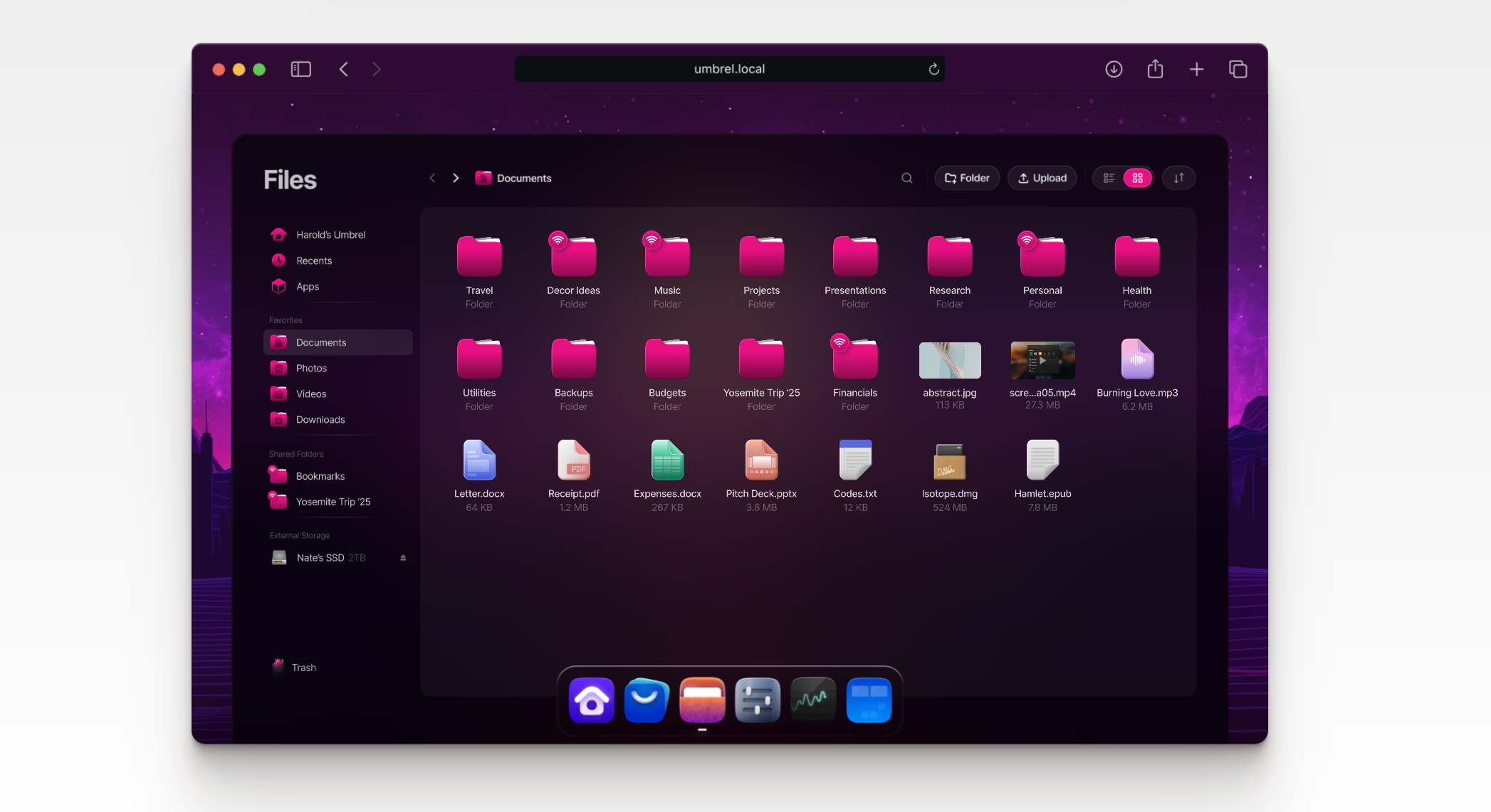
UmbrelOS did not become interesting because it is Debian-based. Plenty of things are Debian-based. It became interesting because it wraps private infrastructure in a shape normal people can tolerate. Umbrel’s current positioning is clear: it is a home cloud OS with a browser-first interface, a built-in app store, one-click updates, app-level permissions and dependencies, unified authentication, hardware monitoring, encrypted backups, and support for Raspberry Pi 5, x86 systems, and virtual machines. The public repository describes it as “a beautiful home server OS for self-hosting” and says it now supports over 300 apps. That combination puts UmbrelOS in a category many self-hosting projects talk about but never quite reach: software that feels like a product before it feels like a project.
Table of Contents
That shift matters because the old self-hosting bargain has always been punishing. You could own your data, your services, and your backups, but you also inherited every rough edge in networking, storage, container management, updates, permissions, and remote access. Most people did not reject the idea of running their own server. They rejected the constant friction of keeping it alive. UmbrelOS is one of the strongest attempts to remove that friction without giving up the private-first instinct that makes self-hosting worth the effort in the first place. The official product page leans into that directly, saying the OS is meant to make self-hosting accessible even to people with no technical knowledge, while still exposing concrete controls around updates, dependencies, 2FA, and device health.
The timing also helps. UmbrelOS 1.0 arrived in February 2024 as what Umbrel itself called a complete rebuild. Since then, the public release trail has been steady: 1.1 brought Terminal and the beta program in April 2024, 1.3 added swappable apps in November 2024, the Files rollout landed in early 2025, 1.4.1 sharpened that file experience in April 2025, and the backups release in September 2025 added Rewind restore, network mounts, and broader storage support. GitHub’s releases page lists umbrelOS 1.5 in November 2025, which marks a fast and visible maturation arc rather than a one-off redesign.
A fresh CNX Software write-up published on April 12, 2026 captures why the project is suddenly easier to notice outside the Bitcoin crowd. It describes UmbrelOS as a Debian-based home cloud OS with a slick web-based interface that runs on Raspberry Pi boards, mini PCs, and older computers, while noting that Umbrel began as an easier way to run a Bitcoin full node and gradually widened into a broader home cloud platform. That outside framing lines up with Umbrel’s own product pages and app store. UmbrelOS still carries its Bitcoin DNA, but it is no longer just a Bitcoin box. It is a consumer-friendly layer over private infrastructure.
What UmbrelOS is trying to fix
The problem UmbrelOS is chasing is not lack of software. Self-hosting already has more software than most people will ever need. The problem is coordination. A typical home server setup asks one person to act as sysadmin, storage planner, backup operator, reverse proxy mechanic, update manager, and family tech support. That workload is tolerable for people who enjoy the machinery. It is exhausting for everyone else. UmbrelOS tries to shrink the distance between “I want my own cloud” and “I can keep this thing working.” Its interface handles app discovery, install flows, dependency visibility, updates, authentication, and storage-facing tasks in one place rather than across five unrelated tools.
That is a bigger deal than it sounds. Most home server systems still assume that confidence with Linux is a reasonable entry requirement. Umbrel does not. The official site says “no technical knowledge required”, which is marketing language, but not empty marketing language. The product actually follows through with browser-based access through umbrel.local, one-click OS updates, single-password authentication across apps, optional 2FA, device monitoring for RAM, storage, and CPU temperature, and app updates surfaced from the same app store that delivered the apps in the first place. Each of those decisions removes one place where a new user would normally leave the path and end up reading forum threads instead.
There is another layer to what Umbrel is fixing, and it has nothing to do with features. It is fixing tone. Traditional self-hosting often feels like software built by people who are suspicious of convenience. UmbrelOS is built by people who clearly want convenience, but do not want to pay for it with data ownership. That changes the emotional experience of the platform. A private system that looks calm and coherent gets trusted faster. A private system that looks like an admin panel gets postponed. This is not shallow design talk. Interface quality changes whether a family photo archive gets backed up, whether a VPN gets used, whether app updates get installed, and whether a household keeps using the box after the most technical person loses interest for a month.
That is also why UmbrelOS has pulled interest from outside its original niche. Once a platform can credibly offer Nextcloud, Immich, Jellyfin, Home Assistant, Pi-hole, local AI tools, remote access options, and Bitcoin infrastructure under one roof, the old framing collapses. It stops being a niche node appliance and starts looking like a private operating layer for digital life at home. The product page calls it an elegant OS for your home server. The app store shows what that claim means in practice.
Why its Bitcoin origin still matters
Umbrel did not begin with “home cloud” as a broad lifestyle category. It began with Bitcoin. That origin still matters because Bitcoin shaped the platform’s instincts before the wider self-hosting audience showed up. The current App Store still gives Bitcoin a starring role. On the Discover page, Umbrel literally frames one section as “Be your own bank” and pitches private node operation, Electrum server connectivity, and private blockchain exploration as first-class uses for the platform. The Bitcoin Node app page goes further and says users can run a personal node powered by Bitcoin Core, validate every transaction themselves, connect wallets directly for privacy, and control settings around network connectivity and performance.
That background matters because Bitcoin users are unusually sensitive to trust boundaries. They care about who is in the middle, who can see activity, who controls updates, and whether a smooth interface hides dangerous assumptions. Umbrel’s early audience forced the platform to think hard about those issues. The home-cloud layer that exists now benefits from that pressure. Single-password protection across apps, optional 2FA, direct node connectivity, attention to privacy language, and a bias toward running important services on hardware you physically control all make more sense once you remember where the company started.
The Bitcoin category also gives Umbrel depth that many polished home server projects do not try to match. The App Store’s Bitcoin section is not just a token checkbox. The store highlights Bitcoin Node, Electrs, mempool, BTCPay Server, LNbits, Alby Hub, and a wider cluster of tools for Lightning, payments, and blockchain visibility. That ecosystem matters even for people who will never install half of it, because it signals that Umbrel is comfortable serving advanced use cases, not just basic file sync and media playback. The platform’s polish is not built on avoiding demanding users. It is built on convincing demanding users to accept polish.
There is also a conceptual link between the Bitcoin side and the home cloud side. Bitcoin taught a large slice of Umbrel’s audience to think in terms of self-custody, verification, and direct ownership of infrastructure. That same mindset now extends naturally to files, backups, passwords, photos, search, and home automation. A person who wants their own node often turns out to be a person who dislikes renting the rest of their digital life from subscription dashboards. UmbrelOS works because it lets one philosophy spill into many use cases.
None of that means Umbrel is only for Bitcoin people now. It clearly is not. It means the Bitcoin origin still explains why the platform feels different from a generic NAS interface with some containers on top. Umbrel did not arrive at private computing because it sounded fashionable. It arrived there because its earliest users cared about it in a high-stakes context. That leaves a mark, and in Umbrel’s case, it is a useful one.
Debian is the floor, not the headline
Calling UmbrelOS Debian-based is accurate, but it only tells a small part of the story. Umbrel’s own QEMU issue says the OS should have good virtualization integration because it is built on top of Debian Bookworm. Debian’s release pages show that Bookworm is Debian 12, initially released on June 10, 2023, with Debian 13 “Trixie” becoming stable on August 9, 2025, which made Bookworm the oldstable release by early 2026. Those are useful facts, because they tell you Umbrel chose a conservative and predictable base rather than something flashy at the operating system layer.
That choice fits the job. A home cloud OS does not need to impress you with package novelty. It needs to sit quietly under files, media, backups, and network services without becoming the thing you worry about most. Debian is good at that. Its support windows are long, the ecosystem is familiar, and the release cycle rewards patience rather than spectacle. If Umbrel had built this on a twitchier base, the nice dashboard would not matter much. What matters is that the visible layer can promise calm because the invisible layer has a long reputation for it. That is an inference, but it is a sensible one given the product shape and the explicit Bookworm reference.
It is also important not to misunderstand the Debian label. UmbrelOS is not trying to be a general-purpose Debian desktop with a better web panel. The repo, install guides, and product pages all point in the other direction. You install it as the OS for this job. You access it through the browser. You add software through the Umbrel App Store. You manage authentication, updates, and storage through Umbrel’s own interface. Debian is the plumbing. Umbrel is the appliance layer. Advanced users can still reason about what sits underneath, but the product is not asking ordinary users to think like Debian admins.
That distinction matters when people compare UmbrelOS with traditional Linux server setups. The right comparison is not “how much of Debian can I touch.” The right comparison is “how much private infrastructure can I run without turning my house into a part-time operations team.” By that standard, Debian’s role is mostly to be boring in the best possible way. It lets Umbrel spend product effort where users feel it: installation flows, app discovery, storage behavior, authentication, and resilience.
A lot of software projects advertise their base because they do not have enough of their own story. Umbrel is in the opposite position. It has a strong product story, so the Debian detail is best read as reassurance. It tells you the foundation is sensible, not that the foundation is the point.
The installation model became stricter for a reason
One of the biggest changes in the Umbrel story is the installation model. People who remember older Umbrel setups often assume it still behaves like software you can layer on top of an existing Debian or Ubuntu install. Umbrel’s own issue tracker says that changed with umbrelOS 1.0. The quoted guidance is blunt: umbrelOS now needs to be installed directly as the operating system on the device’s internal storage, not on top of an existing OS like Debian or Ubuntu. That makes the system less casual to try, but it also makes the product easier for Umbrel to reason about and support.
That stricter model is not just corporate tidiness. It matches the way Umbrel wants the software to be experienced. A platform that promises one-click OS updates, unified authentication, backup orchestration, storage management, app dependencies, and hardware monitoring needs control over more of the stack than an old install script allowed. Once Umbrel decided to behave like an appliance OS, it had to stop pretending it was just another package you sprinkle onto a random Linux box. The 1.0 announcement framed the release as a complete rebirth built from the ground up for stability, UX, and security. The install change is part of that shift, not a side note.
The good news is that the supported install paths are broad enough for most serious users. Umbrel’s wiki includes dedicated guides for x86 systems, Raspberry Pi 5, and Linux VMs. The x86 guide lists a dual-core 64-bit Intel or AMD processor, 4 GB of RAM, and 32 GB of storage as the minimum, while warning that a Bitcoin node often needs 1 TB or more. The VM guide repeats the same memory and storage floor and says the first boot takes around five minutes before the interface becomes available at umbrel.local. That means testing the platform no longer requires committing a physical machine on day one. A VM is a real and official way to see whether the product language works for you.
Raspberry Pi support is also more deliberate than it used to be. The Pi 5 guide recommends installing directly on NVMe or USB storage and explicitly says that microSD-based installation is not recommended because microSD cards wear out, perform worse, and are more vulnerable to instability and data loss under the continuous write pattern a home cloud OS creates. That warning is unusually honest, and it tells you something about the product. Umbrel does not want to win by pretending the cheapest setup is always the right one. It would rather push users toward media that make the experience survivable.
The result is a platform that asks for a bit more commitment up front, then tries to return that commitment with a cleaner life afterward. That is a fair trade. A real home cloud should feel intentional, not like software camping on top of an operating system that had other plans.
The interface is not decoration
Many projects in this category get described as if the interface were just a bonus layer over the real work happening below. UmbrelOS flips that logic. The interface is the real work. Docker containers, Linux storage, and package choices matter, but what makes Umbrel distinctive is the way those pieces are turned into one continuous experience. The product page highlights one-click OS updates, pre-install visibility into app permissions and dependencies, live hardware monitoring, authentication across all apps, and instant app updates from the store. Those are not ornamental touches. They are the reason the rest of the stack feels manageable.
Look at what that means in practice. On a typical DIY stack, you might install an app in one interface, handle auth in another, watch system health in a third, and read release notes somewhere else before you dare update. Umbrel folds those responsibilities together. You can see if an app depends on another app before installation. You can protect all apps with your Umbrel password and add 2FA. You can monitor RAM, storage, and CPU temperature from the same environment. You can update apps from the same store that delivered them. That is not cosmetic polish. It is operational compression. It reduces the number of mental tabs you must keep open just to trust your own server.
This is also where Umbrel’s design instinct is smarter than many of its competitors. Self-hosting platforms often assume that exposing more raw machinery is the honest thing to do. Sometimes it is. Quite often it is just lazy product design. A better system does not hide reality; it stages reality in the order users can handle it. Umbrel’s browser-first approach does that well. The most common tasks appear in the product’s own language rather than the language of the layers beneath it. That matters for retention. A home server that stays comprehensible six months later is worth far more than a theoretically purer stack you dread revisiting.
The best compliment I can pay UmbrelOS is that it understands how people lose servers. They do not usually lose them because a machine catches fire or because Linux becomes impossible. They lose them because the setup becomes psychologically expensive. An update feels risky. A storage change feels opaque. A remote access tweak feels scary. A family member asks for a photo back and the answer becomes “give me a minute” followed by an hour of quiet panic. Umbrel’s interface is trying to lower the emotional cost of ownership. That is a serious engineering goal, even though it arrives disguised as a clean dashboard.
Files changed UmbrelOS from node box to home cloud
UmbrelOS stopped being easy to pigeonhole when Files arrived. The January 2025 announcement for Files described it as a new file manager that turned Umbrel into a full-blown home cloud, and that language was not exaggerated. Before Files, Umbrel already had many useful apps, but the platform still looked like a curated service launcher. After Files, it started looking like a place where ordinary households might actually keep ordinary digital life. That shift is hard to overstate. A home cloud becomes real when it can handle familiar file behavior, not just interesting services.
The follow-up mattered too. UmbrelOS 1.4.1 added search to Files, two widgets, real-time transfer progress, richer media controls, and performance improvements. That is the kind of release note you expect from a mature consumer-facing file product, not a sidecar in a hobbyist server distro. Umbrel was not just adding a folder browser. It was building a user-facing storage experience. That is why the product suddenly made more sense to people who never cared about Bitcoin, Lightning, or self-hosted dashboards for their own sake. Files gave the OS a center of gravity that regular users could understand immediately.
What Files really changed was the platform’s identity. A lot of server projects offer storage somewhere in the stack, but Umbrel started to treat storage as a first-class part of the OS itself. That brought the rest of the ecosystem into focus. Nextcloud was no longer just an app; it became part of a broader story about private documents and sync. Immich was no longer just a photo backup app; it fit into a home cloud model where media, backups, and browsing belonged together. Network mounts later extended that further by allowing users to browse NAS shares and other network drives directly within Files. At that point, Umbrel was not merely hosting services. It was shaping how they met each other.
UmbrelOS in one view
| Area | What UmbrelOS does well | Where it still asks for care |
|---|---|---|
| Core experience | Clean browser UI, one place for apps, auth, updates, and health | The polish can make hard infrastructure choices feel easier than they are |
| Storage | Files, network mounts, external drives, search, media previews | Storage performance still depends heavily on hardware and drive choice |
| Apps | Broad store with 300+ apps across files, media, Bitcoin, AI, networking, and automation | Not every app will behave like a polished first-party product |
| Security | Single-password access, optional 2FA, permission visibility, VPN and tunnel options | Exposing apps remotely still changes the risk picture in a big way |
| Hardware | Runs on Pi 5, x86, VMs, Umbrel Home, and Umbrel Pro | DIY support is best-effort, and cheap storage choices can punish you later |
| Resilience | Encrypted backups, Rewind restore, support for NAS and USB targets | Backups still need thoughtful destination planning and periodic checking |
This table supports the broad shape of the platform, but the main point is simple. UmbrelOS feels coherent because its storage, apps, hardware guidance, and backup model now reinforce one another instead of living as separate ideas. That coherence is what made the home-cloud claim believable.
Backups make the private cloud story believable
A private cloud is not serious until it can survive bad luck. Pretty dashboards and nice app cards are welcome, but the moment that defines a real home cloud is the moment something goes wrong. A drive fails. A directory gets deleted. A migration breaks. A family member wants the version of a file from two days ago, not the broken one from today. Umbrel’s September 2025 backups release is important because it squarely addresses that reality. The release announcement says umbrelOS can now automatically back up files, apps, and data to another Umbrel, a NAS, or an external USB drive, and that Files gained Rewind so users can restore specific files and folders from earlier points in time.
The official product page sharpens that promise even more. It describes encrypted, hourly backups to a USB drive, NAS, or another Umbrel, along with the ability to restore everything or jump back and recover specific files and folders from past backups. That language matters because it shows Umbrel understands what people fear most about self-hosting. They do not just fear complexity. They fear being the only one to blame when something disappears. Rewind-style restore is a product answer to that fear. It translates backup discipline into something ordinary users can picture and actually use.
Backups also widen the OS’s audience. A person deciding whether to trust Umbrel with family photos or shared documents is not mainly asking whether the UI is clean. They are asking whether the system behaves like a place where memory can safely live. Network mounts and external storage support help with that because they let Umbrel fit into existing home storage habits instead of demanding complete loyalty to one disk inside one box. The September 2025 announcement explicitly calls out network drives and NAS shares being mountable in Files, which makes the platform more flexible for households that already own storage gear but want a better interface and app layer around it.
There is still a practical limit here. A good backup UI does not save a bad backup plan. You still have to choose destinations, verify capacity, think about physical separation, and decide what deserves versioned protection versus what can be regenerated. Umbrel cannot do that thinking for you. What it can do is make the backup habit much easier to form and much harder to postpone. That is already a major win. A backup people actually configure beats a better backup system they never finish setting up.
This is one of the places where Umbrel’s product instinct looks strongest. It did not stop at “add backup support.” It tied storage, file browsing, restore history, external destinations, and network mounts into one story. That is how private infrastructure becomes something people keep. It stops asking users to imagine resilience as an admin concept and starts presenting resilience as part of daily life.
The App Store is broad enough to shape behavior
A self-hosting app store only matters if it changes what people are willing to try. Umbrel’s does. The public Discover page organizes software under Files & Productivity, Bitcoin, Finance, Media, Networking, Social, Home & Automation, AI, and Developer Tools. The All apps page shows the depth behind those labels, ranging from Nextcloud, Jellyfin, Home Assistant, Immich, and Pi-hole to Portainer, Gitea, BTCPay Server, Cloudflare Tunnel, code-server, and dozens more. The public repo’s “over 300 apps” claim no longer sounds inflated when you actually scan the catalog. It looks like a real ecosystem with both obvious household uses and more technical escape hatches.
That breadth changes behavior because browsing is cheap. On a traditional DIY server, trying a new service usually means reading install docs, worrying about ports, checking storage paths, and deciding whether today is the day you want to touch your reverse proxy again. On Umbrel, the store invites experimentation. A user who came for photo backup might end up trying Home Assistant, Tailscale, or a budgeting tool. A Bitcoin user might end up with private notes, local search, or a media server. Umbrel lowers the cost of curiosity, and that turns out to be a real product advantage. People use more of what they can discover safely.
The curation style matters too. Umbrel is not trying to be Linux completeness with a pretty coat of paint. The store is filled with things that make sense in a house, a family, or a personal lab: file sync, photo backup, streaming, DNS filtering, recipe managers, automation, Git mirrors, AI chat interfaces, finance dashboards, and Bitcoin tools. Even Portainer shows up as a pressure valve for users who want to go beyond the curated path and run custom Docker containers. That balance is part of why Umbrel works. It gives newcomers a safe front door without insulting advanced users who want a side entrance.
The Discover page also reveals where Umbrel thinks growth is coming from. It highlights AI apps that run on your own hardware, Bitcoin tools for personal infrastructure, “must-haves” like Immich and Tailscale, and a rotating mix of newer community apps. That is not the behavior of a platform frozen around one core use case. It is the behavior of an operating environment trying to become a default home for many kinds of private software. The store is not just an accessory to UmbrelOS. It is the public face of the platform’s ambition.
Nextcloud and Immich give Umbrel its family appeal
If you want to explain UmbrelOS to a household instead of to a sysadmin, Nextcloud and Immich do most of the work. Nextcloud’s Umbrel page calls it a productivity platform that keeps you in control. Immich’s page describes it as a high-performance photo and video backup solution and says it is an open-source, self-hosted backup system for media on your mobile device. Those two apps cover a huge part of what ordinary people actually mean when they say they want their own cloud: documents, shared files, calendars, contacts, and photos that are not trapped inside somebody else’s pricing model.
That is where Umbrel’s product strategy gets practical. Plenty of self-hosting enthusiasts love infrastructure for its own sake, but most households do not. They care about whether pictures from phones land somewhere dependable, whether shared files are easy to reach, whether calendars stay private, and whether the system becomes a burden after the most technical person goes on vacation. Umbrel gives these concerns a clean OS-level frame. Files makes storage visible. Backups make storage feel safer. Nextcloud and Immich make storage useful. The platform’s value emerges through that combination, not through any single app card.
Immich is especially important because photo backup is one of the clearest pain points in modern digital life. It is also the part of self-hosting that many people approach with the most emotion. Losing a media library is different from losing a container config. The Umbrel App Store’s decision to feature Immich so prominently on Discover and in “must-haves” says a lot about what the platform now considers essential. Umbrel is no longer just appealing to people who want sovereignty in theory. It is appealing to people who want their memories somewhere they control.
Nextcloud serves a slightly different role. It turns Umbrel from a media-and-services box into a legitimate work-and-life platform. Once you combine files, documents, contacts, calendars, and photos under a private-first operating layer, the idea of a “home cloud” stops sounding like branding and starts sounding like a reasonable description. Umbrel does not need to replace every feature in Google Workspace or iCloud to win that argument. It only needs to make the core private alternative believable, maintainable, and pleasant enough to keep. On that score, the pairing of Nextcloud, Immich, Files, and built-in backups is the strongest evidence Umbrel has.
Jellyfin, Pi-hole, and Home Assistant show the practical sweet spot
The most persuasive Umbrel apps are not always the flashiest ones. They are the ones that make a household quietly better. Jellyfin’s Umbrel page calls it “The Free Software Media System” and says it lets you stream from your own server to any device without strings attached. Pi-hole says you can block ads across your whole network instead of device by device, including places where browser extensions never reach, such as mobile apps and smart TVs. Home Assistant says it puts local control and privacy first, scans the network for known devices, and keeps data local whenever possible. That trio shows the practical sweet spot of UmbrelOS better than almost anything else.
Jellyfin matters because media is where many people feel the mismatch between ownership and convenience most sharply. They already own files. They just do not have a pleasant way to serve them. Umbrel gives Jellyfin a clean home inside a broader system that already understands storage, updates, authentication, and backups. That does not magically solve codec quirks or streaming expectations, but it dramatically lowers the barrier to getting a capable media server into the house. A polished OS makes good apps easier to trust, and good apps make the OS worth keeping.
Pi-hole shows another side of the platform. It is not glamorous. It is just useful. Network-wide blocking at the DNS layer improves daily life in a way that family members notice without needing a lecture about self-hosting. Smart TVs get quieter. Random apps get less noisy. Web pages often feel faster because junk gets blocked before it is downloaded. When people say UmbrelOS is an easy gateway into private infrastructure, this is the kind of app they mean. It turns abstract control into a visible household improvement.
Home Assistant pushes the argument further by making privacy and automation feel like they belong together. The Umbrel page stresses local control, device discovery, and local processing, which aligns neatly with the rest of the platform’s private-first language. This is not just nice branding symmetry. A home that already trusts one local box for files, photo backup, media, and VPN access is more willing to trust that same box with automation. Umbrel benefits from that compounding effect. Each successful app lowers the psychological barrier to the next one.
These apps also reveal a quieter truth about UmbrelOS. The platform is at its best when it is not trying to replace enterprise infrastructure and not trying to impress Linux purists. It shines when it helps a house do ordinary things privately and cleanly. Store media. Sync photos. Block junk. Automate lights. Share files. Run a VPN. That is a narrower ambition than “your entire digital life,” but it is also more credible, and credibility is what keeps platforms alive.
AI on Umbrel is less silly than it first sounds
A lot of self-hosted AI talk is puffed up and oddly disconnected from actual life. Umbrel’s AI category lands better because it is tied to a place where private context already exists. The Discover page says users can build AI infrastructure at home, run a 24/7 assistant with OpenClaw, host local models with Ollama, and use tools like Perplexica for private web search. That framing works because Umbrel already has the thing most AI demos lack: a local environment where files, photos, calendars, notes, and services can live under one operating layer. AI is more believable on Umbrel because the data it wants to touch is already nearby.
The two flagship examples make the point from different angles. Ollama’s Umbrel page says it lets users download and run AI models directly on their own hardware, with full control over data and privacy, but it also warns that users need enough free RAM or the device may crash or become unresponsive. OpenClaw’s page pitches a more agent-like use case: clearing your inbox, sending emails, managing calendars, and even checking you in for flights from chat apps you already use. One product says “run models here.” The other says “put those models to work in familiar channels.” That is a coherent category plan, not just a random bundle of trendy apps.
What makes this interesting is that Umbrel avoids the emptiest AI fantasy. It does not pretend every home user needs a datacenter-grade inference setup. The store language stays grounded in personal ownership and private workflows. Ollama is explicit about RAM limits. The Discover page pitches AI as something that runs on your hardware, not as magic that erases hardware reality. That honesty makes the category more credible. The best use of AI on a home server is not generic chatbot novelty. It is private assistance with data, communications, and routine tasks you would rather not send through someone else’s cloud unless you have to.
There is still a hard limit here. AI is one of the fastest ways to expose the gap between a Raspberry Pi and a roomy x86 box with plenty of memory. Umbrel cannot flatten that difference. It can only make the category accessible and keep the entry points tidy. That is already useful. A lot of people do not need the strongest possible local AI stack. They need a clean path to see whether any of this is worth bringing into the house at all. Umbrel provides that path. It makes AI feel like an extension of the home cloud, not an unrelated science project.
Remote access is useful and risky at the same time
A private server that only works at home is still useful. A private server that follows you outside the house is much more tempting. Umbrel’s app store supports both the cautious and the convenient versions of that temptation. WireGuard is presented as a free and unlimited VPN you run yourself. Its page describes it as simple, fast, and modern, and notes that outside-the-home access requires opening port 51820/udp on the router and forwarding it to the Umbrel device. Cloudflare Tunnel goes the other way. Its page says you can access Umbrel apps from the internet using Cloudflare’s network via outbound-only connections, while also warning that internet-facing apps attract attackers and bots and should be exposed carefully.
That split is important because it lays bare two different trust models. WireGuard keeps the access boundary closer to home. You still need to expose a port and manage reachability, but you are mostly deciding who gets onto your own VPN. Cloudflare Tunnel is easier for many users because it avoids inbound exposure in the usual sense, yet it also places a big external service in the path and encourages public reachability for apps that might not have been designed with that exposure in mind. Neither model is automatically right. They are different answers to a question about convenience, control, and comfort with intermediaries.
Umbrel itself tries to soften the risk with OS-level protections. The product page says your Umbrel password protects all apps and that you can add 2FA for extra protection. That helps, and it is far better than the scattershot auth setups many DIY servers end up with. Still, remote access is the place where polished UI can most easily fool people into thinking a serious decision is a small one. The platform can simplify exposure, but it cannot shrink the consequences of exposure. If you open services to the internet, your server has entered a harsher neighborhood whether the app card looked friendly or not.
The sanest reading of Umbrel’s remote-access story is that it gives users good tools without pretending those tools erase trade-offs. That is the right posture. Home infrastructure does not become safe because it becomes pretty. It becomes safer when the product makes risk visible and keeps the secure path easy enough that people actually choose it. WireGuard is a good example of that. So is the warning text on the Cloudflare Tunnel page. Umbrel’s job is not to abolish judgment. It is to put judgment inside a workflow ordinary people can survive.
Hardware choice decides whether Umbrel feels delightful or annoying
One of the easiest mistakes people make with UmbrelOS is assuming the software experience will feel the same everywhere because the screenshots look the same everywhere. They will not. Umbrel’s own docs hint at that constantly. The x86 install guide says support for non-Umbrel hardware is best-effort and not guaranteed. The Raspberry Pi 5 guide strongly prefers NVMe or USB drives over microSD. The VM guide gives a modest minimum but also makes clear that storage needs depend heavily on what you want to run. UmbrelOS is one interface laid over several very different hardware realities.
For many people, x86 mini PCs are the sweet spot. They usually offer better CPU headroom, easier SSD options, and more breathing room for media services, photo indexing, and local AI experiments than a Pi. The x86 requirements are not extreme, but the guide’s note about Bitcoin nodes needing 1 TB or more is a reminder that the minimum install spec and the realistic use spec are not the same thing. A box with 32 GB of storage technically fits the install path. It does not necessarily fit the life you had in mind. The cheapest working setup is often not the cheapest satisfying setup.
Raspberry Pi 5 is still relevant, though. It remains a good entry point for people who want a quieter, lower-cost home server and have a modest service mix. Umbrel’s documentation shows it still takes the Pi seriously, but the microSD warning is revealing. The project is effectively telling users that reliability matters more than nostalgia for the old “just flash a card and go” model. That is wise. Home cloud workloads do not behave like casual weekend projects. They write often, they live long, and they get trusted with things people care about. Storage media is not a tiny detail in that environment. It is part of the user experience.
VM installs fill another important role. They are not just for homelab purists. They are the cleanest way to test Umbrel’s operating model before handing it real hardware. The official VM guide makes the process straightforward, and the umbrel.local first-boot flow reinforces the central pitch: this is a browser-first appliance OS, even when it is virtualized. For evaluation, that is excellent. For long-term production, it depends on whether your virtualization host is already part of your household’s trusted rhythm. Umbrel runs well in a VM when the rest of your environment already makes that sensible.
Official hardware and DIY hardware are not the same deal
Umbrel deserves credit for being fairly direct about the difference between its own hardware and everything else. The Umbrel Home vs. DIY comparison says Umbrel Home offers the complete umbrelOS experience with all features, optimized performance, and priority support, while the broader install guides repeat that support for other devices is best-effort. The repo also says you can get an Umbrel Pro or Umbrel Home for the full experience, or install umbrelOS on a Raspberry Pi 5 or x86 system for free. That is not just marketing segmentation. It is a statement about how much variability Umbrel is willing to own.
The official hardware story has also grown. Umbrel’s site now pitches Umbrel Home as a palm-sized home cloud server with up to 4 TB of SSD storage, and the main company page promotes Umbrel Pro with up to 32 TB of SSD storage. The June 2025 Umbrel Home announcement says the refreshed model moved to an Intel N150 processor and offered 1 TB, 2 TB, or 4 TB storage options. That tells you Umbrel is not treating hardware as a mere side channel anymore. It wants the complete product to include the box, not just the OS.
That does not make DIY a bad idea. For many users, DIY is still the best value. A solid mini PC or spare x86 machine can deliver more performance per euro than official hardware, and the free install path is one of the reasons UmbrelOS has such broad appeal. The catch is that DIY shifts more uncertainty back onto you. Thermal behavior, BIOS quirks, drive compatibility, NIC behavior, and odd storage edge cases all become your problem faster. If you enjoy that kind of problem, DIY Umbrel is attractive. If you want the least dramatic path to a home cloud, official hardware makes more sense than enthusiasts sometimes want to admit.
What matters most is not which option is philosophically purer. It is which option matches your tolerance for variance. Umbrel Home is selling predictability. DIY is selling flexibility and cost control. Both are legitimate. Trouble starts when people buy one and expect the experience of the other. A box assembled from spare parts is still an experiment, even when the OS on top feels unusually polished. Umbrel can narrow the pain of DIY. It cannot repeal the physics of DIY.
The license tells you what kind of product Umbrel wants to be
Umbrel is public, forkable for noncommercial use, and built with enough openness that the community can inspect and extend a great deal of it. It is not, however, neutral in the way some people expect from infrastructure software. The public repo says umbrelOS is licensed under PolyForm Noncommercial 1.0.0 and adds a blunt summary: you are free to use, fork, modify, and redistribute Umbrel for personal and nonprofit use under the same license, but commercial uses such as selling hardware with umbrelOS or hosted Umbrel instances require a different relationship with the company. The License FAQ says much the same thing and explicitly states that selling Umbrel or support services around it is not permitted under the standard license.
For normal home users, this changes very little day to day. You can install it, tinker with it, learn from it, and run it for personal purposes without hitting a wall. For companies, vendors, and would-be clone sellers, it changes a lot. That distinction matters because it reveals how Umbrel sees itself. Umbrel is not trying to dissolve into generic open infrastructure. It is trying to remain a recognizable product with a defensible commercial edge. People can disagree with that choice, but they should at least name it correctly. This is not “open source in the loosest possible sense.” It is a public, inspectable, community-friendly product with a commercial boundary.
There is a trade in that boundary. The tighter the product identity, the easier it often is to keep the user experience coherent. Umbrel’s polish did not appear by accident. A company that wants the interface, hardware story, OS behavior, and app ecosystem to feel like one thing will usually resist becoming a pure substrate for everyone else’s commercial ambitions. That does not make the license automatically good or bad. It makes it consistent with the product. Umbrel wants to be the name people recognize when they think about a private home cloud that looks finished. The license protects that ambition.
Some technically minded users will always prefer a looser model, and that is a fair position. They may want a platform that any vendor can package and any service company can sell without friction. Umbrel is not that platform. It is a more opinionated deal: broad freedom for personal and nonprofit use, visible code, a strong community trail, and a firm line around commercial reuse. Anyone evaluating the OS seriously should understand that upfront, because the license is not a footnote. It is part of the product strategy.
Where UmbrelOS still falls short
The sleek interface makes it easy to talk about UmbrelOS as if it solved self-hosting. It did not. It made self-hosting easier to keep doing. Those are different claims. The project’s own documentation still points to the unresolved roughness: non-Umbrel hardware is best-effort, microSD installs are discouraged because they fail more easily, VM setups still depend on your host environment being sane, and storage needs swing hard depending on whether you run only a few utility apps or a full Bitcoin node with media and files layered on top. Umbrel reduces the number of places you can get stuck. It does not reduce that number to zero.
App quality also varies, even if the store is impressively broad. Some apps feel native to the Umbrel vision because they line up neatly with the platform’s priorities around privacy, storage, and household usefulness. Others feel more like good community additions that happen to be packaged well. That is normal for any store with this kind of range. It just means users should not mistake the clean catalog for a guarantee that every app will behave with the same level of polish or integration. A curated store is still an ecosystem, not one monolithic product.
There is also a subtle risk in how convincing the OS feels. The better Umbrel gets at lowering friction, the easier it becomes for users to move quickly past decisions that deserve care. Remote exposure is the obvious example, but storage planning belongs on the list too. A polished file browser can hide the fact that the drive underneath is too small or too fragile for the job. A graceful app card can hide the fact that a mini PC with limited memory is about to struggle once local AI, photo indexing, and media streaming collide. Good product design removes noise. It does not remove consequences. Umbrel is strong enough now that users should remember that distinction on purpose.
Still, the rough edges are easier to forgive because the project is honest about many of them. The docs are specific. The release trail is public. The community forum is active. The warnings around storage and exposure are plain. That honesty matters. It is the difference between a platform that flatters users into trouble and one that actually tries to guide them around it. UmbrelOS has not eliminated the hard parts of private infrastructure. It has built one of the clearest paths through them. For this category, that is already a serious achievement.
Why UmbrelOS matters now
UmbrelOS matters because it treats private infrastructure as something people should be able to live with, not just admire. That sounds obvious, yet a surprising amount of self-hosting software still behaves as if usability were a compromise instead of a requirement. Umbrel rejects that. The platform’s current shape ties together a stable Debian base, a product-grade web UI, a large and growing app ecosystem, better file handling, real backup logic, and a hardware story that ranges from VMs and DIY x86 boxes to official devices like Umbrel Home and Umbrel Pro. That is not a toy anymore. It is a recognizable category contender.
It also matters because the private computing argument has become more concrete. People are more aware of subscription creep, cloud dependence, app lock-in, and the quiet unease of handing everything to platforms that are easy until they are not. UmbrelOS arrives at the right moment with a pitch that ordinary people can grasp: run your own cloud, keep your own files, stream your own media, back up your own data, automate your own home, use AI on your own hardware, and still interact with the whole thing through a browser that does not look like punishment. That last part is what turns the rest from ideology into habit.
It is not the only route into self-hosting, and it is not always the right one. Users who want maximum freedom at every layer may still prefer a looser stack. People who enjoy assembling infrastructure piece by piece may find Umbrel too opinionated. Businesses with commercial reuse ambitions will run into the license boundary. Those are real limits. Yet none of them cancels the central point. UmbrelOS has shown that self-hosting can feel less like homework and more like software people might actually keep in their lives. That is why it stands out.
The best way to read UmbrelOS in 2026 is not as a perfect answer, but as a rare one. It is one of the few projects in this space that understands product, infrastructure, and domestic reality at the same time. It knows that a home cloud has to be more than possible. It has to be inviting, clear, and resilient enough that people still trust it after the novelty wears off. UmbrelOS is valuable because it makes private computing easier to keep. That may be the hardest part of the whole category, and right now it is the part Umbrel handles unusually well.
FAQ
UmbrelOS is a home cloud operating system built around a web interface, an app store, and private-first self-hosting. Umbrel’s own pages position it as an OS for running files, media, networking tools, Bitcoin services, automation, and AI on hardware you control.
Yes. Umbrel’s own QEMU discussion says umbrelOS is built on Debian Bookworm, and Debian’s release pages confirm that Bookworm is Debian 12, originally released on June 10, 2023.
Because the OS pulls updates, app installs, auth, 2FA, hardware monitoring, permissions, dependencies, and storage-facing tasks into one browser-based environment instead of scattering them across separate tools.
Not in the old way. Umbrel’s own issue tracker says that with umbrelOS 1.0 the platform moved to direct OS installation on device storage rather than layering on top of an existing Debian or Ubuntu setup.
Umbrel officially documents installs for x86 systems, Raspberry Pi 5, and Linux VMs, while also selling its own hardware through Umbrel Home and Umbrel Pro.
Yes, especially for lighter home-server use, but Umbrel’s docs strongly push users toward NVMe or USB storage rather than microSD for better reliability and performance.
The Pi 5 guide says microSD cards have limited write cycles, lower performance, and greater risk of instability, corruption, and data loss under the kind of continuous activity umbrelOS expects.
The official x86 and VM guides list a dual-core 64-bit CPU, 4 GB RAM, and 32 GB storage as the floor, while noting that real needs go up fast depending on the apps and services you run.
Yes. Umbrel has an official VM guide, and it says the first boot takes about five minutes before the system becomes available at umbrel.local.
Umbrel’s public repository says the App Store has over 300 apps, and the public store pages show a wide spread across files, media, Bitcoin, AI, networking, finance, automation, and developer tools.
The clearest household wins are Nextcloud for files and collaboration, Immich for photo backup, Jellyfin for media, Pi-hole for network-wide blocking, and Home Assistant for local automation.
Files gave UmbrelOS a real browser-based file layer, and Umbrel’s January 2025 announcement said it turned the platform into a full-blown home cloud rather than just a service launcher.
Yes. Umbrel’s product page and the September 2025 backups announcement describe encrypted, hourly backups, Rewind restore, support for USB and NAS targets, and the ability to back up to another Umbrel.
Yes. Umbrel still highlights Bitcoin heavily, and the Bitcoin Node app remains a flagship part of the store, with private validation and direct wallet connectivity at the center of the pitch.
Yes. Umbrel’s AI section highlights apps such as Ollama and OpenClaw. Ollama’s page says users can run models directly on their own hardware, while warning clearly about RAM requirements.
It can be reasonably safe if handled carefully, but the risk depends on your method. WireGuard keeps access inside your own VPN model, while Cloudflare Tunnel makes internet exposure easier and explicitly warns that public apps attract attackers and bots.
Usually yes for ease and predictability. Umbrel’s own comparison says Umbrel Home gives the complete experience with optimized performance and priority support, while DIY devices are supported on a best-effort basis.
Not quite. The code is public and broadly usable for personal and nonprofit purposes, but Umbrel’s repo and FAQ say commercial reuse is restricted under the PolyForm Noncommercial 1.0.0 license.
If the goal is to get a private home cloud working and keep it working, UmbrelOS is usually the easier starting point because it compresses installs, updates, auth, monitoring, and app discovery into one interface. People who enjoy building every layer themselves may still prefer a manual stack.
Author:
Jan Bielik
CEO & Founder of Webiano Digital & Marketing Agency
This article is an original analysis supported by the sources cited below
umbrelOS – An elegant OS for your home server
Official Umbrel product page used for core positioning, updates, auth, monitoring, backup features, and installation framing.
Umbrel App Store
Official App Store front page used for category structure, featured use cases, AI and Bitcoin emphasis, and app discovery framing.
All apps | Umbrel App Store
Official app catalog used to verify the breadth of the ecosystem and the availability of specific tools and categories.
UmbrelOS
Public repository used for the “over 300 apps” claim, hardware framing, and license summary.
Releases · getumbrel/umbrel
Official release page used for the published 1.5 release timing and product maturity timeline.
Introducing umbrelOS 1.0 — Rebuilt from the ground-up
Official 1.0 announcement used for the full rebuild framing and the shift in Umbrel’s product direction.
Introducing umbrelOS 1.1 with Terminal, the umbrelOS Beta Program, and more
Official 1.1 announcement used for the release timeline and feature progression.
umbrelOS 1.3 is now out with swappable apps, Cloudflare DNS, and more
Official 1.3 announcement used for the release timeline and platform evolution.
Introducing Files, the new file browser on umbrelOS
Official Files announcement used for the shift from node appliance toward a fuller home-cloud identity.
Introducing umbrelOS 1.4.1 with Files search, widgets, and more
Official 1.4.1 announcement used for search, widgets, transfer progress, and file experience improvements.
Introducing Backups on umbrelOS
Official backup announcement used for automatic backups, Rewind restore, network mounts, and external storage support.
Install umbrelOS on x86 Systems
Official x86 installation guide used for system requirements and the best-effort support note on non-Umbrel hardware.
Install umbrelOS on a Raspberry Pi 5
Official Raspberry Pi 5 guide used for storage recommendations, install modes, and the microSD warning.
Install umbrelOS on a Linux VM
Official VM guide used for memory and storage requirements, boot behavior, and browser access through umbrel.local.
umbrelOS on Umbrel Home vs. DIY
Official comparison page used for the distinction between official hardware and DIY installs.
License FAQ
Official license FAQ used for personal, nonprofit, and commercial-use boundaries.
Is the Umbrel install by script coming back any time? · Issue #1826
Official issue used to document the move away from the old install-on-top-of-Debian-or-Ubuntu model.
Feedback on QEMU Functionality in umbrelOS · Issue #1922
Official issue used for the explicit reference to umbrelOS being built on Debian Bookworm and for VM context.
Nextcloud | Umbrel App Store
Official app page used for Nextcloud’s role in private files, collaboration, and household cloud use.
Immich | Umbrel App Store
Official app page used for self-hosted mobile photo and video backup coverage.
Jellyfin | Umbrel App Store
Official app page used for the media-server discussion and local media ownership angle.
Home Assistant | Umbrel App Store
Official app page used for local-first home automation and privacy-focused smart-home control.
Pi-hole | Umbrel App Store
Official app page used for network-wide blocking and practical day-to-day household value.
WireGuard | Umbrel App Store
Official app page used for VPN-based remote access and the router port-forwarding note.
Cloudflare Tunnel | Umbrel App Store
Official app page used for tunnel-based remote access and the warning about exposing apps publicly.
Ollama | Umbrel App Store
Official app page used for local AI models, privacy framing, and RAM-related hardware limits.
OpenClaw | Umbrel App Store
Official app page used for the agent-style AI workflow discussion.
Bitcoin Node | Umbrel App Store
Official app page used for the Bitcoin self-validation, wallet privacy, and advanced settings discussion.
Umbrel Home | Plug and Play Home Cloud Server
Official hardware page used for current Umbrel Home positioning and storage tiers.
Umbrel – Personal home cloud and OS for self-hosting
Official company homepage used for current Umbrel Pro positioning and broader hardware framing.
Introducing the all-new Umbrel Home, now with up to 4TB SSD storage
Official announcement used for the 2025 Umbrel Home hardware refresh details.
Debian Releases
Official Debian release index used for Debian’s stable and oldstable timeline.
Debian “bookworm” Release Information
Official Debian page used for Bookworm release timing and support context.
Debian “trixie” Release Information
Official Debian page used for the transition that moved Bookworm into oldstable status.
UmbrelOS – A Debian-based personal home cloud OS with a slick user interface
Recent third-party overview used for current outside framing of UmbrelOS and its broader market position.
| Citing this article? Brief excerpts are welcome. Please credit Webiano.digital, name the author where stated, and include a link to https://webiano.digital and to this original article. Full or substantial republication requires prior written permission. Read our Copyright and Content Use Policy. |
This article was prepared with the assistance of artificial intelligence tools. The content underwent expert human review, and Webiano Digital & Marketing Agency assumes editorial responsibility for its final version and publication.