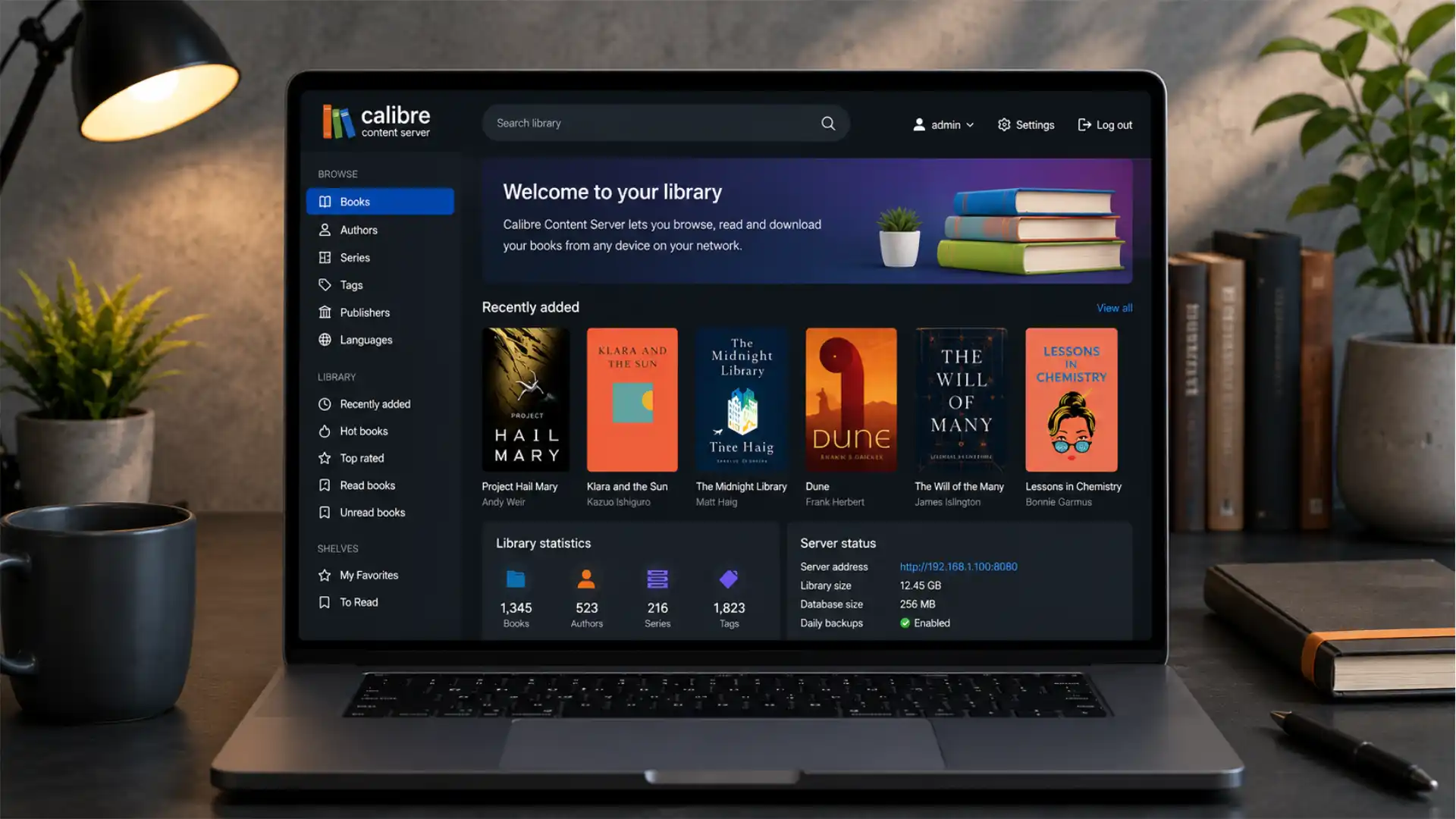
Calibre 9.10 is a small release in file-count terms and a consequential release in product terms. Its headline change is not another conversion preset, a new device driver, or a more decorative desktop view. It is a new “modern” interface for the Content server, built around a sidebar intended to make navigation easier. The same release also allows the Content server to be installed as a Progressive Web App when it is served over HTTPS. Those two lines in the changelog point to a broader shift: Calibre is putting more care into the part of the program that users touch from phones, tablets, spare laptops, and browser-only devices.
Table of Contents
A release defined by its server
That matters because eing only a desktop catalog and becomes a personal library service. A user may spend hours refining metadata in the main application, but the reading moment often happens elsewhere: on a tablet in another room, on a phone during a commute, on a laptop without the library database, or in a browser opened on an e-ink device. The server is the bridge between private collection management and actual access.
For a long time, the word “server” made this part of Calibre sound like a specialist feature. In practice, it has always had a simpler job. It exposes the books already stored in a Calibre library through a browser interface. Users can inspect book metadata, read compatible titles in the browser, download files, and connect some reading applications through OPDS. The official documentation describes it as a way to access Calibre libraries and read books directly in a browser on phones and tablets, without a separate reading or management app.
The 9.10 redesign does not turn Calibre into a subscription reading platform, a hosted cloud locker, or a social catalog. It refreshes the local web surface of a program whose defining trait remains user control. The library is still owned and managed by the person who runs it. The program still works across Windows, macOS, and Linux. Its code remains available under the GNU General Public License version 3.
That distinction shapes the value of the new interface. Commercial book ecosystems usually treat library access as an extension of a retail account. The files, recommendations, reading history, delivery rules, and authentication systems sit within a single vendor’s service. Calibre works from the opposite direction. It begins with files the reader already has, metadata the reader curates, devices the reader owns, and a library folder the reader controls. The Content server is the point where that local arrangement becomes available beyond the computer that maintains it.
A better web interface is therefore not a cosmetic side project. It changes the feel of ownership. A private library only feels truly available when its retrieval layer is pleasant enough that users choose it instead of copying files manually, opening a desktop application, or falling back to a retailer’s cloud. Calibre 9.10 aims at that friction.
The release also arrives after a string of Content server work throughout 2026. Version 9.6 fixed browser-side search and annotation issues in the server viewer; version 9.7 added full offline mode over HTTPS; version 9.8 made titles and covers in the mobile view open book details; version 9.9 corrected how null metadata is applied when serving book files. Seen as a sequence rather than isolated changelog lines, 9.10 looks less like a sudden redesign and more like the visible stage of a sustained effort to make the browser experience trustworthy for daily reading.
The confirmed changes in Calibre 9.10
Calibre 9.10 was released on June 25, 2026. Its official release notes list two Content server additions: a new modern interface with a sidebar for easier navigation, and PWA installation when the server is used with HTTPS. The same release includes saved-search keyword matching in the Edit Book tool, CSS Level 4 selector support, a cover-grid texture adjustment, annotation filtering by custom styles, and an image-compression option that can convert PNG files to JPEG or WebP.
The phrase “modern interface” deserves restraint. Calibre’s release notes do not claim a rewrite of every server function or promise a new information architecture for every possible library configuration. There is no published claim that the Content server has become a complete replacement for the desktop application. The desktop program remains where users do heavy library work: importing files, managing conversion settings, editing metadata in bulk, administering plugins, and configuring most advanced behavior.
What has changed is the browser-facing path through a library. The sidebar gives navigation a fixed visual home, reducing dependence on back buttons, scattered controls, and context-dependent links. That sounds mundane until a library has several virtual libraries, a deep author catalog, series with many volumes, or a mix of reading and download habits across devices. Navigation is the part of a web application that readers notice only when it fails. A server UI that makes library boundaries, browsing choices, and return paths obvious creates less cognitive drag than one that requires users to reconstruct the route they just took.
The PWA item carries a separate meaning. A Progressive Web App is still a web application, not a native executable in disguise. Yet supported browsers can offer it an installed form: a home-screen entry on mobile devices or an app-like entry in a desktop launcher. The web app manifest tells the browser how the application should appear in the operating system, including basics such as its name, icons, theme color, orientation preferences, shortcuts, and screenshots.
For Calibre users, the practical outcome is not a promise of an App Store-style client. It is a lower-friction route back to the personal library. Instead of remembering an IP address, a port number, a local hostname, or a reverse-proxy domain, a reader may open the installed server interface from a familiar launcher location. That does not remove the need for the server to be running or reachable. It makes the act of returning to it less browser-shaped.
Release changes at a glance
| Area | Confirmed Calibre 9.10 change | Practical effect |
|---|---|---|
| Content server | Modern interface with sidebar navigation | A clearer route through libraries and book views |
| Content server | PWA installation over HTTPS | Supported browsers may present the library as an installable web app |
| Edit Book | Saved-search keyword matching | Faster filtering of saved searches in editorial work |
| CSS support | CSS Level 4 selectors | Wider styling compatibility for supported e-book content |
| Image tools | PNG conversion to JPEG or WebP | More direct control over image weight in edited e-books |
The table separates release-note facts from interpretation. The first two rows are the center of this release; the others matter most to people who edit books, prepare files for devices, or maintain polished EPUB and AZW3 editions.
Calibre’s versioning pattern is also worth noting. The project releases frequently and uses changelogs to document granular improvements, corrections, and security fixes. That rhythm means a version such as 9.10 should be judged as part of an ongoing maintenance stream, not as a once-a-year platform relaunch. Users who skip many versions should read the changes between their installed version and 9.10, particularly when they expose the Content server beyond a home network. The project’s own release history includes multiple fixes for server behavior, browser compatibility, security boundaries, and remote-access edge cases.
The content server’s unusual job
The Content server sits between two kinds of software that usually live apart. On one side is a desktop library manager with a database, a local folder structure, conversion tools, metadata editors, device drivers, plugins, search systems, and viewing tools. On the other side is a web catalog and reading environment served to browsers. Calibre joins those roles without requiring a separate cloud account or a hosted vendor service.
The core workflow is straightforward. A reader adds books to Calibre. The application copies those files into its managed library structure, reads or gathers metadata, and stores the catalog information in its internal database. The original source files remain untouched, while the Calibre library becomes the managed working collection. The user can then convert formats, edit metadata, view books, move books to devices, or serve the library over the network.
When the server starts, it is accessible locally through an address such as http://127.0.0.1:8080. For other devices on the same network, the reader uses the machine’s local IP address and port. The server page presents libraries and books, with book records offering metadata plus options to read or download the item.
That arrangement sounds familiar to anyone who has run a media server, but books place different pressure on the interface. A music service often centers playback queues. A video service prioritizes art, duration, and recent viewing. An e-book library requires readers to move through authors, series, tags, publishers, formats, dates, and personal classifications while keeping the actual reading flow quiet. The catalog has to be rich enough to find a title and unobtrusive enough not to turn reading into database work.
The Content server also has an identity problem that the redesign addresses. It is not merely a file server. A basic shared folder can distribute EPUB files. A basic HTTP directory can expose downloads. Neither provides the contextual layer that makes a library usable after it grows: cover art, author sorting, tags, descriptions, series positions, format choices, custom metadata, saved searches, browsing routes, and reader-specific permissions.
It is not merely a web reader either. Many readers will choose to download a file and open it in a specialist application. Others will use an OPDS-compatible app to browse and acquire books. The server must therefore support reading, discovery, download, and handoff without treating any one route as the only route.
The new sidebar has value because it acknowledges that plurality. A familiar navigation surface can support someone who wants to browse from an author page, another person who wants to jump to a virtual library, and a third person who wants to return to a home view after opening one book. In a private library, the user’s workflow is not standardized by a retailer. The interface has to accommodate personal habits that may have been built over years.
Calibre’s command-line server confirms the seriousness of this role. The standalone calibre-server program includes options for authentication, user accounts, custom metadata display, worker processes, logging, Bonjour advertising of OPDS feeds, listening interfaces, URL prefixes, and socket activation. Those are not the features of a toy web page. They are the features of a service that can sit on a household computer, a small home server, or a more deliberately administered Linux host.
Navigation becomes a product feature
A sidebar is easy to underestimate because it is a familiar pattern. Familiarity is exactly its advantage. Web applications become tiring when users repeatedly ask themselves where a command lives, what scope they are browsing, and what action returns them to a stable point. A fixed navigation area answers those questions before they turn into friction.
The consequences are clearest in libraries that are not flat. A collection of twenty books may work well with a simple grid and a search box. A collection of several thousand books behaves differently. Its owner may have distinct virtual libraries for unread titles, work material, children’s books, public-domain classics, comics, reference books, or titles prepared for a certain device. They may use custom columns for language, source, loan status, acquisition date, reading state, original format, or subject. A browser page that exposes only the current list forces the user to remember which filter produced it.
The sidebar can give those library territories a visible home. Its job is not to make the interface look like a commercial streaming service. Its job is to reduce the number of operations between intention and location. The subtle distinction matters. A commercial interface may use a sidebar to promote sections, recommendations, subscriptions, or monetized discovery. Calibre’s sidebar serves a collection that already belongs to the reader.
The new UI also arrives at a point when the desktop version of Calibre has been paying more attention to browsing forms. Calibre 9.0 introduced a Bookshelf view that arranges books in shelf-like rows and allows grouping by fields such as author or series. Calibre 9.6 added a card-based view for full-text search results with book covers. These features do not prove that the Content server shares the same internals or appearance. They do show a project-wide willingness to treat discovery and visual navigation as first-class parts of library work, rather than leaving them as utility screens around a database.
A reader’s first interaction with a personal library is rarely a conversion dialog. It is more often a vague need: “the history book I was reading last month,” “the second novel in that series,” “a short book for a flight,” “something in Spanish,” “the PDF with the conference notes.” The more a library grows, the more those needs depend on orientation rather than file transfer. A browser UI earns its place by shortening the distance between a partial memory and the right title.
The redesign may also reduce the gap between technically confident library owners and people who share the library with family members. A technically confident person may accept an address like 192.168.1.5:8080 and treat browser history as navigation. A partner, child, guest, or colleague is less likely to do that. A consistent menu structure makes a self-hosted collection feel less like a private experiment and more like a usable household service.
There is a limit. Navigation cannot rescue disordered metadata. A sidebar will not fix duplicate authors, inconsistent series names, missing covers, or books dumped into the library without meaningful titles. Calibre’s strength has always been its metadata tooling, and users who want a clean browser experience still need to invest in the underlying catalog. The redesign improves the route through the map; it does not redraw the map by itself.
Large libraries expose the real value of the redesign
The difference between a functional interface and a pleasant one grows with the size and heterogeneity of a collection. A reader with 200 DRM-free EPUB files may be satisfied with a title list. A reader with 15,000 books, scanned PDFs, manga archives, imported newsletters, technical manuals, multiple editions, and custom tags needs stronger orientation cues.
Large collections also reveal the cost of ambiguous state. A user might enter a virtual library that filters by unread books, choose an author, open a series, read the third title, and then want to return to the prior filtered sequence. When the interface does not preserve a clear path, the user is pushed into browser-history behavior rather than library behavior. Those are not equivalent. Browser history records pages. A library interface should preserve meaningful catalog context.
Calibre offers several mechanisms that make this context rich. The desktop program supports virtual libraries, saved searches, custom columns, search syntax, full-text indexing features, tags, series fields, and metadata-based browsing. Its Content server can expose libraries to browsers and can be configured to restrict which custom metadata fields appear in its OPDS and mobile views.
The sidebar has the potential to bring those choices closer to the surface. The release notes do not specify every item it includes or every layout behavior, so strong claims would be premature. Yet the design direction is clear enough: navigation is being treated as a dedicated layer rather than an incidental set of links placed within content pages.
That approach is especially useful for multi-library setups. Some Calibre users run separate libraries for different purposes rather than one enormous database. They may keep private reading separate from professional research, client material separate from personal books, or archival scans separate from clean retail EPUB files. A browser interface has to make the active library obvious. It also needs to make changing libraries feel deliberate, because similar titles or author names may exist across multiple collections.
Readers who use custom columns face another version of the same problem. The Calibre database is flexible enough to model personal classification systems, but flexibility turns into noise when every field is displayed without hierarchy. A well-designed server navigation layer gives users a place to decide which dimensions matter most: collection, author, format, status, series, or a filtered view. The rest can remain available without becoming the first thing everyone sees.
There is also a performance angle, although Calibre has not published benchmark claims for this redesign. Visual clarity affects perceived speed. A page that loads quickly but makes its next action hard to identify feels slow. A page that loads moderately but tells the reader exactly where to go often feels faster because it avoids dead-end clicks and backtracking. That is a human-performance argument, not a claim about rendering milliseconds.
For administrators, the redesign creates a reason to revisit a server that may have been configured once and then ignored. Many self-hosted services settle into “it works” status. Users stop updating their mental model of the product, even as the project adds browser support, offline features, security corrections, mobile-view improvements, and fresh navigation. Calibre 9.10 gives those users a visible prompt to reconsider whether their existing server setup still matches their reading habits.
The PWA addition changes the return path
The PWA feature in Calibre 9.10 should be understood as a convenience layer built on a secure web deployment. It does not move the library into a third-party cloud. It does not eliminate the network. It does not replace authentication. It gives a browser-hosted library a more durable place in the reader’s device interface.
A Progressive Web App is a web application that uses web platform capabilities to offer a more integrated experience. Installed PWAs can appear in a device launcher, dock, taskbar, or home screen, and may open in a dedicated window rather than a conventional browser tab. Browser support and behavior differ by platform, but the core idea is consistent: a website can be treated more like an application without being distributed as a native package through a store.
For a Calibre user, that narrows a surprisingly common gap. A local server might be technically available but practically forgotten. The user may have to remember a local hostname, type an IP address, find an old bookmark, or search browser history. An installed entry changes that. The library becomes one tap away from the same places where people open their mail, notes, calendars, and reading apps.
The significance is stronger for households and small teams than for a single technically confident user. A family member may not remember that a desktop computer is running the library or that the service is available at a certain address. A home-screen icon creates a recognisable destination. It makes the personal library legible to people who did not set it up.
Calibre’s PWA support is explicitly tied to HTTPS. That condition is not arbitrary. Browsers require HTTPS, localhost, or loopback addresses for an application to meet PWA installability requirements. Service workers, the web technology commonly used for offline behavior, are also restricted to secure contexts because they are powerful intermediaries between a page and network requests.
That requirement produces a useful discipline. Many home users run local services over plain HTTP because the service never leaves the home network. For a basic local book page, that may feel adequate. For a PWA with offline-capable behavior and an app-like presence, secure transport becomes part of the experience. The new feature nudges Calibre administrators toward a deployment standard that is more appropriate for credentials, personal library details, and browser-managed access.
The PWA angle also reframes the server’s role. It becomes less like a web export and more like a persistent reading doorway. A browser tab is temporary. A launcher icon suggests a continuing relationship. That psychological change is modest, but product design often turns on modest changes. People return to tools that are easy to find and easy to re-enter.
There are limits. PWA installation is not a universal feature with identical behavior across browsers and operating systems. Desktop installation is supported in Chrome and Microsoft Edge on major desktop platforms, but installation prompts, menu wording, icons, and offline behavior differ. Safari has its own paths and constraints. Users should treat installation as an optional browser capability, not as a guaranteed identical experience on every device.
HTTPS becomes part of the reading experience
HTTPS is often discussed as a security topic for websites and public services. In Calibre 9.10, it also becomes a feature-enabling condition. The official release notes make PWA installation contingent on HTTPS, while version 9.7 introduced full offline mode for Content server connections using HTTPS. That places encrypted transport at the center of the modern browser experience, not at the edge of it.
A secure connection protects more than a password. It protects the integrity of the pages a browser receives. That matters when the page can register a service worker, cache content, present a library catalog, and direct the user toward downloads or browser reading. Without secure transport, a network attacker on an untrusted connection could attempt to alter traffic between the server and the client. Browsers restrict service-worker use to secure contexts precisely because a persistent network intermediary is too powerful to grant over an easily altered HTTP connection.
For a home-only setup, the practical question is not “is HTTPS fashionable?” It is “what features and risks does this deployment need to accommodate?” A server reachable only through a trusted local network has a smaller exposure surface than one forwarded through a home router. Yet readers use phones, tablets, guest networks, mesh networks, and sometimes public Wi-Fi. A library that becomes reachable beyond the LAN should be treated as an internet-facing service, not as a casual file share.
Calibre’s own documentation urges users to turn on username and password protection before making the Content server available from anywhere on the internet. It also advises enabling HTTPS for maximum security, either directly in the server through certificate settings or through a reverse proxy.
The PWA feature gives users a practical reason to follow that guidance. Instead of seeing HTTPS as an administrator’s extra chore, they can see it as part of the route to a more direct, app-like library. That is a better motivational structure than security advice alone. People often update infrastructure when the result is visible in their daily use.
It also exposes an uncomfortable fact: self-hosting is not automatically private or secure just because it begins at home. A public IP address, a forwarded port, weak credentials, unpatched software, and a neglected router can turn a personal collection into a reachable target. The risk may be low for an obscure library, but security does not depend on popularity. Automated scanning finds exposed services without knowing or caring whose books are there.
A good Calibre deployment therefore has layers. The server software should be current. Authentication should be enabled when access crosses a trust boundary. HTTPS should protect external access and unlock PWA and offline features. The service should ideally sit behind a reverse proxy or a private-access layer when exposed on the internet. The host machine should receive ordinary operating-system updates. Backups should exist separately from the live library. Those measures are not glamorous. They are what turns a feature into a durable service.
Offline reading is a feature with real limits
Calibre’s documentation states that the Content server downloads and stores the book being read in an offline cache, allowing reading to continue without an internet connection. It also explains that full offline support depends on HTTPS in typical browsers because the mechanism relies on service workers. A reader can alternatively keep a book open in a browser tab and continue reading while the tab remains open.
Version 9.7 made this capability more explicit by adding full offline mode for HTTPS Content server connections. Version 9.10 extends the argument by allowing PWA installation under the same secure-connection condition. The combination matters. Offline reading is more useful when the library itself is easy to launch; a launchable PWA is more useful when it retains enough content to survive a lost connection.
Readers should still understand what “offline” means here. It does not mean that every book in a large library is silently copied to every device. It does not mean the server database becomes a fully synchronized offline catalog everywhere. It means that browser-side caching can preserve resources needed for reading in circumstances that the server and browser support. The exact cache behavior depends on browser policy, available storage, cache eviction, the resources requested, and the application’s implementation.
That is a healthy limit. A personal library may contain tens or hundreds of gigabytes. Preloading all of it onto a phone would be wasteful and sometimes impossible. The more useful design is selective continuity: the book a person has opened should remain readable when the train enters a tunnel, a flight disables connectivity, or a home connection temporarily fails.
Service workers make this possible by acting as a programmable layer between a web application and the network. They can intercept fetch requests and serve cached resources when appropriate. Their lifecycle is separate from the web page itself, and they may be stopped and restarted by the browser, so durable offline behavior depends on stored data rather than temporary in-memory state.
The reader experience still depends on the book format. A reflowable EPUB with mostly text is a comparatively light object to cache and render. A graphic novel with high-resolution images, a PDF manual with dense scans, or an illustrated textbook can demand much more storage and memory. Offline capability does not erase those physical constraints. It makes a reasonable version of continuity possible where the device and content allow it.
There is also a privacy implication. Caching a book locally is convenient, but it means the device stores reading content. On a shared tablet, a work-managed laptop, or a borrowed device, that might matter. Readers who use the Content server as a private archive should decide whether a given device deserves persistent access before installing the PWA or opening sensitive material.
Browser support remains a practical constraint
The Calibre server documentation is candid about its browser expectations. The newer interface relies heavily on advanced HTML5 and CSS3 features. It has been tested with Chrome and Firefox on desktop, Android Chrome, and iOS Safari. The documentation also preserves a fallback: users with old, limited, or JavaScript-disabled browsers can append /mobile to the server address for a simplified mobile view.
That fallback matters because e-book ecosystems are unusually full of old browsers. E-ink readers may ship with engines that lag far behind mainstream phones. Older tablets persist for years because their battery life and screen size remain good enough for reading. Some devices have browser restrictions imposed by vendors. Some institutional environments lock down browser updates. A web interface that assumes a current engine without providing a plain route leaves part of the e-book audience behind.
Calibre does not solve that problem by freezing its web UI in the past. The project instead keeps a simpler mobile path. That is a sound trade. The modern interface can use the web platform features that make current devices pleasant, while the fallback remains available for devices that cannot meet those assumptions.
The PWA feature belongs firmly on the modern side of that line. Installation requires a browser that supports the relevant web-app behavior, and HTTPS is required outside local development contexts. Readers using ancient e-ink browsers should not expect an installed PWA experience. They should expect the basic server or mobile view, file downloads, or an OPDS-capable reading app where supported.
This division is less a failure than a reminder about the fragmented reading-device market. “Browser access” sounds universal, but browsers are not interchangeable. An iPhone, Android tablet, Chromebook, desktop Firefox installation, Kindle browser, Kobo browser, and decade-old Android device may all render the same address in materially different ways. Calibre’s web server has to live within those facts.
The redesign could make that divide more visible. A polished server UI encourages users to compare it with the interfaces they see in commercial cloud libraries. That comparison is not entirely fair, because commercial vendors control their devices, apps, authentication systems, and service architecture. Calibre has to interoperate with the browser the user already owns. Its advantage is flexibility and independence, not uniformity.
Readers should test the actual devices they intend to use before treating the server as their sole reading path. The test need not be elaborate. Open the library. Browse a few authors and series. Search for a title. Open a text-heavy EPUB and an image-heavy file. Check text size, scrolling, offline behavior, return navigation, and download handoff. Verify that the browser handles authentication properly. A few minutes of testing reveals more than a feature list.
The mobile view is still part of the product
Calibre 9.10’s modern interface does not make the mobile view obsolete. The /mobile endpoint remains important for older or constrained browsers and for users who favor a plain, low-overhead interface. Its role was strengthened recently rather than abandoned: Calibre 9.8 allowed titles and covers in the mobile view to open book-detail pages.
That feature sequence suggests a project that understands the difference between “new” and “replacement.” Not every reader needs the most application-like interface. Some want fast access to a file. Some use a low-power device. Some prefer a stripped-down catalog with minimal JavaScript. Some read through an external app after downloading. Some depend on accessibility tools or browser settings that work better with simpler pages.
The mobile view is also useful for diagnostic work. When the modern interface fails on a device, a simplified route can help isolate whether the problem is server reachability, browser compatibility, authentication, or the advanced UI itself. If /mobile works but the main interface does not, the connection and server are likely fine; the issue lies in browser capabilities or page behavior. That distinction saves time.
A self-hosted library should not force every user into the same aesthetic. The desktop Calibre program is powerful because it lets people choose views, columns, layouts, plugins, conversion paths, and device settings. The browser side benefits from the same pluralism. A reader who wants covers and polished navigation should have it. A reader who wants sparse text and a download link should also have it.
The relationship between the two interfaces also protects against the common mistake of equating visual polish with universal usability. A modern UI may reduce effort for most current devices, but a minimal interface can be more usable in poor network conditions, on older hardware, or for people who dislike motion, dense imagery, and complex controls. The best personal-library system is not the one with the most fashionable screen. It is the one that still works for the devices and people attached to the library.
The release makes this balance more important, not less. A new server UI will draw attention to the rich experience. Administrators should make sure they know the plain fallback exists and explain it to less technical users. A short note in a household password manager or a shared document can prevent frustration: use the normal library icon on modern phones and tablets; use the mobile address on old e-readers or when the main page does not load.
Reading in a browser is not the same as managing a library
The Content server makes Calibre more available, but it does not collapse the distinction between access and administration. That distinction remains one of Calibre’s strengths. The desktop application is a library workshop. The server is a library doorway.
The desktop GUI gives access to the main management features: adding books, metadata operations, conversion, device transfer, search, catalog creation, preferences, plugins, and editing tools. Calibre can read metadata during import, create managed copies of books, and leave the original files untouched.
The Content server is built around consumption and lightweight access. A reader sees libraries, books, metadata, download options, browser reading, and potentially permission-limited functions. This split is sensible. Deep editing on a phone browser is cumbersome. Bulk metadata work is dangerous when performed casually. Format conversion and source editing can demand CPU time, storage, and careful review. Those tasks belong close to the main library host.
The separation also improves governance in shared setups. A parent may want children to browse and read selected books without changing metadata. A research group may want members to access documents without editing the master catalog. A small publisher may want reviewers to download files but not alter titles, covers, or comments. Calibre’s server-side user and access controls matter more in those settings than a broad “write from anywhere” model.
The standalone server options reflect that caution. Authentication is disabled by default in a normal unrestricted configuration, but can be enabled for predefined users. Without authentication, the server is normally read-only to prevent anonymous changes to the library. An option exists to allow unauthenticated local connections to make changes, yet the documentation warns that allowing it means programs on the local machine may alter library data, and specifically flags browser behavior as a concern.
That warning is a useful reminder that local does not mean harmless. A browser is not merely a passive window. It runs code from sites, extensions, and local pages. A local server that accepts write operations without authentication expands the set of things that might interact with the library. The safer default is to keep library management in the desktop application and expose the server primarily for browsing, reading, and controlled downloading.
The 9.10 interface should therefore be read as a refinement of access, not a promise to turn Calibre into a browser-first administration platform. That is a better product boundary. Calibre’s rich desktop tools remain available for the work that needs depth, while the server gets better at the work it should do every day: getting readers to the right book.
Calibre is still not a cloud reading service
The phrase “installable PWA” can make a self-hosted service sound more cloud-like than it is. Calibre 9.10 does not turn a local library into a hosted account with automatic universal sync, a commercial recommendation engine, managed backup, retail licensing agreements, or a vendor-operated identity system. It provides a browser-facing layer for a library that the user must still run, maintain, back up, and secure.
That difference has costs. A cloud service reduces setup. It may handle certificates, availability, storage redundancy, remote access, updates, device synchronization, and account recovery. Calibre asks users to make more decisions. They choose where the library lives, which devices can reach it, whether to use a local network or remote access, how to back it up, and how to handle authentication.
It also has benefits that commercial reading systems rarely match. The user controls the catalog. The service does not disappear because a retailer changes its platform strategy. The collection can include files from several sources and formats. Metadata can be corrected without waiting for a vendor. The user can choose a local-only deployment with no external account. The codebase is open, and the application is released under GPLv3.
The Content server is central to that proposition because it reduces the usability penalty of local control. Without it, a Calibre library can feel trapped on the host computer. With it, the collection becomes a service within the user’s own environment. The 9.10 interface and PWA path make that service easier to approach.
The trade-off is not “cloud bad, local good.” It is about fit. A reader with a few purchased titles who values automatic sync across managed vendor devices may be well served by an existing retailer ecosystem. A reader with a large cross-store archive, older files, independent publications, public-domain books, research documents, family scans, or a strong preference for local control sees a different set of benefits in Calibre.
A hybrid approach is common. A person may use a commercial e-reader for store purchases while managing independent EPUBs in Calibre. They may keep academic PDFs in Calibre but read novels through a vendor’s application. They may use Calibre as a metadata-cleaning and archival layer before sending selected books to a particular device. The Content server makes such mixed arrangements more flexible because it supplies a neutral browser route that is not tied to one hardware brand.
The new UI does not erase the compromises of self-hosting. It makes the reward more visible. A well-run Calibre server can feel like a private library portal rather than a folder shared from a desktop PC. That is an important shift in perceived quality, even when the underlying files and database remain the same.
Home network access is the simplest deployment
The simplest useful Calibre server is a machine on a home network. The host runs Calibre, the user starts the Content server through the Connect/share control, and phones or tablets on the same Wi-Fi network visit the local IP address and port shown by Calibre. The official documentation uses examples with port 8080 and explains that 127.0.0.1 works only on the machine running the server.
This setup is appropriate for many readers. It avoids public exposure. It requires no port forwarding. It keeps the library within the home network. It is easy to turn on when needed and turn off when not needed. It works well for sending a book to a tablet, reading from a browser in another room, or letting household members browse a shared collection.
The limits are equally simple. The server is available only while the host is awake and Calibre or the server process is running. The local IP address may change unless the router assigns it consistently. Guests on a separate Wi-Fi network may not reach it. Some devices may have trouble discovering the address. A server running on a laptop may disappear when the laptop sleeps or leaves the house.
Calibre’s Bonjour option can advertise OPDS feeds to compatible applications, making discovery easier in some local environments. The server documentation also supports direct address access, and its command-line options include settings for interfaces, ports, and Bonjour behavior.
The 9.10 interface is useful even in this simple deployment. A home-screen PWA can replace the memory burden of the local URL once HTTPS is arranged. The sidebar can make a shared collection easier for people who are not comfortable with browser history. The browser reader can keep a currently opened book available during a short connectivity loss where offline support is active.
Yet the PWA condition reveals a practical tension: a basic LAN server often uses HTTP, while the new PWA route needs HTTPS. Some users will decide that an ordinary browser bookmark is enough. Others will set up local HTTPS or use a trusted reverse proxy because the installed experience is worth the effort. Neither choice is wrong. The important point is to understand that the PWA is not automatic on an HTTP-only local server.
For a home network, the best first move is usually reliability rather than feature maximalism. Give the host a stable local address. Confirm that the server works from the devices that matter. Ensure the host does not sleep unexpectedly during use. Back up the Calibre library. Then decide whether the convenience of HTTPS, offline mode, and PWA installation warrants a more advanced setup.
Remote access changes the security posture
Remote access is where a personal Calibre server stops being only a household convenience and becomes an internet service. The documentation describes a basic route: find the host’s external IP address, configure a router to forward the server port, allow the program through firewalls, and connect from an internet-enabled device. It immediately warns users to enable username and password protection before doing this, because an unprotected server could be accessed by anyone who finds it.
The technical steps are easy enough to tempt people into skipping the security steps. That is a mistake. Port forwarding creates a public path to a program on a private network. Once that path exists, internet scanners may discover it. The fact that the library is obscure does not protect it; discovery is automated. A book catalog can reveal interests, habits, personal documents, annotations, and downloaded material. Even a server that exposes only public-domain books is still a foothold into a host that deserves care.
Authentication should therefore be the minimum bar for remote access. Calibre supports password-based authentication and predefined users. User accounts can be managed from the desktop application or through the standalone server’s --manage-users option with a user database.
HTTPS should be the next layer. It protects credentials and page contents in transit, and it unlocks the secure-context requirements tied to PWA installation and full offline behavior. A reverse proxy can supply certificates and place the Calibre server behind a more conventional web-facing boundary. Calibre documents proxy configurations, URL-prefix support, and recommendations to bind the server to localhost when a reverse proxy sits in front of it.
Many users should consider a private network overlay or VPN rather than public port forwarding. The exact choice depends on skills and equipment, but the principle is stable: restrict exposure before relying on obscurity. A private-access design means the Calibre service is not broadly reachable from the public internet at all. It can still be used remotely by approved devices, but access begins with a separate trusted network layer.
The downside is complexity. Certificates, DNS, router settings, reverse proxies, VPN clients, and service supervision take time. That effort is not mandatory for every reader. It becomes appropriate when the library is intended to be available outside the home on a continuing basis. A user who needs one book during a trip may be better served by downloading it before leaving. A user who wants a permanent personal reading portal needs an administration plan.
The 9.10 redesign makes remote use more attractive. That is good news for readers and a reason to be deliberate. Better usability increases the likelihood that a service will become habitual. Habitual services deserve maintenance.
Authentication and user boundaries deserve attention
Calibre’s Content server is not limited to a single anonymous audience. The command-line documentation describes password-based authentication, predefined users, custom metadata restrictions, and controls that affect what users can access. The server can be run with a user database, and Calibre’s tools allow account management and permissions.
This matters because a shared library is not always a shared everything. One person may own personal notes, purchased files, unpublished manuscripts, private documents, or professional material that should not appear in a family browsing page. Another may want different libraries for children and adults. A third may manage a collection for a small school, club, or research group where different people need different visibility.
The simple model is a separate library for each audience. That reduces the chance of accidental exposure and keeps categories clean. Calibre’s multi-library support makes that practical, although it does create more catalog structures to maintain. The more granular model uses permissions and library access rules. The right choice depends on how much separation matters and how much administrative effort the owner accepts.
Permissions also affect user experience. A page that shows inaccessible books or fields creates confusion. A browser interface shaped around a sidebar may make it easier to keep users oriented within the catalog they are actually allowed to see. The 9.10 release notes do not specify new permission features, so the redesign should not be read as a security change. Still, clearer navigation complements access control by making the visible boundary more legible.
Authentication is especially important because reading devices vary. Some older e-ink browsers struggle with modern login flows. Calibre’s documentation notes that some e-ink devices may not handle authentication well and suggests that users test the setup. This is another reason not to make remote access decisions only from a desktop computer.
A practical deployment should answer a few questions in advance. Who needs access? From which devices? Is the server local only or remote? Are all books suitable for every user? Is browser reading enough, or do users need downloads and OPDS access? Do any devices fail with password protection? The answers inform whether the server should be simple, segmented, or placed behind a separate access layer.
Security does not need to turn a home library into an enterprise project. It does need to match the library’s exposure and sensitivity. A single-user LAN server has one risk profile. A remote server shared with several people has another. Calibre provides tools for both, but the owner must choose the boundary.
Reverse proxies turn a personal service into a managed service
A reverse proxy is a server component that receives incoming web requests and passes them to an application running behind it. In a Calibre setup, that often means the proxy handles the public HTTPS connection while Calibre listens only on the local machine. The proxy can provide certificates, redirect HTTP to HTTPS, control headers, limit request sizes, centralize logs, and place Calibre under a domain or URL path. Calibre’s documentation includes examples for full virtual hosts and URL-prefix deployments.
This architecture is more than a technical flourish. It separates public-facing web transport from the book server itself. Calibre does the library work. The proxy does the internet-facing routing. That separation makes certificate renewal, domain handling, and broader web policy easier to manage, especially for users who already run several self-hosted services.
The documentation recommends using --listen-on 127.0.0.1 when the server sits behind a reverse proxy, so that Calibre accepts connections only from the same host. In that design, the proxy is the only component exposed to the network.
For PWA use, a reverse proxy is often the cleanest route to HTTPS. A user can create a stable domain or local hostname, obtain or trust a certificate as appropriate, and then install the Content server from that address. The installed app then points at a stable origin rather than an IP address that may change. The experience feels more intentional because the underlying service is more intentional.
There are trade-offs. A proxy adds another program to configure and update. Misconfigured path prefixes can break resource loading. Incorrect forwarded headers can confuse applications. Certificate problems can stop browsers from treating the site as secure. A user who only wants local tablet access may decide the added complexity is not worthwhile.
For users who do take this route, the benefit extends beyond Calibre 9.10. They gain a reusable pattern for other home services: a password manager, a media library, a note application, a photo archive, or a private dashboard. The Content server becomes one application in a more mature personal infrastructure.
A reverse proxy also does not replace Calibre’s own access controls. HTTPS confirms that traffic is encrypted between browser and proxy. It does not decide who should enter. Authentication, account permissions, and network restrictions still matter. Good self-hosting uses layers rather than assuming one component solves every problem.
Security fixes from earlier releases are part of the story
Calibre’s 2026 release history contains several security-related fixes involving input handling and the Content server. Version 9.2.1 prevented the Content server from using template-based searches in unauthenticated contexts because that was insecure. Version 9.3 and 9.4 addressed Content server issues involving IP banning behavior and sanitization of a content-disposition query parameter. Earlier releases also fixed server path traversal and cross-site scripting vulnerabilities.
These entries do not mean Calibre is uniquely unsafe. They mean the project is doing what mature software projects must do: correcting flaws that emerge as software handles complex files, web requests, browsers, authentication, and network exposure. E-book management is not a low-risk parsing task. EPUB, PDF, CHM, comic archives, document imports, cover images, metadata, templates, and web views bring many forms of untrusted input into one program.
The right lesson for users is maintenance. A Content server that is exposed outside a trusted local network should not remain on an old version because “it still works.” It should be updated with the same seriousness given to a browser, router, operating system, or public web server. The visible features in 9.10 are attractive, but the security history is an equally strong reason to keep current.
The release notes also show how closely browser-facing functionality and security can intersect. A feature that makes metadata easier to serve may need careful handling of headers. A search feature may become risky in an unauthenticated web context. A network-ban mechanism may need to avoid trusting attacker-controlled request headers. A path-handling rule may need to prevent access outside an expected container. These are not user-interface issues in the narrow sense, but they are part of the credibility of a reading service.
This is another argument for modest deployment. Users should expose only what they need. A local-only server does not need public port forwarding. A remote server does not need anonymous write access. A proxy deployment should bind Calibre to localhost. Accounts should use distinct passwords. The host should run supported software. Every reduction in exposure reduces the number of assumptions that must be right.
The 9.10 interface will encourage more people to treat the Content server as part of their daily reading routine. That is excellent, provided the routine includes updates. A personal library is often irreplaceable. The value is not only the book files but the metadata work, reading notes, custom columns, corrections, organization, and years of curation around them.
IPv6 makes network assumptions less simple
Calibre 7.2 added default listening for incoming IPv6 connections as well as IPv4. That change remains relevant because home networks are increasingly dual-stack, browsers choose addresses automatically, and a server exposed in one protocol family may behave differently in another.
For ordinary local use, IPv6 may be invisible. A phone finds the server, a browser loads the page, and the user reads. For administrators, it complicates the assumption that a router’s IPv4 port-forwarding rule is the entire exposure picture. Some networks give devices globally routable IPv6 addresses. Firewall settings, router policy, and host configuration should account for both protocols.
This is not an invitation to fear IPv6. It is a reason to inspect the actual network. A server owner should know whether the Calibre host is reachable only through a private IPv4 address, whether it has a public IPv6 address, whether the router firewall blocks unsolicited inbound traffic, and which interfaces the server is listening on. Calibre’s command-line options provide control over listening behavior.
The 9.10 navigation redesign does not change that network reality, but better UI can lead to broader use. A library that is easy to browse on a tablet is more likely to be shared across more devices. More devices mean more network paths, more browser variants, and more reasons to set clear boundaries.
A small home-server checklist is useful here: confirm the host’s local address; confirm which port the Content server uses; test from the intended Wi-Fi; test with a guest network if relevant; check IPv4 and IPv6 firewall behavior; avoid public exposure unless needed; enable authentication before remote access; use HTTPS for external use and PWA features; and keep a record of the setup. This is not a formal security audit. It is basic ownership.
OPDS remains part of Calibre’s interoperability case
The browser interface gets the visual attention in Calibre 9.10, but OPDS remains a crucial part of the Content server’s usefulness. OPDS, the Open Publication Distribution System, is a catalog format used by reading applications and library services to browse and acquire digital publications. In the classic OPDS model, a catalog is composed of Atom feeds that may serve navigation and acquisition functions; acquisition entries describe publications, formats, metadata, and ways to obtain them.
Calibre’s FAQ states that many reading apps can browse the library directly through its OPDS support. A user can add the server’s address within an app’s online catalog screen and browse or download books from there.
That means the Content server is not locked to its own browser reader. A reader may prefer a dedicated app for typography, annotation, text-to-speech, page turning, dictionary support, or synchronization behavior. OPDS lets Calibre supply the catalog while another application supplies the reading experience. This division preserves choice.
The 9.10 redesign does not supersede OPDS. It makes the first-party browser route more inviting. For some users, that will reduce dependence on third-party client apps. For others, it will simply become a better way to discover and choose a book before handing the file off to another reader. The two paths are complementary.
Interoperability is one of Calibre’s strongest long-term traits. The application supports many input and output formats, handles device transfers, provides a built-in viewer, supports conversion workflows, and exposes catalog access through the server.
That breadth is especially valuable in a market where hardware vendors and storefronts frequently change their priorities. An e-reader app may disappear. A browser may improve or degrade. A device may stop receiving updates. An OPDS-capable application may offer a better experience on one platform than another. Calibre’s server gives users a stable catalog source that can feed multiple reading surfaces.
For administrators, the implication is to test the specific client. OPDS compatibility varies, especially around authentication, pagination, metadata fields, and file handoff. A server that works perfectly in a browser may need small adjustments for an app. The better browser UI in 9.10 does not eliminate that testing, but it gives every user a dependable fallback route.
File formats still shape the experience
Calibre’s value begins with format breadth. The official FAQ lists input support for many common e-book and document types, including EPUB, AZW, AZW3, CBZ, CBR, DOCX, HTML, KEPUB, MOBI, PDF, RTF, TXT, and others. Its conversion system can transform between many supported formats, though the documentation is clear that some input formats are better candidates for conversion than others and that conversion is not a substitute for proper e-book editing.
The Content server inherits the consequences of those formats. A clean EPUB with semantic markup, text flow, a table of contents, and sensible styling is a strong candidate for browser reading. A PDF may be readable but less adaptable to small screens. A comic archive may be visually satisfying on a tablet but heavy on storage and bandwidth. An old MOBI file may be better sent to a legacy device than read in a browser. An academic document with narrow columns may remain awkward despite being technically accessible.
EPUB is particularly relevant because it is built on web technologies. EPUB 3 represents structured and semantically enriched web content, including HTML, CSS, SVG, and related resources, packaged into a single-file container. Its reading-system specification defines how applications render such publications.
That shared foundation makes browser reading natural in principle, though not always perfect in practice. EPUB files are not ordinary websites. They may include complicated styles, embedded fonts, scripts or restrictions, unusual layout rules, image-heavy pages, or content designed for a particular reader engine. Browser-based rendering must balance compatibility, performance, and safety.
Calibre 9.10’s CSS Level 4 selector support is therefore more than a developer footnote. CSS selectors determine how styles target elements in an e-book. Wider selector support may improve compatibility with newer or more complex EPUB styling patterns. The release notes do not promise universal fidelity for every book, and users should not infer that all rendering differences vanish. Yet each standards-alignment improvement reduces the chance that a modern EPUB style rule is ignored or handled poorly.
Format choice also affects downloading. A reader with a Kobo device may prefer KEPUB. A Kindle user may need AZW3 or a workflow appropriate to their device generation. A phone reader may prefer EPUB. A desktop researcher may retain PDFs. Calibre’s server makes the catalog available, but the user still needs the right format for the destination device.
The mature workflow is therefore not “convert everything once.” It is “keep good source files, use Calibre to create or retain the formats that each reading situation needs, and serve those files through a consistent catalog.” That preserves options as devices change.
Metadata is the infrastructure beneath the new UI
A modern Content server interface is only as good as the metadata it displays. Covers, titles, authors, series names, tags, comments, ratings, dates, publishers, and custom columns turn a pile of files into a navigable collection. Without that structure, even an elegant sidebar leads users through disorder.
Calibre’s desktop workflow is built around metadata. When books are added, the program attempts to read metadata and places managed copies in its library. Users can edit titles, author names, covers, descriptions, tags, and other properties. The graphical interface provides the management surface for those tasks.
The practical issue is that e-book metadata arrives messy. Author names may use inconsistent ordering. Series numbers may be embedded in titles. Editions may have near-identical names. Public-domain works may carry poor descriptions. Retail metadata may contain promotional language rather than useful identification. Personal documents may have filenames but no author or title fields. Scanned PDFs may not contain reliable textual metadata at all.
A reader who wants Calibre 9.10’s server UI to feel good should start with the fields that drive real browsing. Normalize author names. Put series information in series fields rather than titles. Use a small number of meaningful tags rather than hundreds of vague labels. Add covers where visual scanning matters. Create virtual libraries for recurring purposes. Use custom columns only where they answer a persistent question.
For example, “read status” can be valuable if it separates unread books from current reading. “Source” can be valuable if a user wants to track purchases, public-domain downloads, personal scans, or review copies. “Language” is useful in multilingual collections. “Format quality” may matter for a curator maintaining both cleaned EPUBs and raw source PDFs. A custom column that nobody uses becomes noise in every view.
The Content server can restrict displayed custom fields in OPDS and mobile contexts, which is useful when a desktop database contains administrative metadata that does not belong in a reader-facing catalog.
The new sidebar makes metadata governance more visible because it creates expectations around browsing. Readers will notice whether authors are alphabetized sensibly, whether series lists are coherent, and whether a search result leads to the right edition. That pressure is productive. It turns Calibre from a storage tool into a library practice.
There is no need to perfect every record before using the server. A private library can improve incrementally. The important move is to correct metadata when the friction appears. If a book is hard to find, fix its title or tags. If a series order is confusing, repair it. If a cover is missing, add one. Over time, the browser experience becomes better because the catalog becomes more truthful.
The Edit Book improvements matter to people who publish and preserve
Calibre 9.10 includes two changes aimed at book preparation rather than browser navigation. The Edit Book tool now matches saved-search lists by keywords when filtering, and the image-compression tool can convert PNG images to JPEG or WebP.
The saved-search change is modest but useful in editorial workflows. People who maintain complex EPUB files may create saved searches for broken links, recurring classes, unwanted markup, publisher-specific patterns, image references, accessibility checks, or text-replacement tasks. As those saved searches accumulate, finding the right one becomes its own small usability problem. Keyword matching lowers that friction.
The image conversion option addresses a more consequential issue: file weight. PNG is excellent for line art, screenshots with sharp edges, transparency, and certain graphic assets. It can be unnecessarily heavy for photographic images where JPEG or WebP offers smaller files at acceptable quality. An EPUB bloated with oversized PNGs becomes slower to transfer, slower to open, and more demanding on devices with limited storage.
That matters to the Content server because a book may be read or downloaded through a network connection. On a home Wi-Fi network, a few extra megabytes may not matter. On a mobile connection, a remote VPN, a weak signal, or an older tablet, the difference becomes noticeable. Reducing unnecessary weight is not merely a publishing preference; it affects access.
The conversion tool should still be used with judgment. PNG-to-JPEG conversion can destroy transparency and create visible artifacts around text, diagrams, and line art. WebP support may be excellent in modern environments yet less predictable in certain old reading systems. A publisher or careful hobbyist should inspect the resulting book, not assume that smaller means better.
Calibre’s own conversion documentation makes a similar broader point: automatic conversion tries to produce output close to the input, but not every format is equally suitable and fine control is sometimes necessary. The documentation recommends using the Edit Book feature for work that needs a properly finished EPUB or AZW3 source before further conversion.
The 9.10 additions fit that philosophy. They do not promise one-click perfection. They give informed users another way to make a book cleaner, lighter, and easier to distribute through their own library infrastructure.
CSS Level 4 support is a quiet compatibility improvement
CSS is often invisible to readers until it breaks. It controls typography, spacing, headings, lists, margins, colors, page layout cues, and the relationship between text and images. EPUB uses web technologies inside a packaged publication, so CSS support affects whether an e-book looks as intended.
Calibre 9.10 adds support for CSS Level 4 selectors. The release note is brief, and it would be irresponsible to claim that every advanced CSS feature is now available or that every publisher’s EPUB will render identically across engines. Yet selector support has a direct effect on style targeting: it determines which elements a stylesheet can identify and format.
For readers, the benefit is mostly indirect. A book whose CSS relies on newer selectors may display closer to its intended design. For editors, it expands the vocabulary available when cleaning or authoring EPUB files. For developers and publishers, it is another sign that Calibre continues to maintain its document-rendering stack rather than treating EPUB as a static legacy format.
This matters because EPUB is an evolving standard ecosystem. EPUB 3.3 is a W3C Recommendation, and the wider publishing standards family includes reading-system requirements and accessibility guidance.
A reading system does not need to implement every aspect of the web platform to be useful. In fact, security and predictability often require careful limits. Yet the further an EPUB renderer falls behind modern content patterns, the more cleanup and compromise readers face. Incremental standards support reduces that gap.
For the Content server, this is part of the quality of browser reading. The user may never see a selector. They will see whether a heading has the right spacing, whether a styled note appears correctly, whether a list is readable, or whether content is visually broken. Better underlying CSS support makes those outcomes less fragile.
Annotation work is moving closer to the center
Calibre 9.10 allows the Annotations browser to restrict displayed annotations by custom annotation styles. This follows earlier 2026 work: version 9.5 added filtering by highlight style, version 9.7 added grouping results by any field, and version 9.6 fixed a Content server viewer issue where annotations were not syncing in some Firefox-on-Android situations.
Annotations are where reading turns into research, study, editing, and recollection. A library can contain thousands of books, but the passages a person marked often become the real working archive. Highlight color or style may encode a personal taxonomy: quotations, action items, definitions, doubts, supporting evidence, language notes, or material for a future article.
Filtering by custom annotation styles gives that taxonomy more practical value. It lets users separate kinds of attention rather than treating all highlights as one undifferentiated mass. A researcher could review only methodological notes. A student could isolate exam-relevant passages. A writer could pull quotations tagged for a project. A reader could distinguish favorite lines from factual references.
The feature also deepens the connection between the desktop library and browser reading. A Content server is more compelling when it is not only a place to open a book but part of a reading system that preserves context. The release notes do not claim a complete multi-device annotation platform, and users should verify sync behavior on their own devices. Still, the direction is clear: annotations are being treated as structured data, not disposable reader clutter.
There are limits rooted in format and workflow. EPUB annotations may behave differently from PDF annotations. Browser storage policies vary. A reader who switches between a vendor app, Calibre’s viewer, and a third-party OPDS client may not get a unified annotation history. Personal knowledge work needs an explicit choice of primary reading environment if notes matter.
Calibre is strongest when it gives readers control over files and metadata. The growing attention to annotations brings the same principle to reading traces. For people who use books as sources rather than only entertainment, that is a quiet but important development.
Full-text search raises expectations for web discovery
Calibre 9.6 introduced a card-based full-text search results view with book covers. It also added a word-prefix completion mode. The Content server received fixes around opening results from full-text search and browser reading search behavior.
Those improvements matter because a library’s value often sits inside books rather than in their metadata. A title, author, and tag tell the reader what a book is. Full-text search finds where a concept, quote, name, or phrase appears across the collection. For research libraries, technical archives, and heavily annotated personal collections, that is a different class of utility.
The new Content server interface in 9.10 sits within that broader discovery effort. A sidebar makes navigation clearer; full-text tools make the destination more precise. Together they move Calibre closer to the experience of a private, searchable corpus rather than a cabinet of files.
Search quality still depends on indexing, formats, OCR, and language. A clean EPUB with embedded text is easy to index. A scanned PDF without OCR is not. A book with unusual Unicode characters or encoding issues may produce unexpected results. Version 9.9 fixed incorrect search-match offsets when text contained non-BMP Unicode characters, a reminder that text search is technically delicate.
For users, the implication is simple: do not judge search only by whether a title appears. Test a few real questions. Search for a distinctive phrase. Search a name with diacritics. Search across a long technical book. Open a result on the intended device. Check whether the result lands at the expected text. This is especially important after upgrading or changing the way the server is accessed.
A personal library becomes much more useful when it answers partial questions. “Which book mentioned that court case?” “Where did I read that definition?” “Which manual had the command example?” “What did that author say about the subject?” Search changes the library from a collection to a retrieval system.
The desktop interface and the server are converging in spirit
Calibre 9.0 introduced a Bookshelf view in the desktop application, allowing users to browse a collection as rows of books on shelves and group them by fields such as authors or series. Version 9.6 added cover-based cards to full-text results. Version 9.10 gives the Content server a modern interface with a sidebar. These are different features in different surfaces, but they share an underlying premise: library navigation deserves more than a bare table.
The important word is “spirit.” There is no reason to assume the server UI duplicates the desktop Bookshelf view or that the two teams share identical code. The broader project direction, though, is recognizable. Calibre is not abandoning its database-like power. It is making that power easier to approach visually.
That change matters for adoption. Calibre has long been admired by people willing to learn its workflows. It can also overwhelm readers who arrive with a folder of EPUB files and a simple desire to read them on another device. Better browsing interfaces reduce the gap between those groups without stripping depth from the program.
The risk is superficiality: visual views can become decorative if they do not respect metadata, performance, keyboard access, accessibility, and large-library behavior. Calibre’s value comes from its underlying catalog. Any new UI earns trust by exposing that catalog more clearly, not by hiding it behind image-heavy screens.
The server redesign has a chance to satisfy that test because it targets navigation, not mere appearance. A sidebar is a structural decision. It says the service should make its sections and routes legible. That is more durable than a cover-grid refresh alone.
For existing users, the development is a reason to re-evaluate habits. Someone who only uses Calibre’s desktop table view may discover that the bookshelf or browser server better fits certain tasks. Someone who sends books manually by cable may find that local browsing and downloads fit their tablet workflow better. Someone who uses a third-party reader app may still value the server as a catalog front end.
Personal ownership becomes visible at the point of access
The phrase “digital ownership” is often used loosely. In the Calibre context, it has a specific practical meaning: the reader has files, metadata, software, and a library structure they can inspect and manage. The Content server makes that control visible when the reader is away from the host machine.
A local archive without an access layer is only partly useful. It may be secure and well organized, but it is not present when the reader wants it on a sofa, in a hotel room, or on a different device. A cloud library without export or control may be present but conditional. Calibre’s server tries to combine availability with local authority.
The 9.10 UI upgrade sharpens that proposition. A personal library needs a front door. It needs to be easy to enter, understandable once inside, and safe enough to use confidently. The sidebar and PWA support address the first two parts. HTTPS, authentication, updates, and careful deployment address the third.
The idea is relevant beyond recreational reading. People keep local collections of academic papers, public-domain archives, family histories, legal documents, training materials, manuals, classroom texts, and independent publications. These collections often outlive particular apps and vendors. A browser-facing catalog makes them usable across time and hardware.
Calibre is not an archival preservation system in the strict institutional sense. It does not replace redundant storage, checksums, migration plans, rights management, or professional repository software. It is a practical personal tool. Yet for many individuals, practical tools are what preserve access in the real world. A well-maintained Calibre library is more likely to survive a device change than a pile of files scattered across downloads folders and discontinued apps.
The new UI has value because it encourages use. Tools that are unpleasant to access become neglected. Neglected libraries accumulate duplicate files, broken metadata, stale formats, and forgotten reading notes. A library that is easy to browse attracts attention; attention produces maintenance; maintenance protects long-term usefulness.
Households are a strong use case for Calibre 9.10
A household library is not simply one person’s catalog shared over Wi-Fi. It is a small social system. One person may set up the host. Another may read mostly on a tablet. A child may browse by cover and series. A relative may use a phone and want a simple download path. Someone may prefer a third-party reading app through OPDS. The server has to accommodate all of them without becoming a technical support burden.
The new sidebar has obvious value here. It gives a shared interface a consistent route through the library. A PWA entry can sit on a phone or tablet home screen. The mobile fallback remains available for older devices. The browser reader avoids forcing everyone to install the same app. OPDS preserves a route for people who already have a preferred reader.
The best household setup is usually modest. Keep the service local unless there is a clear reason for remote access. Put the library host on stable storage. Back up the library folder and database. Use recognizable library names. Avoid exposing adult or private material to accounts that do not need it. Make the browser address easy to find. Test it from the actual household devices.
The temptation is to automate every part of the system. That can create fragility. A simple setup that works every day is better than a sophisticated setup that only one person understands. Calibre 9.10 reduces the need for explanation at the interface level; the surrounding infrastructure should follow the same principle.
A shared catalog also exposes metadata quality quickly. Children and casual readers do not search by filename. They look for cover art, author names, series order, and topics. Fixing those fields is one of the highest-return tasks an administrator can do. The server UI can make a collection look more like a library, but metadata makes it behave like one.
Researchers and knowledge workers gain a private corpus
For researchers, analysts, writers, and students, Calibre is less about “e-books” in the narrow sense and more about controlled access to a reading corpus. The library can hold monographs, public reports, long-form journalism, manuals, conference material, essays, textbooks, and personal documents. Metadata, tags, custom columns, annotations, and full-text search turn that corpus into something more usable than a folder tree.
Calibre’s full-text search and annotation work are especially relevant here. A user may search across books for a phrase, return to a marked passage, filter highlights by custom style, and use browser access to continue reading on another device. The Content server makes the corpus more available without forcing the material into a public cloud service.
The privacy value is practical. Some reading collections reveal ongoing projects, legal interests, health questions, political research, unpublished work, or client material. A locally managed library gives the researcher more control over where those files and catalog records live. That does not guarantee security; poor remote deployment can undo it. It does put the terms of access in the user’s hands.
The PWA route is useful for research because it lowers the cost of returning to a corpus. A book or paper that requires three setup steps is less likely to be consulted. An installed library portal encourages quick reference checks. That can change the rhythm of work: a quote can be verified at the desk, a chapter can be revisited during travel, a manual can be opened from a phone beside equipment.
Research users should be especially careful about backup and source preservation. Calibre creates managed copies, but the library folder is still a live working environment. Backups should be separate, periodic, and tested. Source documents should be retained when their provenance matters. Conversion should not be treated as a replacement for an original PDF, EPUB, or archival scan.
The Content server is not a citation manager, a collaborative annotation platform, or an institutional repository. It can coexist with those tools. Its job is more direct: make a curated private collection accessible in a way that respects the user’s own catalog.
Independent publishers and editors see a different kind of value
Calibre is often associated with readers, but its editing and conversion tools make it useful to independent publishers, authors, production editors, and digital archivists. Calibre 9.10’s saved-search and image-compression features speak directly to that audience.
An editor preparing EPUB files may use saved searches to find repeated markup errors, broken identifiers, unwanted attributes, typographic anomalies, or recurring text patterns. Keyword filtering within saved searches makes a growing quality-control toolkit easier to manage. The feature is small, but editorial work is full of small repeated tasks. Any reduction in retrieval friction matters.
Image compression is also a publishing concern. Large images make e-books heavy to download and can cause performance problems on lower-end devices. A well-chosen conversion to JPEG or WebP may cut file size substantially for photographic content. It should not be applied blindly. Quality loss, color shifts, transparency, and compatibility require review. Still, the option adds a practical control point inside a tool that many independent publishers already use for final checks.
The Content server offers another possible use: controlled distribution to reviewers, proofreaders, or internal collaborators. A small team can serve drafts over a local network or secure private connection, making files easier to retrieve across devices. This should not be confused with a full digital-rights-management platform. Calibre does not change contractual, copyright, or distribution responsibilities. It provides technical access to files that the operator is entitled to manage.
For publishers who care about accessibility, the wider EPUB standards context matters. EPUB Accessibility 1.1 defines content conformance and metadata requirements intended to improve discoverability of accessible publications. Calibre’s broader support for EPUB and its editing tools do not automatically certify a publication as accessible. Accessibility remains a production responsibility involving structure, descriptions, navigation, semantics, and testing.
The lesson is that Calibre is a capable part of a publishing workflow, not the whole workflow. It is useful for inspection, conversion, cleanup, testing, personal cataloging, and distribution. It should be paired with deliberate editorial standards and device testing.
Linux users get a practical self-hosting path
Calibre remains cross-platform, but Linux users often make especially heavy use of its standalone server capabilities. The official Linux download page lists Calibre 9.10.0 as the current release and offers a binary installer for 64-bit Intel and ARM-compatible machines. It also warns that distribution-packaged versions may be outdated or buggy compared with the project’s own binary release.
A Linux host can be a desktop computer, a low-power mini PC, a home server, or a machine that runs continuously. The standalone calibre-server command makes it possible to serve a library without keeping the graphical application open. The server documentation also includes guidance for creating a service on modern Linux systems and for integrating the service behind another web server.
That flexibility makes Calibre attractive to users who want a more durable setup than “leave the desktop app running.” A service can start at boot, run under a dedicated account, use a fixed library path, write logs, and sit behind a proxy. The result is closer to a personal library appliance.
The operational trade-off is responsibility. A continuous Linux service needs updates, backups, file-permission discipline, and a clear plan for storage growth. It is not enough to put a library on a small server and forget it. A failed disk, full filesystem, or accidental permissions change can make the collection unavailable or worse.
Calibre’s Linux documentation notes dependencies and system requirements for its supported binary installer, including current library and runtime expectations. Users with old distributions or minimal servers should check compatibility before designing around a permanent deployment.
The 9.10 Content server changes fit this audience well. A stable Linux host plus HTTPS reverse proxy plus PWA installation produces a personal library that feels remarkably close to a dedicated service, while keeping the files under the user’s control. That is not a mainstream consumer setup. For people comfortable maintaining it, it is one of Calibre’s strongest forms.
Upgrade discipline matters more than feature excitement
Calibre updates frequently, and users should approach 9.10 as part of a maintenance stream. The project’s changelog contains not only new features but bug fixes, compatibility work, security corrections, and changes to specific subsystems. A user coming from 9.9 may focus on the Content server redesign. A user coming from 8.x or an early 9.x release should review the cumulative changes more carefully.
A sensible upgrade process begins with a backup. The Calibre library folder and its database are valuable. Before changing a major application version, copy the library to separate storage or confirm that an existing backup is current and recoverable. A backup that has never been restored or checked is only an assumption.
Then test the software on the host before changing a remote deployment. Open Calibre. Confirm that the library loads. Start the Content server. Test from the host, from a local phone or tablet, and from any remote path that matters. Check login behavior. Open a few books. Verify that downloads work. Verify that browser reading works. Test search and any custom fields or virtual libraries that users rely on.
For a server behind a reverse proxy, test the direct local application path and the public proxy path separately. If the proxy route breaks after an upgrade, knowing that the underlying Calibre server works narrows the problem. If the direct route fails too, the issue is likely within the service or library configuration.
The 9.10 PWA feature adds one more test: installation. Use the intended browser, confirm that the site is served over HTTPS, look for the installation option, install the app, and verify that it opens the expected origin. Then test offline behavior with a book already opened. Do not assume a PWA icon guarantees every offline function on every platform.
Deployment choices for Calibre 9.10
| Setup | Best fit | Benefits | Main trade-off |
|---|---|---|---|
| Local HTTP server | One user on a trusted home network | Minimal setup and fast device access | No HTTPS-based PWA installation or full secure-context benefits |
| Local HTTPS server | Household library with current browsers | PWA route, stronger transport protection, offline features | Certificate setup and local trust management |
| Reverse proxy with HTTPS | Persistent home server or remote service | Stable domain, certificate handling, clearer security boundary | More infrastructure to maintain |
| Private network or VPN access | Remote use with privacy priority | Limits public exposure of the server | Requires client access setup on each remote device |
The table is not a ranking. The right deployment is the least complicated one that meets the reader’s real access needs while keeping the library appropriately protected. Calibre’s own documentation supports local access, remote access, authentication, reverse proxies, and service-style deployments, but it does not remove the need to choose deliberately.
The release does not solve every reading problem
Calibre 9.10 brings a cleaner Content server interface and PWA installation under HTTPS. It does not solve DRM restrictions, vendor lock-in at the rights level, poor source-file quality, broken EPUB markup, device-specific rendering bugs, reading-progress synchronization across every possible app, or the complexity of secure public hosting.
That clarity matters because the topic of e-book management often attracts inflated expectations. Calibre is powerful, but it operates within legal, technical, and format boundaries. It does not automatically make a locked commercial file open. It does not guarantee that a conversion preserves every design detail. It does not replace a device vendor’s cloud sync. It does not make an old e-ink browser modern. It does not protect a server that an owner exposes carelessly.
The value of 9.10 lies in improving a part of the system Calibre already owns well: user-controlled access to a user-controlled library. A better browser interface makes that access more pleasant. PWA installation makes it easier to return. HTTPS-linked offline support makes browser reading more resilient. The rest still depends on the reader’s files, devices, metadata, network, and maintenance.
This is not a weakness. It is the honest shape of self-hosting. Control brings responsibility. The release lowers friction without pretending to remove it all.
The competitive meaning is quieter than a feature war
Calibre does not compete with commercial e-book platforms on retail scale, storefront integration, advertising budgets, or proprietary sync systems. It competes on a different axis: whether readers can manage a heterogeneous collection without surrendering the structure of that collection to a single vendor.
The Content server is central to that difference. A desktop-only library manager is useful, but it does not fully answer the modern expectation that content should be reachable across devices. A cloud platform answers that expectation by centralizing ownership and identity. Calibre answers it by allowing the user to publish their own library into a controlled web environment.
The 9.10 UI update matters because usability is often the weak point in local-first tools. A product can be technically capable and still lose users at the moment they want to do something simple from a phone. Better navigation attacks that weak point directly.
PWA installation adds another competitive response. Consumers are accustomed to opening content from launcher icons. They are less accustomed to typing local addresses. By making the Content server installable on supported browsers over HTTPS, Calibre adapts to that expectation without giving up its local-first architecture.
The broader market signal is that browser interfaces are now part of the core product even for desktop software. Readers move among devices constantly. A personal library that lives only in a desktop window increasingly feels incomplete. Calibre 9.10 recognizes that reality in a restrained, technically grounded way.
A good setup starts with reader behavior, not infrastructure
It is tempting to begin planning a Calibre server by choosing a server, a proxy, a domain, or a container platform. The better starting point is reader behavior. Where do people read? Which devices are current? Do they need books outside the home? Do they prefer browser reading or downloads? Is the collection private, shared, or mixed? How important are annotations? Which formats dominate?
A single tablet at home calls for a different setup from a family with four phones, two e-readers, and a shared archive. A researcher who needs PDFs on a work laptop has different requirements from a novelist who keeps a private EPUB collection. A public-facing volunteer archive has a different risk profile from a private household library.
Calibre 9.10 gives every one of these users a better front end. It does not make their needs identical. The right choice may be a basic local server, an HTTPS PWA setup, an OPDS client, a reverse-proxied service, or no server at all because direct device transfer remains more reliable for a specific e-reader.
The project’s strength is that it permits these choices. The user is not forced into one sanctioned reading route. The release improves one path while preserving the alternatives.
The strongest interpretation of Calibre 9.10
The most accurate reading of Calibre 9.10 is not that it reinvents e-book management. It improves the place where personal library management meets real reading life.
The modern Content server interface recognizes that users need orientation, not only access. The sidebar recognizes that a library is more than a list of files. PWA installation recognizes that an address in a browser is less convenient than a library icon on a device. The HTTPS condition recognizes that browser capabilities, offline support, and security belong together.
Those are mature product choices. They address habits rather than chasing spectacle.
Calibre’s continued relevance rests on the practical freedom it gives readers: store files locally, clean metadata, convert formats where appropriate, use diverse devices, expose the collection through a browser, and avoid making any single retailer the permanent center of a personal library. The 9.10 release makes that freedom easier to use on the devices where people increasingly read.
Common questions about Calibre 9.10 and its Content server
Calibre 9.10 adds a modern Content server interface with a sidebar for easier navigation and allows the server to be installed as a PWA when accessed through HTTPS. It also adds saved-search keyword matching in Edit Book, CSS Level 4 selector support, annotation filtering by custom style, and a PNG-to-JPEG or WebP image-conversion option.
The official Calibre release notes list version 9.10 as released on June 25, 2026.
It is Calibre’s built-in web server for accessing Calibre libraries through a browser. It lets users browse books, view metadata, read supported books in the browser, and download files from other devices.
No. The desktop application remains the main place for deep library administration, conversion, metadata work, plugins, and editing. The Content server focuses on browsing, reading, and access from other devices.
Calibre describes it as a navigation aid for the modern Content server interface. Its practical role is to make movement between library sections and book views clearer, especially in larger or more structured collections.
On supported browsers, yes, when the server is delivered over HTTPS. Calibre 9.10 adds PWA installation in that configuration.
Modern browsers require HTTPS, localhost, or loopback environments for PWA installability. Service workers, which support offline web-app behavior, also require secure contexts.
No. A PWA is an installable form of the web interface. The Calibre library remains on the computer or server operated by the user unless the user chooses a different hosting arrangement.
The Content server supports offline reading through cached content, and Calibre 9.7 added full offline mode for HTTPS Content server connections. Browser behavior and storage limits still apply.
Yes. That is the simplest deployment. Start the server, then connect to the local IP address and port shown by Calibre from devices on the same network.
It requires careful setup. Enable authentication, use HTTPS, keep Calibre updated, and avoid exposing the server publicly unless remote access is genuinely needed. Calibre’s documentation specifically advises password protection before internet access.
Yes. The standalone server supports password-based authentication and management of predefined user accounts through its user database tools.
OPDS is a catalog format used by reading applications to browse and acquire digital publications. Calibre supports OPDS, allowing compatible apps to browse and download books from a Calibre library server.
It depends on the browser. Calibre’s modern server interface expects current HTML5 and CSS3 support, but the /mobile path provides a simpler fallback for old, limited, or JavaScript-disabled browsers.
Calibre supports a large set of input and output formats, including EPUB, AZW3, PDF, DOCX, HTML, KEPUB, MOBI, CBZ, CBR, RTF, and TXT, subject to format-specific limits.
No single update guarantees identical rendering for every EPUB. It expands selector support, which may improve compatibility with books that use newer CSS styling patterns.
It lets Edit Book convert PNG images to JPEG or WebP during image compression. This can reduce file size for suitable images, though users should inspect results because transparency, quality, and compatibility differ by image type and reading system.
Users who rely on the Content server, browser access, current security fixes, or book-editing improvements have clear reasons to upgrade. Back up the library first and test the server from the devices that matter to you.
Yes. The official repository identifies Calibre as an e-book manager and the project’s license is GNU GPL version 3.
Author:
Jan Bielik
CEO & Founder of Webiano Digital & Marketing Agency
This article is an original analysis supported by the sources cited below
Calibre 9.10 release notes
Official changelog confirming the June 25, 2026 release and the new Content server interface, PWA support, editing, CSS, annotation, and image-compression changes.
Calibre Content server documentation
Official guide to browser access, local and remote connections, offline reading, browser support, reverse proxies, and service deployment.
Calibre server command reference
Official reference for authentication, user access, OPDS discovery, logging, worker processes, listening interfaces, and server configuration.
Calibredb command reference
Official documentation covering authenticated access to a running Calibre Content server and related user-account guidance.
Calibre graphical user interface guide
Official overview of Calibre’s desktop workflows for importing, metadata management, conversion, viewing, and library operations.
Calibre FAQ
Official reference for supported formats, device workflows, browser access, OPDS use, and common operating questions.
Calibre e-book conversion guide
Official explanation of Calibre’s conversion system, format limits, fine controls, and editor-oriented workflows.
Calibre customization guide
Official documentation on the project’s plugin architecture and customization model.
Calibre e-book viewer guide
Official guide to Calibre’s built-in viewer, navigation, highlights, bookmarks, search, and reading preferences.
Calibre GitHub repository
The official source repository describing Calibre’s cross-platform e-book management, conversion, cataloging, device, and news-download capabilities.
Calibre GPLv3 license
The project license text documenting Calibre’s use of the GNU General Public License version 3.
Calibre Linux download page
Official installation guidance and current release information for Linux systems.
MDN guide to installable Progressive Web Apps
Technical explanation of HTTPS, localhost, and loopback requirements for PWA installation.
MDN Service Worker API reference
Technical reference explaining secure-context requirements and the role of service workers in web applications.
MDN guide to using service workers
Technical explanation of service-worker registration requirements and secure-origin constraints.
web.dev guide to Progressive Web Apps
Google’s web-platform learning material covering the installed, integrated, and progressive characteristics of PWAs.
web.dev guide to PWA installation
Platform overview of desktop PWA installation support and browser behavior.
web.dev guide to service workers
Technical background on service-worker lifecycles, caching behavior, and web-app resilience.
W3C EPUB 3.3 specification
The standard defining EPUB as a packaged format for structured, semantically enhanced web content.
W3C EPUB Reading Systems 3.3
The W3C specification for reading systems that render EPUB publications.
W3C EPUB Accessibility 1.1
The W3C accessibility specification for EPUB content and accessibility metadata.
OPDS Catalog 1.1
The OPDS specification describing catalog and acquisition feeds for digital publications.
OPDS Catalog 1.2
Later OPDS catalog guidance covering complete acquisition feeds, aggregation, and catalog representation.
W3C announcement of EPUB 3.3
W3C announcement confirming EPUB 3.3 as an international web standard recommendation.
| Citing this article? Brief excerpts are welcome. Please credit Webiano.digital, name the author where stated, and include a link to https://webiano.digital and to this original article. Full or substantial republication requires prior written permission. Read our Copyright and Content Use Policy. |
This article was prepared with the assistance of artificial intelligence tools. The content underwent expert human review, and Webiano Digital & Marketing Agency assumes editorial responsibility for its final version and publication.