GenOffice delivers the free part of its pitch, with no ads, no paid tier for the apps and Apache-2.0 code. The fast part rests on impressions, since no independent timing test turned up, and the AI part is where money and data move. One reviewer spent nearly $60 in Genspark credits on a test run that a cheaper model repeated for under 5 yuan.
Table of Contents
GenOffice, the desktop office suite that Genspark released on 3 August 2026, earns the word free more honestly than most software that uses it. Its Apache-2.0 repository states that the apps carry no trial and no paid tier, and the editors open, change and save Word, Excel, PowerPoint and PDF files on the user’s own machine. The other two adjectives in the praise, fast and clear, stand on weaker ground. Speed remains an impression until someone times it, and the sources reviewed here contain no independent timing test, only release notes that fix freezes, memory use and processor load. Clarity has better support, because AI edits arrive as diffs and tracked changes that can be rolled back. The decisive caveat sits in the AI panel, which runs on Genspark credits unless the user brings a model key, and one reviewer’s test run cost nearly $60. The suite launched as an alpha that its makers say one engineer built in a week for about $10,000 in tokens, and it has shipped a stable build every few days since. This analysis draws on the repository, its release notes, its privacy file and independent reviews. A hands-on impression of speed on one machine is a real observation, but it is one machine, not a benchmark.
The apps are free and the AI panel is metered
The repository’s own FAQ is unambiguous about the apps. GenOffice is free under the Apache-2.0 licence, with no trial and no paid tier for the editors, and the README adds that files open, change, save and convert on the local machine. Only the AI calls leave the computer, and they go to whichever provider the user selects. Independent coverage agrees on the boundary. It’s FOSS reported in the week of launch that opening, editing and saving cost nothing while AI features draw from Genspark’s credit system, and Open Source For You listed deep research, data analysis and deck generation as the server-side actions that consume credits. The README extends the same terms to individuals and teams alike, so the absence of a paid tier applies to a company’s staff laptops as well as to a hobbyist’s.
Genspark’s own plan terms show how large that second layer is. A capture of its help centre taken on 5 October 2026 lists a Free plan with 100 credits a day up to a lifetime limit, Plus at $24.99 a month for 10,000 credits and Pro at $249.99 for 125,000. The same capture records that the lifetime limit on free credits is new, and the page I opened gives no figure for it. The free label therefore covers the editors, while the AI allowance is a separate offer that changed after launch.
Two reservations sit inside the licence itself. The README sets aside an ee directory for future enterprise modules under a separate GenOffice Enterprise License, and it states that the GenOffice and Genspark names and logos are trademarks of Mainfunc, Inc. that forks may not reuse. The editor of AI Weekly called the enterprise directory an obvious route to future monetisation, which is an opinion rather than a disclosure. Today’s apps are free. The sources do not say what the enterprise modules will contain or cost.
Ten stable builds in 32 days, and what the fixes show about speed
Development pace is the one speed metric the record supports. The release list shows ten stable builds between 28 September and 30 October, from v0.11.0 to v0.12.446, after an alpha numbered v0.4.110 at launch in August. Each release note thanks outside contributors by name, which points to an open project that people actually use. The README counted about 11,800 stars and 1,600 forks when I opened it, with several dozen open issues. The cadence cuts two ways. Frequent builds deliver fixes quickly, and they also mean that a version tested in one month may behave differently in the next, so any timing result would expire within weeks.
Several of those notes concern runtime speed, and they describe problems that existed. The v0.11.0 notes say large multi-section documents now open without pinning a processor core, and add a watchdog that offers to close a runaway document. The v0.11.411 notes put the file-index worker under a memory cap so that a runaway parse cannot take the app down. The v0.12.29 notes say a large workbook opens with a fraction of the earlier memory, that opening a deck no longer parses every system font, and that idle background tabs sleep to free memory. The v0.12.446 notes fix a font menu that froze on large documents. Any statement that GenOffice is fast has to name the build, because the changelog shows speed problems being found and fixed week by week.
The early independent test agrees with the changelog. The Geekpark reviewer, working on an August alpha, hit stuttering when changing font sizes in documents with tables, because the interface re-flowed the page again and again. The same reviewer noted that many early faults had vanished in the newest build, and that stability and compatibility remained the weak points. No reviewer I found timed start-up, file opening or scrolling against LibreOffice or Microsoft Office, and the README’s download table lists operating-system versions and chip architectures but no memory requirement.
Local editing explains the speed impression and cloud AI sets its limit
The architecture gives a plausible reason for a fast feel. Opening, saving and converting files happen on the machine, with no server round trip, and the Docs engine keeps the original file as the source of truth. On save it regenerates only the paragraphs that changed and copies every other part of the archive byte for byte. The spreadsheet app hands .xlsx reading and writing to a Rust sidecar rather than to JavaScript. These are design claims from the README, and the same README publishes no timing figure for any of them. On that design, saving a large document after a small edit should be cheap, because most of the archive is copied unchanged. That is reasoning from the architecture, not a measurement. Rendering a complex layout is a different workload, and the release notes show that pagination and font metrics, not saving, absorbed much of the recent effort.
The AI half follows different physics. A model call crosses the network to Genspark’s proxy or to the provider the user configured, and the wait depends on the model and the task. The Geekpark reviewer asked GenOffice to rebuild the formatting of an unstructured 20,000-character paper. The first pass took several minutes of reading and analysis. A second request to apply a pasted journal format took 30 seconds. Local editing speed and AI speed are two separate quantities, and one word such as fast cannot describe both.
One more confusion deserves removal. The headline number attached to the launch, one engineer and one week, measures how quickly the alpha was assembled, not how quickly it runs. AI Weekly pointed out that the claim sits on top of existing components, and the README names the Univer spreadsheet core, the Tiptap and ProseMirror editors and the pdf.js library among them. Build speed and run speed share a word and nothing else.
Genspark’s reasons for giving the editors away
Genspark does not charge for the editors today. According to the Geekpark reviewer, the company lives on subscriptions to an ecosystem that bundles a memory layer, a Super Agent and AI Docs, Sheets and Slides, and it serves more than 7,000 enterprise customers. The reviewer relays the chief executive’s view, given at the launch event, that models will become commodity infrastructure and that open and closed approaches will converge. On that reading, giving up licence revenue on the editors speeds up the product and prepares the ground for the paid ecosystem. AIToolsReview adds company figures of a $250 million annualised run rate and a $2.6 billion valuation, which it sources only to its own earlier article, so they are best treated as unverified.
The incentive is easy to state, and it is analysis rather than disclosure. A free editor that opens every Word, Excel and PowerPoint file puts the credit-metered agent one click from the user’s work. The editor is the distribution channel, and credits are the product. The October change that capped free daily credits is consistent with that logic, since an allowance that never ends would give the channel away as well.
The same structure explains why the open-source release can be generous. The code is Apache-2.0, a bring-your-own-key route now exists for more than a dozen model providers, and the README lists local servers among the supported endpoints. A user who supplies a key or a local model no longer pays Genspark for AI at all. The company gives up the credit revenue from that user and keeps the editor’s reach. Whether that trade pays off is not something the sources can show, and no reviewer I found has reported how many users take the key route. The trademark clause supports the reading that the brand is the asset: forks may reuse the code but must ship their own branding, so the Genspark name stays attached to every official build.
The AI route chosen decides the path of document text
The README describes two AI routes. Signing in with Genspark needs no key, and model calls then pass through the Genspark proxy. Alternatively the user supplies a key for one of more than a dozen named providers, or for any OpenAI-compatible endpoint, local servers included. It’s FOSS read Genspark’s privacy policy in August and reported that text sent to the AI features is passed to third-party providers, among them OpenAI, Anthropic, Google, xAI and ElevenLabs.
Genspark’s enterprise policy, version 1.3 from November 2025, adds that the company will not train models on customer data, that default processing sits in the US West region, and that a prompt reaches the model provider without tenant identifiers. The same document marks an EU sub-processor list and a data-processing agreement as in progress, and its compliance table is dated August 2025. It covers enterprise clients, and I could not confirm that a personal GenOffice sign-in falls under it. The README lists a third path for developers, the genoffice command line and its MCP server, which run on the machine and send nothing anywhere unless an agent calls the search or image tools through a configured provider.
AI routes in GenOffice compared by billing and data path
| Route | Who bills | Where document text goes | Genspark account |
|---|---|---|---|
| Editing only, no AI | Nobody | Nowhere, files stay on the machine | Not needed |
| Genspark sign-in | Genspark credits | Genspark proxy, then the model providers its policy names | Required |
| Own key for a cloud model | The model provider, per use | Straight to the provider the user chose | Not needed |
| Local model server | The user’s own hardware | To the server the user runs | Not needed |
Only the second row involves a Genspark bill, and only that row sends text through Genspark. The key and local routes move the cost and the data path to choices the user makes and can read the terms of.
Telemetry is a separate channel. The privacy file, last updated on 26 August 2026, says official packaged builds send anonymous usage events to Google Analytics 4 from the first launch, including app launches, the file extension of opened files and login clicks. It lists document content, file names, file paths and account identity as never sent, and it says builds compiled from source send nothing. The user can switch reporting off under Settings, General. One more caveat concerns the feature that hides a selection from the AI: the README says it covers only the app’s own AI, and the command line and MCP tools still read the hidden words.
Review tools make AI edits legible while the evidence on clarity stays thin
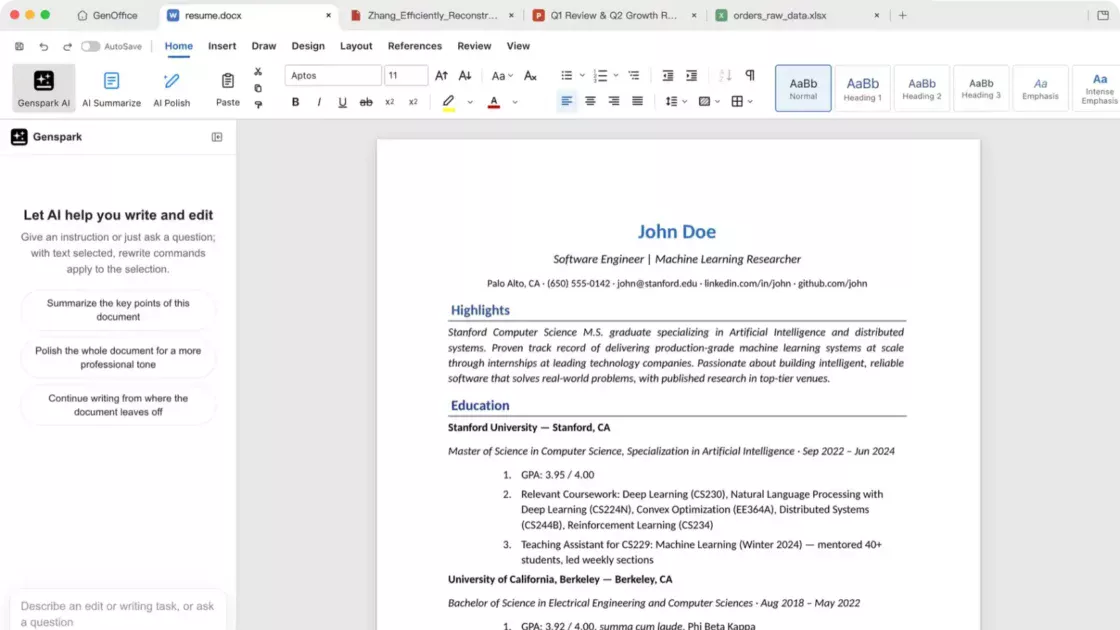
Clarity is the strongest of the three adjectives, and it rests on design rather than on a usability study. The README says Docs lands AI edits as tracked changes and diffs with one-click rollback, that every AI turn is a snapshot, that spreadsheets receive live formulas and not pasted numbers, and that slides appear on a canvas where they stay editable. The release notes add an illustrated in-app manual, an icon-only compact ribbon and, for Docs, a Reviewing Pane that follows Word’s track-changes model. A user can see what the AI touched. Sheets answers questions about a workbook with the exact cells cited as clickable links, and the home-screen Ask AI cites the file behind each claim in its answer. These features make the AI’s inputs and outputs inspectable, which is part of clarity, although the project describes them and no third party has tested them.
Reviewers tested whether the result was usable. The Geekpark tester pasted a 20,000-character paper with no structure and found that GenOffice rebuilt the headings and tables, removed duplicated page headers and lost none of the text, then restyled the references on request. The same tester’s one-sentence request for a seven-project slide deck produced fragmented content and drifting fonts and spacing. The outcome improved when the tester supplied a fixed template and asked for one job per request.
That pattern warns anyone judging clarity from a demo. The interface can show every change and still leave the user with a deck that needs slide-by-slide repair. AIToolsReview wrote in August that no third party had published a systematic fidelity comparison against Word, LibreOffice or Google Docs, and I found none since, so the claim that untouched content survives byte for byte rests on the README alone. I found no usability study either. Clarity is a supported design intention and an unmeasured user experience.
Alpha bugs, stale reviews and the limits of this evidence
The Geekpark tester’s early bug list is long. Text lines scrambled, and in one case every Latin letter in a document turned into a vertical bar. Tables imported with extra gaps and misalignment, and complex PowerPoint graphics landed out of position. The tester concluded that GenOffice was not yet a mature replacement for traditional office software and described it as a new form of AI-assisted office work. Those observations date from the alpha period. Since then the release notes claim that page breaks land where Word puts them across a 50-document production sample, and that dozens of pagination and font-metric fixes came from a 100-document Word comparison. Both are vendor statements that the sources do not verify.
Staleness cuts both ways. Early coverage reported limits that no longer hold. It’s FOSS found only Windows x64 and Apple Silicon builds, and AIToolsReview wrote on 7 August that no own-key option existed. The README I opened lists Linux packages, Intel Mac and Windows on Arm installers, and bring-your-own-key for more than a dozen providers. The andrew.ooo tracker, which describes itself as an AI-operated publication under human supervision, reports that an open layout issue was closed by October and that right-to-left support is still only partly done. A reader who relies on August reviews will judge the product too harshly, and one who relies on the README alone will judge it too generously. The README I opened does not say whether the suite has left alpha.
The limits of this evidence are plain. The sources include no benchmark of speed, no independent fidelity study and no usability test. GitHub stars measure attention, not quality. Several Genspark pages refused automated reading, so its credit prices come from a third-party capture of its help centre, and the cost figure from one reviewer’s task mix cannot be generalised to other workloads. The same reviewer’s cheaper-model rerun came in under 5 yuan, but it handled slide and visual tasks worse, because the model lacks multimodal input. The thesis survives these limits in a narrower form: free is documented, clear is plausible and fast is unproven.
Setting up GenOffice for client files and company files
Readers face four different decisions. A solo user with non-critical documents can install GenOffice, open copies and keep the originals. Editing costs nothing. The AI panel is the part to ration, and with a free allowance that now stops at a lifetime limit, the choice between paying and bringing a key arrives sooner than launch coverage suggested. The tester’s bill of 22,911 credits is a useful scale marker, since it equals about 2.3 months of the 10,000-credit Plus allowance. That ratio is a calculation from two separate sources, not a quoted price.
An agency or freelancer handling client documents faces the sharper trade-off. Signing in with Genspark routes client text through a proxy to the model vendors that Genspark’s policy names. Using a model key whose terms the agency has read, or a local server, keeps the data path inside choices the agency made. Usage reporting can also be switched off under Settings, General. The hide-selection feature protects only the in-app AI, so material that must not reach any model should not sit in a file that an agent on the same machine can read through the command line.
A European company should treat the GDPR status in Genspark’s enterprise policy as unresolved. The document dated November 2025 lists default processing in the US West region and marks the EU sub-processor register and data-processing agreement as in progress. Whether that is settled now, and whether it covers a personal sign-in, is a question for Genspark’s data protection contact before any client material goes through the AI panel.
Teams that return files to clients in Word should round-trip three real documents through GenOffice and open them in Word before relying on the byte-preserving claim. Developers who drive the suite from a coding agent through its command line or MCP server get a local route to real .docx, .xlsx and .pptx files, with the model calls going to the provider they configure.
Conditions that would change this judgment by spring
The judgment as of 7 November 2026 is that GenOffice is free where it says so, conditionally clear, and unproven where it says fast. The next release cycle can settle three open items. The first is independent measurement. A published timing and fidelity comparison against LibreOffice and Microsoft Office on the same documents would turn an impression into data, in either direction. Any such test should name the build, the operating system and the documents used, because the release notes show behaviour changing within days. The second is the enterprise directory. Once modules appear in it, readers will learn which functions Genspark considers worth charging for, and the sentence that the apps carry no paid tier will need a date attached to it.
The third item is the AI allowance. Genspark added a lifetime cap on free credits within two months of launch, and a pattern of tighter free allowances would push more users toward their own keys, which the software already allows. This is a forecast from one observed change, not a finding, and Genspark could just as well widen the allowance to attract users. The observable signals are the plan table in the help centre, the AI section of the README and the event list in the privacy file.
Two developments would weaken the judgment. A release that declares the suite out of alpha while open issues stay at several dozen would suggest the label no longer describes the product’s behaviour. A stable build that reintroduces freezes in large documents would show that the performance fixes were fragile, and the advice to treat GenOffice as a pilot tool, not a standard-issue editor, would then hold until a stable release names its supported scale. Conversely, a benchmark that favours GenOffice on opening large files would justify the word fast, with the build number attached. Until one of these appears, the accurate sentence is the narrow one: free editors, metered AI, speed still to be measured.
GenOffice questions on price, privacy, speed and platforms
For editing, yes. The README states that GenOffice is free under the Apache-2.0 licence with no trial and no paid tier for the apps. The AI features cost Genspark credits, or the fees of a model provider when the user brings a key. An ee directory in the repository is reserved for future enterprise modules under a separate licence.
Not for editing. Opening, editing and saving files works without signing in, and an account or a model key is needed only for the AI panel. The README offers two options, signing in with Genspark or using a key for one of more than a dozen providers or any OpenAI-compatible endpoint.
Through Genspark, a capture of its help centre from 5 October 2026 lists a Free plan with 100 credits a day up to a lifetime limit, Plus at $24.99 a month for 10,000 credits and Pro at $249.99 for 125,000. One reviewer used 22,911 credits, priced at nearly $60, on a set of formatting and deck tasks, and repeated the work on a cheaper model for under 5 yuan with weaker results on visual tasks.
Editing, saving and conversion run on the machine. AI requests go to the Genspark proxy or to the provider the user configured. Usage analytics are on by default in official builds and never include document content or file names, and the user can switch them off under Settings, General.
No independent timing comparison turned up in this research. The release notes show repeated fixes for freezes, memory use and processor load between 28 September and 30 October, so any speed claim should name the build. Testing the user’s own files is the only reliable check.
The README lists macOS on Apple Silicon and Intel, Windows on x64 and Arm, and Linux packages in deb, rpm and AppImage form for x86_64 with glibc 2.34 or newer. Reviews from early August that mention only Windows and Apple Silicon are out of date.
Its stated design copies untouched parts of a .docx byte for byte and rewrites only edited paragraphs. No independent fidelity study has confirmed that, and an August tester saw misaligned tables and displaced slide elements in the alpha. Opening copies and checking them in Word is the safe approach.
Yes. The README describes a genoffice command line, an agent skill and an MCP server that let agents create, convert, read and edit real Office files on the machine. Search and image features still go through the provider configured in the app.
It launched as an alpha, and the README I opened does not say that it has left that stage. Several dozen issues are open, the enterprise policy lists the EU data-processing arrangements as in progress, and the AI route sends text outside the company. A pilot on non-sensitive files is the cautious first step.
Author: Jan Bielik CEO & Founder of Webiano Digital & Marketing Agency
This article is an original analysis supported by the sources cited below
genspark-ai/genoffice: free, open-source AI Office suite The project’s README established the Apache-2.0 licence, the no-paid-tier statement for the apps, the reserved ee directory and trademark clause, the Genspark sign-in and bring-your-own-key routes, the local-only editing design, the hide-selection limit and the command line and MCP server.
GenOffice releases The release list supplied the ten stable builds from v0.11.0 on 28 September to v0.12.446 on 30 October and the changelog entries on CPU load, memory use, freezes, pagination and Word-parity features.
GenOffice privacy file (PRIVACY.md) The privacy file, last updated on 26 August 2026, listed the default-on Google Analytics events, the data the analytics never sends, the source-build exception and the opt-out under Settings.
Genspark Data Security & Privacy Policy for Enterprise Clients Genspark’s enterprise policy, version 1.3 of November 2025, supplied the no-training statement, the default US West processing region, the in-progress EU sub-processor and GDPR items and the August 2025 compliance dating.
Genspark publishes Plus ($24.99) and Pro ($249.99) prices; Free daily credits get a lifetime cap A pricing tracker’s dated captures of Genspark’s help centre supplied the plan prices, the credit allowances and the new lifetime limit on free credits as of 5 October 2026.
This New Open Source Project Wants to Be the AI-First Alternative to Microsoft Office It’s FOSS reported on 5 August 2026 that editing costs nothing while AI draws on Genspark credits, summarised Genspark’s policy on passing text to third-party providers and recorded the platform limits at launch.
Genspark Open Sources GenOffice: The AI-Native Desktop Alternative To Microsoft Office Open Source For You supplied the 3 August 2026 launch date, the v0.4.110 alpha, the one-engineer, one-week, roughly $10,000 build claim and the list of server-side actions that consume credits.
实测 GenOffice Alpha 版:补上办公工作流最后一环 (Hands-on test of the GenOffice alpha) Geekpark’s hands-on review, published on 12 August 2026, supplied the 22,911-credit bill of nearly $60, the cheaper-model rerun under 5 yuan, the alpha bugs, the AI formatting and deck results and the reading of Genspark’s business model.
Genspark open-sources GenOffice AI suite for Mac and Windows AI Weekly supplied the absence of independent tests at launch, the point that the one-week claim rests on existing components and its editorial reading of the enterprise directory.
GenOffice Explained: Genspark’s Open-Source AI Office AIToolsReview supplied the August statement that no third-party fidelity comparison existed, the early claim that no own-key option existed and the unverified company figures quoted in the text.
GenOffice for Windows: Free Open-Source AI Office Suite (2026) Windows Mode confirmed that installing and editing need no account and that the AI panel asks for a Genspark sign-in on first use.
GenOffice Review: Open-Source AI Office Suite (v0.8) This AI-operated, human-supervised review, updated in October 2026, supplied the closed layout issue, the partial right-to-left support and the later platform additions.
| Citing this article? Brief excerpts are welcome. Please credit Webiano.digital, name the author where stated, and include a link to https://webiano.digital and to this original article. Full or substantial republication requires prior written permission. Read our Copyright and Content Use Policy. |
This article was prepared with the assistance of artificial intelligence tools. The content underwent expert human review, and Webiano Digital & Marketing Agency assumes editorial responsibility for its final version and publication.