

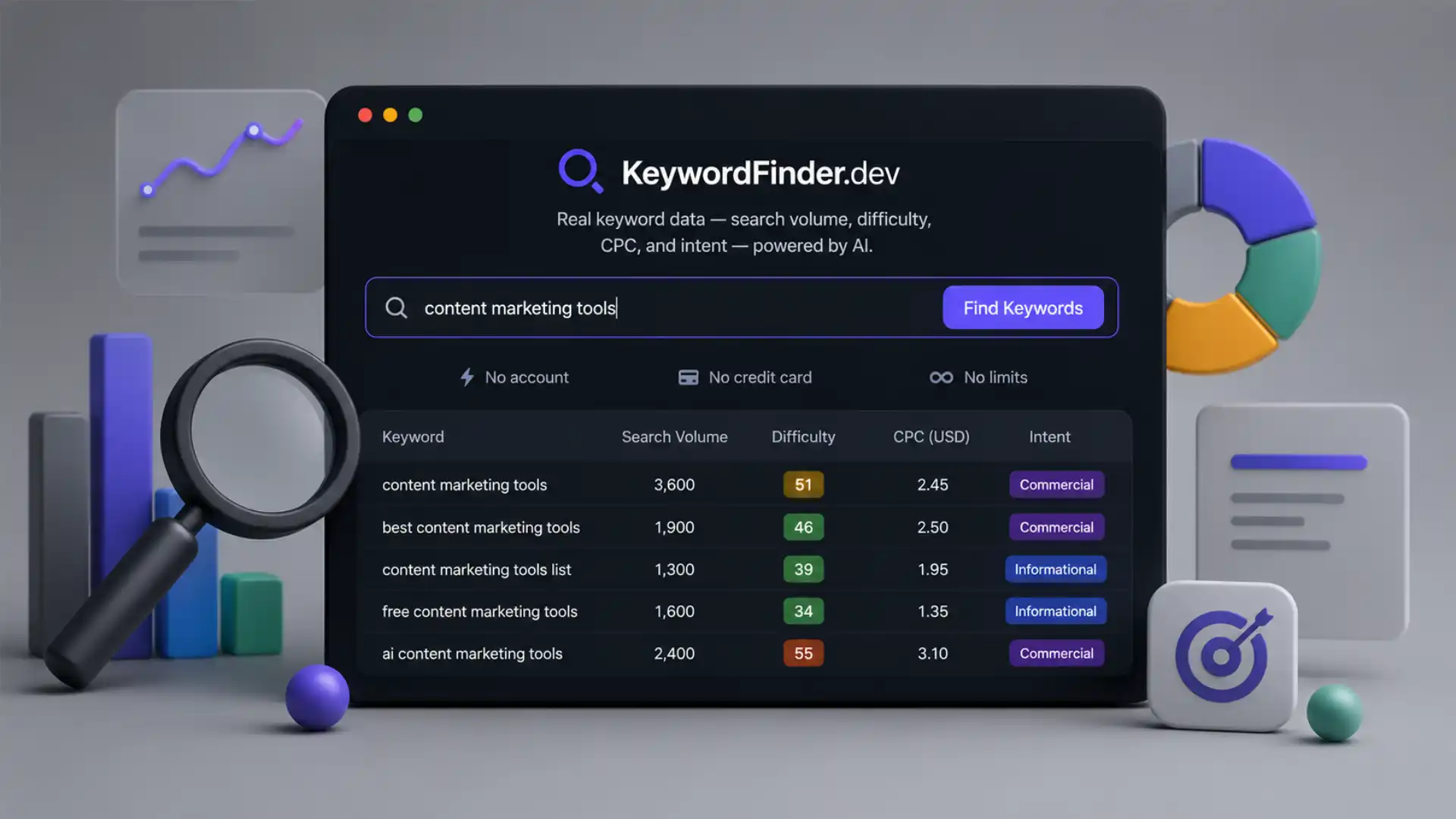
KeywordFinder.dev feels almost suspicious at first because the usual tollbooths are missing. There is no account wall, no trial countdown, no “connect your workspace,” no sales form disguised as onboarding, and no polite nudge toward a paid tier before you have even searched. The page opens with the promise most small publishers wish every SEO tool would make: keyword ideas, volume, difficulty, CPC, intent, clusters, questions, and export, with no credit card and no daily limit. The site says it supports more than 50 keywords per search, eight platforms, ten countries, and a 100 percent free model.
Table of Contents
That absence of friction is the whole story here. KeywordFinder.dev is not trying to be an enterprise SEO command center. It is a fast keyword scratchpad for the moment when you have a topic, a product idea, a niche, or a client request, and you need a first map of demand without opening a billing page. The interface lets you pick a country, choose a platform such as Google, YouTube, Amazon, Bing, Instagram, TikTok, Pinterest, or the Play Store, select a keyword type, and ask for five, ten, fifteen, or twenty keywords at a time. The visible structure is plain: enter a topic, verify you are human, analyze, then inspect keywords, clusters, questions, and export.
The catch is not hidden, which makes the tool more interesting rather than less. The homepage uses the language of “real keyword data,” but the terms page is careful about what that means. It says the search volume, keyword difficulty, CPC, and competition numbers are AI-generated estimates, not direct pulls from Google databases or a proprietary clickstream panel. The same terms page says users should treat the data as a starting point and cross-check important decisions with sources such as Google Search Console, Google Keyword Planner, and their own analytics.
That honesty matters. KeywordFinder.dev is best understood as an idea engine with numbers attached, not as a final authority on whether a business should spend six months building a content moat. It gives you enough structure to sort the obvious from the promising. It gives you intent labels before you have built a spreadsheet. It gives you a rough sense of whether a term is likely to be hard, commercial, obscure, or question-shaped. For many early-stage SEO tasks, that is not a compromise. That is the part of the work where speed beats ceremony.
The site also carries the personality of a small builder project. It was made by Ayush Pal, a developer from India, who says on the about page that he built it after getting tired of paying more than $100 per month for basic keyword research. The about page describes the stack as Google Gemini AI as the primary engine, Groq as fallback, Cloudflare hosting and CDN, Turnstile for bot protection, and plain HTML, CSS, and JavaScript with no frameworks. That detail gives the product its shape: it feels like something built by someone who needed the thing, not by a growth team running a category playbook.
The funny part is that SEO software is one of the internet’s most paywalled categories, yet the act of keyword brainstorming is often messy, exploratory, and low-stakes. People do not always need a cathedral of data to decide what to write next. A blogger wants to know whether “budget desk setup for small apartments” has more life than “home office desk ideas.” A founder wants to know whether people search for the pain or the product. A student wants to understand how intent differs across phrases. A freelance consultant wants quick angles before a client call. KeywordFinder.dev is built for that first messy hour, when the goal is movement.
The useful part is the absence of ceremony
Most SEO products make keyword research feel like entering a cockpit. KeywordFinder.dev does the opposite. The core page has a single task: type a seed phrase and get a list with signals beside it. The page promises search volume, keyword difficulty, search intent, CPC data, topic clusters, trend analysis, question keywords, and CSV export. It also describes the flow as entering a keyword, choosing a target country and platform, letting AI generate keyword variations with metrics, then filtering and exporting the results.
That sounds ordinary until you compare it with the mood of the category. Keyword research tools often confuse seriousness with weight. They add dashboards, campaigns, competitor graphs, site audits, rank trackers, backlink crawlers, AI content briefs, and reporting layers. Those things have their place. Agencies need them. Large sites need them. But a person trying to decide whether a niche is worth a weekend does not need to create a project, invite a teammate, configure a domain, and learn a usage-credit system.
KeywordFinder.dev is appealing because it respects the smallest useful unit of SEO work. A keyword query is not a campaign. It is a question. Does anyone search this? Is the phrase likely informational or commercial? Is the difficulty obviously too high? Are there question variants? Are there platform-specific angles? Can the list be exported before the browser tab gets buried under twelve other tabs? The site answers those questions in the most direct way it can.
The no-account model changes the emotional texture of the experience. No sign-up means no commitment tax. You do not have to decide whether the tool deserves a place in your stack before you have seen a single result. You do not have to create another password for a tool you might use once. You do not have to worry that a test search has started a sales sequence. That sounds minor, but in web tools, those small asks add up. A tool that skips them feels lighter before it has done anything clever.
There is also a stronger privacy signal than most quick SEO tools bother to give. The privacy page says searches are sent to the backend to generate results, but are not stored in a database after the result is returned. It says the site does not collect a name, email, device fingerprint, browsing history, or build a user profile, because there is no account system. It also says Cloudflare may receive basic request data as infrastructure provider, and AI providers such as Google Gemini or Groq process the keyword query as a prompt.
That last point is worth noticing. Keyword privacy is not the same as personal privacy. A search phrase is often harmless, but it might also reveal a product idea, a client niche, a planned campaign, or a private market test. KeywordFinder.dev is more transparent than many tiny tools because it explains that queries go to AI providers. It does not pretend that “no account” means “no external processing.” For a casual search, that is probably fine. For confidential client strategy, you would still think twice.
The Turnstile gate is another small but telling design choice. The site uses Cloudflare Turnstile to keep bots away without turning the page into a puzzle box. Cloudflare describes Turnstile as a CAPTCHA alternative that works without showing visitors a CAPTCHA in many cases, using small browser-side checks and adapting the challenge to the visitor or browser. KeywordFinder.dev needs some kind of abuse control if it offers unlimited free searches. A traditional CAPTCHA would make the tool feel cheap. Turnstile keeps the mood mostly intact.
The tool’s simplicity also makes its limitations easier to see. There is no deep SERP analysis on the visible page. You are not comparing ranking URLs, backlink profiles, content freshness, domain strength, or intent conflicts across the top results. You are not seeing a live search result page with entity coverage and competitor pages. You are getting the first layer: suggestions, rough metrics, intent, clusters, questions, trends, and export. That is not a failure. It is the product boundary.
The strongest use case is early filtering. KeywordFinder.dev lets you reject weak directions quickly. If a seed topic produces mostly high-difficulty, low-intent, low-volume ideas, you might not kill the idea, but you will know it needs a narrower angle. If a boring phrase generates several question keywords with clear informational intent, it might become a blog post, video outline, comparison page, or FAQ block. If Amazon or YouTube variants look better than Google variants, the content format changes before the work begins.
The multi-platform selector deserves credit because keyword behavior is not the same everywhere. People search Google with problems, YouTube with learning intent, Amazon with buying intent, TikTok with curiosity and trend language, Pinterest with visual planning language, and app stores with utility language. KeywordFinder.dev lists Google, YouTube, Amazon, Bing, Instagram, TikTok, Pinterest, and Play Store as supported platforms. That makes the tool more interesting than a generic Google-only keyword generator, especially for creators and small commerce projects.
The experience also has a nice anti-enterprise texture. It does not ask you to define a brand, project, competitor set, domain, or audience persona. It simply asks for a keyword. That is often how real work starts. A person hears a phrase, spots a trend, sees a product category, gets a client brief, or has a half-formed idea while drinking coffee. KeywordFinder.dev is made for that moment, before the idea has earned a project folder.
The site’s own comparison table puts it against Ahrefs, Semrush, and Ubersuggest, with KeywordFinder.dev positioned as free, no sign-up, no daily limits, and including keyword difficulty, search intent, topic clusters, and CSV export. That comparison is bold, maybe too bold, because the larger platforms are not only keyword suggestion tools. They are data businesses with crawlers, link indexes, rank tracking, historical records, and enterprise reporting. But as a first-pass keyword finder, the comparison lands emotionally. The question many users ask is not “Can this replace my agency stack?” It is “Can I get usable ideas without paying rent-level software fees?”
Ahrefs’ current pricing page shows paid plans such as Lite, Standard, and Advanced at $129, $249, and $449 per month, with an enterprise plan listed higher, plus a smaller Starter option and a free site-owner product. Semrush search results show annual-billed pricing beginning at $117.33 per month for Pro and $208.33 per month for Guru, with higher tiers above that. Those numbers explain the emotional pull of a free keyword finder, especially for students, solo builders, new bloggers, local businesses, and freelancers in markets where dollar-priced SaaS feels heavier.
The free claim is not only marketing copy. The terms page says the tool is free with no daily limits, while also reserving the right to add optional paid tiers later for advanced features. It says the core keyword research functionality will remain free and that changes will be transparent. That is the kind of promise small web tools often make before popularity tests their economics. For now, the product’s charm depends on that promise holding.
There is a broader internet point here. The best small tools often win by deleting decisions. KeywordFinder.dev deletes the decision to subscribe, the decision to join a workspace, the decision to save a project, the decision to learn a suite, and the decision to trust a dashboard before you know whether you like the output. It lets curiosity happen faster. That is an underrated form of product taste.
The numbers are useful, but not sacred
The most important line in the entire product is not on the homepage. It is in the terms page, where KeywordFinder.dev says all metrics are AI-generated estimates. Search volume, keyword difficulty, CPC, and competition level are described as learned-pattern estimates, not numbers pulled from Google’s databases or a proprietary clickstream panel. The same section says the data is directionally accurate and useful for decisions, but should not be treated as absolute fact.
That distinction changes how the tool should be used. KeywordFinder.dev is not a measuring instrument in the strict sense. It is closer to a fast map sketched from patterns. A map does not need to show every stone on the road to be useful, but you should not use it to argue over centimeter-level property boundaries. The tool is good at pointing you toward promising phrases, weak phrases, intent groups, and possible content paths. It is weaker as final evidence in a high-stakes forecast.
The homepage’s wording creates some tension because “real keyword data” sounds stronger than “AI-generated estimates.” The site says it provides search volume, difficulty, CPC, and intent, and positions those as the same core data people expect from paid tools. The terms page softens that promise with the more careful explanation. That does not make the tool useless. It makes the tool a judgment test. Users who understand the difference will get more from it than users who treat every number as literal truth.
Search volume has always been slippery, even in paid tools. Different platforms use different sources, buckets, models, panels, and refresh cycles. A keyword with “1,000 searches” in one database might show very different demand elsewhere. For content planning, the exact number is often less useful than the rough relationship between terms. A tool that tells you phrase A is probably larger than phrase B, and phrase C is likely long-tail but easier, still earns its place in the workflow.
Keyword difficulty is even more interpretive. A KD score looks objective because it is a number between zero and 100, but it compresses many messy ranking signals into one simple label. The homepage defines KD as a 0–100 score and suggests low-competition keywords are the ones users can win. It also includes guide copy saying below 40 is easy, 40–69 medium, and 70+ hard, with newer websites advised to target below 30 first. That is a useful rule of thumb, but it cannot replace looking at the actual pages ranking today.
A small local business might beat a higher-authority page because the content is more specific. A tiny specialist blog might rank for a hard-looking query because the SERP is poorly served. A large domain might fail on a supposedly easy term because the intent does not match its page. Difficulty numbers hide those details. KeywordFinder.dev is useful when it tells you where to look. It is risky when it becomes the only thing you look at.
CPC works the same way. High cost-per-click hints at commercial value, not guaranteed profit. A high-CPC keyword might be attractive because advertisers pay for traffic there. It might also be saturated, legally sensitive, lead-quality poor, or irrelevant to your actual offer. A low-CPC keyword might still matter if it shapes early research, builds trust, or brings the exact audience a niche site wants. KeywordFinder.dev includes CPC and advertiser competition, but those are signals, not marching orders.
Intent classification is probably the most useful metric for a fast tool. Knowing whether a keyword is informational, commercial, transactional, or navigational changes the page you should make. The homepage says KeywordFinder.dev auto-classifies intent into those four categories. That is exactly the kind of AI-assisted labeling that makes sense in a lightweight workflow. Even if the label is sometimes wrong, it forces a better question: what does the searcher want to do?
For small publishers, intent mistakes are expensive. An informational article aimed at a transactional query feels weak, and a product page aimed at a research query feels pushy. A keyword like “best standing desk for tall people” needs comparison logic, not a generic buying page. A keyword like “how to fix wobbly standing desk” needs repair advice, not a category grid. KeywordFinder.dev’s intent column does not solve the problem, but it points attention to the problem early.
The question keyword tab is another area where approximation is enough. Question phrasing reveals content angles faster than volume alone. If the seed keyword is “email deliverability,” question variants might expose fears, setup confusion, platform comparisons, or beginner misconceptions. Those questions can become subheadings, support docs, video sections, newsletter issues, or product education. The homepage says the tool surfaces question keywords and positions them as useful for featured snippets. Even without perfect volume, the questions themselves are useful raw material.
Trend analysis is similar. An eight-month trend line is a directional clue, not a market prophecy. The homepage says KeywordFinder.dev includes eight-month search trend data to spot rising keywords early. A rising trend might mean genuine demand, seasonal movement, news noise, social hype, or model hallucination depending on the source. The right use is to flag a phrase for follow-up. The wrong use is to build an entire quarterly strategy from one upward arrow.
The best way to use KeywordFinder.dev is to split research into two passes. The first pass is expansion. Enter broad ideas, test platforms, change countries, collect variants, and look for phrases with interesting intent. The second pass is validation. Check the live SERP. Look at ranking pages. Search in Google Trends. Check your Search Console if you already have a site. Use Keyword Planner for ad-facing estimates. Compare with a paid tool if the decision matters. KeywordFinder.dev belongs heavily in the first pass and lightly in the second.
The product’s own terms encourage that posture. They explicitly call it a research and discovery tool, not a replacement for Google Search Console. The terms say it is useful for ideas, spotting opportunities, and planning content strategy, while exact data for your own site belongs in Search Console. That sentence is the product’s best defense against overclaiming. It tells you where the tool ends.
This is why the tool feels more trustworthy when you read past the homepage. The marketing is loud, but the legal and about pages are unusually plain-spoken. The founder explains the personal reason for building it. The privacy page says what is collected and what is not. The terms page says the numbers are estimates. That combination makes the tool easier to recommend with caveats. It does not pretend to be magic once you read the fine print.
There is also a cultural angle. AI has made it cheap to generate plausible research surfaces, and the web is filling with tools that turn prompts into dashboards. Some are useful. Some are decorative. Some are dangerous because they make guesses look like measurements. KeywordFinder.dev sits in the useful camp when the user keeps the estimate label in view. The interface gives structure to brainstorming. The user must supply skepticism.
That skepticism should not kill the fun. Most keyword research starts with guesses anyway. A good SEO does not begin with certainty. They begin with a topic and ask what language the market uses. KeywordFinder.dev is a quick way to generate that language, sort it by rough signals, and catch variants a human might miss. The estimates are imperfect, but imperfect direction beats a blank spreadsheet.
The danger is false confidence. A clean table can make weak data feel stronger than it is. When a keyword has a volume, KD, CPC, intent, competition label, and trend sparkline, the brain relaxes. It feels measured. The tool’s biggest responsibility is to keep users aware that the numbers are modeled. The terms page does that. The interface could make it even more visible by labeling estimated metrics directly near the results.
A small badge such as “AI-estimated” beside volume and KD would improve trust. The best version of KeywordFinder.dev would make its uncertainty part of its design, not just part of its terms. That does not weaken the product. It tells serious users that the builder understands data integrity. People do not need every free tool to be perfect. They need to know what kind of imperfect they are using.
The strongest feature is intent at rough-draft speed
The most interesting thing about KeywordFinder.dev is not that it gives keyword suggestions. Plenty of tools generate keyword lists. The more useful trick is that it wraps the list with enough context to make the first sorting pass less painful. Volume, KD, CPC, intent, competition, trend, clusters, and questions sit together. That layout means you are not only collecting phrases. You are deciding what kind of work each phrase implies.
Intent is where the tool becomes more than a thesaurus. A keyword list without intent is just vocabulary. A keyword list with intent becomes a content plan, a landing page map, a YouTube topic list, an Amazon listing angle, or a research backlog. KeywordFinder.dev’s four intent categories are simple: informational, commercial, transactional, and navigational. Simple is right here. Most users do not need a taxonomy with twelve subtypes. They need to avoid making the wrong page.
Imagine a seed phrase like “standing desk.” The informational branch might include setup questions, posture problems, health concerns, and comparisons with sitting desks. The commercial branch might include “best standing desk for small room,” “standing desk vs converter,” or “adjustable desk reviews.” The transactional branch might include “buy standing desk online” or platform-specific shopping phrases. A navigational phrase might involve a known brand. Each branch leads to a different page format.
This matters for search because Google does not rank abstract relevance alone. It ranks pages that satisfy the dominant intent of the query. A polished article can miss if the searcher wanted a product grid. A product page can miss if the searcher wanted setup instructions. An AI intent label is not final proof, but it forces the writer or marketer to ask the right question before writing. That saves time.
KeywordFinder.dev’s clusters add another layer. Topic clustering turns scattered keywords into a rough architecture. The homepage says the tool auto-groups keywords into clusters for modern SEO strategy. In practice, clustering is useful when a seed phrase explodes into too many variants. Instead of treating every keyword as a separate article, clusters show which phrases likely belong together. That prevents thin, duplicate pages and helps you see the shape of a topic.
A beginner might use clusters to plan a small blog. One cluster becomes the main guide, another becomes a comparison article, another becomes a troubleshooting post, another becomes a buying-intent page. A freelancer might use clusters to explain a content plan to a client without building a complex deck. A founder might use clusters to see which problem language is richer than the product language. The cluster does not write the strategy, but it makes the strategy visible sooner.
The export option matters more than it sounds. CSV export is what turns a cute web tool into a working research step. The homepage says results can be exported and imported into Google Sheets. Without export, a keyword tool becomes a one-off browsing toy. With export, it becomes part of a workflow. You can add columns for priority, page type, existing URL, status, owner, notes, SERP observations, and conversion value. The free tool becomes the front door to your own system.
The question tab has a similar workbench quality. Questions are often better content prompts than keywords. A phrase like “CRM for small business” is broad and crowded. A question like “what CRM should a solo consultant use” carries context, audience, pain, and comparison intent. KeywordFinder.dev’s question view gives users a way to move from seed topic to human concerns. That is where useful content usually starts.
This is also where the tool’s AI foundation makes sense. AI is good at generating adjacent language and classifying rough intent. It is less reliable when asked to produce exact demand numbers. KeywordFinder.dev combines both. The generative part can be genuinely helpful. The metric part needs caution. If the tool leans into its strength—fast expansion, classification, clustering, and question discovery—it earns attention even if the numbers remain approximate.
The supported platforms make intent more interesting because intent shifts by platform. A Google keyword often asks for information or comparison. An Amazon keyword is usually closer to purchase. A YouTube keyword may want a tutorial, review, demo, or visual proof. A TikTok keyword may reflect trend language rather than stable evergreen demand. A Play Store keyword is often utility-driven and compact. KeywordFinder.dev’s platform selector invites users to think about those differences before producing content.
That is useful for creators. A YouTuber should not copy a Google keyword plan blindly. Searchers on YouTube often want demonstrations, opinions, before-and-after proof, walkthroughs, and personality. A phrase that works as a blog title may sound dead as a video title. The ability to switch platforms from the same small tool makes brainstorming more honest. It reminds the user that search behavior belongs to a place.
It also matters for ecommerce. Amazon keyword research is not the same as blog keyword research. A merchant cares about product modifiers, use cases, size, material, compatibility, and buyer urgency. Transactional phrases are not embarrassing there; they are the point. If KeywordFinder.dev gives a small seller a quick way to see buying-language variants before writing a listing or planning ad groups, it has done useful work.
The country selector is another practical touch. Search language changes by market even when the language stays the same. A keyword in the United States may differ from one in the United Kingdom, India, Australia, Canada, Germany, France, Brazil, Singapore, or the UAE, which are the countries visible on the homepage selector. The country list is not exhaustive, but it is enough to remind users that global keyword research is not one-size-fits-all.
A limitation appears here too. Ten countries is useful, but narrow. A publisher working in Spanish-speaking Latin America, Eastern Europe, Southeast Asia, or Africa may need more coverage. A multilingual site may need local platforms, accents, slang, and regional intent differences. For now, KeywordFinder.dev looks strongest for English-language or globally common niches, with some coverage beyond the United States. Expansion here would make the tool more serious.
The count selector is modest: five, ten, fifteen, or twenty keywords. That restraint is not a problem. Infinite keyword lists are often worse than small useful ones. A huge export creates cleanup work. A tighter set encourages the user to search again with better seeds. The homepage’s larger “50+ keywords/search” claim likely reflects the full generated output across tabs, clusters, or available views, while the visible selector controls batches or result counts. The exact behavior is something users should test in the browser.
The design also benefits from not pretending every keyword is equal. Filters for intent make the table more readable. The homepage shows filters for informational, commercial, transactional, and navigational results. Filtering by intent is one of the fastest ways to turn a pile of suggestions into a plan. A content writer can start with informational queries. A landing page builder can check transactional and commercial phrases. A brand manager can inspect navigational terms.
This is the part that feels editorially satisfying. KeywordFinder.dev is small, but it thinks in workflows. Search, classify, cluster, inspect questions, export. That is a coherent research loop. It is not trying to be everything. It gives you a fast first draft of the keyword universe around a topic, then leaves you to do the adult work of validation, judgment, and publishing.
A tool like this also changes who gets to participate. SEO research has become expensive enough to discourage casual learning. Students, new bloggers, side-project builders, and small merchants often learn from scraps: autocomplete, Reddit, free trials, YouTube advice, and whatever limited free tier still works. KeywordFinder.dev gives those people a more complete practice surface. They can see how volume, difficulty, CPC, intent, and clusters relate without paying first.
That educational value might be the product’s quiet strength. A beginner who uses KeywordFinder.dev repeatedly will start seeing keyword patterns. They will notice that broad terms are often harder. They will notice that question keywords carry clearer content angles. They will notice that commercial intent needs different pages than informational intent. They will notice that platform choice changes the phrasing. Even if the numbers are approximate, the pattern recognition is real.
A tiny tool with a very specific taste
KeywordFinder.dev looks and reads like an indie web product, not a SaaS machine. That gives it warmth, but also exposes the rough edges. The copy is direct, occasionally oversized, and sometimes a little too confident. The homepage says it gives the same data as Ahrefs and Semrush for free. The about page says it was built because the founder needed keyword data but could not justify the subscription cost. Those two messages live in tension: one is a challenger claim, the other is a personal builder story.
The builder story is more persuasive. The about page has the useful specificity of a side-project origin. Ayush Pal says he was working on a side project in 2024, needed keyword data, and found the paid tools too expensive for basic research. He says the tool started as something he built for himself, then shared with friends and the SEO community. That is believable. It explains why the product cuts straight to the search box and skips the business software choreography.
The tech stack reinforces that feeling. Vanilla HTML, CSS, JavaScript, serverless functions, AI APIs, CDN hosting, and bot protection are enough for the job. The DEV post says the tool was built with vanilla HTML, CSS, and JavaScript, with a serverless backend, CAPTCHA bot protection, and CDN deployment. The about page names Gemini as primary AI engine and Groq as fallback. That is a very 2026 web stack: small frontend, AI back end, cloud edge, minimal account logic.
There is something refreshing about that. The web still has room for single-purpose tools made by one person. Not every useful product needs a team page, customer logos, white papers, and a “book a demo” button. KeywordFinder.dev is closer to the older internet tradition of the helpful utility: one URL, one job, quick result, no drama. The AI layer makes it modern, but the spirit is older.
The design choice to avoid an account system shapes the privacy story. No account means fewer objects to protect. The privacy page says there is no profile to build, no email marketing, no tracking pixels, no cross-site cookies, and no data resale. It says the only cookies that may appear are technical cookies from Cloudflare for security and performance. That is the kind of privacy posture small tools should copy. The easiest data to secure is data never collected.
The same page avoids a common trap. It does not claim that nothing leaves your browser. It states that keyword searches are sent to the backend, and that AI providers process the keyword query as a prompt. That distinction is good product hygiene. Users deserve to know when their queries are processed by third-party AI services, even if no personal data is attached. For casual keyword research, the risk is low. For sensitive product launches, the user should know the path.
The terms page is similarly plain. It says users may use generated keyword data in spreadsheets, reports, presentations, blog posts, and other work, and that KeywordFinder.dev does not claim ownership over the search results. It also forbids automated scraping, bulk API-style requests without permission, attempts to reverse-engineer or compromise the tool, and reselling the keyword data as a standalone product without adding real value. Those boundaries make sense for a free service living on rate-limited AI infrastructure.
The “no limits” promise carries an obvious economic question. Unlimited free AI-backed tools are rarely unlimited in the physical world. API providers have rate limits, abuse risks, cost ceilings, and policy constraints. The terms page acknowledges that the underlying AI services have their own rate limits and costs, and says searches might fail temporarily during provider outages or rate limits. That honesty is better than pretending free infrastructure floats above reality.
The product’s future depends on how it handles success. A free tool that becomes popular faces a fork. It can stay small and fight abuse. It can add optional paid features. It can restrict heavy users. It can accept degraded reliability. It can seek sponsorship. The terms page already leaves space for optional paid tiers while promising core keyword research will stay free. That promise will matter more if the tool gains serious traffic.
The site’s copy sometimes sounds like it wants to win a pricing argument against giants. That is emotionally appealing, but strategically risky. Ahrefs and Semrush are expensive because they maintain large data systems, crawlers, historical databases, reporting infrastructure, and support layers. KeywordFinder.dev should not need to prove it is “the same” to be worth opening. Its better claim is narrower and stronger: it gives fast AI-assisted keyword research without a subscription.
That sharper positioning would also protect user expectations. People disappointed by a free tool usually expected a paid suite in disguise. People delighted by a free tool usually expected a narrow job done quickly. KeywordFinder.dev belongs in the second category. It should lean into that identity: fast idea discovery, intent sorting, clusters, questions, export, no account. That is enough.
The visual interface, based on the page text available, seems built around clarity rather than decoration. Country, platform, keyword type, result count, verification, analyze, tabs, filters, table, export. The flow is easy to understand from the page structure alone. It does not need an onboarding tour because the product is self-explanatory. That is a rare advantage in SEO tools, where the first screen often demands interpretation.
The page also has educational copy below the tool. It explains keyword difficulty, search intent, long-tail keywords, CPC, and topic clusters. Some of that guide copy is broad, but it serves the audience. A beginner landing on the page might not know why CPC matters or what a navigational query is. The tool does not force users to leave and read a separate SEO glossary before using it.
One guide claim should be treated carefully. The homepage says long-tail keywords account for over 70 percent of all searches. That stat is common in SEO writing, but the exact percentage often depends on definition and source. Since KeywordFinder.dev itself does not cite a study for it on the page, users should treat the idea as directionally useful: longer, specific phrases often have clearer intent and lower competition. The exact percentage matters less than the habit it encourages.
The founder’s DEV post adds a useful outside-of-site snapshot. It repeats the core feature set: search volume estimates, KD score, CPC, intent, clusters, eight-month trend data, questions, CSV export, and support for eight platforms. It also includes a comment from a user asking for bulk keyword analysis via CSV upload for programmatic SEO workflows. That request points to the next obvious product tension: the more useful the tool becomes, the more people will want features that stress the free model.
Bulk upload would be powerful, but it would also change the character of the product. A single-keyword tool invites exploration; bulk analysis invites operational scale. Once agencies, programmatic SEO builders, or affiliate teams start uploading hundreds of seeds, abuse protection and cost control become harder. KeywordFinder.dev might eventually need a split: free interactive research for humans, paid or permissioned bulk workflows for heavy use. That would not betray the product if the core remains free.
The current version is more charming because it is narrow. It feels like a sharp pocketknife, not a toolbox on wheels. You open it, cut through one specific problem, and leave. That kind of utility is easy to underestimate because it does not look grand. But the web needs more of it: tiny tools with a clear opinion, plain privacy, no forced account, and enough data to move a thought forward.
Where it fits in a real research workflow
KeywordFinder.dev is easiest to recommend when the job is clearly defined. Use it at the beginning, not the end. Open it when you need angles, not when you need defensible forecasts. Use it when you are naming content opportunities, not when you are allocating a six-figure budget. It is a scout, not a court witness.
The first workflow is niche exploration. Type a broad market phrase and see what language appears. A founder testing a product idea can search the problem, the category, the audience, and the alternative. If “AI meeting notes for lawyers” produces richer commercial and question variants than “legal productivity software,” that is useful. It tells the founder how people might frame the need. It also exposes whether the category language is too broad, too competitive, or too vague.
The second workflow is content briefing. A writer can use the tool to separate page types before drafting. Informational keywords become guides, tutorials, glossaries, and explainers. Commercial keywords become comparisons and “best” lists. Transactional keywords become product pages, landing pages, or category pages. Navigational keywords might suggest brand demand or competitor interest. Intent filtering makes that separation faster.
The third workflow is platform planning. A creator can test whether a topic belongs on Google, YouTube, Amazon, TikTok, Pinterest, or an app store. The same seed phrase may imply a blog post in one place and a short video in another. A craft topic might look dull on Google but rich on Pinterest. A software feature might look weak on TikTok but strong in Play Store language. KeywordFinder.dev’s platform selector makes those comparisons accessible without separate tools.
The fourth workflow is client conversation. Freelancers can use it as a fast pre-call research surface. Before speaking with a local business, a consultant can gather rough keyword clusters, questions, and intent groups around the service. They should not pretend the data is final. But walking into a call with ten specific search phrases beats walking in with generic advice. It makes the conversation concrete.
The fifth workflow is education. Students and beginners can learn the grammar of SEO by playing with topics. Search a head term. Search a long-tail phrase. Change the country. Switch platforms. Compare informational and transactional outputs. Export and organize. This teaches a core SEO skill: demand is not one number; it is a pattern of language, intent, competition, and format.
Where KeywordFinder.dev is strongest
| Use case | Why it works | What to check elsewhere |
|---|---|---|
| Early niche research | Fast keyword expansion with rough demand signals | Live SERPs, Trends, competitor pages |
| Blog planning | Intent labels and question keywords shape article ideas | Search Console, content gaps, ranking pages |
| Ecommerce angles | Amazon and transactional terms reveal buyer language | Marketplace search data, product margins |
| Creator research | YouTube, TikTok, Pinterest, and platform choices change phrasing | Native platform search, comments, viewer behavior |
| Client prep | CSV export turns quick research into a usable worksheet | Paid tools, analytics, local SERPs |
The table’s point is simple: KeywordFinder.dev is strongest when it accelerates the first draft of research. It is weaker when the work requires audited data, live competitive analysis, backlink context, or revenue modeling. That boundary makes the tool easier to use well.
A practical workflow starts with several seed searches, not one. One seed phrase gives you one tunnel. A better pass uses the problem, product, audience, use case, competitor alternative, and platform-specific language. For a meal-planning app, you might search “meal planner,” “cheap meal prep,” “family dinner planning,” “grocery list app,” “meal plan for weight loss,” and “weekly dinner ideas.” Each query produces a different view of demand.
After that, export and sort. The CSV should become a thinking document. Add columns for page type, funnel stage, confidence, source, notes, SERP observations, and priority. Mark which ideas are articles, comparison pages, product pages, videos, listing pages, or support docs. Delete the phrases that look off. Merge duplicates. Highlight surprises. The export matters because real strategy happens after the tool.
Next, validate the shortlist manually. Open the live search results for any keyword that might become a serious page. Look at what ranks. Are the top results forums, ecommerce pages, videos, listicles, tools, brand pages, government sites, or definitions? Are the ranking pages fresh? Are they long? Are they backed by strong domains? Is the query dominated by a feature snippet, shopping block, local pack, video carousel, or AI answer? KeywordFinder.dev cannot answer all of that from the visible feature set.
Then check whether your site deserves to target the term. A keyword is not an opportunity just because a tool says the difficulty is low. Your site needs topical fit, authority, a page format that matches intent, and a reason to satisfy the query better than existing results. A tiny site might win obscure questions. A product-led company might win bottom-funnel comparisons. A local business might win geographic queries. The same keyword means different things depending on who is publishing.
This is where the tool’s estimated data becomes useful again. Approximate metrics are good for prioritizing which manual checks deserve time. You probably will not inspect 200 live SERPs by hand. KeywordFinder.dev can help narrow the list to 20 candidates. Then human judgment takes over. That is the right division of labor.
For agencies, KeywordFinder.dev is not a replacement for paid tools. It is a cheap research layer before the paid-tool meter starts running. An agency might use it for brainstorming, workshop exercises, content ideation, or quick prequalification, then move serious targets into Ahrefs, Semrush, Google Search Console, or internal data. That saves time without pretending the free tool contains everything.
For solo creators, it might be enough for many decisions. A small blog does not always need enterprise-grade certainty. If the goal is publishing useful posts consistently, KeywordFinder.dev can supply topic ideas, question angles, and rough prioritization. The creator can validate by searching manually and watching their own analytics over time. The cost of being slightly wrong is usually low. The cost of never starting is higher.
For ecommerce, the stakes vary. A store owner should use the tool to find language, not to forecast inventory. Transactional keywords, modifiers, and platform-specific phrases can improve collection pages, product copy, blog support, and ad tests. But stocking decisions need sales data, marketplace data, margins, supplier constraints, and customer research. KeywordFinder.dev can reveal what buyers might search. It cannot tell you what to warehouse.
For local businesses, the country coverage may be useful but not enough. Local SEO often depends on city, neighborhood, and service-area phrasing. KeywordFinder.dev’s visible country selector is broad; it does not appear to offer city-level targeting from the homepage text. A plumber, dentist, or restaurant marketer can still use it for service keywords and question ideas, then check local SERPs manually. The local pack is its own world.
For product builders, the best use is language discovery. Search queries often reveal the user’s problem more honestly than product category labels. People may not search for “knowledge management platform.” They search “how to organize team notes,” “Notion alternative for engineering docs,” or “find Slack decisions later.” KeywordFinder.dev can surface those angles faster than an internal brainstorming session.
The tool also has a role in content pruning. Enter a topic you already cover and see whether the current page matches the surrounding intent. If the tool surfaces mostly commercial variants but your page is purely educational, you might add comparisons, templates, pricing language, or product CTAs. If it surfaces many question variants, you might restructure the page around user concerns. Use the output as a mirror, not an oracle.
A small warning belongs here. Keyword tools can make people chase phrases instead of serving readers. A table full of keywords tempts writers to stuff every variant into one page. That leads to ugly content. The better use is to understand the searcher’s world. What words do they use? What do they fear? What comparison are they making? What format do they expect? KeywordFinder.dev gives raw clues. The page still needs taste.
The tool’s speed also makes iteration cheap. Bad seeds teach you almost as much as good ones. If a phrase returns thin or irrelevant ideas, the market might not use that phrase. Try a simpler word, a buyer word, a problem word, a platform word, or a competitor-adjacent word. This back-and-forth is how keyword research actually feels. It is less like pulling a report and more like interviewing a search box.
What it reveals about the web now
KeywordFinder.dev is not only a keyword tool. It is a small sign of where web tools are going. A single developer can now combine static front-end code, serverless functions, AI model calls, bot protection, CDN hosting, and a clean interface into something that used to require a heavier product team. That does not mean the output equals the data depth of large SEO companies. It means the first layer of many workflows is being compressed into tiny public utilities.
This compression is good for access. People who were priced out of SEO software get a usable starting point. The founder’s own explanation on DEV says he could not justify spending more on SEO tools than on hosting, so he built his own. That sentence probably describes thousands of small builders. Dollar-priced software subscriptions often assume a revenue base that beginners do not have. Free tools fill that gap.
The same compression is risky for trust. AI can produce confident-looking tables faster than users can question them. When a tool displays search volume, KD, CPC, intent, and trend, the output inherits the visual authority of data. Users may forget that the numbers are estimates. This is why KeywordFinder.dev’s terms page matters. It makes the uncertainty explicit. The next step would be making that uncertainty visible in the results interface.
The product also reflects a shift from data ownership to data simulation. Classic SEO platforms are built around crawlers, panels, logs, and long-running datasets. AI-first tools can mimic parts of the experience by generating likely keyword variants and estimated metrics from learned patterns. That is cheaper and faster, but also less grounded. The future probably contains both: expensive ground-truth-ish systems for serious operators, and lightweight AI research tools for fast exploration.
KeywordFinder.dev sits at that boundary. It borrows the shape of a professional SEO table, but the economics of an indie AI tool. That makes it useful and slightly uncanny. It looks like a simplified version of paid software, yet underneath it has a different data philosophy. The right user will feel liberated by that. The wrong user will overtrust it.
The no-account model is part of a quieter web trend too. After years of forced sign-ups, lightweight tools feel newly desirable. Users are tired of handing over email addresses to resize an image, calculate a metric, generate a file, or test a phrase. Tools that work before asking for identity feel respectful. KeywordFinder.dev benefits from that fatigue. Its “no account” promise is not a small feature; it is a mood.
There is also a backlash against dashboards. A lot of software now feels like work before the work. You sign in, create a project, choose settings, dismiss modals, dodge upgrade prompts, and only then get to the task. KeywordFinder.dev restores the old web pleasure of a page that just does the thing. That pleasure is easy to miss until you use a tool that still has it.
The privacy page adds another signal. Data minimization is becoming a product feature users can feel. Saying “we do not have an account system” is more convincing than saying “we take privacy seriously.” The absence of collection is concrete. The page still acknowledges infrastructure and AI providers, which keeps the claim grounded. That kind of plain-language privacy copy belongs on more small tools.
The use of Turnstile also shows the tradeoff every free public tool faces. Open access invites abuse. Without some verification, a free AI-backed keyword generator could be scraped, automated, drained, or resold. Cloudflare says Turnstile can run non-interactive browser checks and only require more interaction when needed. KeywordFinder.dev’s human verification is the price of keeping the door open without turning the tool into a bot buffet.
The product’s biggest design opportunity is trust labeling. Every estimated metric should feel estimated at the point of use. A small tooltip beside volume, KD, CPC, and trend would do more for credibility than another marketing claim. “AI-estimated, best used for directional research” would be enough. Serious users appreciate honesty. Beginners learn better when uncertainty is visible.
Another opportunity is source-aware validation. The tool could eventually add a lightweight checklist beside each keyword: search manually, inspect top results, check your Search Console, compare with Keyword Planner, confirm intent, decide page type. That would preserve the tool’s simplicity while teaching better habits. It would also separate KeywordFinder.dev from shallow AI dashboards that pretend the generated table is the end of the work.
Bulk workflows are tempting but dangerous. CSV upload, saved lists, project history, and team sharing would make the tool more powerful and less pure. Each feature adds data retention questions, cost pressure, abuse vectors, and account temptation. The product’s charm comes from not saving you. It gives you output and lets you leave. Any future feature should protect that feeling.
The competitor comparison could also become more careful. KeywordFinder.dev does not need to frame itself as a free Ahrefs or Semrush. That comparison attracts attention, but it invites unfair expectations. The better comparison is with the blank page, autocomplete rabbit holes, and limited free tiers. Against those, the tool shines. Against full SEO suites, it is a small research utility with a different job.
This is not a criticism of ambition. Small tools are allowed to be bold. The best indie products often start with a blunt belief: this should be simpler, cheaper, faster, or less annoying. KeywordFinder.dev’s belief is clear: basic keyword research should not require a subscription. That belief is strong enough. It does not need to win every feature comparison.
The site also captures a specific moment in SEO culture. Search is fragmenting across Google, YouTube, marketplaces, social platforms, app stores, and AI interfaces. Keyword research is no longer just “what do people type into Google?” It is “where does this audience express demand, and in what language?” KeywordFinder.dev’s platform selector is a small answer to that shift. It does not solve the whole fragmentation problem, but it recognizes it.
For writers, marketers, and founders, the practical lesson is simple. Use tools like this to widen your field of view. Do not outsource judgment to them. Let the tool show you phrases, clusters, questions, and intent guesses. Then read the SERP, understand the user, and decide whether you can make something better than what already exists. The human part of SEO has not disappeared. It has become more necessary because AI makes mediocre research look polished.
KeywordFinder.dev is worth opening because it respects momentum. It gives you a way to move from vague idea to usable keyword map in minutes. That is a real service. Not every site needs to become a platform. Some sites are best when they remain a sharp little instrument sitting at a memorable URL, ready when curiosity hits.
Small answers before you open it
The site says it is free, requires no account or credit card, and has no daily limits. The terms page says it intends to keep core keyword research free, while reserving the right to add optional paid tiers for advanced features later. Treat the current free model as real, but remember that popular free tools sometimes change when usage grows.
No, not according to its own terms. The terms page says volume, keyword difficulty, CPC, and competition are AI-generated estimates based on learned patterns, not direct pulls from Google databases or proprietary clickstream panels. Use the numbers for direction, then validate anything important elsewhere.
KeywordFinder.dev was built by Ayush Pal, a developer and digital creator from India. The about page says he built it after getting tired of paying high monthly prices for basic keyword research, and names Gemini, Groq, Cloudflare, Turnstile, HTML, CSS, JavaScript, and GitHub in the build stack. That indie origin is a big part of the product’s appeal.
The homepage lists Google, YouTube, Amazon, Bing, Instagram, TikTok, Pinterest, and Play Store. That multi-platform angle makes it more useful for creators, ecommerce sellers, app builders, and social-first marketers than a Google-only generator.
The homepage selector shows India, United States, United Kingdom, Australia, Canada, Germany, France, Brazil, Singapore, and UAE. That is a useful starting set, but not full global coverage.
The privacy page says searched keywords are sent to the backend to generate results, but are not stored in a database after the result is returned. It also says AI providers process the search query as a prompt. Do not enter confidential launch plans or sensitive client phrases unless that processing path is acceptable.
Bloggers, students, indie founders, creators, freelancers, ecommerce owners, and small businesses will get the most from it. The best user is someone who needs fast keyword direction without subscribing to a full SEO suite. Agencies and serious SEO teams may still use it for brainstorming, but they will want stronger validation tools for final decisions.
The main limitation is not the interface; it is the nature of the data. AI-estimated keyword metrics are useful for discovery, but weak as final evidence. For serious business choices, check the live SERP, your analytics, Google Search Console, Keyword Planner, customer language, and at least one other source.
Yes, if you do keyword research even occasionally. KeywordFinder.dev earns a bookmark because it removes friction from the first search. You might not use it as your final SEO authority, but it is exactly the kind of small utility that saves a messy idea from staying messy.
Author:
Jan Bielik
CEO & Founder of Webiano Digital & Marketing Agency
This article is an original analysis supported by the sources cited below
KeywordFinder.dev
Official homepage for the tool, including the product promise, supported platforms, country selector, listed features, comparison table, and basic keyword research guide.
About Us — KeywordFinder.dev
Official about page explaining who built the tool, why it exists, and which technologies are named in its stack.
Privacy Policy — KeywordFinder.dev
Official privacy page describing what search data is processed, what is not collected, how Cloudflare is used, and how AI providers process keyword prompts.
Terms & Conditions — KeywordFinder.dev
Official terms page explaining acceptable use, ownership of generated keyword data, the free model, rate-limit realities, and the key note that metrics are AI-generated estimates.
I Built a Free Keyword Research Tool — No Sign Up, No Limits, No Credit Card
Founder’s DEV Community post describing the motivation, feature set, supported platforms, stack, and early feedback around KeywordFinder.dev.
Cloudflare Turnstile documentation
Official Cloudflare documentation explaining Turnstile as a CAPTCHA alternative used to verify humans with less intrusive browser-side checks.
Ahrefs plans and pricing
Official Ahrefs pricing page used for context on why free keyword tools feel attractive to solo creators and small teams.
Semrush plans and pricing
Official Semrush pricing page used for context on the paid SEO-tool market KeywordFinder.dev positions itself against.
| Citing this article? Brief excerpts are welcome. Please credit Webiano.digital, name the author where stated, and include a link to https://webiano.digital and to this original article. Full or substantial republication requires prior written permission. Read our Copyright and Content Use Policy. |
This article was prepared with the assistance of artificial intelligence tools. The content underwent expert human review, and Webiano Digital & Marketing Agency assumes editorial responsibility for its final version and publication.














