A website migration is one of the few projects in digital marketing where a single overlooked setting can erase years of compounding search equity in a weekend. The launch usually feels like a celebration. The new design looks sharper, the codebase is cleaner, the platform is faster. Then, somewhere around the tenth day, organic sessions start sliding. First fifteen percent below the old baseline, then twenty-five, then forty. By the time anyone diagnoses the cause, the team is staring at months of recovery work instead of the growth the project promised.
Table of Contents
The stakes behind a site move most teams underestimate
The discomfort is widespread because the risk is real. In one survey of search professionals, 78.3 percent said they expected organic traffic to fall after a migration, and they were not being pessimistic. A migration changes many things search engines have already learned about a site at the same time: URLs, templates, internal links, rendering, crawl paths, and the way pages canonicalize. Google has to relearn all of it at scale, and the relearning takes time even when everything is executed correctly.
The word migration covers more ground than most people assume. Changing a domain is a migration. Moving from HTTP to HTTPS is a migration. Switching content management systems is a migration. A redesign that touches URL structure is a migration. Consolidating several sites into one is a migration. Each of these reshapes the signals that determine where a site ranks, and each fails in slightly different ways. Treating them as identical is the first mistake.
What you are really protecting during this process is not the website itself but the accumulated trust that search engines and answer engines have built up about it over months or years. That trust is attached to specific URLs. Every indexed address carries some weight: the backlinks pointing at it, the rankings it holds, the engagement signals tied to it, the place it occupies in the site’s topical structure. When a URL changes and nothing tells the search engine where the content went, that weight does not transfer. It dissipates. The new URL starts closer to zero than to where the old one left off.
The good news is that the failure modes are well understood. Migrations rarely go wrong because of something exotic. They go wrong because of a missing redirect, a noindex tag left over from staging, a robots file that blocks the wrong directory, or a decision to change too many things at once so that nobody can tell what caused the drop. The damage is usually self-inflicted, which also means it is usually preventable. A migration handled with discipline can hold rankings steady through the transition and, in many cases, come out the other side faster and better structured than before.
This is the difference between a controlled move and a hopeful one. A controlled move starts months before launch, documents every URL, maps every redirect, tests everything in staging, and watches the right reports obsessively for weeks afterward. A hopeful move pushes the new site live, checks that the homepage loads, and assumes the rest will sort itself out. The first approach treats search equity as something you can lose. The second finds out the hard way that you can.
The migration types that carry different levels of risk
Not every migration carries the same exposure, and knowing which kind you are running shapes every decision that follows. Google groups site moves into two broad categories, and most real projects are a blend of several specific types layered on top of each other. The more types you stack into a single launch, the harder it becomes to isolate the cause when something breaks.
A domain change is the move people picture first. The site shifts from one hostname to another, for instance from a longer brand-variation domain to a cleaner one, or after a rebrand, merger, or acquisition. Every URL on the site changes because the domain is part of every URL. This is among the higher-risk moves because the entire address space is new to search engines, and it is the one case where Google provides a dedicated Search Console tool to ease the transition.
A protocol change, moving from HTTP to HTTPS, looks small but rewrites every URL on the site from one that begins with http to one that begins with https. The difference is subtle to a human and total to a crawler. Google has said HTTPS can positively influence rankings, which motivated a wave of these moves, but the underlying reality is a complete URL restructure that needs the same care as any other.
A structure or architecture change keeps the domain but reorganizes the URLs themselves, for example moving content from one path pattern to another or flattening a deep hierarchy. This is the change that most directly affects internal linking and the relationships between pages, because the addresses search engines have mapped are being rearranged.
A platform or CMS change, often called replatforming, swaps the software running the site. Moving from one ecommerce platform to another, or from a traditional CMS to a headless setup, almost always forces URL changes because different platforms generate URLs in different formats. The data layer changes too, which is where metadata and structured data tend to get lost.
A subdomain to subfolder consolidation moves a section such as a blog from blog.example.com to example.com/blog, or the reverse. These moves change how authority is grouped and are increasingly common as teams try to concentrate topical signals in one place.
A redesign is the broadest and most slippery category. It can mean anything from a full rebuild of code and content to a set of cosmetic tweaks. The danger is that a redesign quietly bundles in URL changes, template changes, content rewrites, and navigation changes without anyone labeling it a migration at all.
The practical lesson from how Google’s own engineers describe these moves is blunt: the single most common mistake is changing too many things at once. When a team treats a migration as the moment to overhaul design, content, metadata, URL structure, and platform simultaneously, a later traffic drop becomes nearly impossible to diagnose. The cause could be the new URLs, the new technology, the rewritten content, the migration mechanics, an unrelated algorithm update, or a penalty. Stacking variables removes your ability to tell them apart. The disciplined sequence is to move first, stabilize, establish a baseline on the new setup, and only then begin changing content and design.
The difference between a move with URL changes and one without
Google draws a line between two kinds of moves, and the line determines which playbook you follow. The distinction is simple but people get it wrong constantly, which leads them to use the wrong tools and skip the steps that matter.
A move without URL changes means the paths stay identical and only the infrastructure underneath shifts. Changing hosting providers while keeping the same domain and the same URLs is the clearest example. The address a user types and the address Google has indexed do not change, so there is no redirect mapping to build and no signal forwarding to worry about. The risks here are different in kind: server response times, IP reputation, DNS propagation, and whether the new host serves pages identically to the old one. Google’s guidance treats this as a separate, lighter process precisely because the URLs are not moving.
A move with URL changes is the harder case and covers the majority of migrations people actually run. The moment any indexed URL changes, you are in the territory of redirect maps, signal preservation, and recrawl timelines. Domain changes, HTTPS moves, structure changes, and most replatforming projects all fall here. This is where the bulk of search equity is won or lost, and where the steps in this guide concentrate.
The reason the distinction matters in practice shows up in tool choice. The Change of Address tool in Search Console is built for domain and subdomain moves, but Google explicitly says not to use it for an HTTP to HTTPS move, because the search engine works that change out on its own. It also says not to use it for moving pages from one path to another inside the same domain, where the correct action is simply to add redirects and update sitemaps. Reaching for the wrong tool because you misclassified the move wastes effort and can muddy the signals you are trying to send.
There is also a timing consequence. Moves without URL changes tend to settle quickly because search engines have less to relearn. Moves with URL changes need Googlebot to visit every old and new URL at least once before the move is considered complete, and there is no fixed crawl frequency that guarantees how fast that happens. The speed depends on the number of URLs and the speed of your server. A small site can settle in days; a large one can take many weeks. Misjudging which category you are in leads to misjudging how long the dust will take to settle, which in turn leads to panic-driven changes during the exact window when patience is the correct response.
Most real projects are honest about being a move with URL changes only after launch, when the redirects they skipped start showing up as a problem. The cleaner approach is to assume URL changes are happening, audit to confirm whether they are, and plan the full mapping process before any code ships.
The place SEO equity actually lives and what you are protecting
To migrate well, you have to understand what you are carrying across. The instinct is to think of a website as content and design, the things you can see. Search engines see something different: a set of URLs, each with a history, connected by links, described by metadata and structured data, and ranked according to signals that have built up over time. The migration’s job is to move that entire system intact, not just the visible parts.
The clearest unit of search value is the indexed URL. Every URL Google has stored carries weight from several sources at once. There are the external links pointing at it, which pass authority and are among the strongest ranking signals there are. There are the rankings the URL currently holds for specific queries, which represent accumulated relevance. There is the URL’s position in the site’s internal link graph, which tells search engines how important the page is relative to others. There are engagement and freshness signals tied to the address. When the URL changes and a redirect connects it to its replacement, most of that weight transfers. When the URL changes and nothing connects it, the weight is stranded.
This is why the redirect map is not paperwork but the core mechanism of the whole project. A 301 redirect tells search engines the old address has permanently become the new one, and the indexing pipeline treats that as a strong instruction to move the stored signals to the destination. Without it, the old URL eventually returns a 404 or a soft 404, Google deindexes it, and the new URL is left to earn its rankings from scratch. One missed high-authority page can produce a visible dip on its own.
Backlinks deserve special attention because they are the hardest signal to rebuild and the easiest to lose. Some of your most valuable links may point at pages you have half-forgotten: an old resource, a press mention, a guide that ranked years ago. If those URLs are not in your inventory and not redirected, the link equity they carry goes nowhere. Auditing backlinks before a move is not optional for any site that has earned links over time, because the redirects protecting linked pages are the redirects that protect rankings.
There is a second layer of value that is easy to overlook: the signals embedded in the pages themselves. Title tags, meta descriptions, canonical tags, hreflang annotations, and structured data all tell search engines how to interpret a page. Migration scripts that move the visible content but drop these fields produce pages that rank worse not because the content changed but because the machine-readable context vanished. A page can read identically to a human and perform far worse because its schema, its canonical, or its title was lost in the export.
The practical framing is this. You are protecting a graph of URLs, the authority attached to each node, the links between nodes, and the metadata that explains each node to a machine. A migration that preserves all four survives. A migration that preserves only the content a visitor can see tends to bleed traffic for months. Everything that follows is about keeping those four things intact while the underlying system changes around them.
Building the URL inventory before anyone touches code
Every successful migration begins with a complete list of the URLs the old site exposes to search engines. This sounds trivial and almost never is. Large sites accumulate URLs in places nobody remembers: orphaned pages with no internal links, old campaign landing pages, PDFs and images, parameterized variations, and content that ranks despite being buried. If a URL is not on the list, it will not be redirected, and if it is not redirected, its value is at risk.
The reliable way to build the inventory is to pull from several sources and reconcile them, because no single source is complete. A crawler such as Screaming Frog or Sitebulb will find most pages by following internal links, but it will miss orphans by definition, since a crawler can only reach what is linked. Google Search Console shows which URLs Google has actually indexed and which ones receive impressions and clicks, which surfaces pages a crawler cannot see. Analytics, in current setups a GA4 property, reveals which URLs draw traffic. Server log files show what Googlebot is genuinely requesting, including URLs that none of the other tools surface. The site’s own database or CMS export provides the canonical list of pages the platform knows about.
Cross-referencing these lists is where orphans and forgotten assets appear. A URL that shows up in Search Console impressions but not in the crawl is a page Google ranks that your own navigation no longer reaches. Those pages are often the ones with old backlinks, which makes them exactly the ones you cannot afford to drop. The reconciliation step turns a partial picture into a near-complete one.
While building the inventory, capture more than the address. For each URL, record its current title tag, meta description, canonical tag, indexability status, the response code it returns, its inbound internal links, and whatever ranking and traffic data you can attach. This snapshot becomes the baseline you measure recovery against, and without it you will have no way to prove whether a post-launch drop is a real problem or normal fluctuation. Benchmarking page speed at this stage matters too, so you can tell later whether the new site introduced a performance regression.
The inventory is also the moment to make deliberate decisions about what not to carry across. Large sites are full of stale, thin, or duplicate pages that generate little or no organic value. Migrating all of them dilutes the new site and wastes crawl budget. Reviewing the inventory lets you decide which low-value URLs to retire and redirect to a relevant parent page, rather than recreating dead weight on the new platform. Pruning genuinely poor pages and consolidating overlapping ones can improve the overall quality ratio of the domain, which search engines reward. The discipline is to prune on purpose, with data, rather than to lose pages by accident.
This work has to happen before development locks in the new URL structure, because the inventory informs the mapping, and the mapping informs decisions about how URLs should be shaped on the new platform. Teams that build the inventory after the new site is already designed find themselves retrofitting redirects to a structure that was chosen without reference to the pages that needed protecting. Order matters: inventory first, then mapping, then build.
Mapping old URLs to new ones as the technical core of the move
The redirect map is the document the entire migration turns on. It is a table that pairs every old URL with the new URL that should replace it, and it is the single most important SEO safeguard in any move with URL changes. Get it complete and correct and most of your search equity survives. Leave gaps, especially gaps that include high-traffic or high-authority pages, and traffic bleeds away through the holes.
The principle is a one-to-one mapping: each indexed old URL points to the single most relevant equivalent on the new site. The destination should match the searcher’s intent as closely as possible. A product page should redirect to the equivalent product page, a category to the equivalent category, an article to the equivalent article. The destructive shortcut, redirecting large numbers of unrelated old pages to the homepage, sends search engines a confusing signal and tends to be treated as a soft 404 rather than a genuine equivalent, which means the equity does not transfer. Redirect to the closest relevant page, not to the homepage.
On large sites the mapping is built in layers. The first layer is pattern-based and automatic. Because most platforms generate URLs in a consistent format, the bulk of URLs can be transformed by rule. If the old platform produces a product URL in one shape and the new one produces it in another, a regular expression that strips the old prefix and extension and adds the new prefix can map the majority of pages in one pass. In typical ecommerce migrations this pattern-based mapping covers roughly seventy to eighty percent of URLs. The second layer is manual and handles the exceptions: discontinued products, categories that were merged or split, content that was consolidated, and any URL that does not follow the general rule. These have to be decided case by case.
The third layer, which teams skip at their peril, is validation. Every destination in the map must actually exist on the new site and return a 200 status code. A redirect that points at a URL returning a 404 is no better than having no redirect at all; in some respects it is worse, because it looks intentional. Crawling the full list of destinations to confirm they all resolve is the step that catches typos, missing pages, and structural assumptions that turned out to be wrong. The map is not finished when it is written. It is finished when every target has been confirmed live.
The scale of this work is easy to underestimate. For an ecommerce site with ten thousand products, the complete mapping, including variants, categories, filters, content pages, and assets, commonly produces between twenty-five thousand and forty thousand redirect rules. That volume is why the map should live as a version-controlled file outside the CMS, typically a spreadsheet or CSV, rather than only inside a plugin. Plugin updates, theme changes, and host migrations have a habit of wiping redirect rules stored only in the application, and a master file lets you rebuild and re-verify them at any time.
A few rules keep the map healthy. Avoid wholesale slug changes unless there is a real reason, because every changed slug is a redirect that could have been avoided. Where tracking parameters carry meaning, decide how they are handled rather than discarding them blindly. And map the non-obvious URL types deliberately: faceted and filtered pages, paginated series, and the static pages such as shipping, contact, and policy pages that users and search engines both expect to find. The completeness of the map, not its cleverness, is what protects rankings. A simple map with no gaps beats a sophisticated one that quietly drops a thousand pages.
Redirect types and the specific signal each one sends
A redirect is not a single thing. It is a family of HTTP responses and browser behaviors, and the type you choose tells search engines what you mean. Picking the wrong one is the most common technical error in migrations, and it produces a quiet kind of damage because the redirect appears to work for users while sending the wrong message to crawlers.
The 301, a permanent redirect, is the one you want for almost every migration. It tells browsers and the indexing pipeline that the old URL has permanently moved to the new one. Google follows it, marks the destination as the canonical URL to keep in the index, and over time the old URL drops out of results while the new one takes its place. Rankings, cached signals, and consolidated authority shift to the destination. The default for any URL change you intend to keep is a 301.
The 302, a temporary redirect, says the move is temporary and the original URL is expected to return. The critical consequence is canonicalization: a 302 tells Google to keep treating the source URL as the canonical version, because you have signaled it will come back. Use a 302 for a permanent move and you are telling Google to keep indexing the old URL instead of the new one. This mismatch, a 302 used by mistake for a permanent change, is the single most common technical SEO error in site migrations. The legitimate uses for a 302 are genuinely temporary: A/B tests, short maintenance windows, seasonal landing pages, and similar situations where the source will return.
The 307 and 308 are the modern HTTP/1.1 counterparts. A 307 is a temporary redirect like a 302 but preserves the original request method, which matters for forms, checkout steps, and API requests where the method must not change. A 308 is the permanent counterpart to the 307. For ordinary page moves the SEO behavior aligns with their older equivalents, and most migrations never need them, but they matter for developers handling non-GET requests.
Then there are the client-side redirects, which happen in the browser rather than at the server. A JavaScript redirect runs code to send the browser elsewhere. Google can process many of them, but they are riskier because the crawler may need to render the page before it discovers the redirect, and if rendering is delayed or fails, the redirect is processed slowly or not at all. A meta refresh redirect is weaker still and can confuse users, especially the delayed kind that shows a page for a few seconds before moving. The rule is to use server-side redirects whenever possible and treat client-side methods as a last resort when server configuration genuinely cannot be changed.
One persistent myth deserves correcting. The old rule that 301 redirects bleed roughly fifteen percent of link value has been retired publicly by Google. Google’s representatives have stated that permanent redirects do not cause a loss of PageRank, and that signals flow through 301, 302, and other 3xx redirects via canonical consolidation. The reason to prefer a 301 for a permanent move is not equity loss but canonical intent: the 301 tells Google to replace the old URL with the new one, and the 302 tells Google to keep the old one. Use the type that reflects the truth of the situation.
Redirect types and when to use each
| Type | Meaning | Use it for | Avoid it for |
|---|---|---|---|
| 301 | Permanent server-side redirect | Domain moves, HTTPS moves, URL restructures, merged pages | Anything genuinely temporary |
| 302 | Temporary server-side redirect | A/B tests, maintenance pages, short-term campaigns | Any permanent URL change |
| 307 | Temporary, preserves request method | Temporary moves on forms or API endpoints | Permanent moves |
| 308 | Permanent, preserves request method | Permanent moves where method must be preserved | Cases a simple 301 already covers |
| JavaScript | Client-side, runs after rendering | Last resort when server config is locked | Primary redirect method for large sites |
| Meta refresh | Client-side, page-level | Almost nothing in modern SEO | Any case where a server redirect is possible |
The table reflects how search engines interpret each response, not just how browsers handle them. The single rule that prevents most problems is to default to a 301 for any change you intend to keep, and to reserve every other type for the narrow situation it was designed for.
Redirect chains, loops and the latency they introduce
Choosing the right redirect type is half the work. The other half is making sure each redirect goes straight from the old URL to the final destination in a single hop. When redirects stack into chains, they degrade both crawlability and page speed in ways that compound across a migration.
A redirect chain happens when one URL redirects to a second, which redirects to a third, before reaching the final page. This occurs naturally over a site’s life as URLs change more than once, and migrations make it worse when new redirects are layered on top of old ones without flattening them. Google has said it will follow a chain up to roughly five hops, but every hop adds a network round trip before the page loads, consumes crawl budget, and raises the chance that the crawler stops early and never reaches the destination. Best practice is zero chains: flatten every multi-hop redirect so the source points directly at the final URL.
The performance cost is not theoretical. Each extra hop in a chain adds latency before a single byte of page content arrives, and that latency shows up directly in Largest Contentful Paint, one of the Core Web Vitals Google uses as a ranking input. A chain is, in effect, a way to fail a speed metric before the page has even started to render. On a migration where you are already asking search engines to recrawl everything, handing them slow, multi-hop redirects makes the reassessment slower and the experience worse.
A redirect loop is the pathological case, where a series of redirects eventually points back to the original URL and traps browsers and crawlers in an endless cycle. Loops usually come from conflicting rules, for example a protocol redirect and a trailing-slash rule that disagree, and they take pages out of the index entirely until they are fixed. Crawling the site after launch to detect loops is non-negotiable.
There is a subtle trap worth flagging because it is hard to see. A redirect can appear broken in Search Console when the real problem is an intermediate URL in the chain being blocked by robots.txt. You set up a redirect from URL A to URL B, but the chain actually runs A to C to B, and C is disallowed in robots.txt. Googlebot cannot follow through the blocked intermediary, the redirect fails to resolve, and the report gives no clear explanation. Flattening chains removes this failure mode along with the latency.
Two habits keep chains from forming. First, update internal links to point at the final destination rather than relying on redirects. A site that links internally to old URLs forces Googlebot through redirect hops on every crawl, even when each individual redirect is correct. The links in your navigation, your content, and your sitemaps should all point at live final URLs. Second, audit redirects regularly rather than only when something breaks; a monthly crawl that flags every 3xx response, every chain, and every 302 that has been live longer than ninety days catches problems while they are still small. On a mid-sized site a redirect audit commonly surfaces dozens of fixable issues, and resolving them can recover a meaningful slice of organic traffic on its own.
Canonical tags, and why they are not a substitute for redirects
Canonical tags and redirects are often confused, and the confusion causes real damage during migrations. They solve different problems, send different signals, and should work together rather than competing. Treating a canonical tag as a lightweight redirect is a mistake that leaves old URLs live, crawlable, and competing with the pages meant to replace them.
A canonical tag is a hint placed in a page’s head that tells search engines which version of a page is the preferred one when several similar or duplicate URLs exist. A store that sells the same product in several colors, reachable through several URLs, uses canonical tags to point all the variants at one preferred version so search engines consolidate signals there instead of splitting them. The key word is hint. A canonical is advisory; Google can and sometimes does choose a different canonical if other signals disagree. A redirect, by contrast, is a directive that physically sends the user and the crawler to a new address.
This difference matters during a move. If you change a URL and use only a canonical tag pointing from the old to the new, the old URL still exists, still returns a 200, and still loads its content. Users following old links land on the old page. Crawlers can still index it. You have suggested a preference without enforcing the move, and you have left two live URLs where there should be one. For a permanent URL change, the redirect is the correct instrument, and the canonical on the new page should confirm the new URL as its own preferred version.
The two work together in a specific way. On the new site, every important page should carry a self-referencing canonical that points to its own final URL, using the correct protocol and host. This prevents the new pages from accidentally consolidating onto the wrong version of themselves. Mixed signals here, where a page’s canonical points to an http version while the page serves over https, or to a www version while the site runs without www, scatter the signals you are trying to concentrate and slow down the consolidation Google performs after a move.
The most dangerous canonical problem in migrations comes from staging. During development it is common to build on a staging subdomain, and if the canonical tags on those pages hardcode the staging URL, they can ship to production unchanged. The live pages then tell Google that the canonical version of each page lives at staging.example.com, a URL that will eventually return a 404. Google may honor those canonicals, consolidate ranking signals onto addresses that do not resolve, and effectively hand your equity to a dead environment. The same trap applies to hreflang annotations that reference staging URLs. Auditing canonical and hreflang values on launch day to confirm they point at production, not staging, is one of the highest-value checks you can run.
There is also a relationship between canonicals and sitemaps. The XML sitemap you submit after a move should contain only canonical, indexable URLs that return 200. Including redirected URLs, 404s, or noindexed pages in the sitemap sends conflicting signals and slows discovery of the URLs you actually want indexed. The canonical tag, the sitemap entry, the internal links, and the redirect target for any given page should all agree on a single final URL. When those four signals point at the same address, search engines consolidate quickly. When they disagree, the reassessment drags on and rankings stay volatile longer than they need to.
URL structure decisions that follow Google’s 2025 guidance
A migration is the rare moment when you can reshape URLs without the friction of changing them on a live, settled site, which makes it the right time to follow current structure guidance, and the wrong time to change URLs that are already fine. The instinct to clean up every URL has to be balanced against the reality that every changed URL is a redirect and a small risk. The goal is to improve structure where it genuinely helps and to leave good URLs alone.
In June 2025, Google refreshed its documentation on URL structure best practices with clearer guidance and concrete examples, partly to reflect how crawlers, users, and AI systems read URLs. The direction is consistent: URLs should be readable, descriptive, lowercase, and stable. A slug that describes the topic, such as a clear product or article name, helps both users and machines understand a page before they open it. Generic slugs like a bare numeric identifier or a “page2” pattern were called out as examples that lead to ambiguous indexing, because they tell a search engine nothing about the content.
Several specific points carry into migration decisions. Use hyphens, not underscores, to separate words in a slug, because Google does not treat underscores as word separators, which affects how it detects the words in a URL. Keep casing consistent and lowercase throughout the site; inconsistent casing creates duplicate-looking URLs and indexing inefficiency. Avoid excessive query parameters, especially the parameter explosions that faceted navigation produces, because long parameter strings confuse crawlers and generate near-duplicate URLs. Where filters can be expressed as readable static paths, that is generally cleaner than a stack of parameters. And pick one format for structure and slugs and stick to it rather than mixing patterns across sections.
The migration-specific judgment is about how much to change. If the old URLs already follow these principles, keep them. Preserving a clean, descriptive URL across a platform change eliminates a redirect, removes a risk, and keeps the address users and search engines already know. Many platform migrations fail not because the new URLs are bad but because the team changed URLs that did not need changing, multiplying the redirect map and the surface area for error. The cleanest replatforming keeps slugs identical wherever the new platform allows it and only changes the parts of the path the platform forces.
When URLs do have to change, design the new structure around a clear topical hierarchy. Group products under relevant categories and informational content within broad topics, with a hierarchy shallow enough to navigate but deep enough to express relationships. A navigable structure with breadcrumbs helps users move between related pages and helps search engines understand how comprehensively the site covers a topic. This topical clarity has grown more important as AI systems parse not just the words on a page but the structure of the URLs, the consistency of the taxonomy, and whether pages follow expected patterns.
The trade-off to keep in front of the team is simple. Cleaner URLs are a long-term asset; changed URLs are a short-term risk. A migration should resolve that tension deliberately, changing structure only where the long-term benefit clearly outweighs the redirect cost, and documenting every change in the redirect map. URLs changed casually, without that calculation, are the ones that show up later as gaps in the map and dips in the traffic.
Internal links, sitemaps and crawl efficiency after the switch
Once URLs change, the connections between pages have to be rebuilt to match, or the new site will lean on redirects for navigation it should handle directly. Internal links and sitemaps are how search engines discover pages, understand their relative importance, and find the new URLs quickly. Neglecting them slows the recrawl and leaves the migration looking shakier than it is.
Internal links are the most overlooked part of a migration because they feel like they will sort themselves out. They do not. After a URL change, every internal link that still points at an old address forces users and crawlers through a redirect on every visit. Update internal links to point directly at the new final URLs, throughout the navigation, the body content, the footer, and any hardcoded references in templates. A site that links internally to old URLs is telling Googlebot to do extra work on every crawl, burning crawl budget and adding latency, even when each redirect is technically correct. Pulling the full set of internal links with a crawler and updating them to the destinations is tedious and worth doing completely.
Internal links also carry a meaning beyond navigation. The structure of links tells search engines which pages matter most; pages that receive many internal links are read as more important. A migration that flattens or scrambles the internal link graph can change how authority flows through the site even when the content is identical. Preserving the important internal linking patterns, the way category pages link to products, the way pillar content links to supporting articles, keeps the relative importance of pages stable through the move.
The XML sitemap is your fastest channel for telling Google about the new URLs. Submitting an updated sitemap through Search Console immediately after launch speeds the discovery process, and for large sites where crawl paths have changed it is often the difference between a recrawl that takes days and one that drags on. The sitemap should list only canonical, indexable URLs that return 200; redirected URLs, 404s, and noindexed pages do not belong in it. For very large sites, breaking the sitemap into multiple files by content type or section makes it easier to monitor which groups of pages are being indexed and to spot sections that are lagging.
A useful technique during a domain move is to keep a sitemap of the old URLs available temporarily as well. Google’s own guidance notes that submitting a sitemap helps it discover moved URLs faster, and keeping the old sitemap reachable for a period helps Googlebot find the old addresses so it can follow their redirects and process the move. The point is to make discovery of both the old and new URL sets as fast as possible, since the move is only complete once Googlebot has visited every old and new URL at least once.
Crawl efficiency ties all of this together. After a move, Google has to recrawl the site to understand the new structure, and anything that wastes crawl budget slows the process. Redirect chains, infinite parameter spaces, faceted navigation that generates endless URLs, and duplicate addresses all force the crawler to spend time on noise instead of the pages that matter. A migration is the moment to tighten crawl efficiency, not loosen it. Clean internal links, a clean sitemap, flattened redirects, and controlled parameter handling let Googlebot spend its budget rediscovering your important pages, which is exactly what you want during the window when rankings are being reassessed.
The staging environment and the directives that must never leak
The most devastating migration failures are not subtle. They are blunt mistakes where a directive meant to hide a site during development survives to launch and tells search engines to ignore the live site entirely. These mistakes have taken sites down by ninety percent or more overnight, and they are almost always preventable with a single pre-launch check.
During development, the standard and correct practice is to keep search engines away from the staging site so that incomplete content does not get crawled and indexed. Teams do this with a noindex meta tag on every staging page, a Disallow rule in robots.txt, password protection, or some combination. All of these are right for staging. The disaster comes from forgetting to remove them when the site goes live.
Leaving a sitewide noindex tag on a launched site is the classic catastrophe. Developers set pages to noindex during staging to prevent premature indexing, the new site ships with the tag still in place, and every page is now asking Google not to index it. Google obliges and begins deindexing the entire site. Once the tag is removed it can take days to weeks for Google to recrawl and reindex everything, during which the site is effectively invisible. This single mistake is frequently described as the most common migration disaster, and it is the first thing to check when a launched site loses traffic fast.
The robots.txt equivalent is just as severe. A Disallow: / rule in the root robots.txt tells crawlers not to visit any page on the site. If that rule was used to block the staging environment and ships to production, the new site is blocking search engines from crawling anything. In one documented case a developer added a root disallow during maintenance, forgot to remove it, and traffic dropped ninety-five percent. Reviewing the live robots.txt carefully before and immediately after launch is non-negotiable, and a separate trap is disallowing the directories that hold CSS and JavaScript, which prevents Googlebot from rendering pages properly even when the content itself is allowed.
There is a difference between these two directives that matters for diagnosis. Robots.txt prevents crawling; noindex prevents indexing. A page blocked by robots.txt is never fetched, so Google never sees the page or any tag on it. A page that is crawlable but carries a noindex tag is fetched but kept out of results. Combining them creates a confusing situation where Google cannot crawl the page to discover the noindex, so the two should not be stacked on the same page. Knowing which directive is causing a problem tells you where to look.
The staging URLs themselves are another leak point. If canonical tags, hreflang annotations, or hardcoded links reference the staging hostname and ship to production, the live site points search engines at addresses that will not resolve. Validating that no production page references staging is part of the same launch-day audit.
The defense against all of this is process, not vigilance in the moment. Before launch, the checklist must include explicit verification that noindex tags are removed from all pages, that robots.txt allows crawling of the important sections, that password protection is lifted, and that no canonical or hreflang value points at staging. A surprising number of migrations fail purely because a protective directive was never removed, so this verification deserves its own line item, its own owner, and a manual check of the live homepage source on launch day rather than trust that the deployment handled it.
HTTP to HTTPS moves and the full URL restructure they cause
Moving a site from HTTP to HTTPS feels like a configuration tweak and is in fact a complete URL migration. Every address on the site changes from one that begins with http to one that begins with https. The change is invisible to a casual eye and total to a search engine, which treats the http and https versions of a URL as different addresses. This is why HTTPS moves have a reputation for quietly reducing rankings when handled carelessly: teams make the switch without realizing they have triggered a full restructure.
The mechanics are straightforward when treated with the seriousness the move deserves. Get and configure the TLS certificate on the server, then redirect every http URL to its https equivalent with a 301. The redirect map for an HTTPS move is usually mechanical, since the only change is the protocol, but it has to be complete: every page, every asset, every variation. Internal links should be updated to use https directly so the site does not route through redirects internally, and canonical tags should reference the https versions.
Google has stated that moving to HTTPS can be a positive ranking signal, which is part of why these moves became common, but the benefit only materializes if the move is clean. Mixed content is the most common HTTPS problem, where a page served over https still pulls some resources over http. Browsers flag or block mixed content, which breaks functionality and undermines the security the move was supposed to provide. Auditing for mixed content, every image, script, stylesheet, and embedded resource loading over the correct protocol, is part of completing the move.
One important practical point separates HTTPS moves from domain moves: do not use the Change of Address tool for an HTTP to HTTPS migration. Google’s documentation says explicitly that for an http to https move you should follow the site-move-with-URL-changes guidance but skip the tool, because Google works the protocol change out on its own. Reaching for the tool here is a misclassification that does not help and can confuse the signals.
HTTPS moves tend to process relatively quickly when done correctly, with pages often reindexed within a few days rather than weeks, because the change is narrow and Google understands it well. That speed can lull teams into treating the move casually, which is precisely how mixed content and incomplete redirects slip through. The discipline is the same as any URL change: map everything, redirect with 301s, update internal references, validate, and monitor. The fact that the only thing changing is five characters at the front of every URL does not make it any less of a migration.
Domain changes and the Change of Address tool
A domain change is the migration Google built a dedicated tool to support, and understanding exactly what that tool does and does not do prevents both over-reliance on it and neglect of the steps it cannot replace. The Change of Address tool in Search Console is for moving a site from one domain or subdomain to another, for example from one brand domain to a new one. It is not a substitute for redirects; it is a layer on top of them.
The sequence is specific. You move and redirect the site first, then file the change of address. The tool runs a quick pre-check to confirm you own both the old and new properties in Search Console and to verify that a sample of pages on the old site is returning 301s to the new site. If the pre-check passes, both properties display a notification that a move is in progress, and that notification persists for 180 days. Filing the request before the redirects are live, or without owning both properties, means the tool cannot do its job.
What the tool actually does is forward signals and shift crawl priority. It tells Google to emphasize crawling and indexing the new site over the old one, forwards various signals from the old site to the new, and tells Google to prefer the new site over the old when choosing canonical pages. These actions continue for 180 days from the start of the migration. After that window, Google stops recognizing any relationship between the two sites and treats the old domain, if it still exists and is crawlable, as an unrelated site.
There are firm implications in that 180-day figure. Keep the 301 redirects live for at least 180 days, and longer if the old URLs still receive any traffic from Google. The tool does not erase the old site from the index, and old URLs can keep appearing in results if they remain available and lack an equivalent on the new site. Redirects and canonical tags from the old pages to their new equivalents reduce how often the old URLs show up. The redirects are doing the real work; the tool is accelerating Google’s recognition of it.
Two operational cautions matter for domain moves. First, keep paying for the old domain for at least a year even after the content is gone, so that no one else can register your abandoned domain and use it maliciously while it still carries authority and inbound links. Second, verify that your Search Console verification will survive the move; if you verify ownership through an HTML file, a meta tag, or an analytics snippet, make sure the new site includes the equivalent, because verification tokens can differ when the URL changes. Review the settings you configured on the old property, such as crawl rate and any disavow file, and re-apply them to the new property, since Google recommends re-uploading a disavow file to the new site rather than assuming it carries over.
The tool also works in the reverse direction for the receiving site. If you are consolidating one domain into another, the owner of the destination property sees a notification that other sites are moving in, and traffic from the old domains is gradually added to the destination as Google redirects users. The Change of Address tool is genuinely useful for domain moves, but its value is bounded: it speeds and clarifies a transition that the redirects, the canonicals, and the sitemaps are actually carrying.
Subdomain to subfolder consolidation and its trade-offs
A recurring migration question is whether to keep a section such as a blog or help center on its own subdomain or fold it into a subfolder of the main domain. The move from blog.example.com to example.com/blog, or the reverse, is a real migration with URL changes, and it is worth understanding why teams make it and what it costs to execute.
The argument for consolidating into a subfolder rests on how authority is grouped. Search engines treat a subdomain as somewhat separate from the main domain, which means signals earned by content on the subdomain may not fully reinforce the main site and the reverse. Pulling that content into a subfolder concentrates the topical and authority signals on a single host, so a strong blog can lift the rankings of the main site’s commercial pages and vice versa. Teams chasing topical authority, especially as AI systems weigh how comprehensively a domain covers a subject, increasingly prefer the subfolder model for exactly this consolidation effect.
The argument for keeping a subdomain is usually practical. Some platforms host certain functions on a subdomain by default, some technical setups make subfolders difficult to serve from a different application, and some organizations want a section to remain operationally and editorially separate. A documentation system, a community forum, or a separately managed publication can be easier to run on its own subdomain even if a subfolder might consolidate signals slightly better.
The execution is where the trade-off becomes concrete, because consolidating is a URL change for every page in the section. Every old subdomain URL needs a 301 to its new subfolder equivalent, internal links across both the section and the main site need updating to the new paths, canonical tags need to reference the subfolder URLs, and the sitemaps need to reflect the new structure. Search Console treats subdomains and the main domain as separate properties, so you will be working across properties and watching both during the transition.
There is a specific danger in these moves that has burned teams badly: leaving the old version of the section live and crawlable on the subdomain after launching the subfolder version. In one case a site partially relaunched while the old version sat on a legacy subdomain that remained accessible to Google, and the two competed against each other for the same branded and non-branded terms, cannibalizing rankings on both. A consolidation only consolidates if the old location is fully redirected and removed, not left running in parallel. Two live copies of the same content competing for the same queries is worse than either copy alone.
The decision should be made on the merits of the specific site rather than on a blanket rule, but the direction of travel in current practice favors concentrating content under one host where it is technically feasible, because the consolidation of authority and the clarity it gives both search engines and AI systems tend to outweigh the operational convenience of separation. Whichever way the decision goes, the move itself follows the same discipline as any URL change: complete redirect map, updated internal links, aligned canonicals, fresh sitemaps, and a clean removal of the old location once the new one is stable.
International sites, hreflang and country targeting during a move
Multilingual and multi-regional sites add a layer of complexity to migrations because they carry hreflang annotations, country targeting, and often multiple URL variants of the same content. A move that mishandles these signals can collapse international rankings even when the rest of the migration is clean, and the failures tend to be hard to spot because they affect specific locales rather than the whole site.
The hreflang annotation tells search engines which language and regional version of a page to show to which users, and it works as a set of reciprocal references: each version of a page points to all the others, including itself. During a migration every one of these references changes because the URLs change. If the hreflang map is rebuilt incompletely, or if it points at old URLs, or if the reciprocal links are broken, search engines lose the ability to match the right version to the right user, and they may show the wrong language version, suppress some versions, or treat localized pages as duplicates of each other.
The migration discipline for international sites is to build an hreflang map per locale that references the new URLs, with every reference reciprocal and every target returning 200. The same staging trap that affects canonicals applies with extra force here: hreflang annotations that hardcode staging URLs and ship to production point the entire international setup at addresses that will not resolve. Validating the full hreflang implementation on launch day, confirming the references are reciprocal, point at live production URLs, and use the correct language and region codes, is essential and easy to skip under launch pressure.
Country and currency targeting interacts with URL structure decisions. International sites are typically organized by subfolder per locale, by subdomain per locale, or by country-specific domains, and a migration may change which model is used. The current trend, visible in how modern platforms handle international commerce, favors a single codebase with localized content served under the appropriate subfolder, because cloning an entire site per region creates multiple codebases and duplicate-content risk. Consolidating regional clones into one localized structure during a migration reduces duplication, but only if the hreflang links correctly distinguish the localized versions so search engines understand they are alternates rather than duplicates.
A common and damaging shortcut in multilingual migrations is exporting content by scraping the rendered DOM or the live CMS database under the assumption that what is displayed is authoritative. This misses fields that are not visible, drops custom metadata, and can capture stale content if editorial teams kept updating production while developers worked from a frozen export. The result is a new site that launches with a stale snapshot, overwriting weeks of translation and localization work and requiring emergency remediation. Field-level mapping that explicitly accounts for meta directives, structured data, and locale-specific fields prevents the silent loss.
The monitoring after an international move has to be segmented by locale and market, because an aggregate traffic line can look stable while one country’s rankings collapse. Tracking organic performance per locale, and watching for the specific signature of hreflang problems, such as the wrong language version ranking in a market, lets you catch a localized failure before it compounds. International migrations reward the same completeness as any other, with the added requirement that the completeness has to hold across every language and region the site serves.
Core Web Vitals and the performance regressions migrations cause
A migration that fixes URL structure but slows the site down trades one ranking risk for another. Performance is a ranking input, and migrations introduce performance risk through new hosting, unoptimized assets, changed server configurations, and the redirect hops discussed earlier. A new site that looks better and loads slower can underperform the old one even with a flawless redirect map, which is why benchmarking and protecting Core Web Vitals belongs in the migration plan.
The three current Core Web Vitals measure different parts of the loading and interaction experience. Largest Contentful Paint measures how long the main content takes to render and is sensitive to server response time, asset sizes, and redirect latency. Interaction to Next Paint, which replaced First Input Delay as a Core Web Vital on March 12, 2024, measures responsiveness to user input across the whole visit rather than just the first interaction. Cumulative Layout Shift measures visual stability, how much the page jumps around as it loads. A migration can degrade any of these: a new theme with heavier assets hurts LCP, new client-side interactivity hurts INP, and new ad or image loading patterns hurt CLS.
The discipline is to benchmark performance before the move and re-measure after, so a regression is visible rather than guessed at. Running Lighthouse audits on critical pages before and after migration catches lab-measured regressions early. Field data, the real-user metrics that actually feed ranking, comes from the Chrome User Experience Report through tools such as PageSpeed Insights, and here a timing nuance matters: the field data uses a 28-day rolling collection window, so meaningful post-migration field metrics typically require several weeks of traffic on the new site before they stabilize. A migration that looks fine in lab tests on day one may still show field regressions once enough real-user data accumulates.
This timing has a practical consequence for diagnosis. In the first weeks after launch, field Core Web Vitals reflect a mix of old and new experience and are not yet a reliable read on the new site. Lab data is available immediately and is the right tool for catching obvious regressions at launch, while field data becomes the authoritative measure only after the collection window has filled with new-site traffic. Reacting to incomplete field data in the first week, or assuming the absence of a field regression means none exists, both lead to wrong conclusions.
The redirect connection deserves repeating because it sits at the intersection of two sections. Redirect chains directly harm LCP by adding round trips before content loads, so flattening chains is both a crawl-efficiency measure and a performance measure. A migration that introduces multi-hop redirects is failing a Core Web Vital before the destination page begins to render, and the fix, single-hop redirects to final destinations, improves both at once.
Performance work during a migration is not about chasing perfect scores. It is about ensuring the new site is at least as fast as the old one so the move does not introduce a regression that suppresses rankings independently of the URL changes. Benchmark first, audit critical templates before launch, watch field data fill in over the weeks after, and treat any post-migration slowdown as a problem to fix rather than a cost of the move. A migration is an opportunity to improve speed; it should never be allowed to quietly degrade it.
Structured data, metadata and the fields migration scripts drop
The signals that vanish most often in a migration are the ones nobody can see on the page. Title tags, meta descriptions, canonical tags, hreflang annotations, and structured data all shape how search engines and AI systems interpret a page, and migration scripts that move the visible content while dropping these fields produce pages that perform worse for reasons that are invisible in a browser. A page can look identical to a human and rank lower because its machine-readable context was lost.
Title tags and meta descriptions are the most direct casualties. A migration that imports body content but leaves title tags blank, generic, or templated strips away the primary on-page signal of what each page is about and the text that often appears in search results. Preserving the existing titles and descriptions, or deliberately improving them with the existing keyword targets intact, is a basic safeguard. Pages launched with empty or duplicated titles are a frequent cause of post-migration ranking loss that has nothing to do with redirects.
Structured data, the schema markup that describes products, articles, organizations, breadcrumbs, FAQs, and more, is increasingly important and increasingly easy to lose. Schema lets search engines understand the entities on a page and qualifies the page for rich results, and it has grown more consequential as AI systems use structured facts to interpret and represent content. A migration that does not explicitly carry structured data across, and validate it on the new site, can drop rich result eligibility and weaken how machines understand the page. Validating Product, Offer, Review, Breadcrumb, Article, Organization, and FAQ markup after launch with a rich results testing tool confirms the schema survived and parses correctly.
The mechanism behind these losses is usually a migration script that lacks field-level mapping. When custom fields holding meta robots directives, structured data, or pagination annotations are not explicitly mapped from the old system to the new, they get truncated, renamed, or dropped. The fix is unglamorous: map every field that carries an SEO signal explicitly, rather than assuming a content export captures everything. Teams that export only what renders, or that scrape the DOM, systematically lose the fields that do not appear in the visible output.
There is a timing trap specific to metadata in migrations involving multiple teams. Developers often work from a frozen content export to keep quality assurance stable, while content and localization teams keep updating the live site, refreshing copy and correcting translations. At launch, the new platform deploys the stale snapshot and overwrites the editorial work done during the build. Coordinating a content freeze, or a clear cutover process, prevents the new site from launching with weeks-old metadata and content. The freeze is as much about metadata as about body text, since titles, descriptions, and schema are exactly the fields that get updated and then overwritten.
The practical check is to compare the new site against the pre-migration snapshot field by field for a sample of important pages: titles, descriptions, canonicals, hreflang, and structured data all present, all correct, all pointing at the right URLs. This comparison, run on launch day and again a few days later, catches the silent metadata losses that otherwise surface weeks later as unexplained ranking declines. The content a visitor sees is the easy part to migrate. The invisible signals that tell machines how to read that content are the part that quietly breaks.
Images, PDFs and other assets that quietly carry traffic
Migrations focus on pages and forget that non-HTML files often rank, draw traffic, and carry links of their own. Images appear in image search, PDFs and documents rank in regular results and attract backlinks, and both get overlooked in redirect maps because they do not feel like pages. Dropping them deindexes a traffic source that was working quietly in the background.
Images can drive meaningful traffic through image search, and they are routinely forgotten during migrations. When the migration moves images to new URLs without redirecting the old ones, the images drop out of image search results and any links pointing at them break. The practical guidance is specific: when you redirect images, keep the file name and the image dimensions the same wherever possible, so the images are not deindexed during the relaunch. Preserving the file name in particular helps search engines recognize the image as the same asset at a new location.
PDFs and downloadable documents are the other commonly missed asset. A whitepaper, a manual, a report, or a datasheet can rank for valuable queries and accumulate backlinks over years. If those files move or disappear without redirects, the rankings and links go with them. Including hosted documents in the URL inventory and the redirect map, and confirming the new locations resolve, protects a category of traffic that rarely shows up in a page-focused crawl.
There is a performance angle here as well. Broken or missing non-HTML assets do not just lose their own traffic; they can slow the pages that reference them and create errors that degrade the user experience. A page that tries to load a moved image or a missing document is slower and more error-prone than one whose assets resolve cleanly, which feeds back into the Core Web Vitals concerns from the performance section.
The discovery problem is that a standard crawler following internal links may not surface every asset, especially documents that are linked from few places or reached mainly through search. This is another reason the URL inventory has to draw on Search Console impressions and server logs, not just a crawl, since those sources reveal which images and documents Google actually serves and requests. An asset that appears in Search Console but not in the crawl is exactly the kind of forgotten file that needs a redirect.
The fix is to treat assets as first-class URLs in the migration. Inventory them, map them, redirect them, and validate that the new asset URLs return 200, the same discipline applied to pages. The effort is small relative to the traffic protected, and the cost of skipping it is a slow, invisible erosion of image and document traffic that often goes undiagnosed because nobody was watching those URLs in the first place.
Launch day execution and the order operations should run in
Launch day is a high-stakes, time-sensitive window where the sequence of operations matters as much as the operations themselves. A well-prepared migration can still go wrong if steps run in the wrong order, if protective directives are removed too early or too late, or if nobody verifies the live site immediately after the switch. The goal is a controlled cutover with a known order and a checklist that gets ticked in real time.
Timing the launch deliberately reduces risk. Scheduling the go-live for off-peak hours means fewer users are interacting with the site during the riskiest window, which limits the impact of any problem and gives the team room to troubleshoot before traffic peaks. For an international site, off-peak has to be considered across the markets that matter, since there is no single quiet hour globally.
The core launch-day sequence runs roughly like this. Confirm the new site is fully ready and matches the staging build that passed QA. Remove the protections that were hiding the site: delete password protection, remove noindex tags from every page, and update robots.txt to allow crawling. Activate the redirects so old URLs point at new ones. Update DNS if the domain or host is changing. Then verify, immediately and manually, that the live homepage and a sample of key pages are indexable, that the redirects resolve in a single hop, and that robots.txt and canonical tags are correct on the production site.
That verification step is where the most catastrophic mistakes are caught, so it cannot be skipped or delegated to an assumption. Check the live homepage source by hand for a stray noindex, and confirm robots.txt does not contain a root disallow, because these two errors are the ones that take a site down hardest and fastest. Crawling a list of important URLs immediately after launch confirms their indexability status at a glance and surfaces canonical problems, redirect chains, and pages that ship with the wrong directives.
Search Console actions follow the cutover. Submit the updated XML sitemap through Search Console to speed discovery of the new URLs. For a domain move, file the Change of Address request after the redirects are live and verified. Use the URL Inspection tool to request indexing of the most important new URLs, which can nudge Google to crawl them sooner. These actions tell Google the move has happened and accelerate the recrawl that the whole project depends on.
A rollback plan deserves a place in the launch runbook. Define in advance what counts as a failure serious enough to revert, who makes that call, and how the revert is executed, so that a genuine disaster does not turn into an improvised scramble. Most migrations do not need to roll back, and the plan exists precisely so that the decision is made calmly against pre-agreed criteria rather than in a panic. A complete backup of the old site and its configuration taken before launch is the safety net that makes a rollback possible at all.
The discipline of launch day is to run a known sequence, verify the dangerous items by hand, tell Google what happened, and watch closely. The work that makes launch day calm was done in the weeks before, in the inventory, the mapping, and the staging tests. Launch day itself is execution against a checklist, and the checklist’s most important lines are the ones that confirm the site is visible to search engines at all.
DNS, TTL and the propagation window
When a migration involves a new domain or a new host, the change has to propagate through the global DNS system, and the timing of that propagation affects how smoothly the cutover goes. DNS is the layer that translates a domain name into the server address that actually serves the site, and changes to it do not take effect instantly everywhere. Mishandling the propagation window can leave some users hitting the old server and some hitting the new one during the transition.
The mechanism to control is TTL, the Time To Live value on the DNS records. TTL tells resolvers how long to cache a record before checking for an updated one. A long TTL means changes take longer to propagate because resolvers keep serving the cached answer; a short TTL means changes propagate faster. The practical technique is to lower the TTL well before the migration, so that when you make the cutover, resolvers pick up the new records quickly. After the migration is complete and stable, the TTL can be returned to normal levels to reduce DNS query overhead.
Propagation is not instantaneous even with a low TTL. DNS changes can take several hours to spread across the internet, and during that window different users may be routed to different servers depending on which records their resolver has cached. Planning for this means expecting a period where both the old and new infrastructure are serving traffic, and ensuring both behave correctly so that whichever a user reaches, the experience and the redirects work. Cutting over without lowering the TTL first can stretch the transition window from hours into a day or more, increasing the time during which the picture is inconsistent.
For a move that changes hosting but keeps the same URLs, DNS is most of the technical risk, since there is no redirect mapping to worry about. The new host has to serve pages identically to the old one, respond at least as fast, and carry over any server-level configuration that affected SEO, such as redirect rules, response headers, and crawl directives. Confirming that the new server returns the same status codes and the same content for a sample of URLs before and after the DNS change catches configuration drift between environments.
A related server-layer consideration is the CDN. A content delivery network sitting in front of the site can have its configuration changed during a migration in ways that affect how Googlebot reaches the site, and CDN misconfiguration is a known cause of post-migration crawl problems that look mysterious until someone checks the edge layer. If the migration touches the CDN, verifying that Googlebot can reach the site through it, and that the edge is not blocking or mishandling crawler requests, belongs in the launch checks. The DNS and server layer is unglamorous, but a migration that nails the content and the redirects can still stumble if the infrastructure underneath routes traffic inconsistently during the cutover.
Monitoring cadence for the first thirty days
The weeks immediately after launch determine whether problems get caught while they are cheap to fix or discovered after they have compounded. Monitoring a migration is not a single post-launch check; it is a structured cadence that front-loads attention when the risk is highest and tapers as the site stabilizes. The teams that recover fastest from migration problems are the ones watching the right signals on a schedule, not reacting to a traffic chart weeks later.
A useful structure is a set of checkpoints at one, seven, fourteen, and thirty days after launch. The day-one checkpoint confirms the fundamentals: the site is indexable, redirects resolve, robots.txt is correct, sitemaps are submitted, and no staging directives leaked. The day-seven and day-fourteen checkpoints track indexation progress, crawl behavior, and early ranking shifts, looking for sections that are lagging or errors that are accumulating. The day-thirty checkpoint assesses whether the site is settling into its new baseline or whether a real problem persists. Each checkpoint has a defined set of things to verify rather than a vague instruction to keep an eye on traffic.
Within that structure, the right rhythm is daily checks for blockers in the first two weeks, then weekly checks for indexing and ranking shifts. Blockers, errors, stray noindex tags, robots.txt problems, redirect failures, are checked daily early on because they are the issues that do the most damage fastest and are the cheapest to fix once found. Indexing coverage and ranking positions shift more slowly and are better watched weekly, since daily fluctuation in rankings during a recrawl is noise rather than signal. Authority and internal linking improvements operate on an even longer cycle. Matching the check frequency to how fast each signal actually moves prevents both missed disasters and overreaction to normal volatility.
Consistency in this cadence matters more than intensity. Reacting to every daily wobble by changing something introduces what one practitioner calls signal churn, where constant tweaking makes it impossible to tell what is working and confuses the search engine that is trying to settle on the new site. The discipline is to fix genuine blockers immediately, leave normal fluctuation alone, and let the recrawl proceed. A single source-of-truth dashboard that unifies analytics, Search Console, and crawl data helps the whole team, including leadership, read one narrative instead of arguing over conflicting numbers.
The most important mindset during this window is calibrated patience. Some traffic loss and some instability after a migration are practically inevitable, and the move is not complete until Googlebot has visited every old and new URL at least once, which takes weeks on a medium site and longer on a large one. The acceptable level of traffic loss should have been defined before the migration, so that the monitoring can distinguish a normal dip from a genuine crisis against a pre-agreed threshold rather than against gut feel. Watching closely is not the same as panicking; the cadence exists so that you catch the real problems early and have the discipline to wait out the normal turbulence that surrounds even a flawless move.
Reading Search Console during and after the move
Search Console is the primary instrument for a migration, and knowing which reports to read and what they actually tell you separates productive monitoring from staring anxiously at a traffic line. Several of its most useful reports are underused, and reading them correctly turns vague worry into specific, fixable findings. The starting point is to have verified both the old and new properties separately, since a domain move spans two properties and you need data from both.
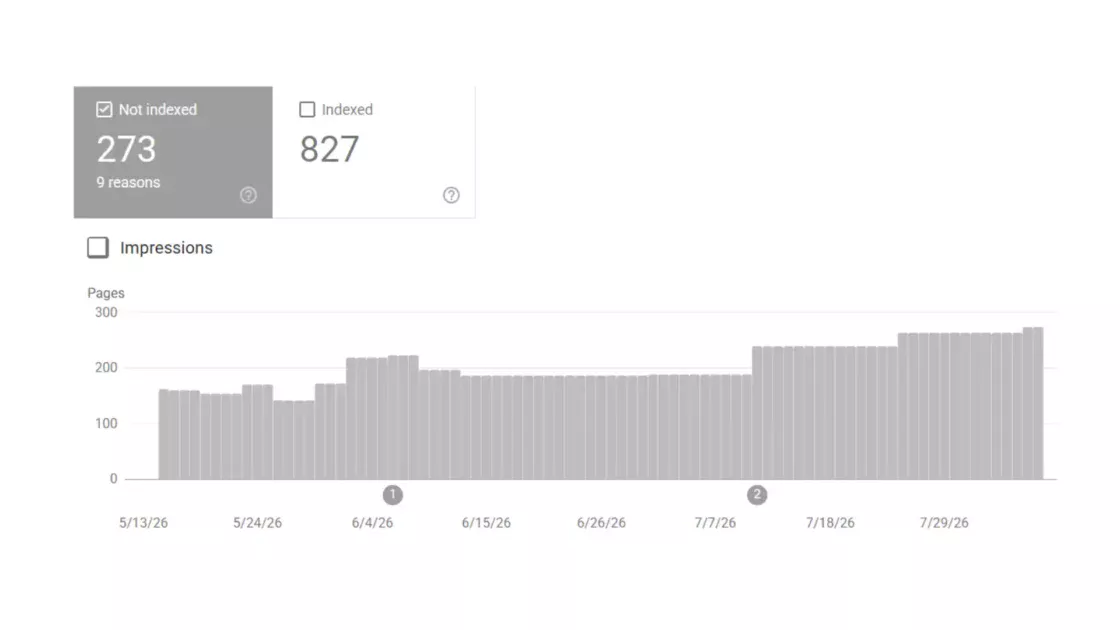
The Pages report, sometimes called the index coverage report, shows which URLs Google has indexed and which it has excluded, with reasons. After a migration this is where you watch the new URLs move into the index and the old ones move out, and where exclusion reasons flag problems: pages marked as crawled but not indexed, pages excluded by noindex, pages blocked by robots.txt, and redirect issues all surface here with counts you can track over time. A sudden rise in a problematic exclusion category is an early warning that something in the move is misconfigured.
The URL Inspection tool lets you check any single URL in detail: whether Google has indexed it, what canonical Google chose, how Googlebot rendered it, and whether there are crawl or indexing problems. During a migration it is the tool for verifying that important pages are indexable on the new site, that Google selected the intended canonical rather than a different one, and that a redirect is being processed as expected. When a specific page is not behaving, the URL Inspection tool tells you why far faster than guessing.
The Crawl Stats report, tucked away in the settings menu, is one of the most useful and least used diagnostics for a migration. It shows how Googlebot is interacting with the site: how many requests it is making, the response codes it is getting, and how different Googlebot types are behaving. Its response breakdown lets you drill into URLs by response type, surfacing 4xx errors, redirects, and pages that are not being reached at all. For a migration this report reveals whether Google is crawling the new site, whether it is wasting requests on the old domain, and whether redirects and errors are showing up at the crawl level.
The Performance report tracks impressions, clicks, average position, and click-through rate by query and page. After a migration it is where you watch rankings stabilize or decline, ideally segmented by site section so that a problem in one area is not hidden by stability elsewhere. Comparing the new site’s performance against the pre-migration baseline you captured during the inventory is how you judge whether the move is on track, and segmenting by folder or section isolates which parts of the site are recovering and which are stuck.
A caution about reading this data: several things can produce an apparent drop that is not a real problem. Analytics configuration changes during the move can break tracking and show a fake decline. Mismatched Search Console properties can split data so that neither shows the full picture. Seasonality can depress traffic for reasons unrelated to the migration. And Google serving both old and new URLs in parallel during the transition can scatter metrics across both. Validating that the data is real before acting on it prevents emergency fixes for problems that do not exist. The Sitemaps report rounds out the toolkit by showing how many submitted URLs have been indexed, which tells you whether discovery is progressing.
The combined picture from these reports answers the questions that matter during a move: are the new pages getting indexed, is Google crawling the right site, are the redirects working, did any directive leak, and are rankings holding. Reading them on the monitoring cadence, against the pre-migration baseline, turns the anxious post-launch period into a managed process with specific findings and specific fixes.
Diagnosing a post-migration traffic drop in the right order
When traffic falls after a migration, the order in which you investigate determines how fast you recover. Random changes in response to a drop tend to make things worse, because they add variables to a situation that is already hard to read. The reliable approach is to work through the possible causes in a fixed sequence, from the most catastrophic and easiest to fix to the more subtle, and to confirm the drop is real before acting at all.
The first question is whether the drop is genuine. Validate the data before reacting: check that analytics tracking did not break during the move, that you are reading the correct and complete Search Console properties, that seasonality is not the cause, and that Google is not simply serving old and new URLs in parallel during the transition. A meaningful share of apparent post-migration drops dissolve under this check because the traffic was never actually lost. Defining the acceptable level of loss before the migration gives you the threshold to judge whether what you are seeing is a crisis or expected turbulence.
If the drop is real, check the fundamentals first, because the catastrophic causes are also the quickest to fix. Is there a sitewide noindex left over from staging, asking Google to deindex the entire site? Is robots.txt blocking crawling with a root disallow or blocking the directories that hold CSS and JavaScript? Is there a redirect chain with an intermediate URL blocked by robots.txt, so the redirect silently fails to resolve? These are the issues behind the most severe overnight collapses, they are common, and they are often missed at launch. Checking the live homepage source and the production robots.txt by hand takes minutes and rules out or confirms the worst cases immediately.
If the fundamentals are clean, segment the problem: did you lose indexing, rankings, or both, and troubleshoot in that order. Lost indexing means pages are dropping out of the index, which points back to crawl blocks, noindex directives, canonical conflicts, or redirect failures. Lost rankings with intact indexing points more toward content changes, lost metadata, internal linking changes, or relevance shifts. Treating a ranking problem as an indexing problem, or the reverse, sends you fixing the wrong thing. The Pages report and the Performance report together tell you which one you are facing.
Redirects are the next layer, because incorrect or missing redirects, and the conflicting signals they create with canonicals and internal links, are consistently among the primary causes of major post-migration traffic loss. Even mostly correct redirect coverage fails if the gaps include high-authority or high-traffic legacy URLs, so the check is not whether most redirects work but whether the specific high-value pages are redirected correctly to relevant destinations, in a single hop, to URLs that return 200. Confirming that canonicals self-reference the final URLs and that no mixed host or protocol signals exist removes a whole class of conflicting-signal problems.
The deeper layers, when the fundamentals and redirects look fine but recovery stalls, involve crawl efficiency and server behavior. Server logs reveal whether Googlebot is stuck in redirect loops or 5xx errors, whether it is wasting its budget on duplicate or parameter URLs, and whether it is still crawling the old domain instead of consolidating on the new one. An old domain that remains crawlable after a move splits Google’s crawl budget between two sites and prevents it from consolidating authority on the new one, which is a documented cause of migrations that never recover. The CDN and server configuration are the last layer, checked when crawler access itself is in question.
The structured cadence for recovery mirrors the monitoring cadence: daily checks for blockers, weekly checks for index and ranking shifts, and longer-cycle work on authority and internal linking, with fixes deployed against a single source of truth so the whole team reads one story. Recovery is usually a matter of finding the deviation from the plan and fixing it, which is far faster when an SEO was involved from the start and the migration was documented, because then the investigation is simply comparing the live site against what was specified and correcting where they diverge.
The migration hangover and realistic recovery timelines
Some migration damage is not the dramatic overnight collapse but a slow, prolonged decline that drags on for months, and understanding this pattern keeps teams from either panicking too early or giving up too soon. The phenomenon has a name in the field: the migration hangover, a long-term loss of authority and traffic that follows a poorly executed move. Recognizing it, and knowing realistic recovery timelines, is part of managing the move responsibly.
A migration hangover is the prolonged, often avoidable drop in organic traffic that follows a migration, and in severe cases its effects persist for twelve to eighteen months. This is different from the normal post-launch dip, which is expected and recovers within weeks or months. The hangover is a sustained underperformance that signals something structural went wrong, a domain move with incomplete redirects, an authority that never fully transferred, a competing old version left live, or a stack of changes that confused the search engine about what the site now is.
The realistic timeline for a healthy migration is worth stating plainly because expectations drive decisions. Google’s own framing is that a medium-sized site can take a few weeks for most pages to move in the index, and larger sites take longer, with the move considered complete only once Googlebot has crawled every old and new URL at least once. For a domain move, Google takes roughly 180 days to fully process the change of address. Most sites see ranking stability settle somewhere in the four-to-eight-week window after launch, with continued improvement after the initial fluctuation, though full recovery and growth can take longer. Leadership often expects faster recovery than the search engine delivers, and managing that expectation prevents destructive mid-recovery interventions.
The distinction between normal turbulence and a genuine hangover is the judgment that matters most during recovery. Normal turbulence shows rankings wobbling and then stabilizing as the recrawl completes, with traffic returning toward the baseline over weeks. A hangover shows no sign of recovery, or a continued decline, well past the point where stabilization should have begun. The case studies of severe hangovers share a signature: the expected initial drop, followed by no recovery, traced eventually to a concrete technical cause such as the old domain still being crawled, a sitewide indexing problem, or redirects that were never as complete as believed.
The temptation during a hangover is to start changing things, and that temptation has to be resisted in favor of diagnosis. Changing content, structure, or design while recovery is uncertain adds variables and creates the signal churn that prevents both you and the search engine from settling. The correct response to a hangover is the structured diagnosis from the previous section: confirm the drop is real, check the fundamentals, segment indexing versus rankings, audit the high-value redirects, and examine crawl behavior and server logs. A hangover almost always traces to a specific, findable cause, and finding it is faster than guessing at fixes.
The reassurance, grounded in how these moves actually behave, is that a clean migration recovers and a flawed one recovers once the flaw is found and fixed. The expectation should be calibrated turbulence followed by stabilization, with a defined threshold for what counts as a real problem and the discipline to wait out normal volatility while investigating anything that crosses the line. The hangover is real, but it is a symptom of a fixable error, not an unavoidable tax on moving a website.
Ecommerce replatforming and the URL pattern problem
Ecommerce migrations carry the highest stakes because traffic loss converts directly into revenue loss, and they carry a specific structural challenge that content sites do not face: different platforms generate URLs in fundamentally different formats. Replatforming an online store is a site move with URL changes by definition, and the scale of the redirect map plus the platform-specific URL patterns make it among the most demanding migrations to execute cleanly.
The numbers set the stakes. Poorly executed ecommerce migrations lose traffic at a striking rate, with one analysis citing that the day-ten decline scenario, organic sessions sliding fifteen, then twenty-five, then forty percent below baseline, plays out in around eighty percent of badly handled ecommerce moves. For a store, that decline is lost sales during the exact period when the new platform was supposed to drive growth. The discipline required is proportional to the revenue at risk.
The URL pattern problem is the technical heart of an ecommerce replatform. Each platform produces product and category URLs in its own shape, and the differences have to be understood before a single redirect is written.
Common platform URL patterns
| Platform | Typical product URL pattern |
|---|---|
| Magento / Adobe Commerce | /catalog/product/product-name.html |
| Shopify | /products/product-name |
| WooCommerce | /product/product-name/ |
| PrestaShop | /en/category-name/product-name.html |
These patterns are why a Magento-to-Shopify move is among the most complex: the path prefix, the file extension, and the presence or absence of the category in the URL all differ, so every product URL has to be transformed to match the new platform’s format.
The mapping approach for an ecommerce site works in the layers described earlier, applied at scale. Pattern-based regular expressions handle the bulk, transforming the old prefix and extension into the new format, which covers roughly seventy to eighty percent of URLs. Manual mapping handles discontinued products, merged or reorganized categories, and consolidated content. Validation confirms every destination returns 200, because a 301 to a 404 is no better than no redirect. For a store with ten thousand products, the complete map including variants, categories, filters, and content commonly runs to between twenty-five thousand and forty thousand rules, which is why it has to live in a version-controlled file outside the platform.
Faceted navigation is an ecommerce-specific complication. Filter and sort combinations generate enormous numbers of near-duplicate URLs, and a migration has to decide how these are handled: canonicalized to the main category, excluded from sitemaps, and prevented from consuming crawl budget. Carrying faceted noise across to the new platform multiplies the crawl problem and dilutes the signals on the pages that matter. The migration is the moment to consolidate thin and duplicate filter URLs rather than recreate them.
Platform-specific behaviors need accounting for. Shopify, for example, has a fixed URL structure built around /products/ and /collections/ and auto-generates canonical tags, so the mapping has to account for the fixed format and the canonicals have to be confirmed to point at the correct URLs, especially where multiple domain variants exist. Metadata that lives in custom fields, JSON-LD product schema and image alt text in particular, is easy to leave behind in a platform move, which makes products harder for both search engines and AI shopping assistants to understand. Migrating and validating Product, Offer, Review, and Breadcrumb schema is as important as the redirects for a store that wants to keep its rich results and its visibility in AI-driven product discovery.
The same one-change-at-a-time discipline applies with extra force in ecommerce, where the temptation to redesign, rewrite product copy, and replatform all at once is strong. The advice from those who run these moves is consistent: keep design, content, domain, and metadata as stable as possible during the platform move, establish a baseline on the new platform, and only then begin optimizing. The fewer variables changed during the replatform, the easier it is to find the cause of any problem, and in ecommerce the cost of a slow diagnosis is measured in lost orders.
Migrations seen from five different business types
The migration playbook is consistent, but the stakes, the high-risk pages, and the failure consequences differ sharply by the kind of business running the move. Looking at five common types makes the abstract principles concrete and shows where each kind of site should focus its attention.
For an ecommerce store, the migration is a revenue event. The highest-value URLs are product and category pages that convert, and the redirect map runs to tens of thousands of rules because of variants and filters. The specific risks are the platform URL pattern differences, faceted navigation explosions, lost product schema, and the direct conversion of any traffic dip into lost sales. The consequence of a botched ecommerce migration is immediate and measurable in orders, which is why these moves justify the most rigorous testing and the strictest one-change-at-a-time discipline. The reward when done well is real: clean replatforms have produced double-digit organic traffic gains within months on faster, better-structured stores.
For a publisher or media site, the value is concentrated in a large archive of content pages, many of which rank for long-tail queries and carry backlinks accumulated over years. The migration challenge is sheer volume: thousands or millions of article URLs, a long tail of pages that individually draw little traffic but collectively matter, and old content with valuable links that is easy to forget. The risks are incomplete inventory that strands archive pages, lost article schema and publication dates, and the indexing backlog that large sites face when Google has to recrawl an enormous URL set. Publishers also feel the AI-search shift acutely, since informational content is exactly what AI Overviews tend to answer directly, making the post-migration AI-visibility question especially live.
For a SaaS company, the site is usually a mix of marketing pages, a documentation or help center, and a blog, often spread across a main domain and subdomains. The common migration is a subdomain-to-subfolder consolidation or a CMS change, and the high-value pages are the commercial landing pages and the documentation that ranks for product-related queries. The risks are the consolidation done incompletely, leaving an old subdomain competing with the new subfolder, and the documentation losing rankings when its URL structure changes. SaaS buyers increasingly start product research in AI assistants, which raises the stakes on preserving the structured, well-organized content that those systems extract and cite.
For a local business, the migration interacts with local search signals and citations in a way other sites do not face. The high-value assets include the pages that rank in local results and the consistency of the business’s name, address, and phone number across directories and profiles. A migration that changes URLs without updating the business’s directory listings and profiles creates inconsistency that Google collates across citations, eroding the trust that local rankings depend on. The guidance is to update existing profiles and listings to the new URLs rather than creating new ones, and to treat citation consistency as part of the migration rather than an afterthought, since mismatched domains across profiles can cost local visibility.
For a large enterprise, the defining feature is complexity: many stakeholders, multiple markets and languages, large URL sets, and tangled technical infrastructure. Enterprise migrations are where the most variables get stacked, where content freezes are hardest to coordinate across teams, and where the stale-snapshot problem, developers working from a frozen export while content teams keep updating production, does the most damage. The recovery framing for enterprise moves is explicitly long-tail, with realistic timelines measured in months, and the recommendation to embed structured checkpoints directly into the project timeline rather than bolting SEO review on at the end. The cost of a failed enterprise migration is large enough that involving SEO from the start, and migrating in phases, is not caution but basic risk management.
Across all five, the common thread is that the principles do not change but the focus does. Every type protects the same things, URLs, authority, links, and metadata, but the pages that carry the most value, and the failure modes that hurt most, are specific to the business. A store guards its product pages and schema, a publisher guards its archive and its long tail, a SaaS company guards its documentation and consolidation, a local business guards its citations, and an enterprise guards against the complexity of changing too much across too many teams at once. Knowing which kind of site you are running tells you where to spend the disproportionate share of your attention.
Migration effects on visibility in AI search and answer engines
A migration in 2026 is no longer only about protecting Google rankings, because a growing share of discovery now happens inside AI-generated answers, and the move affects visibility in those systems through mechanisms that overlap with traditional SEO but are not identical to it. Any serious migration plan now has to account for how ChatGPT, Perplexity, Gemini, Google’s AI Overviews, and similar systems find, interpret, and cite the site.
The scale of the shift is the reason it matters. AI Overviews now appear on a large share of Google searches, by various measures around half or more, and AI platforms have grown into a genuine discovery channel rather than an experiment. A pivotal change came on May 7, 2026, when ChatGPT began surfacing clickable brand links directly inside answers rather than relying mainly on footnote citations; across tracked sites, ChatGPT referral traffic jumped sharply week over week, and the share of responses containing a URL rose from a few percent to over twenty percent. AI answers became a direct traffic channel, not just a perception metric, which means losing AI visibility during a migration now costs measurable referral traffic.
The migration-specific concern is that AI systems retrieve and cite content based partly on signals a migration disrupts. Open-world systems such as Perplexity and Google’s AI Overviews pull live data through retrieval, so they re-evaluate a site as it is recrawled, which means the same crawl and indexing health that governs traditional recovery also governs AI re-inclusion. If a migration leaves pages unindexed, slow, or carrying lost metadata, the AI systems that depend on retrieval lose the ability to find and cite them, and AI citations can take four to eight weeks to recover as the systems reprocess the new site, on a similar timeline to organic rankings.
Structured, extractable content is what these systems favor, which makes the metadata and structured-data losses discussed earlier doubly costly. FAQ-style content with appropriate schema is among the most citable formats, because question-and-answer pairs map directly onto how people query AI systems, and clear definitions, well-organized content, and visible publication and update dates all help AI systems treat a source as trustworthy. A migration that drops FAQ schema, strips publication dates, or scrambles content structure makes the site harder for AI engines to extract, independent of its Google rankings.
Content freshness is a stronger signal for AI systems than many teams expect. Analysis of AI citations finds that recently updated content is cited far more often, with one study reporting that content updated within thirty days receives several times more AI citations than stale content. A migration is a moment of disruption to freshness signals, since publication and update dates can be reset or lost in the move. Preserving accurate dates, and treating the migrated content as current rather than letting the move strip its recency, protects the freshness signal that AI retrieval rewards.
Two structural realities about AI search shape migration strategy. First, AI citation ecosystems are fragmented: studies find only around a tenth of domains are cited by both ChatGPT and Perplexity, so visibility in one system does not guarantee visibility in another, and a migration’s AI-visibility recovery has to be monitored across platforms rather than assumed from one. Second, a large share of what AI systems say about a brand comes from third-party sources, reviews, industry publications, and forums, not from the brand’s own site, which means a migration protects the first-party piece of AI visibility but cannot fix the off-site narrative. First-party content still accounts for a substantial share of citations, so keeping the owned site retrievable and well-structured through a migration remains worth doing.
The practical addition to the migration plan is modest but real: preserve FAQ and structured content with its schema, keep publication and update dates intact, maintain the crawl and indexing health that retrieval-based AI systems depend on, and monitor AI citations across the major platforms after launch alongside traditional rankings. A migration that protects Google rankings through clean redirects and intact metadata protects most of the AI-visibility foundation at the same time, because the underlying requirements, retrievable, well-structured, trustworthy, current content, are largely shared. The systems are different, but the discipline that keeps a site visible to Google is most of what keeps it visible to the answer engines.
The case for moving in phases rather than all at once
The instinct on a big migration is to flip everything at once and get the disruption over with. For large or complex sites there is a strong argument for the opposite: moving in phases, so that the scope of any problem is contained and the cause of any drop is easy to identify. Phasing is not always possible, but where it is, it converts a single high-stakes event into a series of smaller, recoverable ones.
The core benefit of phasing is diagnostic clarity. When a small, lower-risk section moves first and behaves as expected, the team validates the process, the redirect approach, and the monitoring before applying them to critical content. If something goes wrong in the first phase, the damage is limited to a section rather than the whole site, and the cause is obvious because only that section changed. Google’s own guidance endorses this for large sites, recommending an initial move of just a piece of the site to test the effects on traffic and indexing before moving the rest, either all at once or in further chunks.
The sequencing of phases can follow several logics depending on the site. Moving by content type takes one category at a time, for instance blog posts before product pages. Moving by traffic volume takes low-traffic sections first, then high-traffic areas, so the riskiest content moves only after the process is proven. Moving by business priority takes less critical content first, then revenue-driving pages. Each approach shares the same logic: prove the process on something you can afford to get slightly wrong before applying it to something you cannot.
Phasing pairs naturally with the one-change-at-a-time principle that runs through this whole guide. A phased migration is, in effect, a way of reducing the number of variables changing at any one moment, not across the whole site but within each phase. It keeps the search engine from having to reassess everything simultaneously, and it keeps the team from having to diagnose everything simultaneously. The move still completes; it just completes as a sequence of contained steps rather than one large leap.
There are real costs and limits to weigh. Phasing extends the overall timeline, requires running old and new systems in parallel for longer, and can be technically impossible if the platform change forces an all-or-nothing cutover. Running two systems in parallel creates its own risks, particularly the danger of leaving old content crawlable and competing with the new version, which has to be managed carefully at each phase boundary so that the old location is properly redirected as each section moves. The judgment is whether the diagnostic safety of phasing outweighs the extended exposure of a longer transition.
For a small site, phasing is usually unnecessary; the URL set is small enough that a clean single cutover is both manageable and faster. For a large or complex site, phasing is often the difference between a contained problem and a sitewide one. The larger the site, the more pages there are to strand, the longer the recrawl takes, and the harder a sitewide drop is to diagnose, all of which tilt the calculation toward moving in pieces. The decision should rest on the site’s size, complexity, and technical constraints, with a clear preference for phasing whenever the platform allows it and the site is large enough for an all-at-once move to be genuinely risky.
A pre-launch and post-launch checklist worth enforcing
A migration is the kind of project where a checklist is not bureaucracy but the mechanism that prevents catastrophic, well-known mistakes. The most damaging migration failures are not novel; they are the same handful of errors recurring, which means a checklist that forces verification of each one catches the disasters that vigilance alone misses. The value is in enforcing the checks, with owners and sign-off, not in having the list exist.
Before launch, the inventory and mapping have to be complete and validated. Confirm the URL inventory draws on crawl, Search Console, analytics, server logs, and the CMS export, so orphans and forgotten assets are included. Confirm the redirect map covers every indexed URL one-to-one, that destinations are relevant rather than dumped on the homepage, and that every destination has been crawled and returns a 200. Confirm images and documents are in the map. Confirm the new URL structure follows current guidance where URLs change and preserves good URLs where they do not.
Still before launch, the metadata and signals have to be verified to survive. Confirm title tags, meta descriptions, canonical tags, hreflang annotations, and structured data are mapped field by field and present on a sample of important pages in staging. Confirm canonicals self-reference final production URLs and that no canonical or hreflang value points at staging. Benchmark page speed and capture the pre-migration ranking and traffic baseline, since recovery cannot be measured without it. Take a complete backup of the old site and its configuration as the rollback safety net.
On launch day, the visibility checks are the ones that prevent the overnight collapses. Verify, by hand on the live site, that noindex tags are removed from every page, that robots.txt allows crawling and does not contain a root disallow, and that password protection is lifted. Confirm the directories holding CSS and JavaScript are crawlable. Activate and spot-check the redirects, confirming they resolve in a single hop. Update DNS where the domain or host changes, having lowered the TTL in advance. Submit the updated XML sitemap, file the Change of Address request for a domain move, and request indexing of key URLs.
The post-launch checks run on the monitoring cadence. In the first two weeks, check daily for blockers: stray noindex, robots.txt problems, redirect failures, crawl errors, and any directive that leaked. Through the following weeks, check indexing coverage and rankings weekly, segmented by section, against the baseline. Watch the Crawl Stats report to confirm Google is crawling the new site and not wasting budget on the old domain. Let field Core Web Vitals fill in over the collection window before judging performance. Update directory listings, social profiles, and any external references to the new URLs.
Two cross-cutting principles make the checklist work. First, involve SEO from the beginning, not as a cleanup crew after launch, because a documented migration with SEO input is far faster to diagnose when something goes wrong, since recovery becomes a matter of finding where the live site deviated from the plan. Second, change as little as possible beyond the move itself, keeping design, content, and metadata stable so that any problem has a small set of possible causes. The checklist’s job is to force these verifications to happen, with a named owner for the dangerous items and an explicit sign-off that they were checked on the live site, because the failures it prevents are precisely the ones teams are sure they would never make until they do.
Backlinks, outreach and the external references you do not control
Much of a migration is about signals on your own site, but a significant share of search value comes from references on sites you do not control, and those references do not update themselves when your URLs change. Backlinks, directory listings, social profiles, and citations all point at specific URLs, and a migration that ignores them leaves equity stranded on addresses that now only work because of a redirect, or worse, that break entirely.
Backlinks are the highest-value external signal and the hardest to rebuild, which makes protecting them a priority. The first line of defense is the redirect map: as long as a linked old URL redirects to its new equivalent, the link’s value largely transfers, since permanent redirects forward signals. The audit step is to identify which old URLs carry backlinks and confirm every one of them is redirected correctly, because a missed redirect on a heavily linked page loses that page’s accumulated authority. Tools such as Ahrefs, Semrush, and Majestic surface the backlink profile and the specific URLs that links point at, which feeds directly into prioritizing the redirect map around linked pages.
Beyond redirects, there is the question of updating the links themselves at the source. Reaching out to the owners of high-value linking pages to update them to the new URLs preserves equity more cleanly than relying on a redirect forever, and it avoids the small ongoing cost of the redirect hop. This is rarely practical for every link, since locating and contacting every linker is a large effort, but it is worth doing for the handful of links that matter most. For the rest, the redirect carries the value.
Directory listings and citations need updating, particularly for businesses with a local dimension. Google collates information across citations, so inconsistency between the domain listed in directories and the live domain erodes trust, especially for local rankings. Update existing directory profiles and listings to the new URLs rather than creating new ones, since updating preserves the history attached to the profile while creating duplicates fragments it. Consistency of the business name, address, phone number, and URL across profiles is part of the migration for any site that depends on local search.
Social profiles and old social posts are a quieter source of broken links. Many sites have posts and profile links pointing at their content, and dead URLs send users from those posts to 404s, breaking the experience and losing the traffic those posts still generate. Updating the URLs in social profiles, and ensuring redirects cover the URLs that older posts link to, keeps that traffic flowing. Coordinating with whoever manages social channels, and giving them the redirect map, prevents the broken-link problem on platforms outside the website itself.
A reassuring point applies when a migration combines domains with imperfect backlink profiles. Historically, merging sites with low-quality links could trigger manual actions, but the link spam algorithm changes mean poor-quality backlinks are now largely discounted rather than penalized, since Google recognizes that spammy links commonly point at sites through no fault of the owner. This makes domain consolidation less fraught than it once was, though the discipline of redirecting linked pages and updating external references remains the same. The external signals you do not control are, in aggregate, a large part of what a migration must preserve, and they require deliberate work because nothing about changing your own URLs updates them automatically.
Analytics continuity and measuring the move accurately
A migration that loses measurement loses the ability to tell whether it worked, and broken analytics during a move is both a common problem and a frequent source of false alarms. Keeping measurement continuous through the transition is what lets you distinguish a real traffic drop from a tracking artifact, and it is the foundation for proving recovery against the pre-migration baseline.
The first principle is continuity of the analytics setup itself. The current standard is a GA4 property, and the recommendation from practitioners is to keep using the existing analytics account rather than creating a new one, updating it for the new site so that direct, period-over-period comparisons remain possible. Starting fresh on a new property severs the comparison and makes it impossible to judge the move against history. Ideally, the GA4 property is running and collecting clean data on the old site for at least a month before the migration, so the baseline is solid.
Tracking has to be verified to survive the move, because broken tracking is one of the most common causes of an apparent post-migration collapse that is not real. A migration can drop or misconfigure the analytics snippet, change the data layer, or break event and conversion tracking, producing a traffic line that craters for reasons unrelated to search. Verifying that the tracking code is present and firing on the new site, using a debug or preview mode before and immediately after launch, catches tracking failures before they masquerade as a ranking disaster. When traffic appears to drop after a move, confirming that tracking did not break is the first diagnostic step precisely because so many phantom drops trace to measurement, not to lost rankings.
Linking analytics and Search Console gives a complete picture that neither provides alone. Analytics shows behavior on the site, Search Console shows how the site appears in search, and connecting them lets you see the full path from impression to click to on-site action. For a migration, this combination is how you tell whether a drop is happening at the impression level, the click level, or the conversion level, which points to different causes. A drop in impressions suggests an indexing or ranking problem; stable impressions with falling clicks suggests a different issue; falling conversions with stable traffic suggests an on-site problem with the new build.
The data-validation discipline from the diagnosis section rests on this measurement foundation. Several things produce apparent drops that are not real: broken tracking, mismatched or split Search Console properties, seasonality, and Google serving old and new URLs in parallel. A clean, continuous measurement setup is what lets you rule these out quickly and focus on genuine problems. Without it, every wobble looks like a crisis and every fix is a guess.
For ecommerce, the measurement stakes extend to commercial metrics that go beyond traffic: conversion rate, average order value, revenue per session, and the international mix all need to carry across so that the move’s business impact is measurable, not just its organic traffic. A migration judged only on sessions can look fine while revenue suffers, or look alarming while revenue holds, so tracking the commercial metrics alongside the search metrics gives the true picture. Measurement continuity is unglamorous, but it is the difference between managing a migration with evidence and reacting to it with anxiety.
Regulatory, privacy and data handling during a platform move
A migration that moves user data, changes how tracking works, or shifts where a site is hosted touches privacy and compliance obligations that sit alongside the SEO work. Ignoring these turns a search project into a legal and trust risk, and the migration is often the moment when data handling either gets cleaned up or quietly broken. The compliance dimension is most acute for ecommerce and any site that processes personal data, but it applies broadly.
The most basic security requirement is the one the HTTPS section already touched: a valid TLS certificate serving the entire site over a secure connection. Browsers warn on insecure pages and on mixed content, and those warnings damage both user trust and rankings. A migration is the right moment to confirm the certificate covers all hostnames and that no resources load insecurely, since a half-secured site undermines the security the move was meant to provide. For stores, the secure connection is not optional, it underpins both payment security and the trust signals search engines read.
Data migration itself carries obligations where personal data is involved. Moving customer records, order histories, and account information from one platform to another has to be done in a way that preserves the integrity and security of that data, and for businesses subject to regimes such as GDPR, the handling has to remain compliant throughout the transfer. Treating the migration as an occasion to review what personal data is held, where it lives, and whether its handling is compliant turns a technical necessity into a chance to reduce risk. A security assessment of the new platform, and confirmation that data is encrypted in transit and at rest, belongs in the migration plan for any site holding personal data.
Tracking and consent are a specific compliance pressure point during a move. The analytics and tag setup that gets rebuilt on the new site has to respect consent requirements, and a migration that re-implements tracking is also re-implementing the consent mechanisms around it. Getting this wrong, deploying tracking that fires before consent, or losing the consent layer in the rebuild, creates compliance exposure even as it affects measurement. The guidance to use cookies or local storage appropriately, and to handle tracking within consent rules, applies with extra force when the whole tracking layer is being rebuilt.
Content and data accessibility is an emerging consideration as AI systems consume the site. Not all content should be equally available to every system, and a migration is a natural point to decide what is exposed, what is gated, and how the site governs access by automated agents. Some organizations now make deliberate choices about which content they want surfaced in AI answers and put governance around how and where it appears, which is a decision the migration can implement rather than leave to default. This intersects with the older robots and crawl-directive decisions but extends them to the question of how the site’s data is used by retrieval and training systems.
The practical addition to the migration plan is to bring whoever owns data protection and compliance into the project alongside SEO and development, so that the data transfer, the security configuration, the consent layer, and the content governance are handled deliberately rather than discovered after launch. The migration touches not just rankings but the trust and legal posture of the business, and the same discipline that protects search equity, plan it, verify it, document it, protects the compliance position too. A move that improves structure and speed while quietly breaking consent or exposing data has traded one risk for a more serious one.
Choosing tools that make a migration verifiable
A migration is only as reliable as the tools used to verify it, because almost every step in this guide depends on checking something at scale that cannot be checked by hand. The right toolkit turns assertions into evidence: that every URL is inventoried, that every redirect resolves correctly, that no directive leaked, that indexing is progressing. Knowing which tool does which job, and using them together, is what makes the verification real rather than hopeful.
For crawling and technical auditing, a dedicated crawler is the backbone. Screaming Frog and Sitebulb crawl the site to surface every URL reachable by internal links, every redirect and its status code, redirect chains and loops, canonical tags, indexability status, and broken links. During a migration they are used repeatedly: to crawl the old site for the inventory, to crawl the staging site for parity against the old one, to validate that redirect destinations return 200, and to crawl the live site immediately after launch to confirm indexability and catch leaked directives. A crawl of a list of important URLs is the fastest way to see their indexability at a glance, and a full crawl is how chains and loops are found before they do damage.
For the parts of the inventory a crawler cannot reach, other sources fill the gaps. Google Search Console reveals indexed URLs, impressions, and clicks, surfacing the orphan pages a crawler misses, and it provides the Pages, URL Inspection, Crawl Stats, Performance, and Sitemaps reports that govern post-launch monitoring. Analytics, in current setups GA4, reveals which URLs draw traffic. Server log analysis shows what Googlebot is actually requesting, including URLs no other tool surfaces and signs that the crawler is stuck in redirect loops, hitting 5xx errors, or wasting budget on the wrong site. Each source sees something the others do not, which is why the inventory and the monitoring draw on all of them.
For backlinks and the external picture, the link-analysis tools, Ahrefs, Semrush, and Majestic, surface the backlink profile and the specific URLs that links point at, which is essential for prioritizing the redirect map around linked pages and for judging the authority at stake. These same platforms offer site audit features that flag redirect problems, canonical conflicts, and the 302s that should be 301s, complementing the dedicated crawlers.
For performance, the Core Web Vitals work depends on the right measurement tools. Lighthouse provides lab measurements for catching regressions on critical templates before and after launch, while PageSpeed Insights and the underlying Chrome User Experience Report provide the field data that actually feeds ranking, with the caveat that field data fills in over a collection window. WebPageTest and similar tools give deeper performance diagnostics when a regression needs investigating.
A few practices tie the toolkit together. Keep the redirect map as a version-controlled file, typically a CSV, outside the CMS, so that plugin updates, theme changes, or host migrations that wipe in-application redirects cannot destroy the master record, and so the rules can be re-verified at any time. Run a redirect audit on a schedule, not only when something breaks, because a monthly crawl that flags every 3xx response and every chain catches problems while they are small. And unify the monitoring signals into a single dashboard so the whole team reads one narrative from analytics, Search Console, and crawl data rather than arguing over fragmented numbers. The tools do not run the migration, but they are what make every claim in the plan checkable, and a migration whose steps cannot be verified is a migration running on faith.
Mistakes that show up again and again
The failures that wreck migrations are not exotic. The same handful recur across sites of every size, which is the reassuring part, because a known set of mistakes can be checked for deliberately. Naming them plainly, in one place, is a way to inoculate a project against the errors that experienced teams still make under launch pressure.
The most destructive mistake is leaving a noindex tag on the live site after launch. Developers set staging pages to noindex correctly, the new site ships with the tag in place, and Google begins deindexing the entire site. This single error has produced traffic collapses of ninety percent or more, and it is consistently described as the most common migration disaster. The defense is a hand-check of the live homepage source on launch day.
Close behind is a robots.txt that blocks the new site, whether a root-level disallow that bars all crawling or a disallow on the directories holding CSS and JavaScript that prevents proper rendering. A maintenance-time disallow that survives to production has dropped traffic ninety-five percent overnight. Reviewing the live robots.txt before and after launch rules this out.
Missing or wrong redirects are the steady, less dramatic killer. Missing redirects strand the value of old URLs; 302s used for permanent moves tell Google to keep the old URL; redirect chains add latency and risk the crawler stopping early; and redirects to irrelevant pages or the homepage fail to transfer equity because they look like soft 404s. The damage is proportional to the value of the pages affected, and even mostly complete coverage fails if the gaps include high-authority pages.
Changing too many things at once is the mistake that turns a recoverable problem into an undiagnosable one. When a team overhauls design, content, metadata, URL structure, and platform together, a later drop has too many possible causes to isolate, and Google’s own engineers single this out as the most common error. The discipline is to move first, stabilize, then change.
Incomplete URL inventory leaves orphaned pages, forgotten assets, and old linked content out of the redirect map, losing their value silently. Teams focus on main pages and neglect the blog archive, old resources, images, and PDFs that draw traffic and carry links. Building the inventory from crawl, Search Console, analytics, logs, and the CMS export, rather than a crawl alone, prevents this.
Staging URLs leaking into production through canonical tags or hreflang annotations points the live site at addresses that will not resolve, and Google may honor them, consolidating signals onto dead URLs. Lost metadata and structured data from migration scripts that drop fields produce pages that rank worse for invisible reasons. Leaving the old site crawlable after a move splits crawl budget and lets the old version compete with the new for the same queries. Broken analytics creates phantom drops that trigger emergency fixes for problems that do not exist.
Two procedural mistakes underlie many of the technical ones. Involving SEO too late, calling them in to fix a migration after launch rather than planning it from the start, removes the documentation and parity that make problems fast to diagnose. Neglecting external references, failing to update directory listings, social profiles, and high-value backlinks, leaves equity on URLs outside the site that nothing on the site can fix. None of these mistakes is clever or unforeseeable. They recur because launch pressure tempts teams to skip verification, which is exactly why the verification has to be enforced as a checklist with owners rather than left to the assumption that no one would make so basic an error.
The questions to settle before approving any migration
A migration should not be approved until a short list of questions has clear answers, because the answers determine whether the project is set up to protect search equity or to lose it. These are the questions a stakeholder should be able to ask and have answered with specifics, and an inability to answer any of them is a sign the migration is not ready.
The first question is why the migration is happening and what is changing. A migration justified by a real constraint, an old platform that cannot scale, a structure that confuses users and search engines, a domain that no longer fits the brand, is a migration with a clear scope. One justified by a vague desire to refresh the site tends to balloon into changing everything at once. Defining the purpose and the exact scope, and resisting the urge to bundle in unrelated changes, is the first decision that shapes the risk.
The second question is whether the full URL inventory and redirect map exist and have been validated. Not whether they are planned, but whether every indexed URL, including orphans, assets, and linked pages, is inventoried, mapped one-to-one to a relevant destination, and confirmed to resolve at 200. This is the technical core of the move, and a migration approved without it is approved on hope.
The third question is what the pre-migration baseline is. Rankings, traffic, conversions, Core Web Vitals, and the metadata snapshot all have to be captured before the move, because recovery cannot be measured without them and a post-launch drop cannot be judged against nothing. A team that cannot produce the baseline cannot tell a real problem from normal fluctuation.
The fourth question is what level of traffic loss is acceptable and for how long. A migration will almost certainly dip; the question is what counts as normal turbulence versus a genuine crisis, defined as a threshold in advance so the monitoring can distinguish the two. Without a pre-agreed threshold, every dip triggers panic and every recovery week feels like failure. Realistic timelines, weeks for stabilization on a medium site, up to 180 days for a domain change to fully process, have to be understood by the people watching the numbers.
The fifth question is who owns the dangerous launch-day checks. The noindex removal, the robots.txt verification, the canonical and hreflang validation, the redirect spot-check, these need a named owner and an explicit sign-off on the live site, not a shared assumption that the deployment handled them. The errors these checks prevent are the ones that cause the worst collapses, and they are prevented by accountability, not vigilance.
A sixth question, increasingly relevant, is how the move protects visibility beyond Google. With discovery shifting toward AI answers, the plan should account for preserving the structured, current, retrievable content that AI systems cite, and for monitoring AI visibility across platforms after launch alongside traditional rankings. A migration that protects clean redirects and intact metadata protects most of this foundation, but it should be a conscious part of the plan rather than an accident.
The honest test for approving a migration is whether these questions have specific, evidenced answers. A migration ready to launch is one where the purpose is defined, the inventory and map are validated, the baseline is captured, the acceptable loss is agreed, the dangerous checks are owned, and the search engines and answer engines have been accounted for. A migration that cannot answer them is not a migration ready to launch; it is a hopeful move waiting to find out the hard way what it skipped. The discipline of settling these questions first is what separates the moves that hold their rankings from the ones that spend the next year trying to recover them.
Questions that come up on every migration project
A migration is any significant change to a site that alters how search engines have learned to read it. That includes changing the domain, moving from HTTP to HTTPS, switching CMS or ecommerce platforms, restructuring URLs, consolidating a subdomain into a subfolder, or a redesign that touches URL structure. Google groups these into moves with URL changes and moves without, and the moment any indexed URL changes you are in the higher-risk category that needs a redirect map.
Some short-term fluctuation is normal and expected; in one survey, 78.3 percent of search professionals anticipated a traffic dip after a move. A clean migration with complete redirects and intact metadata holds rankings steady through the transition and recovers within weeks. Large, sustained losses are not normal and almost always trace to a specific error such as a missing redirect, a leftover noindex tag, or too many changes made at once.
A medium-sized site usually sees rankings stabilize within roughly four to eight weeks, with larger sites taking longer. The move is only complete once Googlebot has crawled every old and new URL at least once. For a domain change, Google takes around 180 days to fully process the change of address. A decline that shows no recovery well past these windows signals a fixable technical problem rather than normal turbulence.
Use 301 redirects for any permanent change, which covers almost every migration. A 302 tells Google the move is temporary and to keep indexing the old URL, so using a 302 for a permanent move is one of the most common and damaging migration errors. Reserve 302s for genuinely temporary situations such as A/B tests and maintenance pages.
No meaningful amount. The old rule that 301s lose around fifteen percent of value has been retired publicly by Google, which states that permanent redirects do not cause a loss of PageRank and that signals flow through 3xx redirects via canonical consolidation. The reason to use a 301 is to send the correct permanent signal, not to avoid equity loss.
Keep them for at least 180 days, and longer if the old URLs still receive any traffic from Google. There is no penalty for leaving 301 redirects in place permanently, and many sites do. Removing them too early, while Google still recognizes the old URLs, risks reversing the equity transfer.
Leaving a sitewide noindex tag on the live site after launch, carried over from staging. It tells Google to deindex the entire site and has caused traffic collapses of ninety percent or more. A close second is a robots.txt that blocks crawling of the new site. Both are caught by a hand-check of the live site on launch day.
Use it for moving a site from one domain or subdomain to another, after the redirects are live and verified. It forwards signals, shifts crawl priority to the new site, and tells Google to prefer the new site as canonical, for 180 days. It does not replace redirects; the redirects do the real work and the tool accelerates Google’s recognition of the move.
No. Google says explicitly not to use the tool for a protocol move, because Google works the change out on its own. Follow the standard move-with-URL-changes process, redirect every http URL to its https equivalent with a 301, but skip the tool.
It is strongly discouraged. Changing too many things at once is described by Google’s own engineers as the most common migration mistake, because a later traffic drop becomes impossible to diagnose among the many variables. Move first, stabilize, establish a baseline on the new setup, and only then change content and design.
Build the map in layers. Use pattern-based regular expressions to transform the bulk of URLs from the old format to the new, which covers roughly seventy to eighty percent on a typical site. Map exceptions such as discontinued products and merged categories manually. Then validate that every destination returns a 200, because a redirect to a 404 is no better than no redirect.
No. A canonical tag is a hint about the preferred version of a page among duplicates; a redirect is a directive that physically moves users and crawlers. For a permanent URL change, use a redirect. Using only a canonical leaves the old URL live and crawlable, competing with the page meant to replace it.
The equity does not transfer well. Redirecting many unrelated old URLs to the homepage tends to be treated as a soft 404 rather than a genuine equivalent, so the ranking signals are lost. Redirect each old URL to the most relevant equivalent page instead, matching the searcher’s intent.
Yes. Images draw traffic through image search and documents rank and attract backlinks, and both are commonly forgotten. Include them in the inventory and redirect map, and when moving images keep the file name and dimensions the same where possible so they are not deindexed during the relaunch.
Each hop adds a network round trip before the page loads, which consumes crawl budget and directly harms Largest Contentful Paint, a Core Web Vitals ranking input. Google follows a chain only up to around five hops and may stop early. Flatten every chain so the source points straight at the final destination, and update internal links to point at final URLs.
Work in order. First confirm the drop is real by checking that analytics did not break and that you are reading the correct Search Console properties. Then check the fundamentals: noindex, robots.txt, and blocked redirect intermediaries. Then segment whether you lost indexing, rankings, or both, and troubleshoot in that order. Then audit the high-value redirects, then examine crawl behavior and server logs.
Yes. Retrieval-based systems such as Perplexity and Google’s AI Overviews re-evaluate a site as it is recrawled, so the same crawl and indexing health that governs Google recovery governs AI re-inclusion, on a similar four-to-eight-week timeline. Preserving FAQ and structured content with its schema, keeping publication dates intact, and maintaining crawlability protects AI visibility. Monitor AI citations across platforms after launch, since visibility in one system does not guarantee it in another.
For a large or complex site, phasing is usually safer. Moving a small, lower-risk section first proves the process and contains the damage if something goes wrong, and Google recommends this for large sites. Phase by content type, traffic volume, or business priority. A small site can usually move in a single clean cutover.
Verify by hand that noindex tags are removed from every page, that robots.txt allows crawling and has no root disallow, and that password protection is lifted. Confirm CSS and JavaScript directories are crawlable. Activate and spot-check redirects for single-hop resolution. Validate canonicals and hreflang point at production, not staging. Submit the updated sitemap and, for a domain move, file the change of address.
Keep using the existing analytics property rather than starting a new one, so period-over-period comparison survives, ideally with at least a month of clean baseline data before the move. Verify the tracking code fires on the new site using a debug mode before and after launch, since broken tracking is a frequent cause of phantom drops. Link analytics with Search Console for a complete view of impressions, clicks, and on-site behavior.
Author:
Jan Bielik
CEO & Founder of Webiano Digital & Marketing Agency

This article is an original analysis supported by the sources cited below
Site moves with URL changes — Google Search Central Google’s official documentation on moving a site to new URLs, covering URL mapping, 301 redirects, sitemap submission, monitoring both sites, and the expectation of temporary ranking fluctuation.
Change of Address tool — Google Search Console Help Google’s reference for the Change of Address tool, including the 180-day signal-forwarding window, the pre-checks for ownership and 301s, and the guidance to keep the old domain for a year.
URL structure best practices — Google Search Central Google’s guidance on readable, lowercase, hyphenated, descriptive URLs, including the treatment of underscores and the problems caused by excessive parameters and inconsistent formats.
The ultimate guide to redirects for SEO — Sitebulb A detailed technical guide to 301, 302, and client-side redirects, the canonical signal each sends, the latency cost of chains, and why internal links should point at final destinations.
When website migrations go wrong, a guide to disaster recovery — Sitebulb A practitioner framework for diagnosing underperforming migrations, covering data validation, the fundamentals check for leaked noindex and robots blocks, and the use of the Crawl Stats report.
What is a migration hangover traffic drop and how do you avoid it — Search Engine Journal An explanation of the prolonged post-migration decline, its causes in poor redirects and late SEO involvement, and the case of a competing legacy subdomain cannibalizing rankings.
Soft 404s and indexing issues caused a 90% traffic collapse — Search Engine Land A case study of a multi-domain migration that failed to recover because the old domain stayed crawlable and split crawl budget, compounded by soft 404s and an indexing backlog.
Common website migration mistakes that drag down SEO — Oncrawl An analysis of how staging directives, hardcoded staging URLs in canonical and hreflang tags, and dropped metadata fields leak into production and damage rankings.
SEO site migration checklist, 12 steps — Shopify Shopify’s replatforming SEO guidance, including the advice to change one thing at a time, prune low-value pages, and establish a baseline before optimizing content.
Ecommerce replatforming and migration guide — Shopify A structured ecommerce migration playbook aligning with Google’s site-move guidance, covering 1:1 redirect mapping, staging validation, hreflang, and structured data.
Generative AI stats 2026 — Similarweb Data on AI search growth, the May 2026 ChatGPT shift to clickable brand links, the resulting referral surge, citation patterns, and the fragmentation of citation ecosystems across platforms.
Why changing URLs can devastate SEO traffic — Ignite Visibility Guidance on the costs of URL changes, 1:1 mapping, the dilution risk of redirect chains, and the value of organizing URLs by topic with a clear hierarchy.
301 vs 302 redirects guide — SE Ranking An explanation of how redirect type maps to intent, how 301s consolidate signals to the destination as canonical, and how to monitor redirect issues in Search Console.
301 and 302 redirects SEO guide — W3Era A reference on choosing redirect types, avoiding chains and loops, keeping canonicals consistent with the final destination, and the role of 307 and 308 status codes.
SEO migration 2025, the complete guide — Velox Media A migration walkthrough covering priority-page identification, pre-migration ranking reports, orphan-page discovery, and post-launch comparison against the old site.
How changing URLs affects SEO — Americaneagle.com Practical guidance on building a URL inventory from multiple sources, mapping old to new URLs, implementing 301s, and updating internal links to the new addresses.
The ultimate website migration SEO checklist — Hashmeta A checklist covering phased migration, removal of staging protections, DNS and TTL management, and the frequently forgotten step of removing noindex tags before launch.
Website migration definitions, types, risks and best practices — SEOZoom An overview of migration failure modes including wrong redirects, robots.txt and noindex blocks, duplicate content, and the warning against making too many changes at once.
12 site migration mistakes that damage SEO — Embryo A catalogue of common errors including outdated robots.txt files, root-directory disallows, forgotten image and PDF redirects, and unupdated social media links.
Generative engine optimization for B2B, the complete 2026 guide — Mersel AI Research-backed analysis of AI citation behavior, the freshness boost for recently updated content, the share of citations from first-party versus third-party sources, and recovery timelines.
The SEO impact of a migration to Shopify — Swanky An agency account of ecommerce migration risks and mitigations, including metadata preservation, international SEO protection, and documented organic traffic gains after clean replatforms.
What is a redirect, types and best practices — Network Solutions A primer on server-side and client-side redirect types, the planning process starting with a URL mapping, and why server-level redirects are preferred over browser-based methods.
Redirects in SEO guide — DefiniteSEO A technical guide to redirects covering link-equity transfer, the importance of destination relevance, the misuse of redirecting unrelated pages to one destination, and the role of 307 and 308.
| Citing this article? Brief excerpts are welcome. Please credit Webiano.digital, name the author where stated, and include a link to https://webiano.digital and to this original article. Full or substantial republication requires prior written permission. Read our Copyright and Content Use Policy. |
This article was prepared with the assistance of artificial intelligence tools. The content underwent expert human review, and Webiano Digital & Marketing Agency assumes editorial responsibility for its final version and publication.