

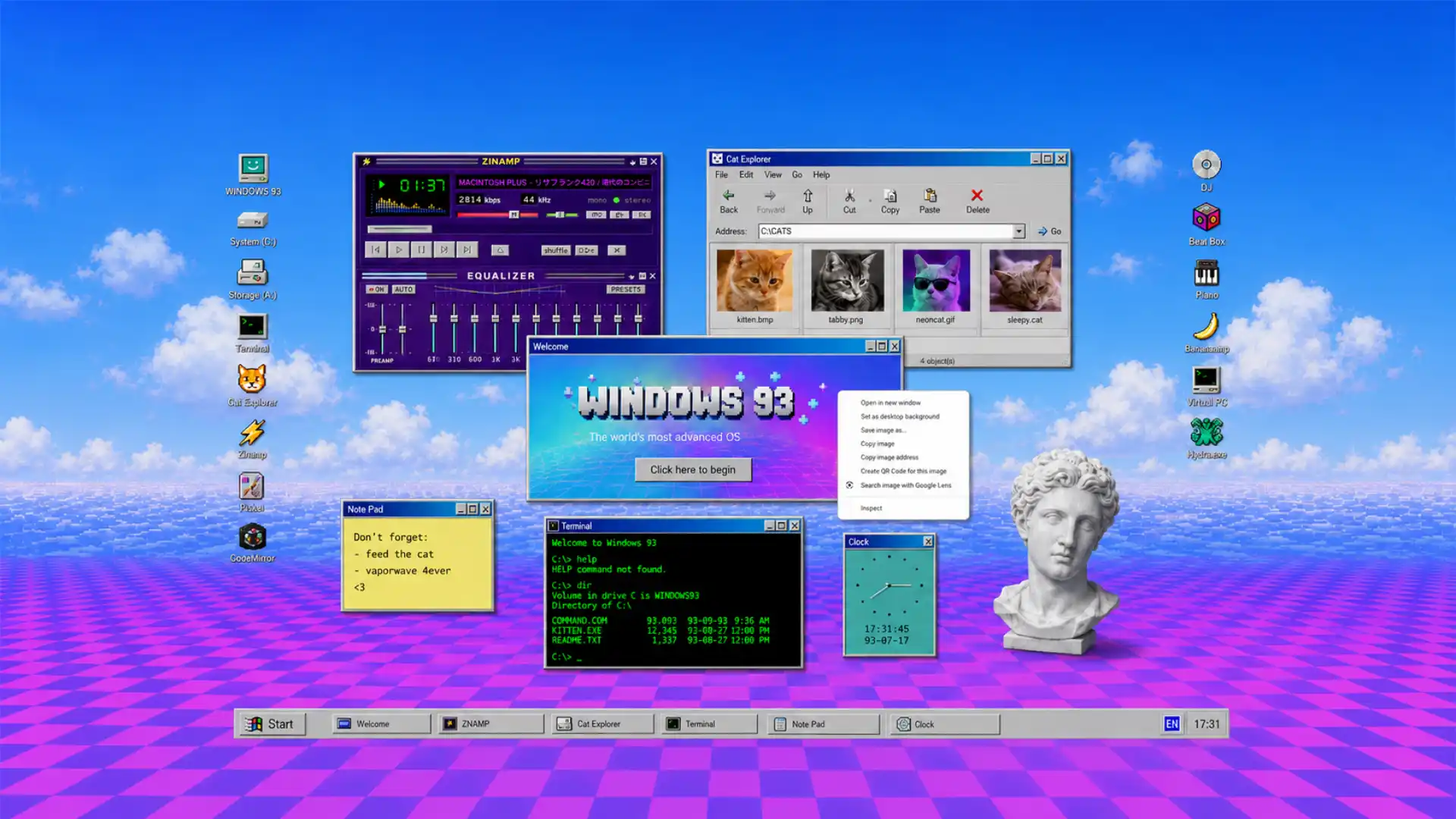
Windows 93 is a fictional operating system that runs entirely in your browser. It looks like a distorted version of an old Windows desktop, complete with icons, folders, pop-up windows, and a Start menu. Instead of normal software, it is filled with strange apps, small games, sound experiments, visual glitches, and internet jokes. It is not a faithful remake of Windows 95. It is a surreal parody of old computers, early web culture, and the chaotic side of digital nostalgia.
Table of Contents
That first minute is the whole reason to open it. Windows 93 does not ask for a sign-up, a tutorial, a workflow, or a clean explanation of what it is for. It gives you a desktop and lets curiosity become the operating system. The proper response is not to search for a useful feature. It is to click the icon with the most suspicious name, drag a window somewhere it does not belong, turn on an effect that ruins the screen, and see whether the site punishes you with a joke or rewards you with another room.
The name is already an excellent lie. Microsoft never made a Windows 93, and the project has always played in that gap between remembered software and imagined software. When it appeared in 2014, contemporary coverage described a browser-based counterfeit operating system full of working oddities, from Cat Explorer to the deeply unnecessary drama of Poney Jockey. Windows 93 was never trying to reconstruct a lost product. It was inventing the version of the past that the internet deserved.
It still matters because it has not frozen into a novelty screenshot. The live project currently identifies itself as version 3.1.3, which is a small but telling fact: this remains a maintained web world rather than a dead page passed around in nostalgia threads. Its newer shape is not a perfect preservation of every old gag, and some famous pieces belong more to earlier versions than to the current desktop. That change is part of the story. Windows 93 has survived because it treats its own past as raw material, not a museum display.
The desktop that refuses to be useful
A normal operating system earns trust by reducing friction. It makes files predictable, menus legible, and errors rare. Windows 93 takes that contract, folds it into a paper airplane, and throws it at your forehead. Friction is the entertainment. It wants you to notice that a desktop is already a strange theatrical object: a tiny office with drawers, buttons, documents, authority figures, trash bins, and a taskbar that insists everything important can fit into a strip at the bottom of a screen.
The project understands the emotional machinery of old Windows better than many earnest retro recreations. It knows that the pleasure is not stored in a specific shade of grey or a pixelated icon alone. The pleasure lives in anticipation. You remember sitting at a machine where every folder might contain a game, a broken installer, a badly named MP3, a half-finished document, or a program that made the screen wobble for no sensible reason. Windows 93 rebuilds that expectation without pretending your childhood computer was orderly or innocent.
Its desktop is packed in the way a teenager’s actual desktop used to be packed. Icons do not whisper. They announce themselves. The names swing from almost credible to openly ridiculous. You are offered software-shaped objects rather than a tidy catalog of services, and each one carries a tiny suggestion that something is hidden behind it. That sense of concealed consequence is hard to design on purpose. Modern interfaces often try to make every action self-explanatory. Windows 93 knows that mystery creates a stronger memory than clarity.
The visual language is borrowed from the era of Windows 95 and its descendants, but it is not worshipful. The familiar boxy windows, beveled controls, small title bars, and low-resolution symbols are there to establish a shared grammar. Then the project abuses that grammar. Recognition becomes a trapdoor. You think you know what a program window is supposed to do. You think a browser icon promises a browser. You think an executable is probably an executable. Windows 93 waits for those assumptions and starts changing the temperature in the room.
That is why calling it merely “retro” misses the point. Retro projects often turn old technology into furniture: a polished beige object for people who want a soft reminder of childhood. Windows 93 is closer to finding a suspicious floppy disk in a drawer and deciding to see what happens. It recreates the unstable social feeling of old computing, not the clean design language of old computing. The difference is enormous. One is decoration. The other is an encounter.
The desktop also restores something that the current web has spent years sanding down: the right to be useless with conviction. Most sites arrive carrying a mission statement. They want to sell, measure, retain, explain, convert, rank, or at least keep you watching. Windows 93 does not need to become your daily tool. It does not pretend that a dancing cursor or an absurd little application will fix your life. It earns attention because it is comfortable being a detour.
That comfort gives the project an edge. A site with no obvious business case can be oddly more honest than one wrapped in the language of personal benefit. Windows 93 makes no serious promise except that it has more inside it than the first screen reveals. The invitation is direct: poke around. You are not a customer progressing through a funnel. You are someone who found a strange machine switched on in an empty room.
There is a slight menace in that invitation, which is also part of the charm. Old software taught users to accept minor danger as the price of discovery. You downloaded things with questionable names. You clicked links because someone on a forum said they were funny. You learned the difference between an error message and a catastrophe by living through both. Windows 93 turns that old ambient anxiety into a cartoon. It lets the desktop look haunted without asking the visitor to install an actual haunted file.
A fake operating system with real instincts
The project works because its parody has real operating-system instincts beneath it. You can move windows. You can layer them. You can keep several things open until the screen turns into a stack of imperfect decisions. Spatial mess is not an accidental by-product here; it is part of the composition. A desktop becomes personal when it remembers where you left things, even when “things” are a fake chat room, a little game, a sound experiment, and a text editor imitating a text editor from another century.
That freedom creates a kind of authorship. Two people can visit Windows 93 and leave with different memories because they opened different doors in a different order. One person remembers a screen effect that made the desktop feel briefly possessed. Another remembers a tiny program that should not have worked but did. Someone else spends ten minutes dragging windows into a ridiculous pile just because the system allows it. The site does not deliver one experience; it supplies an instrument for making small accidents.
The best web toys behave like that. They do not have to be vast. They need a dense enough set of reactions that the user starts forming habits. Windows 93 gives its icons personality through timing, sound, visual texture, and the simple fact that they occupy a pretend computer rather than a conventional webpage. Every window inherits the social weight of a desktop application. It feels more private than a browser tab, even though the entire thing is sitting inside one.
The browser is a strange place to build that feeling. Browser tabs are designed to be interchangeable. You open a page, read or use it, then close it. A web desktop asks for a different posture. It asks you to linger inside an environment. It invites you to see the browser as a room containing a machine rather than a delivery system for isolated documents. Windows 93 is a browser tab that refuses tab behavior. It wants to be a place you inhabit for a while.
That choice looked amusing in 2014, when the web still had plenty of ornate personal sites, experimental Flash-era energy in living memory, and a stronger tolerance for pointless browser toys. It looks sharper now. Current web design is often optimized for short attention, mobile screens, and immediate comprehension. Windows 93 refuses to flatten itself into a card, a feed, or a neat product page. Its stubborn desktop shape becomes a critique without needing to make a speech about design culture.
The parody also succeeds because it never fully settles on one target. It is making fun of Windows, certainly, but it is also making fun of tech confidence, nostalgia, software names, hacker aesthetics, meme culture, interface authority, and the long tradition of pretending a computer knows what it is doing. The joke moves whenever you try to pin it down. An old logo may become a gag. A fake utility may turn into a working toy. A serious-looking dialog box may contain total nonsense.
That instability makes Windows 93 feel closer to a collage than a product. Collage is not random. Good collage depends on placement. A scrap of advertisement, a bit of television, a piece of obsolete interface, and a dumb sound effect become funny because they touch each other in exactly the wrong way. Windows 93 arranges cultural debris with a musician’s ear. It knows when to let a joke land and when to interrupt it with a louder joke.
The project’s credited makers, Jankenpopp and Zombectro, were identified in early coverage as the people behind this surreal imitation of a nonexistent system. That authorship matters because Windows 93 does not feel like a corporate nostalgia exercise assembled from a brand guide. It has the private weirdness of people who actually enjoy the materials they are remixing. The references do not arrive as a checklist of “things from the 1990s.” They arrive as things someone loved, found embarrassing, or wanted to bend until they broke.
There is also generosity in the way the project lets you fail. A normal website treats dead ends as bad design. Windows 93 treats them as atmosphere. A wrong click, a pointless app, or an absurd interaction can still be the point because the project has trained you to enjoy the detour. Nothing needs to justify itself by becoming productive. In a web culture that tracks every second of attention, that is a surprisingly luxurious position.
The joke lands because the windows work
Windows 93 would be thin if it were only a clever screenshot. Plenty of nostalgic web pages can imitate the outer shell of an old computer for a few seconds. The difference is that this one gives the shell enough behavior to become believable. A draggable window changes the stakes. Once you can move it, close it, stack it, minimize it, or make it collide with another piece of nonsense, the interface stops being a picture and starts acting like a small world.
That world has always contained programs that range from parody to playable experiment. Earlier editions became known for items such as Cat Explorer, odd audio tools, small games, a terminal, visual effects, and deliberately warped versions of familiar software categories. The current version has changed the lineup, which is why a visitor should not expect every legend from old screenshots to appear in exactly the same form. The constant is not a fixed app list. It is the urge to make software behave like a prank with a menu bar.
The site’s humor becomes stronger when an application contains a real little bit of craft. A music toy that responds. A game that has rules. A text field that does more than display a joke. A visual effect that changes the whole desktop rather than merely showing an animated GIF. Working behavior gives absurdity weight. A fake browser that opens something, however strange, carries more comic force than a static image of a browser ever could.
The old Cat Explorer reference is revealing. It is funny because it takes a modern browser category and pushes it through a cheap, anxious, counterfeit Windows filter. Yet it also had functional elements, which meant the gag was not only about the name or the icon. It asked the visitor to participate in the joke through ordinary interface behavior. You clicked, navigated, reacted, and gradually realized that the system was willing to meet you halfway.
That willingness is why Windows 93 has lasted longer than a viral one-liner. Most novelty sites offer a single punchline. You see it, grin, send it to one person, and leave. Windows 93 hides its punchlines in an environment. The comedy is distributed across use. You do not consume it in a single scroll. You accumulate it through mishaps, found objects, fake errors, and the particular order in which the desktop decides to reveal itself.
What makes Windows 93 worth opening
| Element | What it does | Why it stays with you |
|---|---|---|
| Fake desktop rules | Lets you move, stack, open, and break the visual order | Turns browsing into physical play |
| Strange app names | Promises familiar software, then bends the promise | Makes every click feel slightly risky |
| Working mini-tools | Gives some jokes actual interaction and depth | Prevents the site from becoming a screenshot |
| Audio and visual interruption | Uses sound, glitches, effects, and abrupt shifts | Creates a memory rather than a clean session |
| Deep-link curiosity | Rewards wandering instead of a prescribed path | Makes the visitor feel like an explorer |
The table is almost too tidy for the project, but that contrast explains its trick. Windows 93 uses recognizable interface pieces as handles. They let you grab hold of the experience before it pulls the floor sideways. Without those handles, the site would be noise. With them, it becomes a comic machine.
The taskbar is one of those handles. It is a tiny piece of visual architecture that tells you where “open” things belong and how activity is supposed to be managed. On an ordinary desktop, it is nearly invisible because its purpose is so familiar. On Windows 93, it becomes a stage prop. A taskbar full of ridiculous windows is funny because it looks like a normal day at work gone morally wrong. The interface gives nonsense administrative weight.
Window chrome matters too. Title bars, close buttons, and resize corners carry old habits with them. You have used those gestures so often that they feel almost bodily. Windows 93 takes advantage of that muscle memory. You close something because you expect closure to restore calm. You minimize something because you assume it will wait politely. The project is funniest when it uses boring computer reflexes as a delivery system for surprise.
There is a small lesson here for anyone building interactive sites. People do not only enjoy content; they enjoy systems that acknowledge their actions. A button that changes state, an object that remembers where it was moved, a sound that follows a click, or a visible consequence for a small choice can make a page feel alive. Windows 93 is not an argument for turning every site into a prank desktop. It is evidence that interaction has emotional texture when it is treated as more than an input field and a submit button.
The site also protects itself from the usual failure of nostalgia: the assumption that more references automatically mean more feeling. Windows 93 has references everywhere, yet it does not rely on recognition alone. You do not need to remember every old program, every early-web meme, every ugly icon, or every abandoned software habit. The experience works even when the reference goes over your head. A weird object remains weird. A surprising response remains surprising. A small game remains playable.
That is why younger visitors can enjoy it without treating it as an archive lesson. They may not have used Windows 95. They may not remember software delivered on a CD, messenger clients with absurd usernames, or a time when installing a media player felt like an adventure. None of that is required. Windows 93 does not gate its humor behind personal history. It uses history as texture, then gives everyone the same invitation to make a mess.
A museum of internet behavior that never became respectable
Windows 93 preserves a kind of web behavior that became unfashionable before it disappeared. It remembers when people made pages because they had an image, a sound, a joke, a weird theory, a collection, or a tiny program they wanted other people to encounter. The old web was full of people building rooms, not merely publishing posts. Those rooms could be ugly, loud, slow, unsearchable, or poorly organized. They could also feel more personal than a perfectly tuned platform.
The project does not romanticize every part of that period. Old internet culture had plenty of bad taste, broken links, hostility, scams, and casually awful behavior. Windows 93 is better understood as an edit of the emotional residue: the silliness, risk, tackiness, excess, and amateur invention. It keeps the electricity and throws away the dial-up bill. You are not asked to return to the past. You are asked to remember that the past was not as tidy as modern nostalgia makes it look.
Its version of the 1990s is also deliberately inaccurate. The project borrows from Windows 95, later desktop habits, early-2000s meme culture, console sounds, web utilities, and various scraps of tech mythology. That temporal confusion is a strength. Windows 93 is not set in 1993. It is set in the collective afterimage of old computing. The date is a fictional label for a mood: late, loud, half-broken, and convinced that software might become anything.
That fictional past allows the project to make a sharper point about branding. Real operating systems tend to market themselves as coherent answers. They promise stability, simplicity, security, and a future that arrives in clean blue gradients. Windows 93 offers the opposite: inconsistency, oddness, visual clutter, and a future that seems to have been assembled from rejected shareware. Its fake brand feels more human because it has no interest in looking trustworthy.
The result resembles the way memory works. You do not remember a specific desktop exactly. You remember a sound from startup, the embarrassment of a bad wallpaper, the thrill of finding a hidden game, the annoying pop-up that would not leave, the folder full of nonsense, the friend who knew a better media player, the accidental installation that changed your browser homepage. Windows 93 collects those sensations without pretending they form a clean historical record.
There is a strong argument that its real subject is not Windows at all. Its real subject is the experience of being a curious user before every digital product became professionally managed. Back then, software often seemed to have a personality because it was visibly imperfect. Menus were ugly. Interfaces contradicted themselves. Applications crashed. Yet the rough edges made people feel they could poke around, customize something, learn a trick, or break a thing without filing a support ticket. Windows 93 brings back the feeling that computers are available for meddling.
That feeling matters because modern computing often hides its machinery. A phone turns complexity into smooth surfaces. A social platform turns your presence into a feed. A cloud service turns files into invisible infrastructure. There are good reasons for that convenience, but the loss is real. When systems become too frictionless, they also become harder to imagine changing. Windows 93 brings knobs, windows, fake drives, and goofy utilities back into view. It gives the user something to grab.
The project’s surrealism makes that point better than a serious manifesto could. A serious manifesto would tell you that software should feel more playful, more inspectable, more open to experimentation. Windows 93 lets you feel the argument in your hands. You drag a window. You encounter a weird tool. You find an effect that changes the visual state of the whole desktop. The theory arrives disguised as messing around.
That disguise is worth protecting. Internet culture is full of “experiences” that announce their importance before they earn it. They explain their concept, list their values, and ask for admiration. Windows 93 does not ask to be admired. It asks to be used badly. That is one reason its personality survives the years. It has enough confidence to let the visitor decide whether the whole thing is funny, annoying, brilliant, exhausting, or all four in ten minutes.
The project also understands that the web used to have a more permissive relationship with embarrassment. People posted too much, animated too much, used too many fonts, and made too many things blink. The dominant style of the current web has trained people to fear looking unsophisticated. Windows 93 is gleefully unsophisticated on purpose. Its confidence comes from refusing the polished taste test. It knows that a site can be ugly in a way that is much more alive than a tasteful page built from safe decisions.
That does not mean it is careless. Beneath the deliberate ugliness is timing, composition, and a clear sense of when a window should interrupt another window. The mess has rhythm. The bad taste has editing. Good chaos has structure, even when it pretends not to. Windows 93 is persuasive because it understands the difference between random noise and a controlled loss of control.
Sys42 and the engineering beneath the mess
The most interesting surprise is that Windows 93 is not only a pile of jokes glued to an old interface. Beneath it sits a serious interest in how browser technology can support desktop-like behavior. The public Sys42 project describes itself as a cleanup of the Windows93 codebase and a toolkit for building interfaces and web desktop applications. The prank has an engine. That fact changes the project from a cult web toy into a small argument about what the browser is capable of holding.
Sys42’s stated ambition is unusually specific. It is not trying to be another general-purpose component collection dressed in fashionable vocabulary. Its documentation talks about desktop-first interfaces, modular JavaScript and CSS utilities, GUI components, responsive use across devices, and a “fantasy OS” model for third-party apps. The important word is desktop. The project is interested in the browser as a place where windows, processes, apps, themes, and visible system behavior can exist together.
That makes Windows 93 more than a parody of old Windows. It becomes a test case for a question that keeps returning to the web: why should a browser page behave only like a page? Browsers have long been able to run games, editors, music tools, communication systems, drawing apps, and elaborate simulations. Yet much of the web still presents those capabilities inside a conventional website shell. Windows 93 throws away the shell and makes the interface itself the subject.
The desktop-first idea is especially interesting because it refuses the usual assumption that a web interface should begin from the smallest phone screen and expand outward. The Sys42 material does not deny responsive use, but it clearly treats desktop-style interaction as its own problem rather than a relic to be squeezed into a mobile layout. A windowed environment asks for room, overlap, and spatial memory. It needs a user to think with position, not only scroll direction.
That is an unfashionable concern, which may be exactly why it is useful. So much contemporary design treats every interface as a sequence: scroll down, tap through, go back, repeat. Desktop interfaces are different. They invite parallel attention. You can leave something open while you inspect something else. You can compare, hide, return, rearrange, and make your own imperfect map of the screen. Windows 93 keeps that messy parallelism alive inside the browser.
The project’s technical seriousness also explains why its humor does not collapse after the opening gag. A fake operating system needs more than a wallpaper and some icons. It needs event handling, state, window behavior, application boundaries, input responses, visual layering, and a way to hold many small pieces together without the whole thing becoming an unusable pile. The more convincing the false system becomes, the funnier its wrongness can be.
There is a useful contrast with many AI-generated interface concepts that circulate online now. Those concepts often look polished in a still image, then disappear when anyone asks how the interaction would work. Windows 93 takes the opposite path. Its visuals are intentionally crude, but the project gains force through behavior. It earns the right to look foolish because it bothered to make things respond. That is a better foundation for digital play than a perfect mockup.
The source project also points toward a bigger, quieter value: code and systems that remain inspectable. Sys42 describes its modules, its approach, its components, and its ambitions in public. Some documentation is incomplete, and the project openly marks itself as a work in progress, but that openness suits the spirit of Windows 93. A strange computer world feels richer when you can see that someone built its plumbing. Mystery in the interface does not require mystery in the craft.
That visible plumbing gives designers and developers a different reason to visit. They may arrive for the absurd desktop, then notice the care required to make a browser behave like a place with its own furniture and rules. Windows 93 will not hand anyone a universal recipe for modern product design, nor should it. Its lesson is more useful than a recipe: take interaction seriously enough that the joke has somewhere to live.
The project also carries a subtle warning. Building an entire environment is harder than building a single page. It is easy to add windows, apps, menus, effects, and themes until the result becomes noise. Windows 93 gets away with excess because excess is part of its premise, but even it relies on a recognizable center. The desktop is the anchor that lets the chaos stay readable. Without that shared frame, the site would become a collection of unrelated tricks.
For the people who enjoy the web as a medium rather than only as an information pipe, this engineering layer is one of the richest parts of the story. A browser desktop may look like a dead-end novelty, yet it asks direct questions about the future of interfaces: what should feel native, what should remain spatial, what should be inspectable, and what forms of play disappear when every product is optimized for immediate clarity? Windows 93 answers none of these questions politely. It answers by opening another window.
What Windows 93 gets right about the browser
The browser has always been more expressive than the average webpage. That gap is not a technical limitation. It is a cultural one. Many sites choose safe patterns because safe patterns are easy to explain, easy to measure, and unlikely to confuse a visitor. Windows 93 takes the opposite risk. It accepts confusion as a form of attention. A visitor who pauses to wonder what an icon does is already more engaged than someone who has skimmed another familiar landing page.
That is not permission for bad design everywhere. A banking site should not behave like a cursed desktop. A medical portal should not hide its important buttons inside a parody dialog box. The lesson is contextual. Not every interface needs more chaos, but many need more character. There is a difference between making people work harder and giving them a feeling that the thing they are using has a point of view.
Windows 93 has a point of view in every corner. It does not need a manifesto panel or a chirpy onboarding message to state it. The point of view arrives through names, shapes, sounds, and interruptions. A tiny choice in a title bar can carry more personality than a page of brand language. The interface speaks before the copy does. That is a rare skill, especially on the web, where many products begin with words because their visual behavior has nothing to say.
The site also understands pacing. It does not deliver all its nonsense in one burst. You discover it through an uneven sequence of small encounters. Some take seconds. Some become rabbit holes. Some may not work the way you expected, which is part of the mood. Pacing turns a collection of gags into a place. A good place has corners, dead ends, familiar routes, and an occasional thing you still cannot explain after returning several times.
This is why screenshots never fully capture Windows 93. A screenshot can show the palette, the icons, the old-school window frames, the clutter, and the strange names. It cannot show the timing of an effect or the low-level pleasure of moving one window over another. The project is lived through interaction, not represented by it. That makes it unusually resilient in a culture that often consumes sites as images before anyone opens them.
It also gives the project a kind of resistance to content extraction. You cannot reduce Windows 93 to a short description without losing the thing that makes it work. “A fictional browser operating system” is accurate, yet it sounds like a category tag. The actual site feels less like a category and more like an argument with a computer. You need to spend a few minutes inside it to understand why the argument is funny.
The current web would benefit from more projects with that resistance. Not more dark patterns. Not more artificial confusion designed to trap attention. More work that cannot be fully understood from a preview image. More pages that reward touching them. More little systems that become clearer, stranger, or warmer when a person stays long enough to form a relationship with their odd rules.
Windows 93 also makes a strong case for treating browser projects as places with weather. Most websites feel climate-controlled. Every button works as expected. Every surface shares the same brand polish. Every message has been checked by legal, product, marketing, and some exhausted person who removed the last strange word from it. Windows 93 has weather because it allows turbulence. Its screen can feel noisy, unstable, playful, annoying, or unexpectedly calm after the wrong application closes.
That weather comes from imperfection. The site does not require every feature to read as a confident, finished service. Some pieces are more polished than others. Some are clearly there because they amused the makers. Some are residues from earlier internet instincts. Unevenness becomes texture when the surrounding work has enough intention. A clean product team might call that inconsistency. A visitor may call it life.
There is a further reason the project feels fresh. It was born before the current flood of machine-made interface imagery, but it already understands the difference between surface novelty and usable weirdness. It does not merely paste vaporwave colors over a generic layout. It turns retro aesthetics into behavior. The old pixels matter because they change how you read the system’s rules. They make a fake error feel plausible, a fake utility feel tempting, and a silly app feel like a discovery.
That is the real achievement. Windows 93 does not bring back an operating system. It brings back the feeling that an interface might contain someone’s peculiar sense of humor. The web has plenty of personality in text and video. It has less personality in the little reactions of its software. Windows 93 reminds visitors that the cursor, the window, the menu, and the sound effect are all places where a human being can leave a fingerprint.
Why the rough edges are part of the deal
Windows 93 is not a service to trust with anything important. It is not meant to replace a real operating system, a work environment, a communications tool, or a storage system. Treating it as a playful public website is the correct frame. You do not need to bring secrets, sensitive data, or a serious task into a fictional desktop built around surprise. The project is better when you give it the same low-stakes attention you would give a strange arcade cabinet.
Its roughness is also a feature, though not every visitor will enjoy it. Some people will find the clutter tiring after a few minutes. Others will dislike the old-web references or the deliberate visual aggression. Some applications and bits of behavior will be more rewarding than others, and the current version may not match the exact set of things that older articles celebrate. Windows 93 does not owe anyone a smooth conversion experience. Its refusal to tidy itself is part of why it still feels distinct.
That refusal has a cost. The project is much easier to love as a discovery than as a daily habit. A tool built for frequent work needs predictability. A strange digital place needs a reason to revisit. Windows 93 chooses replay value over utility. You return because you remember a feeling, a particular effect, an obscure little program, or the urge to show someone else the part that made you laugh.
The best way to approach it is with a few unproductive minutes available. Open it on a desktop or laptop if possible, where the windowed interface has room to misbehave. Do not rush straight toward an explanation. Let the desktop make its case. The right mode is not research mode or productivity mode; it is wandering mode. Let one thing lead to another, and do not worry about finding the “main” feature because the project does not really believe in one.
There is a useful distinction between random clicking and attentive wandering. Random clicking treats every icon as disposable. Attentive wandering notices the site’s habits. It watches the language used in titles. It notices how applications overlap, how sound changes the mood, how certain elements imitate authority, and how the desktop gradually starts feeling less like a page. Windows 93 rewards people who bring both curiosity and a tiny amount of patience.
For designers, the site is worth opening as a reminder that polish is not the same thing as conviction. For developers, it is worth opening as proof that browser interfaces can hold more spatial drama than a stack of components. For artists, it is worth opening because it turns a piece of dead corporate iconography into an eccentric stage. For anyone who simply misses finding strange things online, it is worth opening because it feels found rather than delivered.
The web has become very good at showing people what they already expected to see. Recommendation systems tighten taste into loops. Search results often privilege the answer over the encounter. Social feeds turn discovery into a sequence of familiar formats. Windows 93 arrives from a different tradition. It feels like the kind of thing a friend would send at 1:14 in the morning with no explanation except “open this.”
That is a small kind of magic, but it is real. The web is better when it contains places that do not need to become useful, viral, or legible to everybody. It needs a few corners where bad ideas are allowed to become good experiences through care, rhythm, and a willingness to look foolish. Windows 93 is one of those corners. It is a fake computer that asks you to remember why clicking around used to feel like an event.
A few things people ask before they click
Is Windows 93 an actual operating system? No. It is a browser-based fictional desktop environment that imitates the experience of an operating system through web technology. Its power lies in the performance of being an OS, not in replacing the software on your computer. The distinction matters because it frees the project to be absurd in ways a real operating system could never afford. Its failures are part of the act, not a reason to call technical support.
Do the applications really do anything? Many of them do, though not always in the conventional sense of “useful.” The project mixes genuine interaction, small games, playful utilities, audio and visual experiments, and bits whose entire purpose is to derail your expectations. The site works best when you stop demanding a sensible outcome from every click. You are not auditing software. You are exploring a digital sketchbook that happens to wear a desktop costume.
Is it only for people who remember old Windows? No. Familiarity adds extra layers, but the humor is not locked behind nostalgia. Someone who never touched Windows 95 can still understand the comic pleasure of a fake system taking itself too seriously, then betraying its own rules. The desktop is readable because the basic visual language still lives in modern computing. Buttons, windows, folders, menus, alerts, and taskbars remain cultural objects even when their exact styles have changed.
What should you open first? Start with the obvious things, then follow whatever feels least sensible. The goal is not to speedrun the site or find the official “best” application. It is to notice when a familiar pattern bends into something stranger. Windows 93 becomes memorable the moment you stop using it correctly.
Author:
Jan Bielik
CEO & Founder of Webiano Digital & Marketing Agency
This article is an original analysis supported by the sources cited below
WINDOWS93
The live browser desktop, consulted for its present runtime and version information.
Sys42 on GitHub
The project’s public codebase and documentation, which describes its Windows93 origins and desktop-interface approach.
Windows 93 is your new favorite operating system
Contemporary 2014 coverage of the project’s initial public presence, including its surreal desktop behavior and notable applications.
WINDOWS 93, A Surreal Online Version of a Nonexistent Computer Operating System
Contemporary account naming Jankenpopp and Zombectro as the project’s creators and describing its Windows 95-inspired premise.
| Citing this article? Brief excerpts are welcome. Please credit Webiano.digital, name the author where stated, and include a link to https://webiano.digital and to this original article. Full or substantial republication requires prior written permission. Read our Copyright and Content Use Policy. |
This article was prepared with the assistance of artificial intelligence tools. The content underwent expert human review, and Webiano Digital & Marketing Agency assumes editorial responsibility for its final version and publication.














