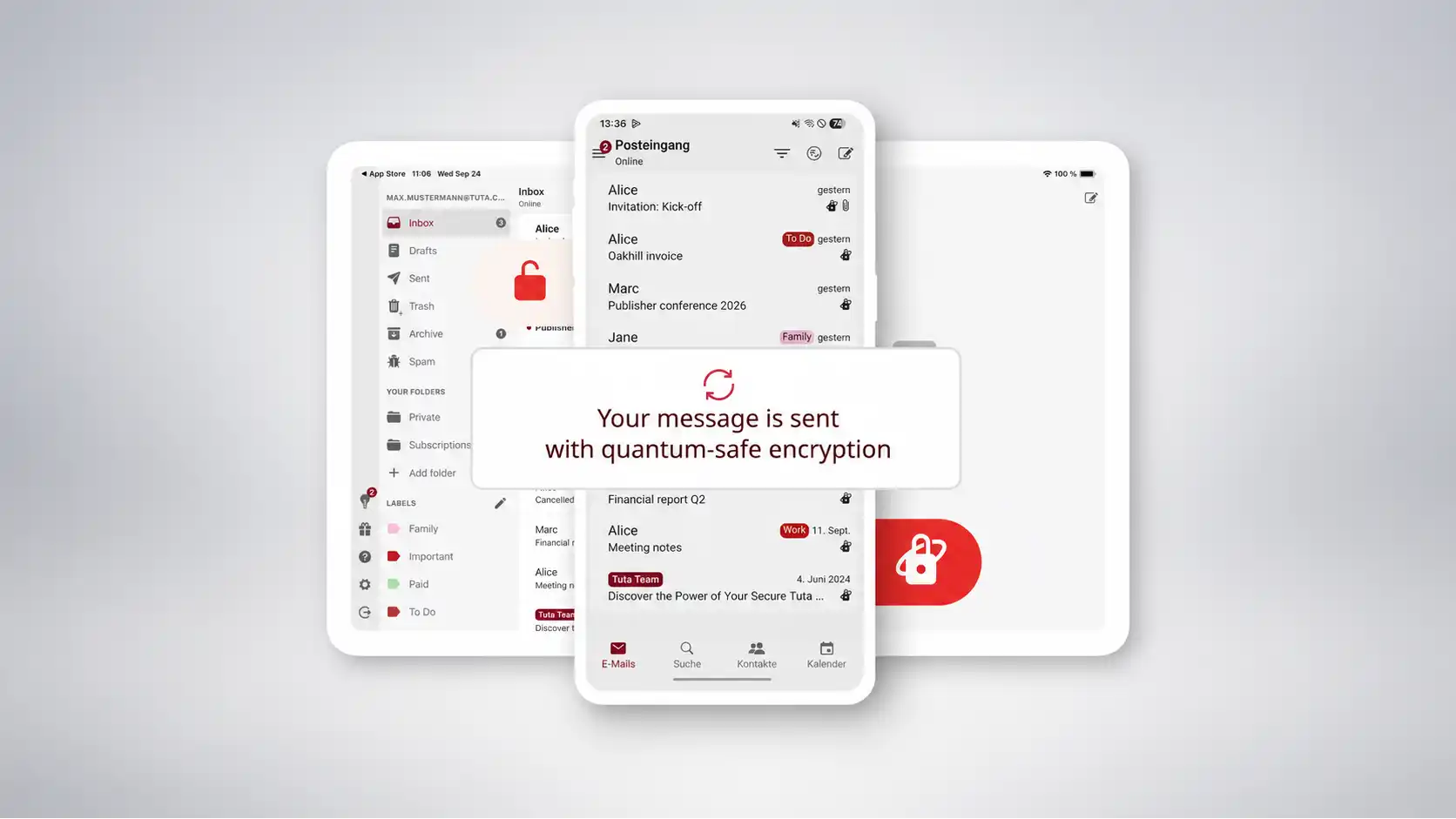
Tuta is interesting because it treats ordinary email as a leak by default. Not a dramatic leak, not a cinematic one, but the quiet kind that lives in subject lines, calendar reminders, address books, search indexes, push notifications, and the small pieces of metadata people stop noticing. Most secure email services ask the user to behave differently. Tuta tries to make the service behave differently first. It encrypts mail, calendars and contacts end-to-end, says it stores user data encrypted on its servers, and builds features around the idea that even the provider should see as little as possible.
Table of Contents
Calling any email provider “the most private in the world” is risky. Privacy is not a trophy with one permanent winner. It depends on threat model, law, payment trail, device security, contacts, habits, and the plain old reality that email still has to talk to other mail servers. But Tuta earns attention because it pushes privacy into places where most users never look. It does not just encrypt message bodies between its own users. Its security page says Tuta encrypts more data than PGP-style systems, including subject lines, contacts and calendars, and its pricing page says all data in Tuta is encrypted with zero access to the mailbox.
The first surprise is how ordinary it looks. Tuta is not a dark-web-looking tool for people who enjoy suffering for privacy. It presents itself as email, calendar and contacts, with web, mobile and desktop apps, free accounts and paid plans. The difference sits underneath the surface: no advertising business model, no server-side search through readable mail, no IMAP because that would require a weaker security trade-off, and open-source clients for people who want the code to be inspectable. Tuta’s homepage puts the whole pitch into three words: secure, green, ad-free.
The second surprise is timing. Tuta did not wait for quantum computers to become a consumer panic story before shipping post-quantum protection. In March 2024 it announced TutaCrypt, a hybrid protocol combining post-quantum and classical algorithms, and its encryption page says it was the first email provider to implement a protocol for post-quantum secure encryption. That claim matters because encrypted email has a long memory problem. Messages captured now may stay valuable for years, which is why the “harvest now, decrypt later” threat keeps appearing in serious security discussions.
There is also a stubborn European quality to the project. Tuta is built in Germany, says its servers are based in German ISO 27001-certified data centers, and publishes a transparency report with German court-order data. That does not magically solve every legal or technical concern. It does make the service feel different from the standard Silicon Valley privacy pitch, where privacy is often a setting, a policy page, or a temporary marketing angle. Tuta’s identity is closer to a small infrastructure bet: email should work without becoming an advertising sensor.
The email service that refuses the obvious business model
The cleanest way to understand Tuta is to look at what it refuses. It refuses advertising, refuses to scan readable mail for profit, refuses IMAP support because it would force decrypted data into a different model, and refuses the assumption that convenience should always win. This makes the product less universally frictionless than Gmail or Outlook, but that friction is the point. Privacy products usually fail when they copy the comfort of the old system while keeping the old system’s incentives. Tuta is more honest than that. It changes the product shape.
That refusal begins with the inbox itself. The mailbox is not treated as a searchable pile of corporate intelligence. Tuta says it does not search through user data on the server because it is encrypted there. Instead, it builds an encrypted search index locally on the user’s device or inside the browser, letting people search mail while keeping the server away from readable content. That detail may sound small, but it captures the whole product philosophy: the feature still exists, but the data path changes.
Search is where many privacy tools quietly give up. People want to find an old attachment, a phrase in a thread, a sender, a subject line, or a calendar detail without learning a new ritual. A provider that encrypts everything but makes search useless will lose normal users. A provider that keeps search convenient by reading everything on the server has not really changed the underlying bargain. Tuta’s local search-index approach is one of those boring design choices that tells you the product was built by people arguing with the problem rather than decorating it.
The refusal also appears in Tuta’s lack of IMAP. For many email power users, no IMAP sounds like damage before it sounds like protection. IMAP is the bridge that lets mail apps pull email from a server. It is old, expected, and useful. Tuta’s position is that IMAP would only work by sending decrypted data to a device in a way that weakens the security model, so it built its own open-source desktop clients instead. You may disagree with that trade-off. You may need IMAP for a workflow Tuta does not fit. But at least the choice has a clear reason.
This is where Tuta becomes a Web Radar object rather than just another encrypted email recommendation. The site is a public argument about product boundaries. Most web services grow by adding compatibility. Tuta grows by saying some compatibility is too expensive if the price is privacy. It is not a maximalist app in the usual productivity sense. It is maximalist about what the provider should not know. That is rarer than another nice-looking inbox.
The ad-free model is less romantic than it sounds, but more important. A private email service has to make money without converting attention into surveillance. Tuta has a free plan and paid individual and business plans, with paid tiers adding storage, addresses, custom domains, support and team features. The pricing page lists a 1 GB free plan, 20 GB on Revolutionary, 500 GB on Legend, extra addresses on paid plans, and business-like features such as custom domains and shared mailboxes. That is a normal subscription model attached to an unusually strict data model.
The free tier matters because privacy cannot remain a luxury texture for people with spare budget. Tuta’s “forever free” positioning is part mission, part funnel, and part practical internet politics. A service like this needs paid users to survive, but the free account makes the switch psychologically smaller. It lets a curious user try encrypted email without committing a domain migration, a family account, or a business move. The web needs more privacy tools that allow experimentation before conversion.
Tuta’s paid plans also reveal its intended audience. The custom-domain features, alias addresses, catch-all support, calendar sharing and business plans show that Tuta is not only chasing activists and cryptography hobbyists. It wants families, freelancers, clinics, NGOs, schools, journalists, and small companies that need email to look professional without handing their entire communication archive to an advertising company. The homepage explicitly lists business, medical, personal, activists and journalists among its use cases.
The business case is more interesting than it first appears. A company inbox is not just correspondence; it is contracts, HR disputes, invoices, strategy, legal panic, hiring conversations and private customer data. Businesses often accept mainstream email because the tools are familiar and procurement likes safe names. Tuta offers a different kind of safety: less readable data sitting on someone else’s server. That does not remove compliance work, endpoint risk or human error. It changes the default exposure.
There is a cultural point here too. Email became boring because it became infrastructure, and infrastructure tends to disappear until it breaks. Tuta makes email visible again. It reminds users that an inbox is not neutral. Someone runs it. Someone stores it. Someone writes the search index. Someone designs the notification system. Someone decides whether the business survives on subscriptions or surveillance. The site is worth opening because it turns those invisible choices into product features.
What Tuta encrypts that other services often leave exposed
The strongest part of Tuta’s pitch is not that it encrypts email. The strongest part is how aggressively it expands the definition of what deserves encryption. Tuta’s security page says it does not use PGP and instead uses an implementation that encrypts more data, including subject lines, contacts and calendars. It also says email, calendars and contacts are encrypted by default, with servers storing encrypted data and decryption keys available only to users.
Subject lines are the perfect example of boring danger. People put the real message in the subject line all the time. “Biopsy results,” “Divorce papers,” “Invoice overdue,” “Union meeting,” “Passport scan,” “Complaint against manager,” “Interview notes,” “Therapist appointment,” “Whistleblower contact.” A system that encrypts the body but leaves the subject readable still leaks a lot. Tuta’s decision to encrypt subject lines is not a technical flourish. It protects the part of email that people treat casually because the interface trained them to.
Calendar encryption may be even more revealing. A calendar often knows where you will be before your friends do. It knows doctors, lawyers, job interviews, school meetings, travel, fertility appointments, political events, support groups, date nights, religious services and private routines. Tuta Calendar is presented as zero-knowledge and quantum-safe, with events, invitations, shared calendars and notifications encrypted end-to-end. It even says reminders are protected so third parties cannot track them.
That calendar detail is why Tuta feels like more than an inbox. The service is trying to protect the daily coordination layer of a person’s life. Email is where people talk. Calendar is where they move. Contacts are who they know. Together, those three categories describe a human network better than many social profiles do. A privacy service that protects the email body but ignores schedules and address books leaves a large shadow of the user intact. Tuta appears to understand that.
Contacts deserve the same attention. An encrypted address book is not just a feature for neat people. Your contact list may expose activists, clients, medical specialists, lawyers, sources, family ties, financial advisors, organizers, romantic partners and every loose thread in your social graph. Tuta’s own materials describe encrypted contacts and an encrypted address book, and its GitHub repository describes the service as letting users encrypt emails, contacts and calendar entries across devices.
The push-notification claim is also worth noticing. Notifications are a privacy leak disguised as convenience. On many services, the operating system or notification pipeline may see enough to infer what is happening. Tuta’s encryption page says it never sends unencrypted data via notifications and never allows unencrypted data to be stored on the device. Its calendar page also says reminders are kept hidden from the phone’s operating system so Google or Apple cannot see calendar events.
Where the privacy is actually visible
| Area | What Tuta tries to protect | Why it matters |
|---|---|---|
| Email body | Message content | The obvious private conversation |
| Subject line | The headline of the message | Often reveals the sensitive part |
| Contacts | Address book data | Exposes relationships and networks |
| Calendar | Events, sharing, reminders | Reveals movement, plans and routines |
| Search | Local encrypted index | Keeps search away from readable server data |
| Clients | Open-source app code | Lets outsiders inspect the software model |
The table is small because the product idea is small in the best sense: encrypt more of the ordinary stuff. Tuta is not compelling because every feature sounds exotic. It is compelling because the protected areas are familiar. The private data was hiding in plain sight.
The local search-index idea deserves another pass because it has good product taste. Privacy software often punishes the user with missing basics and then calls that discipline. Tuta’s approach is less self-righteous. It keeps the feature but moves the computation. If the server cannot read the mailbox, the server should not be the place doing the reading. This creates different constraints, but it avoids the lazy answer: “secure means inconvenient.”
The external-recipient flow is another practical compromise. Email cannot become private by pretending everyone already uses the same encrypted provider. Tuta lets users send end-to-end encrypted messages to people outside Tuta through a shared password. The recipient opens the message through a secure flow and can reply encrypted. This is not as effortless as sending a normal email to anyone, but it bridges the real world. The web rarely changes all at once; it changes through awkward bridges that become less awkward over time.
This is where Tuta’s choice not to use PGP becomes important. PGP has history, credibility and a reputation among technical users, but it also carries baggage around usability and metadata. Tuta says it uses a different approach because it wants to encrypt more data than PGP-style email typically protects. That puts Tuta in an interesting position: it is privacy-friendly, but not nostalgic. It is not trying to make ordinary people become old-school encryption users. It is trying to make encryption disappear into the app.
The danger with invisible encryption is trust. When encryption becomes automatic, most users cannot tell whether the promise is real. Tuta answers this partly through open-source clients, partly through published documentation, and partly through its transparency report. None of those eliminate the need for trust. They make trust more inspectable. That is the realistic goal for almost every privacy product on the web. You rarely remove trust completely; you make abuse harder to hide.
Tuta’s transparency report is unusually concrete for a consumer-facing service. The report says it is updated every six months and includes orders by German courts as well as a warrant canary. The same page says individual mailboxes are only released with a valid German court order, and encrypted mailbox data cannot be decrypted by Tuta. For July 1 to December 31, 2025, it lists requests for inventory data, real-time traffic data, stored content data and real-time content data, with releases in some categories after German court orders.
A transparency report is not a magic shield. It does not stop legal requests, prevent targeted surveillance, or make every user anonymous. It does something more modest and useful: it gives the public a recurring view into the pressure placed on the provider. That matters for a service built on privacy claims. If a company says it protects users but hides every legal interaction behind vague statements, the user is left with branding. Tuta at least offers numbers and process.
The German jurisdiction angle is easy to oversell, so it should be handled carefully. Germany and the EU have strong data-protection frameworks compared with many markets, but law is not encryption. A court order can still matter. Metadata needed for email delivery can still exist. Users can still expose themselves through devices, recipients, backups, payment methods or weak passwords. Tuta’s advantage is not that geography turns privacy into certainty. The advantage is a stack of choices: encryption design, local search, open-source clients, subscription funding, German infrastructure and public reporting.
That stack is why the site lands differently from a typical “secure email” landing page. Tuta does not only promise safety; it shows the shape of the safety. You can see where the compromises are. No IMAP. Shared passwords for outside recipients. Paid tiers for heavier use. Metadata limits because email delivery still needs addresses. An honest privacy tool should make its edges visible. Tuta’s edges are part of its identity.
Post-quantum email without the sci-fi costume
Post-quantum cryptography usually arrives wrapped in bad futurism. Tuta makes it feel like maintenance. That is the correct tone. The point is not that a quantum computer is about to read your weekend plans tomorrow morning. The point is that encrypted archives may be captured now and decrypted later if algorithms age badly. If a message needs to remain private for years, the future becomes part of the threat model. Tuta’s March 2024 TutaCrypt launch speaks directly to that problem.
TutaCrypt uses a hybrid model. Tuta described it as combining a post-quantum key encapsulation mechanism, CRYSTALS-Kyber, with an Elliptic-Curve Diffie-Hellman key exchange using x25519. Its blog post says new Tuta Mail accounts generated after the release would use quantum-safe algorithms, while rollout to existing users would happen in steps. The encryption page says that since March 2024 Tuta has been rolling out this protection to accounts, using a hybrid approach that combines proven encryption algorithms with post-quantum secure algorithms.
That hybrid approach is sensible because cryptographic migration is rarely clean. A provider does not get to declare the old world over and move everyone instantly. Existing accounts have keys. Apps need updates. Protocols need testing. Users need compatibility. New algorithms need confidence. A hybrid design hedges the move by combining classical and post-quantum components rather than betting the whole service on one fresh mechanism. That is not glamorous, but secure infrastructure is mostly ungorgeous work done early.
The claim that Tuta was first matters less as a medal than as a sign of seriousness. Most consumer email providers barely explain encryption beyond a lock icon. Tuta publishes a protocol name, a rollout date, algorithm details and future plans. Its announcement says TutaCrypt replaces RSA-2048 for new accounts with a quantum-safe hybrid encryption protocol combining CRYSTALS-Kyber and x25519. Its security page says RSA has been replaced with ECDH x25519 and Kyber-1024 to release quantum-safe cryptography to all Tuta users.
There is a good editorial lesson here. The best privacy products do not ask users to become cryptographers, but they should still respect the people who are cryptographers. Tuta’s public explanation is technical enough to be inspectable without making the whole product hostile to normal readers. That balance is hard. If a privacy company hides the details, experts get suspicious. If it only speaks to experts, normal users leave. Tuta’s web presence tries to stand in the middle.
Post-quantum protection also changes the emotional pitch. Traditional privacy marketing often focuses on today’s attacker: advertisers, employers, platforms, data brokers, governments, bad Wi-Fi, hacked servers. Post-quantum thinking adds a delayed attacker. It asks whether your encrypted material will still be safe when the tools used to attack it become stronger. That sounds abstract until you think about medical records, source communications, legal disputes, political activity or family secrets. Some mail ages into irrelevance. Some mail ages into evidence.
The strongest argument against caring is that most users have more immediate problems. A stolen phone, reused password, phishing link or compromised recipient can ruin privacy long before quantum computing matters. That is true. It does not make TutaCrypt pointless. It means post-quantum encryption should not be the only reason to pick the service. It is one layer in a product that also needs good account security, two-factor authentication, careful recovery, trustworthy apps, and habits that do not leak everything elsewhere. Tuta supports 2FA, including TOTP and U2F, across its clients according to its plan details.
The future-facing work also says something about Tuta’s scale. This is not a giant company casually assigning a cryptography team to a speculative feature for public relations. Tuta is a narrower product with a narrower promise, so the post-quantum work feels central to its identity. The 2024 announcement says the company is working with the University of Wuppertal and references a broader PQMail research path toward stronger future properties. That makes Tuta feel less like an app with encryption and more like an encryption project that decided email was the most stubborn place to start.
A skeptical reader should still separate claims from guarantees. Post-quantum does not mean invincible, finished or immune to implementation mistakes. It means the provider is moving toward algorithms meant to resist quantum attacks, within a protocol that must still be tested, deployed, maintained and audited in real-world software. Tuta’s open-source posture matters here. The GitHub repository exposes the client code and lists the project under GPL-3.0, while Tuta’s open-source page says all clients are published for Windows, macOS, Linux, Android, iOS and web.
The open-source angle is not decoration. For an encrypted service, the client is where trust becomes practical. If encryption happens on the user’s device, the user needs confidence that the app is doing what it claims. Open source does not mean every line has been reviewed by the perfect expert. It means the code is available for inspection, forks, bug reports, reproducible scrutiny and public pressure. Closed-source privacy tools ask users to believe. Open-source privacy tools at least let belief be challenged.
Tuta says its apps were audited by SySS GmbH before public release and that the experts were not able to hack into the system or retrieve encrypted data. That is a useful claim, but a past audit is not permanent proof. Software changes. Attack methods change. Dependencies change. A real privacy product must keep earning trust. Tuta’s public code, active GitHub releases, security documentation and transparency report form a better trust pattern than a single badge. The point is repeated exposure, not one ceremonial audit.
The post-quantum work also gives Tuta a better story than “we are like Gmail but private.” It is not like Gmail. It does less of some things, refuses some integrations, and pushes harder on confidentiality. That makes it less comfortable for users who treat email as a universal productivity operating system. It makes it more interesting for users who think the inbox has become too valuable to leave readable.
The design is quiet because the argument is loud
Open Tuta’s site and you do not get the feeling of a cyberpunk bunker. You get a clean, slightly earnest European privacy brand with bright illustrations, simple product pages and a lot of confidence. That matters because privacy tools often make themselves socially expensive. They look suspicious, complicated or joyless. Tuta tries to look normal. The radical part is not the interface mood. The radical part is the business and encryption model underneath.
This is the right kind of camouflage. A private email service should not require users to announce that they are the kind of person who uses private email. The more normal the product feels, the easier it becomes to recommend to family, colleagues, schools, small teams and non-technical people. The best version of Tuta is not the one used only by journalists and activists. It is the one used by someone who simply does not want their calendar and inbox turned into raw material.
The name change from Tutanota to Tuta helped. Tutanota had charm, but it sounded like a tool you had to explain twice. Tuta is shorter, easier to say, easier to put on a domain, and less tied to the older encrypted-email niche. The company’s own milestone page says it rebranded from Tutanota to Tuta in 2023, after launching Tutanota in 2014 as a fully end-to-end encrypted email service. The shorter name makes the project feel less like a specialist app and more like a consumer service with a point of view.
The site’s “Turn ON privacy” framing is a little slogan-heavy, but it lands because the product backs it with choices. Slogans are cheap when the service still monetizes the user in the usual way. Here, the line points toward encrypted mail, encrypted calendars, open-source clients, renewable energy claims and no ads. Tuta’s homepage says it is secure, green and ad-free, and its team page says the service is run completely on renewable energy while offering discounts to nonprofits and schools.
The renewable-energy detail could look like a bolt-on ethical badge. In Tuta’s case, it fits the broader anti-extraction posture. The company is not only saying “we will not read your mail.” It is trying to position the whole service against the dominant pattern of big platforms: attention extraction, data extraction, infrastructure opacity and environmental externalization. You do not need to buy the entire moral package to see the coherence. It is a privacy service with an institutional personality.
The interface promise is also restrained. Tuta is not trying to become the everything app. Mail, calendar, contacts and future encrypted storage are adjacent enough to make sense. They are all personal-information containers. The product line feels like it is growing along a privacy graph rather than a growth-team spreadsheet. Tuta Calendar is a good example because it does not add a flashy new category; it protects one of the most intimate categories people already use every day.
The calendar page has a revealing claim: event reminders are kept hidden from the phone’s operating system so that Google or Apple cannot see the events. That is the kind of feature mainstream users rarely ask for because they do not know the leak exists. A good privacy product sometimes has to protect against leaks users cannot name. The danger is sounding paranoid. Tuta mostly avoids that by tying the claim to plain examples: events, invitations, shared calendars, notifications, mobile apps, desktop clients.
The mobile story matters because privacy tools die on phones. People will not keep a secure service if it falls apart on the device they use all day. Tuta offers Android and iOS apps, desktop clients for Windows, macOS and Linux, and a web client. It also emphasizes F-Droid availability for Android users who avoid Google’s app ecosystem, and its open-source page says it was the first open-source email app available on F-Droid. That is a very specific signal to privacy-aware Android users.
F-Droid support is more than distribution trivia. For some users, downloading a privacy app through Google Play already feels like a compromise. Offering an F-Droid route says Tuta understands the people who care about the whole dependency chain. Most users will still use the App Store or Play Store. The point is that Tuta leaves a door open for the stricter crowd without making the mainstream door unusable.
The GitHub repository gives the project another kind of texture. A public repo makes the product feel less like a black-box service and more like a living piece of web infrastructure. The repo describes Tuta as an email service focused on security and privacy that lets users encrypt emails, contacts and calendar entries on all devices. It also shows active releases, development documentation and GPL-3.0 licensing. A normal user may never open it. The fact that it exists still changes the trust equation.
There is also a small joy in seeing privacy treated as product craft rather than moral lecture. Tuta’s best pages explain choices through features. No server-side search through readable data, so local encrypted search. No IMAP, so open-source desktop clients. External recipients do not use Tuta, so shared-password encrypted exchange. Calendar reminders leak data, so encrypted reminders. This is privacy made visible as design, not just policy.
The product is not frictionless. A privacy product that claims zero friction is usually hiding the friction somewhere else. Tuta users may miss IMAP, certain third-party clients, familiar Gmail-style integrations, or the broad ecosystem around Google Workspace and Microsoft 365. Businesses may need training and migration planning. Families may need to explain shared passwords to relatives. The trade-off is clear: you give up some ecosystem comfort to reduce how much the provider can know.
This clarity makes Tuta easier to judge. It is not a universal replacement for every email user. It is a strong candidate for people who want private personal email, custom-domain email without an ad platform underneath, secure communication for small organizations, or a privacy-first calendar that does not treat life logistics as readable cloud data. It is probably a poor fit for someone whose entire workflow depends on conventional mail clients through IMAP and deep third-party integration.
That honest limitation strengthens the recommendation. The web is full of tools that pretend to be for everyone because “everyone” sounds bigger in a pitch deck. Tuta feels narrower and sharper. It asks a more useful question: which parts of modern email are you willing to change to make the provider less powerful? If the answer is “none,” Tuta will feel restrictive. If the answer is “quite a lot,” it becomes one of the more interesting services to test.
The privacy claim is strongest when it admits the limits
The user phrase “the most privacy email in the world” points toward a real feeling. Tuta does look like one of the most privacy-serious email services available to ordinary users. But a responsible article should not turn that into an absolute ranking. There is no universal privacy scoreboard. Proton Mail, Mailbox.org, Posteo, StartMail and self-hosted setups all make different trade-offs. Tuta’s strongest claim is narrower and more defensible: it encrypts unusually much by default and designs around keeping the provider away from user data.
Email itself sets hard limits. A message sent to a normal outside email address cannot become magically private once it leaves the encrypted environment. Tuta can protect communication between Tuta users and can use shared-password flows for external recipients, but the wider email system still depends on addressing, routing and recipient-side behavior. Its security page acknowledges that email addresses of senders and recipients are metadata needed by the protocol to deliver mail. That one line is worth more than a page of overconfident marketing.
Metadata is the stubborn ghost in email privacy. Even when the words are hidden, the social pattern may remain partly visible. Who contacted whom, when, and through what address may matter as much as content in some situations. Tuta reduces exposure in areas many providers leave open, such as subject lines, contacts, calendars and search. It does not repeal the architecture of email. People with extreme threat models need to understand that difference.
The provider’s legal environment is another limit. Tuta’s transparency report is useful because it shows that law-enforcement pressure exists. The report says Tuta only releases individual mailboxes with a valid German court order, and that encrypted mailbox data cannot be decrypted by Tuta. It also lists cases where inventory data, traffic data and stored encrypted content data were requested or released. A user should read that as neither scary nor comforting by default. It is the reality of running an email service in a legal system.
Encrypted stored content is not the same as readable stored content. That distinction is central to Tuta’s value. If a provider receives a lawful order for data but only has ciphertext for many categories, the order produces less. That is the practical power of end-to-end encryption. It does not stop every request. It changes what can be produced. For users who want less readable material sitting inside corporate infrastructure, that difference is enormous.
Device security remains the unglamorous weak point. If someone controls your phone, laptop or browser, the best mailbox encryption may not save you. Tuta’s model protects data on servers and in transit across its encrypted flows, but users still need strong passwords, two-factor authentication, safe recovery practices, clean devices, careful browser extensions and sane habits around attachments. This is true for every private email provider. The app cannot protect a secret after the user copies it into an unsafe place.
Recipient behavior is another weak point. Private email is a two-party dance performed on a floor built by many strangers. You can send an encrypted message to a recipient, but the recipient can screenshot it, forward it, download it, print it, paste it into Slack, or store it in an unsafe mailbox if the flow allows. Tuta improves the sender’s side of the exchange and offers encrypted external replies through shared passwords. It cannot make every human in the chain careful.
The no-IMAP decision also has a cost. Users who depend on Apple Mail, Thunderbird workflows, command-line mail tools or company archiving systems may hit a wall. Tuta’s desktop clients are the official route. That is good for the security model, but it narrows flexibility. Some users will see that as a reasonable boundary. Others will see it as a deal-breaker. Privacy products should be allowed to have deal-breakers; they are often where the real philosophy lives.
Import and migration deserve a practical note. Changing email providers is not like changing a note-taking app. Addresses are identity. Old accounts are recovery channels. Newsletters, banks, tax systems, schools, doctors, domains and two-factor flows may all point to the current inbox. Tuta offers import features on paid plans through desktop clients according to its pricing page, but the human work of migration remains. A privacy switch is part software, part life admin.
The best use case may be gradual. A person can start with a free Tuta address for sensitive accounts, personal correspondence, activist work, client intake or family communication before moving a whole domain. A freelancer can test custom-domain behavior on a paid plan. A small nonprofit can trial team workflows. A privacy switch does not have to be dramatic to be useful. Sometimes the right move is to protect the accounts that matter most first.
This is also where Tuta’s free plan earns its place. It lowers the cost of curiosity. People can see whether the interface feels comfortable, whether calendar workflows fit, whether contacts sync as expected, whether external encrypted messages confuse recipients, and whether the missing IMAP support matters in real life. Privacy claims become much easier to evaluate once the tool is inside the user’s actual day.
Tuta’s marketing sometimes calls itself the world’s most secure email service. As an editorial judgment, the safer claim is that Tuta is among the most aggressive mainstream providers in what it encrypts by default. The evidence is visible: end-to-end encrypted mailbox, subject lines, contacts, calendar, encrypted reminders, local search, open-source clients, post-quantum rollout, German-hosted servers and a transparency report. That is enough to make the service worth opening without pretending the privacy debate is settled.
Who should open Tuta first
Tuta is easiest to recommend to people who feel a quiet disgust toward normal email but still need normal email. That includes people who do not want their inbox used for ad targeting, people who dislike the idea of readable cloud archives, and people who want a private calendar without self-hosting. They may not be experts. They may not know PGP from SMTP. They just know that a lifetime of messages should not be sitting around as someone else’s business asset.
Journalists and sources are an obvious audience, but not the only one. A journalist’s inbox can reveal leads, identities, drafts, legal threats and off-record exchanges. Tuta’s encryption model, external password-protected messages and reduced provider access make it relevant. But journalists with high-risk sources may need more than email: secure messengers, operational security, burner devices, legal advice and careful metadata handling. Tuta is useful infrastructure, not a full safety plan.
Activists are another fit. Organizing work produces sensitive calendars, contact lists, donor records, strategy threads and meeting invitations. A tool that encrypts calendar data and contacts, not just message text, fits that reality better than a body-only encrypted mailbox. Tuta’s own homepage lists activists as a use case and describes “privacy, anonymity, security” in one place. Again, the strongest use is probably combined with secure devices, careful group norms and limited forwarding.
Small medical, legal and consulting teams should at least look. Their email contains the kind of private detail that feels mundane until it leaks. Tuta positions itself for medical and business use and mentions GDPR-compliant end-to-end encrypted communication on its homepage. It also offers business plans, custom domains and shared mailbox/calendar features. A clinic or law office still needs proper compliance review; Tuta does not replace professional obligations. It does offer a different data posture from ad-funded mail.
Freelancers with custom domains are another underrated audience. A solo designer, developer, consultant, therapist, writer or advisor may not need a heavy enterprise suite. They do need a professional address, reliable mail, calendar coordination and control over the inbox. Tuta’s paid plans include custom domains, alias addresses and catch-all features. For people who want privacy without self-hosting mail, that combination is attractive.
Families are a surprisingly strong use case too. Family inboxes contain school documents, travel papers, medical appointments, financial forms, passwords people should not email but do, and private conflict. Tuta’s family option on paid plans and shared calendars point toward households that want less exposure without building their own infrastructure. The calendar side may be more persuasive than the mail side for many families, because schedules are where daily privacy leaks become obvious.
Developers and open-source users will appreciate the project for different reasons. The GPL-3.0 client code, GitHub repository, F-Droid support and local build documentation give technical users something to inspect and argue with. That does not mean Tuta is perfect for every developer. Some will dislike the lack of IMAP or the service architecture. But a privacy project with public code invites a better kind of criticism than a closed provider with glossy claims.
People leaving Google or Microsoft should expect a mindset shift. The mainstream suites are powerful because they connect everything. Tuta’s power comes from disconnecting the provider from your readable data. That means fewer ecosystem tentacles. It also means the product feels calmer. You are not joining a giant productivity universe. You are choosing a more private container for communication and scheduling.
There are also people who should not switch blindly. If your company relies on complex mail routing, compliance archiving, third-party client access, shared delegated inbox patterns or deep office-suite integration, test before moving. Privacy-first architecture changes workflows. Tuta’s strengths are real, but they do not erase operational needs. A serious organization should pilot with a small group, test external recipient flows, verify calendar sharing, check import/export needs, and document recovery processes.
The private-email curious should start with the web experience and mobile app. A privacy product that feels noble but annoying will not survive contact with Monday morning. Send normal mail. Send a password-protected external message. Search old messages. Add contacts. Try the calendar. Turn on two-factor authentication. Test offline behavior. Use it for a few real tasks, not a fantasy threat model. Tuta’s value becomes clearer when you see where the service blends into daily use and where it deliberately refuses to.
The strongest reason to open Tuta is not fear. It is the feeling that email should have developed differently. The web normalized free inboxes financed by data extraction, and then everyone built their professional and personal lives inside them. Tuta is a reminder that the inbox could be a paid or free privacy utility instead. It will not replace every mainstream suite tomorrow. It does not need to. It shows a path that should exist.
Questions people ask before moving their inbox
No public source can prove that in a clean, universal way. Tuta has unusually strong privacy credentials for a mainstream email service: end-to-end encryption by default, subject-line encryption, encrypted contacts and calendars, local search, open-source clients, a post-quantum encryption rollout and a transparency report. Those are serious signals. But “most private” depends on the user’s threat model, device security, legal context, recipients, payments and habits. The better claim is that Tuta is one of the most privacy-forward email services ordinary people can actually sign up for and use.
Because subject lines are accidental confessions. People put sensitive information into them constantly, and many encrypted-email approaches protect the body while leaving the subject exposed. Tuta says its non-PGP approach lets it encrypt more data, including subject lines. That makes the mailbox less revealing even before the message is opened. For users with medical, legal, activist, family or business mail, the subject line may be the part that needed protection most.
Tuta’s answer is that IMAP would weaken the model by requiring decrypted data to be sent into a conventional mail-client workflow. Instead, it offers its own open-source desktop clients for Windows, macOS and Linux, along with mobile and web apps. This is one of the clearest trade-offs in the product. If your life depends on IMAP, Tuta may frustrate you. If you accept official clients in exchange for tighter control over encryption, the decision makes sense.
Yes, but the flow is different from normal email. Tuta lets users send end-to-end encrypted messages to external recipients through a shared password. The outside recipient can read and reply through the encrypted flow. This is useful because the whole world is not on Tuta. It is also a reminder that private email across providers requires cooperation. You gain confidentiality, but you add a small step for the recipient.
The calendar is where the privacy argument becomes personal. Tuta Calendar is described as zero-knowledge and quantum-safe, with events, invitations, shared calendars and reminders encrypted end-to-end. A private inbox is useful; a private calendar protects the rhythm of a person’s life. Meetings, appointments and reminders reveal health, politics, work, family and movement. Tuta’s choice to protect calendar notifications is the kind of small technical decision that shows it understands real privacy.
No, but it makes the trust claim inspectable. Tuta publishes client code, keeps a public GitHub repository and licenses the project under GPL-3.0. Open source does not guarantee that every bug is found or every release is flawless. It does allow outside review, public criticism and technical verification in a way closed-source privacy products do not. For encrypted email, where the client is central to the promise, that openness matters.
Switch because you want your email provider to know less. That is the cleanest reason. Do not switch because a slogan says “world’s most secure” and you want a magic shield. Switch because you prefer a mailbox where encryption is default, search is local, calendars and contacts are treated as sensitive, the business model is not advertising, and the provider publishes more about its legal-request exposure than most users will ever read. Tuta is best understood as a smaller, stricter bargain.
Anyone with complex workflows should test first. Heavy IMAP users, businesses with strict archiving requirements, teams tied to Google Workspace or Microsoft 365, and people who need many third-party integrations should pilot Tuta before moving everything. The same strictness that makes Tuta interesting may create friction. That is not a flaw by itself. It is the cost of refusing parts of the old model.
Why Tuta belongs on the radar
Tuta belongs in Web Radar because it is not just “Gmail, but encrypted.” It is a visible attempt to rebuild the assumptions underneath ordinary communication. The website is worth opening even if you do not switch, because it teaches you where privacy leaks live: not only in message text, but in subject lines, calendars, contacts, search indexes, notifications, legal processes, business models and app distribution. A good internet discovery changes how you see familiar tools. Tuta does that to email.
The best part is its seriousness without spectacle. There is no need for hacker cosplay here. Tuta’s most interesting decisions are quiet: local encrypted search, no IMAP, open-source clients, F-Droid support, encrypted calendar reminders, post-quantum rollout, German-hosted servers and a transparency report that publishes court-order categories. Each piece is small enough to miss. Together, they create a service with a point of view.
The web needs more tools that are willing to be a little inconvenient for a reason. Convenience without boundaries is how the inbox became a data mine. Tuta’s boundaries will annoy some users. They will reassure others. Either way, they are legible. A product that says no to certain integrations, no to ads, no to readable server-side search and no to metadata complacency is more memorable than another privacy page added to the same old business model.
Tuta is also a reminder that privacy does not have to mean isolation. The service is trying to make encrypted communication usable enough for ordinary life. Free accounts, mobile apps, desktop clients, custom domains, external encrypted replies and calendar sharing all point toward normal usage, not bunker behavior. That is the hardest part of privacy software: making protection feel like infrastructure instead of ceremony.
For someone already deep into privacy tools, Tuta may feel familiar. For everyone else, it may be the first time they notice how much of an inbox is not actually private by design. That is the discovery value. You open the site expecting secure email and leave thinking about your calendar, contacts, notifications, search and subject lines. The product expands the privacy conversation without forcing the reader into a technical maze.
The cleanest recommendation is this: open Tuta, create a free account, and use it for something that deserves a quieter home. Not because Tuta solves every problem, but because it proves email can be built with different loyalties. The internet has too many services that treat privacy as a compliance page and too few that make privacy the product’s spine. Tuta is one of the rare ones that feels built from the spine outward.
Author:
Jan Bielik
CEO & Founder of Webiano Digital & Marketing Agency
This article is an original analysis supported by the sources cited below
Tuta
Official Tuta homepage used for the service’s core positioning, its secure, green and ad-free framing, and its stated use cases for personal users, businesses, medical users, activists and journalists.
Security at Tuta
Official security documentation used for Tuta’s claims about end-to-end encryption, subject-line encryption, encrypted contacts and calendars, local search, lack of IMAP support, metadata limits and mail delivery constraints.
Everything you need to know about Tuta’s encryption
Official encryption explainer used for Tuta’s post-quantum encryption claims, “encrypt everything” framing, notification privacy and the March 2024 rollout of hybrid post-quantum protection.
Tuta launches post quantum cryptography for email
Official launch article used for TutaCrypt details, the March 11, 2024 announcement, the hybrid CRYSTALS-Kyber and x25519 design, rollout notes and future protocol direction.
Open source
Official open-source page used for Tuta’s claims about publishing all client code, GPLv3 licensing, public auditability, F-Droid support and independent security testing.
Transparency report and warrant canary
Official transparency report used for Tuta’s six-month update cycle, German court-order process, warrant canary framing and request statistics for July 1 to December 31, 2025.
Tuta pricing
Official pricing page used for plan details, storage amounts, custom domains, alias addresses, two-factor authentication, encrypted address book, encrypted calendar and German server information.
Tuta on GitHub
Official public repository used for the project description, GPL-3.0 license, open-source client code, development resources and active release information.
| Citing this article? Brief excerpts are welcome. Please credit Webiano.digital, name the author where stated, and include a link to https://webiano.digital and to this original article. Full or substantial republication requires prior written permission. Read our Copyright and Content Use Policy. |
This article was prepared with the assistance of artificial intelligence tools. The content underwent expert human review, and Webiano Digital & Marketing Agency assumes editorial responsibility for its final version and publication.