

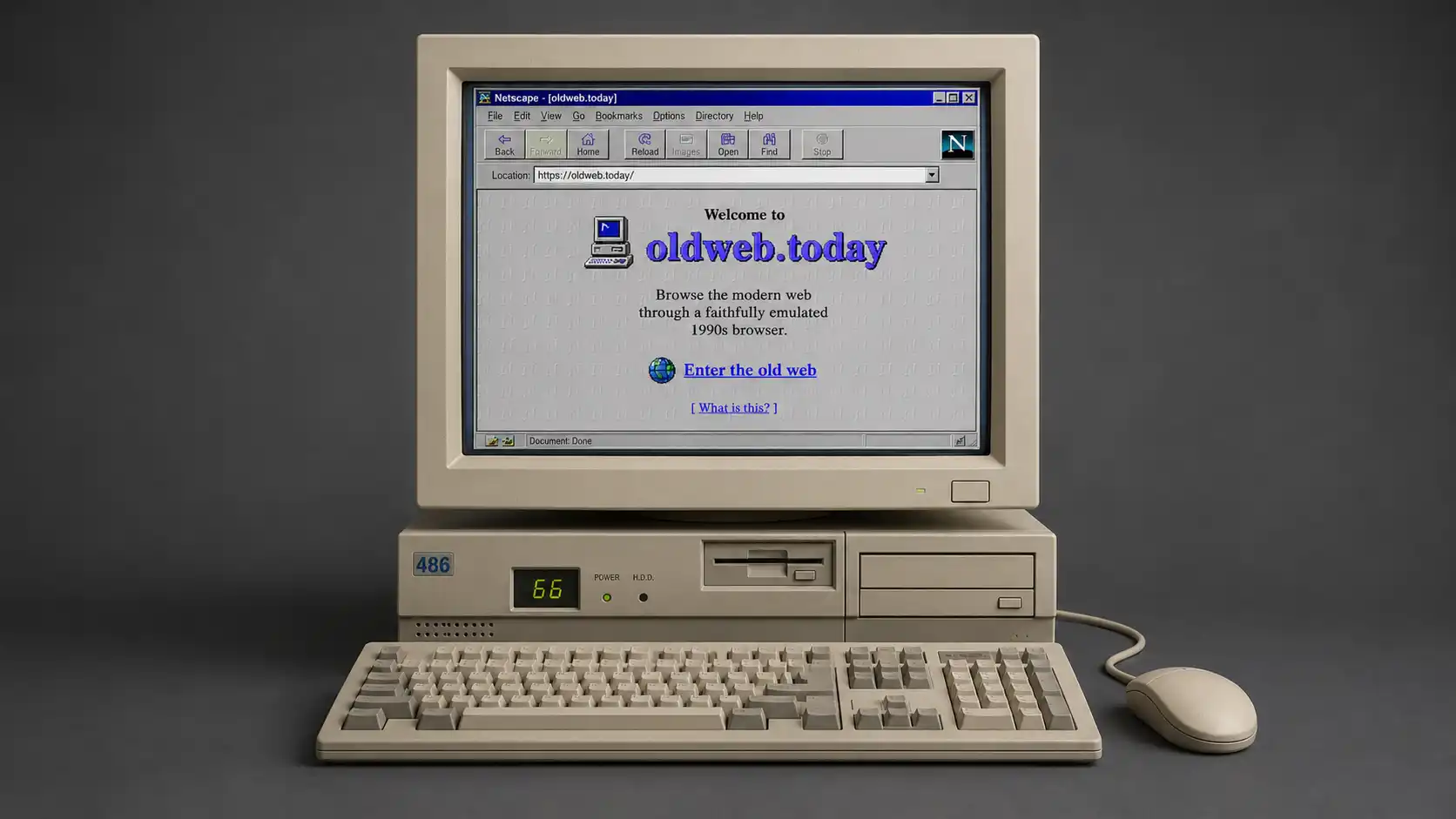
Web archives have trained us to accept a small historical cheat. We paste an old URL into a modern interface, choose a year from a calendar, and assume we are seeing the site as it existed. We are not, quite. We are seeing old files interpreted by new software, with a current browser making silent decisions about layout, fonts, scripts, media, security, and failure. OldWeb.Today starts from the more interesting premise: if you want to understand a past web page, you may need to bring back part of the machine that first made sense of it.
Table of Contents
The browser was part of the page
That is the hook, and it is stronger than the usual nostalgia pitch. OldWeb.Today lets you enter a URL, select a browser or emulator, choose either the live web or an archived date, and then load the page inside a period-appropriate browser environment. Its public interface still presents those two routes—“Browse Live Web” and “Browse Archives”—rather than treating history as a gallery of screenshots.
The difference lands the moment an old browser window appears inside a modern tab. A menu bar takes up room. A chunky toolbar interrupts the page. A loading pause feels less like a site problem and more like a small computer waking from a long nap. The page is no longer a flat relic pinned behind glass. It becomes an argument between the site and the browser that was built to read it.
That argument mattered more in the 1990s than many people remember. The web was not a stable stage with one agreed visual grammar. It was a place where Mosaic, Netscape, Internet Explorer, MacLynx, Opera, and later Firefox each brought their own habits, gaps, strengths, and awkward little misunderstandings. A page designed for one browser might be merely odd in another; it might be unusable in a third. Compatibility was part of the experience, not an invisible technical concern for someone else to solve.
OldWeb.Today does not try to pretend that the web was neat. It lets the mess remain visible. Tables can sit where they feel least graceful. Text can crowd an image. A navigation bar can look like a filing cabinet made by someone who had only recently discovered colored backgrounds. The point is not to laugh at old design. The point is to notice that the web did not become modern because everyone suddenly learned taste. It changed because browsers, screens, connection speeds, authoring tools, business models, and user expectations changed together.
That makes the project unusually good at restoring proportionality. A late-1990s homepage viewed in Chrome often looks like a primitive layout wearing a borrowed suit. Its images arrive too cleanly. Its fonts sit too calmly. Its strange dimensions become decorative quirks. Load the same page in an old browser and the quirks regain force. The page starts to explain itself. Its limits become part of its logic.
A practical example is more revealing than a hundred lectures about web history. Open an archived personal site from the late 1990s. First view it through a standard Wayback replay in a current browser. Then load it through a Netscape or early Internet Explorer environment in OldWeb.Today. You may still see the same words and pictures, but the page’s emotional temperature changes. The browser chrome, the old rendering habits, the smaller visual field, the waiting, and the fussy controls all tell you that this site belonged to a different daily rhythm. Context is not decoration here; it is part of the document.
The project’s source code describes OldWeb.Today as a system connecting emulated browsers to web archives, and that phrasing is more precise than it first appears. It is not merely applying an old skin to a new browser. It runs legacy browser environments and points them toward either live pages or archival replay. The project also includes a Flash-focused route through Ruffle, which matters because old web culture was not made only of HTML and GIFs. It was made of plug-ins, applets, sound, little interactive scenes, educational toys, navigation experiments, and strange personal interfaces that modern browsers no longer know what to do with.
There is a small but important cultural correction hidden in that design. The old web was not inherently simple. It was simpler in some ways and stranger in others. A 1997 page might contain fewer scripts than a current news site, yet ask you to install a plug-in, wait for a Java applet, or tolerate a navigation system made from image slices. It could be visually crude and technologically ambitious at the same time. OldWeb.Today gives those contradictions somewhere to live.
A screenshot cannot do this work. Screenshots are useful evidence, but they are mute. They show a surface, not a relationship. They cannot reproduce the hesitation of an old browser trying to load a page, the way an image map invites a click, the feel of a fixed-width layout inside an era-specific window, or the peculiar friction of a site that assumed a mouse, a desktop, and patience. OldWeb.Today turns browser history into something you can handle rather than merely observe.
This is why the site deserves attention even from people with no sentimental attachment to dial-up sounds, clunky toolbars, or the first version of Yahoo. It is a rare web project that makes a basic technical truth visible: every page is read through software, and software has a history. We tend to remember websites as if they were posters. OldWeb.Today reminds us that they were closer to performances. The browser was part of the cast.
A forgotten interface has a point of view
A browser is never neutral, even when it has become familiar enough to disappear. Current browsers are built to hide their own judgment. They smooth over old code where possible, block risky behavior where necessary, substitute fonts, resize images, negotiate encryption, and quietly adjust a thousand details so a page feels legible. That convenience is useful, but it also erases the older, sharper edges of the web. OldWeb.Today lets those edges come back into view.
Look at an early portal or fan site through a browser of its time and you quickly notice how much design was shaped by the window surrounding the page. The browser’s toolbar was not a distant piece of operating-system furniture; it occupied the same attention as the site’s own header. Menus were visible. Buttons were literal buttons. Status bars announced destinations. The “web” did not feel like a single immersive surface. It felt like a stack of frames, panes, controls, and interruptions. The interface had seams.
Those seams produced a different kind of authorship. Site makers had to think about browser menus, window dimensions, color depth, screen resolution, plug-in prompts, and sometimes the user’s tolerance for a page that loaded one image at a time. A polished contemporary site often tries to erase its construction. A late-1990s page frequently puts construction on display. Tables hold things together. Spacer GIFs become structural beams. Animated badges boast about the browser that will treat the page correctly. The design speaks openly about its dependencies.
OldWeb.Today is compelling because it does not sand that language down. A browser badge that once looked like a tiny manifesto becomes legible again when it appears inside the kind of browser it was addressing. “Best viewed in Netscape” is not just a quaint line of copy. It is a reminder that the page was made for a specific reader and a specific machine, not for a universal, abstract internet user.
The project also makes old choices feel less ridiculous. Modern viewers often see a tiled background, a narrow column, or a row of tiny graphics and assume the designer had poor judgment. Sometimes that is fair. Often it is incomplete. A constrained visual field encouraged density. Limited image tools made every decorative choice count. The scarcity of typefaces pushed people toward browser defaults, bitmap text, and handmade graphics. Animation carried emotional weight because motion itself was still a minor event. What now reads as excess once read as possibility.
This is not an excuse for every blinking button. It is a better way to look at them. The old web had its share of clutter, clutter that could feel cheerful one minute and unbearable the next. But clutter had a social meaning then. It often signaled care, personal ownership, enthusiasm, or a refusal to let the page feel like an office document. A current design system might remove those marks in the name of consistency. The old page often says, “someone was here, and they had access to a GIF editor.”
The browser changes the status of that clutter. Viewed in a current tab, an archive page can feel like a broken artifact from a dead medium. Viewed in an emulated browser, it feels more like a thing operating inside its own rules. That distinction matters. A museum label often tells you what an object is. OldWeb.Today is closer to letting you pick it up, even when it remains fragile.
This is especially useful for people who work around interfaces today. Designers tend to study finished products. Developers tend to study code. Researchers tend to study documents. OldWeb.Today makes a case for studying the encounter itself. What did the page ask of the user? What could the browser do? What did it refuse to do? What had to be installed, tolerated, guessed, or waited through? Those questions are not nostalgic. They are practical ways to understand how digital culture formed.
A page’s point of view becomes easier to see when you use the browser that shared it. Early personal sites assumed that visitors might arrive through directories, web rings, guestbooks, or links traded in email signatures. Corporate pages assumed a different kind of trust than today’s conversion-driven funnels. Search was not yet a permanent command center for every action. Discovery had more dead ends and more personality.
The browser also restores the sense that a page had limits. A current web page often stretches endlessly, responds to every screen size, and quietly follows the user from device to device. Many old pages were made for a rough rectangle of pixels and a specific desktop posture. Their boundaries are obvious. They stop where the page stops. They have a front door, a back button, a links page, a guestbook, and sometimes a tiny counter ticking upward like a public heartbeat. The site behaves like a place, not a feed.
That does not mean the earlier web was kinder. It could be exclusionary, inaccessible, slow, confusing, and technically brittle. OldWeb.Today does not hide those flaws, which is part of its value. A browser from the 1990s is not a utopian object. It is a record of compromises, missing standards, uneven access, and software habits that later generations had good reasons to abandon. Historical context should not become historical flattery.
Still, the old interface has a point of view worth recovering. It asks us to notice that the web was once a more visible machine. You could feel the parts. You could see when something depended on a plug-in. You could tell when a page was too large. You could sense the difference between a site that had been carefully assembled and one that had been copied from a template. OldWeb.Today brings back that tactile awkwardness. It makes the web feel made again.
A whole small computer inside the tab
The clever part of OldWeb.Today is not the retro window dressing. It is the fact that much of the machinery behind the window is real enough to misbehave. The project’s current technical notes describe an approach that runs emulators for old operating systems and browsers inside JavaScript, with a custom networking layer connecting those emulated environments to either the live web or an archive source. The old browser is not a costume placed over your tab; it is a guest inside it.
That architecture gives the project an almost absurd charm. You open one modern browser and, inside it, another browser begins life inside an older operating system. An early Mac environment can appear. Windows 98 can appear. A browser from the era can start inside that system. Then the old browser reaches out through a modern bridge toward an archived page or a current URL. The result is not perfectly literal time travel. It is a carefully staged technical reunion between old software and accessible web content.
The earlier version of OldWeb.Today took a different route. When the project first appeared in 2015, it used cloud-hosted emulated browser sessions running in Docker containers. Webrecorder’s account of the later redesign is blunt about the cost: the original system needed serious resources and could serve only a fixed number of people at once. The 2020 rebuild moved the emulation into JavaScript and WebAssembly inside the user’s browser, shifting much of the computational burden to the visitor’s own machine.
That change is more than a technical upgrade. It altered the emotional shape of the project. A remote virtual machine feels like a service. A complete old browser running in your own tab feels like a small act of software archaeology performed locally. The delay becomes intelligible. A sluggish moment is not necessarily a website failing to keep up with 2026; it may be a modern computer politely carrying the weight of an older computer inside a page.
OldWeb.Today’s official repository identifies v86 as the emulator used for Windows and a JavaScript port of Basilisk II for Mac environments. It also describes Ruffle as a separate Flash route, used without an emulated browser to render Flash material inside the current browser. The project’s design therefore moves between three distinct moods: a full old Windows experience, a full old Mac experience, and a more direct Flash-oriented mode. Each route values a different balance of speed, reach, and historical fidelity.
The Windows path carries a particular charge because it allows you to watch a period browser behave like software, not merely look like one. Internet Explorer 5 or 6 does not just frame the page with an old toolbar. It carries the habits of an old browser. It has its own rendering logic, its own relationship to plugins, and its own sense of what the web ought to be. The repository notes that IE 6 includes Flash 9 in the emulated Windows 98 setup, while earlier Netscape and Internet Explorer variants include older Java and Flash possibilities. The environment brings dependencies back into the room.
The Mac route feels different. A classic Mac browser is not merely a Windows browser with different buttons. Its visual language changes the page’s atmosphere. Menus, window decoration, fonts, spacing, and the behavior of the browser all suggest a different culture of computing. It is easy to forget how much “the internet” once meant “the internet as encountered through a particular operating system.” OldWeb.Today restores that split. A page can feel more or less alien depending on the machine that surrounds it.
The networking trick is the project’s hidden hinge. Emulated browsers do not understand the modern web on their own. OldWeb.Today’s code describes a custom in-browser network stack that handles requests from the emulator and returns data drawn from either a fetch of the live page or an archive source. The system uses a proxy arrangement so the emulated browser can load the selected home page and selected archival timestamp without a full restart of the emulator. The site acts as a translator between decades of web assumptions.
That translation also explains why the service is not magic. The project’s own documentation notes limits, including a focus on GET requests and a restricted set of proxied headers. Those are not obscure implementation footnotes. They are clues about the experience. A page might open beautifully while a complex interaction stalls. A link might work while a form does not. A visual artifact may survive while the larger service around it has long vanished. OldWeb.Today recreates a meeting, not an entire lost infrastructure.
The strongest way to use the site is to accept that unevenness. Do not approach it as a tool that owes you a perfect replay of every page ever published. Approach it as a tool that puts historical constraints back into the encounter. The pauses, gaps, and odd errors are often part of the lesson. They point to missing resources, dead hosts, browser limits, or archive limitations. A failed click still tells you something about what the web required.
The Ruffle option is where OldWeb.Today becomes more than a browser museum. Flash was once one of the web’s loudest creative languages. It carried games, animations, menus, art projects, interactive advertisements, educational material, and countless tiny experiments that were impossible with plain HTML of the time. Modern browser support for Flash disappeared, but Flash content did not instantly vanish from archives. OldWeb.Today’s Ruffle route offers a way to reopen some of that material without loading a complete historical operating system first.
Ruffle is fast because it does less historical reenactment. It is aimed at the media format, not at reproducing every condition surrounding it. Webrecorder’s own explanation makes the trade-off clear: Ruffle may be faster, while an emulated IE 6 environment may be slower but closer to the original behavior for some Flash works. Speed and faithfulness do not always point in the same direction.
That is a surprisingly useful lesson far beyond Flash. Every reconstruction makes choices about what to preserve. Do you preserve the output, the interface, the interaction, the source code, the operating environment, the available plugins, the timing, or the feeling of waiting? OldWeb.Today never resolves that question once and for all. It makes the question visible through use. Its imperfections are part of its honesty.
Where the modern web breaks beautifully
The phrase “browse the live web through a 1990s browser” sounds like a playful dare. It is also an unusually sharp way to see the present. Load a current site through an old browser environment and you are not likely to receive a smooth experience. You may get a blank page, a half-formed page, text with no styling, a broken connection, or a page that seems to have gone quiet. That silence is often more informative than a polished success.
A current site contains assumptions that older browsers cannot share. It may depend on newer encryption standards, advanced JavaScript, contemporary CSS, client-side rendering, modern image formats, web fonts, third-party scripts, APIs, or a huge chain of services that no 1990s browser could anticipate. OldWeb.Today’s live-web option exposes those dependencies by letting them fail in a setting where they can no longer hide behind compatibility layers. The modern web reveals how much machinery it asks you not to notice.
The resulting failures are not a reason to dismiss the experiment. They are the experiment. A page that will not load in an old browser is a statement about its era. It tells you that the web has moved from documents toward applications, from pages you receive toward systems you enter, from isolated files toward a web of conditional relationships. That shift brought real gains. It also made the web harder to preserve, harder to replay, and harder to explain through a single static capture. OldWeb.Today lets incompatibility become evidence.
The mismatch can be funny. An old browser may greet a modern platform with a blank white field where a full commercial universe should be. You may see a headline without the rest of the page, a pile of raw links, or a polite failure that looks almost serene. The comic effect comes from the collision between a browser built for a smaller, quieter web and a page built for a constant exchange of code, tracking, personalization, media, and remote services. The browser does not understand the performance because the performance did not exist yet.
It is tempting to turn this into a simple moral about the past being cleaner. Resist that. The old web was not pure. It had banners, spam, scams, intrusive animation, ugly interfaces, broken links, and plenty of tracking habits in early form. The current web did not become complex for no reason. It became more capable, more interactive, more accessible in some ways, and more ambitious. OldWeb.Today is useful because it refuses a lazy before-and-after story. It lets you feel both the gain and the cost.
A late-1990s page through Netscape may feel wonderfully direct because its file structure is legible. A current page through the same browser may feel hostile because it expects an entire ecosystem around it. Neither reaction tells the full story. The first page may be hard to search, hard to use on a small screen, and impossible for some visitors to access. The second may deliver sophisticated tools, media, and services that older creators could not imagine. The site turns nostalgia into comparison rather than worship.
OldWeb.Today is at its best when you choose a URL with intent. A personal homepage, a local newspaper archive, an early product page, a university department site, an experimental art project, or a once-important portal each reveals a different seam in web history. You start to notice how navigation changed, how pages announced their identity, how information density shifted, how copywriting became more controlled, and how old sites assumed people would actually browse. The web once invited wandering more openly.
Early sites often carried a visible social map. There were links pages, guestbooks, web rings, counters, mailing-list invitations, “email me” badges, and small credits for the software used to make the page. Those objects made the site feel connected to a distributed amateur culture. A modern page may be linked into a far larger network, but that network is usually concealed behind platforms, recommendations, search rankings, embedded feeds, and analytics. OldWeb.Today brings back an era when connection was often named on the page.
The pace changes too. A page that loads slowly inside emulation forces attention into strange places. You may watch an image area remain empty. You may wait for a browser to settle. You may notice the cursor, the browser’s status messages, the order in which pieces arrive. This is not simply frustration. It alters how you read. Instead of treating the site as a disposable surface, you begin to watch it assemble. Waiting makes the interface legible.
Current product teams spend enormous energy reducing visible delay. They use skeleton screens, prefetching, invisible loading states, predictive interfaces, and fast transitions to prevent the user from feeling the machine underneath. OldWeb.Today reverses that habit. It lets the machine become palpable again. An old page is rarely just “there.” It appears, piece by piece, through an environment with limits. The project restores a sense of digital materiality.
The web archive adds another kind of breakage, one that belongs to preservation rather than browser age. The Internet Archive explains that captures are not always complete: images may be absent, JavaScript-generated links can fail, forms may need a live server, and missing resources may cause the archive to substitute the nearest available capture or even reach toward a live version where possible. OldWeb.Today cannot repair those gaps. It makes them feel more immediate.
That gap is worth treating with care. An archived page is not a courtroom-perfect snapshot of a single frozen second. It is a reconstruction assembled from whatever was captured and can still be replayed. The Wayback Machine itself says that not every date for every site is complete, and users may end up moving between available capture times as they follow missing links. A timestamp is an invitation to inspect, not a guarantee of total historical certainty.
OldWeb.Today adds a second layer of uncertainty because the browser environment is also a reconstruction. The result is not less useful because of that. It is more interesting. You are watching two histories meet: the history of a page capture and the history of software built to read it. The errors and mismatches are often where the story lives. A broken page can be a better historical object than a perfectly cleaned-up one.
This is where the phrase “breaks beautifully” earns its place. The brokenness is not always beautiful in a decorative sense. It is beautiful because it reveals structure. A missing image tells you that a resource was external. A dead menu tells you that interaction depended on a server. A Flash object tells you that a whole media layer lived outside HTML. A blank live page tells you that the current web has crossed a compatibility threshold. Failure becomes a map of dependency.
For people who build websites, this is sobering. Every contemporary page feels normal inside the ecosystem that currently sustains it. It may rely on a deployment pipeline, third-party scripts, web fonts, cloud services, frameworks, authentication layers, and browser features that appear permanent until they are not. OldWeb.Today makes permanence look less certain. Tomorrow’s web archive may inherit our pages without the conditions that made them work.
For people who only browse, the site offers a more personal realization. The internet you remember is not stored inside your memory as a clean visual object. You remember the room around it: the browser buttons, the screen shape, the delays, the sound, the feeling of being lost, the accidental discoveries. OldWeb.Today does not reproduce your childhood bedroom or the hum of an old desktop, but it does recover an important part of that atmosphere. It gives memory some of its missing hardware back.
The best way to use a time machine is to wander carefully
OldWeb.Today works best when you approach it like a place to investigate rather than a party trick to exhaust in three minutes. The temptation is obvious: type an old domain, choose Netscape, grin at the toolbar, and leave. The better move is to spend enough time with one site to notice what changes when the browser changes. The project rewards comparison more than spectacle.
Start with a page that had a life beyond a single moment. An old news site, a product homepage, a fan community, a software company, an online magazine, or a personal site that persisted for years gives you something to follow. Look at the same address across several dates. Then look at one date through two browser choices. The page may not change much in raw content, yet its usability, density, and emotional force can shift dramatically. You are not just comparing designs; you are comparing conditions of reading.
Choose the archive date deliberately. The Internet Archive’s own guidance explains that its service is built around URLs and time ranges, but individual captures can be incomplete or substituted with nearby versions when resources are missing. That means a precise-looking date should be treated as a working hypothesis. Look at the capture information where available, note missing pieces, and avoid pretending that a single replay is the whole record. Good historical browsing keeps its uncertainty visible.
The browser choice matters just as much as the date. A full old browser environment is the right choice when you care about the surrounding experience: the window, browser behavior, old plug-ins, and the historical mood of the software. Ruffle is the right choice when the central object is Flash and you want a quicker route to the content. The project itself presents those as different technical paths rather than interchangeable buttons. Use the route that matches the question you are asking.
What stands out at a glance
| What to try | Why it is worth doing | What to expect |
|---|---|---|
| An archived 1990s page in Netscape or Mosaic | The browser becomes part of the historical scene | Period menus, constrained layouts, uneven loading, and old rendering habits |
| The same URL in two browser environments | Differences become easier to spot than in a single replay | Changed spacing, media behavior, font feel, and interaction friction |
| Flash material through Ruffle and a full old browser | Speed and historical closeness can pull in different directions | Ruffle may load faster; an old browser may better preserve some original behavior |
| A current URL in an old browser | The present web exposes its dependencies when compatibility falls away | Partial rendering, failures, raw content, or a page that does not arrive at all |
| A site across multiple archival dates | A website’s life is clearer when treated as a sequence | Missing resources, nearby captures, gradual redesigns, and shifting priorities |
The table is less a checklist than a way to avoid the shallowest version of the experience. OldWeb.Today becomes more revealing when you change one condition at a time. The same page in two browsers tells you something. The same browser across five dates tells you something else. A modern page in an old environment tells you where today’s web has become dependent on systems that are easy to forget.
A useful first session starts with restraint. Pick one URL. Pick one archival year. Let it load. Click around without rushing. Notice the first thing that feels unfamiliar. Is it the browser? The page width? The density of links? The way images arrive? The amount of copy? The absence of endless scrolling? The first discomfort is often the first clue.
Then try to name what the page expected from its visitor. Did it expect a person to explore manually? Did it assume a desktop monitor? Did it depend on an applet? Did it offer a visible email address and a guestbook because direct contact was the point? Did it present information as a sequence of hand-built pages rather than a stream of updates? Every interface contains a theory of its user.
It helps to resist the urge to measure the old web only against today’s standards. A page built in 1998 did not fail because it lacks responsive design. It was not waiting for future designers to rescue it. It was built inside a different set of constraints, and it solved some problems that contemporary sites solve differently. The same courtesy should be extended in reverse. A current page is not “bad” because it fails in Netscape. The value lies in the contrast, not the verdict.
The old browser view also makes old information architecture easier to see. Many early sites explained themselves through categories, directories, and visible hierarchies. The home page often acted as a real entrance hall. You could see the departments, the sections, the recent updates, and the links outward. A current site may put comparable information behind search, recommendations, menus, or personalized modules. OldWeb.Today makes navigation feel like a historical genre.
Try following links without using a search engine. That simple constraint recreates part of the earlier experience. The web had search, but search was not always the dominant grammar of movement. You moved through lists, related pages, portals, web rings, “cool sites” pages, and human-curated link collections. Dead ends were common. So were accidental discoveries. The old web made room for getting pleasantly lost.
This is one reason the project will appeal to writers and editors, not only technologists. It offers a way to study how pages make promises. An old publication home page may advertise frequency, authority, community, or novelty through different visual signals than a current one. A small personal page may declare itself through hand-drawn buttons and a list of favorite links. A company page may seem almost shy compared with the polished confidence of present-day marketing. The copy becomes easier to read when the interface around it is restored.
Designers may find the site even more unsettling. Contemporary design culture often treats removal as maturity: fewer elements, fewer choices, fewer visible edges. OldWeb.Today shows an earlier web where visible structure was often a kindness. You could tell where one section ended. You could see the navigation. You could understand that a link was a link. The old web did not always make things easy, but it frequently made them explicit. Clarity and minimalism are not the same thing.
Developers will recognize a different lesson. Old pages are full of constraints that have not vanished; they have merely changed form. A page still depends on its runtime environment. A browser still carries assumptions. A deployment still needs services. A site can still break when a third party disappears. OldWeb.Today is a reminder that every web product is a temporary agreement between code, software, infrastructure, and habits.
Researchers and educators can use the site to make web history less abstract. It is one thing to explain that web design once depended on browser-specific behavior. It is another to place a student inside a browser environment and ask them to compare a page’s behavior. The tool makes historical literacy experiential. A user does not merely hear that a browser mattered; they feel the browser getting in the way, shaping the result, and becoming part of the evidence. Experience can be a better teacher than a polished summary.
A small warning belongs here. Do not use OldWeb.Today as a substitute for a normal browser, and do not make it the place where you log into accounts, enter personal data, or conduct anything sensitive. Its appeal lies in visiting public, harmless URLs and archived material through legacy software environments. Treat the site as a viewing instrument, not a daily workstation. The old browser is the subject of the experiment, not your trusted tool for ordinary tasks.
Do not expect every archived download to behave like a modern download either. A Webrecorder forum explanation notes that files downloaded within the emulated machine may land inside that virtual environment rather than directly on the visitor’s actual device. The same thread also points out that archival dates can feel odd because the archive may have only certain captures available. The virtual computer has its own boundaries.
There is freedom in those boundaries. OldWeb.Today is not designed to make the past frictionless. It is designed to make it reachable. The difference is crucial. Frictionless history becomes a decorative slideshow. Reachable history keeps its awkwardness, its missing pieces, its dated controls, and its own small ways of resisting you. That resistance is often the thing worth opening.
The archive is only half the artifact
People often talk about web preservation as if it were mainly a storage problem. Save the HTML. Save the images. Save the scripts. Keep enough files and you have saved the page. OldWeb.Today makes a more demanding claim, even when it does not state it outright: the browser environment belongs to the artifact too.
That claim has real consequences. A page built around a Flash animation is not fully preserved when the animation file exists but no common browser can play it. A Java applet is not fully preserved when the archive retains the code but the environment that ran it has disappeared. A site designed around a particular browser’s rendering habits is not fully preserved when it can only be viewed through a new browser that interprets it differently. Preservation has layers.
Webrecorder’s 2020 explanation of the project puts Flash and Java near the center of the story. The service included historical browser environments with old versions of Shockwave or Flash, as well as Ruffle for a more direct Flash route. It also discussed Java applets, which remain present in parts of the archived web even though they have vanished from normal browsing. The point is not that every old interactive work will run perfectly. The point is that a preserved file needs a viable route back to experience.
This matters for culture, not just software history. A huge amount of early digital expression was made through formats that later became inconvenient, unsafe, unsupported, or commercially abandoned. Some of it was disposable. Some of it was art. Some of it was education. Some of it was a child’s first game, a student project, an institutional experiment, an interactive documentary, or a small business’s entire public face. A generic archive replay can preserve traces of those things. Emulation gives some of them a chance to behave again.
The distinction between “visible” and “alive” is useful here. A screenshot of an old interactive page is visible. A video of someone using it is more alive. A working replay inside a related browser environment is closer still. None of these is the original moment, and none should pretend to be. But each step restores a different part of the encounter. OldWeb.Today sits on the side of preservation that values behavior.
Behavior is slippery. A button may load a different resource depending on date. A rollover effect may be missing. A counter may stop. A guestbook may point to a vanished server. A game may load but not save. A page can look correct while its social function has disappeared. This is not a flaw unique to OldWeb.Today. It is a fact about the web. Websites were never just collections of files.
The Internet Archive is candid about this difficulty. Its guidance states that dynamic pages can fail when they depend on forms, JavaScript, or interaction with the original host. It also notes that sites may be absent because crawlers never found them, because access was restricted, because robots exclusions applied, or because owners requested removal. Any serious use of web archives should begin with humility about those omissions. An archive is a record of what was captured, not a guarantee of what once existed.
OldWeb.Today does not make that humility less necessary. It gives it a form. A missing image inside Netscape feels different from a missing image in a contemporary Wayback frame. The older environment makes the absence more legible as a historical condition. You can almost sense the page reaching toward a resource it once expected to find. The failure gains texture.
There is an ethical dimension to this too. The web has often been treated as less deserving of care than books, buildings, or physical artifacts because it feels endlessly reproducible. Yet digital things vanish with alarming ease. Domains lapse. Services close. Files move. Platforms alter interfaces. Business models change. Browser support ends. A page may remain online while becoming functionally unreadable. The web disappears in degrees.
OldWeb.Today draws attention to one of those degrees: unreadability caused by the loss of software context. That is a quietly radical focus. It says that preservation is not merely about keeping a copy of the page somewhere. It is also about retaining enough of the environment that the page’s original behavior remains intelligible. The browser does not need to be romanticized. It needs to be recognized as part of the historical apparatus.
The project’s open-source character reinforces that point. Its repository explains how the system connects emulated environments, JavaScript networking, archives, and browser choices. That transparency matters because preservation tools should not become black boxes of their own. A future researcher should be able to ask what was emulated, what was proxied, what was substituted, and what limits applied. Method is part of trust.
There is also a practical lesson for anyone publishing online now. A beautiful current site will not necessarily make a good historical object later. The most visually advanced page can become nearly impossible to replay if it relies on private APIs, personalized responses, ad-tech chains, interactive scripts, cloud-hosted assets, or services that vanish. A plain page with clear links, stable assets, readable text, and modest dependencies may survive with more of its character intact. Simplicity is not nostalgia; it is a form of future care.
That does not mean every website should retreat to 1998. It means people who care about the long life of their work should think about what happens when the environment disappears. Exportable data, stable URLs, accessible HTML, local copies of key assets, and deliberate archiving all matter. OldWeb.Today gives this ordinary advice a more vivid backdrop. It lets you watch what happens after the ecosystem around a page has thinned out. The future archive begins with choices made in the present.
The project is also a useful corrective to the idea that preservation must feel solemn. It can be funny, curious, and deeply satisfying. You can open a long-forgotten page and feel the delight of a browser window that looks like it should be running on a beige desktop. You can watch a clumsy animation return. You can see a forgotten navigation scheme make sense. Joy does not weaken the preservation argument. It makes people care enough to return.
That is the rare thing about OldWeb.Today. It has the rigor of a preservation project without the dead air of a preservation lecture. It makes a serious point through a playful experience. The site does not ask visitors to admire a concept. It asks them to click a link, wait for an old environment to appear, and discover that the browser they barely remember had opinions about the world. Curiosity carries the theory.
OldWeb.Today is not a nostalgia machine
Calling OldWeb.Today a nostalgia machine would be understandable and incomplete. It certainly invites memories. The old menus, the familiar browser chrome, the pages that feel like they were made before every corner became rounded and every interaction became measured—those things have emotional force. But nostalgia alone is a shallow container for the project. The site is more useful when it makes you question your memory.
Memory tends to clean up the past. It remembers the charm of personal websites and forgets the broken image icons. It remembers the freedom of wandering and forgets the frustration of slow connections. It remembers the weirdness and forgets the accessibility problems. It remembers the human scale and forgets the difficulty of finding anything. OldWeb.Today corrects that selective memory by restoring some of the inconvenience. The old web becomes less perfect and more real.
The site also punctures a common myth about the earlier internet: that it was simply less commercial. There were commercial pressures everywhere, just in different forms. Portals wanted attention. Banner ads competed for clicks. Pages pushed downloads, subscriptions, software, and affiliation. The visual language was less polished, but the hunger for traffic was already present. Viewing those pages in old browsers makes the continuity easier to see. The business of attention did not begin with the feed.
What changed was the way commercial pressure became embedded in interface behavior. Early pages often shouted. Current pages frequently infer. An old site may flash an advertisement in the corner. A current site may rearrange itself around personalization, measurement, retargeting, recommendation, and invisible optimization. One approach is visibly noisy; the other is often quieter and more pervasive. OldWeb.Today helps you see that interface power moved from the obvious surface into the underlying system.
The same is true of identity. Old personal pages often announced their maker in plain sight. A name, an email address, a collection of interests, a favorite quote, a guestbook, a handmade graphic, a list of links: the page could feel like a room someone had decorated. Current personal identity is often distributed across platforms whose interface rules are set elsewhere. A profile exists inside a feed, a network, an algorithm, a monetization system. The old homepage was clumsy, but it belonged to its maker more visibly.
That observation should not become a fantasy of complete independence. Hosting costs money. Software requires skills. Pages still depended on providers and browsers. Many people were excluded by access, equipment, and technical confidence. Yet the visible ownership mattered. A messy page could carry a clear voice because it was not trying to resemble a platform. OldWeb.Today makes that voice audible again. You can feel the difference between a place and an account.
For writers, this may be the site’s most surprising gift. It restores the web as a medium with a physical sense of composition. A page header is not just an SEO zone. A link list is not just a retention mechanism. A guestbook is not a failed comments system. A site map is not a relic. Each object carried a social promise. It said something about who might arrive, what they might do, and how the author imagined being found. Old interfaces speak in social assumptions.
For product people, the lesson is harsher. Many current websites are designed around a fantasy of frictionless continuity: the same account, the same identity, the same data, the same interface, everywhere. OldWeb.Today reminds us that continuity is contingent. Browsers change. Plug-ins vanish. file formats die. Companies shut down. Standards are replaced. A product that feels permanent can become unreadable in a surprisingly short time. Digital permanence is usually a temporary arrangement.
The project makes that arrangement visible without preaching. You choose a browser and discover that a page either lives, stutters, or disappears. You choose a date and find that some resources belong to nearby captures rather than that exact moment. You click a control and discover that the original service is gone. The lesson comes through use, not warning labels. OldWeb.Today teaches by making the web resist you.
This resistance also makes the project refreshing in a culture of polished demo experiences. Most products want to make you feel capable immediately. OldWeb.Today wants you to feel curious enough to tolerate a little uncertainty. It does not give you a modern onboarding sequence explaining every feature in optimistic language. It gives you a browser choice, a URL field, an archival date, and a small invitation to try. The interface trusts the user’s appetite for exploration.
That appetite is worth defending. The web has become easier to use in many ways, but it has also become more managed. Search, social feeds, app stores, and recommendation systems reduce the number of strange accidental paths available to us. OldWeb.Today revives a different mode of browsing: open a page, follow a link, hit a dead end, return, try another page, notice a bizarre button, wonder who made it. The site makes room for unplanned discovery.
The project has an almost literary relationship to dead ends. A dead link is not merely an error message. It is a trace of a relationship that once existed between pages, people, hosts, and assumptions. A missing image is a blank space in a small historical scene. A broken applet is a reminder that a page once asked more of the browser than a current replay can provide. Loss becomes visible without being melodramatic.
That is the difference between a museum of screenshots and a living archive interface. A museum can show you what survived. OldWeb.Today lets you notice what did not. It keeps the gaps exposed. It does not repaint them into a smoother story. In a period where so much online material is constantly revised, deleted, repackaged, or buried, that honesty is rare. The absence is part of the record.
The site also deserves credit for not overclaiming. Its own documentation speaks in terms of supported browser environments, archive connections, emulators, network limitations, and ongoing development rather than pretending it has solved web preservation. The project is ambitious but not arrogant. It knows that live web replay, historical browser behavior, Flash, Java, archives, and old software all involve trade-offs. A serious tool does not need to pretend it is complete.
That modesty makes OldWeb.Today more trustworthy. The web’s past is too big, too fragmented, and too dependent on vanished conditions for any single site to restore. But a project does not need to recover everything to change how people see something. OldWeb.Today recovers enough to expose the missing dimension in standard archive viewing: the browser itself. That is a small shift with large consequences.
Open it for the pleasure of seeing Netscape again. Stay for the deeper realization that the modern web is not the natural state of the internet. It is one temporary version of a medium that has already changed its shape many times. The old browser window sitting inside your current tab is a strange little mirror. It reflects the past, but it also reflects the assumptions we carry into the present. The web looks different once you remember it could have been otherwise.
A few practical questions after the time travel
No. It is a different way of approaching archived material. The Wayback Machine is the archive service that lets people search URLs and date ranges to visit historical versions of websites. OldWeb.Today uses an emulated-browser layer to connect people to archived pages or live URLs in a period-aware environment. One is fundamentally about archive access; the other changes the software context in which that access happens.
Yes, the current site offers a live-web option alongside archived browsing. Do not expect modern pages to work well. That is often the point. A live page can expose how heavily the current web depends on browser features, scripts, encryption, services, and formats that older software never had to handle.
Treat it as a target, not a perfect guarantee. Archived sites are assembled from captures, and captures can be incomplete. The Internet Archive explains that missing links or resources may lead to the closest available capture and that some content is absent because it was never collected or cannot be replayed without its original server.
Start with a browser that fits the period you are investigating. Netscape or an early Internet Explorer environment makes sense for late-1990s browsing; Ruffle makes sense for Flash-first material. Then try the same page in another browser and notice what shifts. The comparison is often more revealing than the first successful load.
The project documentation says that several emulated Netscape and Internet Explorer variants include early Java or Flash support, while Ruffle provides a native-browser Flash path. Support is not a promise that every archived work will run perfectly. Flash, Java applets, and web archives all bring format-specific limits, but the options give older material more routes back into view.
Some modes are not merely painting an old toolbar on top of a page. They are running an emulated operating system and browser inside your current browser. Webrecorder’s description of the 2020 version says the emulators run in the browser and are limited by the visitor’s own CPU, which makes the wait part of the technical reality rather than a simple loading defect.
Be careful with that expectation. A Webrecorder forum answer explains that a download triggered within the emulated environment may go into the virtual machine instead of directly to the visitor’s computer. The old desktop inside the tab has its own interior space.
People with a personal memory of the early web will have an easy entry point, but nostalgia is optional. Designers, developers, historians, writers, educators, archivists, and curious browsers all have reasons to open it. The appeal is not that it makes the past look cute. It is that it makes an overlooked part of digital history usable again: the software that taught old pages how to appear.
Author:
Jan Bielik
CEO & Founder of Webiano Digital & Marketing Agency
This article is an original analysis supported by the sources cited below
OldWeb.Today
The live project interface, checked for its browser selector and options to browse current pages or Internet Archive captures.
OldWeb.Today source code and technical notes
The official repository documenting the emulated browser environments, Java and Flash support, custom networking, and archive connection model.
Announcing the New OldWeb.Today
Webrecorder’s account of the project’s move from Docker-hosted browser sessions to JavaScript and WebAssembly emulation in the browser.
Flash Ain’t Dead Yet! Even More Ways to Run Flash using OldWeb.Today
Official notes on browser additions, Flash versions, Java support, and Ruffle.
Using the Wayback Machine
Internet Archive guidance on incomplete captures, broken resources, dynamic pages, and date substitutions during replay.
Old Web Today at FOSDEM 2022
A technical session description covering web archives, old browsers, Flash, Java applets, WebAssembly, and emulation trade-offs.
Downloading files from old versions of websites
A Webrecorder forum discussion explaining how downloads and archival capture dates behave inside OldWeb.Today’s virtual environments.
| Citing this article? Brief excerpts are welcome. Please credit Webiano.digital, name the author where stated, and include a link to https://webiano.digital and to this original article. Full or substantial republication requires prior written permission. Read our Copyright and Content Use Policy. |
This article was prepared with the assistance of artificial intelligence tools. The content underwent expert human review, and Webiano Digital & Marketing Agency assumes editorial responsibility for its final version and publication.














