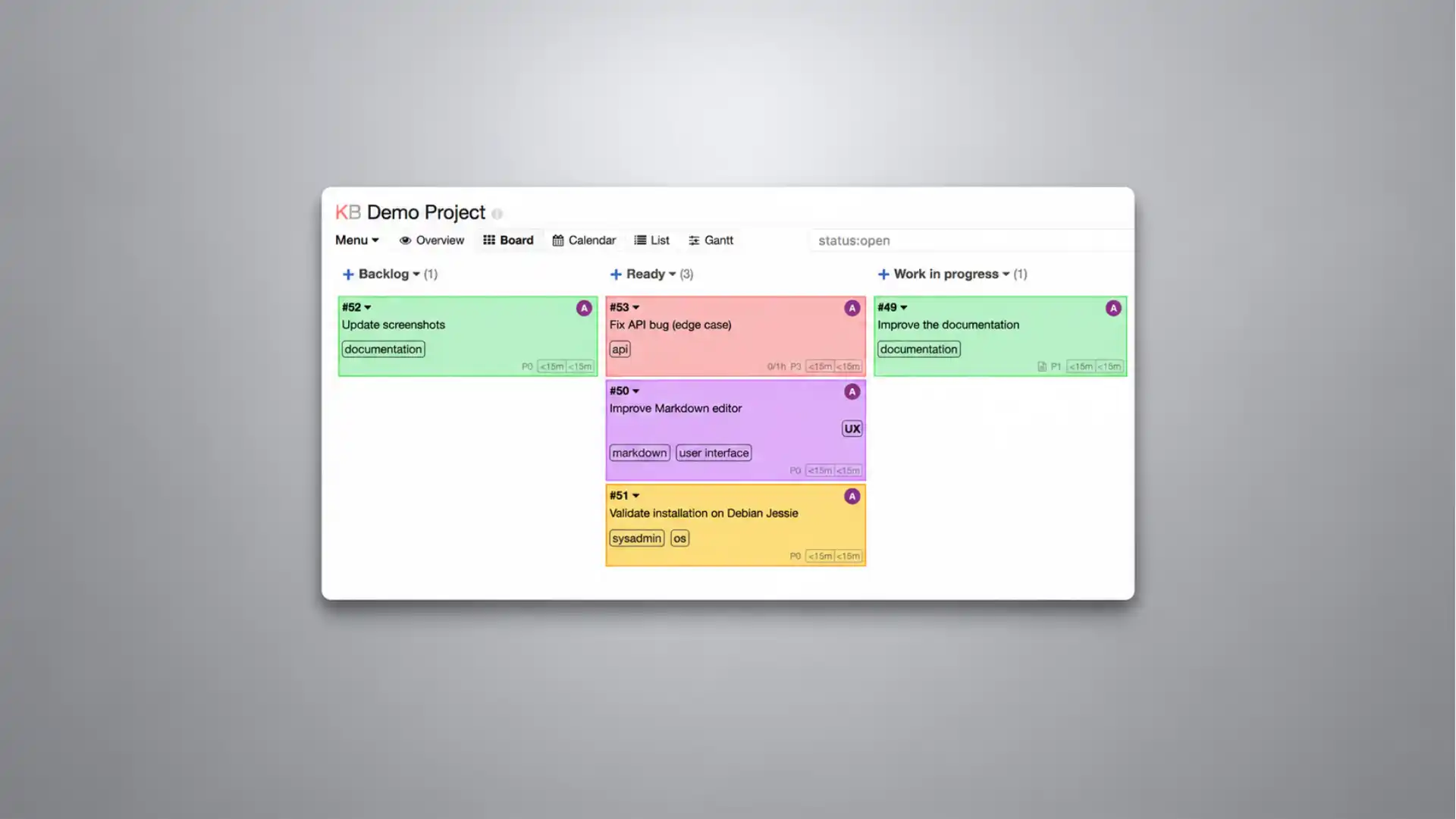
Kanboard’s most interesting feature is not that it does kanban. It is that it refuses to turn kanban into a corporate dashboard religion. Open Kanboard and the promise is almost aggressively plain: visualize work, limit work in progress, drag tasks across columns, host it yourself, install it without drama. That is not a pitch deck. That is a tool saying, with unusual confidence, that most project management software got too hungry. Kanboard describes itself as a free and open source Kanban project management tool, with self-hosting and simple installation right on the front page.
Table of Contents
The site looks like it belongs to another web era, but not in a neglected way. Kanboard feels like software from a time when a tool was allowed to have one clear job and stop there. It does not lead with AI planning, executive alignment, productivity scoring, “team operating systems,” or animated onboarding theatrics. It gives you a board, columns, cards, limits, filters, task details, comments, attachments, automatic actions, authentication options and enough plumbing to fit a small team’s workflow. The product does not behave like a platform trying to eat the company. It behaves like a board.
That is why Kanboard is more interesting than a fresh screenshot may suggest. It is not trying to seduce the whole organization at once. It is for people who want a private place to track actual work without inviting a whole work-management culture into the room. A small agency, an IT team, a research group, a repair shop, a school department, a non-profit operations team or a solo developer may understand the appeal quickly. Kanboard does not ask them to become a “workspace.” It gives them a board and lets them decide what belongs on it.
There is a useful tension at the heart of the project. Kanboard’s GitHub repository says the application is in maintenance mode, while its release page still shows regular releases, including Kanboard 1.2.52 in April 2026. That sounds like a contradiction until you sit with the product for a minute. Maintenance mode, in this case, does not read like an abandoned warehouse. It reads like software that has reached a stable shape and is being kept in working order with small fixes, security work and community contributions.
That status changes the way Kanboard should be judged. It is not the board you choose because you want surprise features every quarter. It is the board you choose because you want a mature piece of software that already knows what it is. The April 2026 GitHub release notes mention comment visibility rules, public access tokens for inactive users, timing-safe token comparisons, parameterized queries and ownership validation for bulk task changes. That is not glamorous product work. It is the kind of work that keeps a self-hosted tool from slowly becoming unsafe or brittle.
The web has plenty of project tools that sell control while quietly multiplying complexity. Kanboard sells something rarer: restraint. The official homepage says the interface is simple and that the number of features is voluntarily limited. That line is not a throwaway. It is the product philosophy in one sentence. Kanboard is not minimal because it forgot to grow. It is minimal because the board is the point.
The board that refuses to become a platform
Kanboard’s first act of taste is that it keeps the board at the center. Tasks live in columns, columns represent stages, and moving a card is the main gesture. That sounds ordinary until you compare it with modern project tools where the board is only one view among many, buried beside timelines, docs, goals, forms, inboxes, reports, automations and admin layers. Kanboard does not bury the board. It lets the board be the product.
That choice matters because kanban works best when the surface is easy to read. A board should tell the truth at a glance: what is waiting, what is active, what is blocked, what is done. When a tool adds too much management furniture around that surface, the visual method loses force. Kanboard’s plainness keeps the work visible. It may not look fashionable, but it has a useful lack of drama.
The official feature list starts with the basics: visualize work, limit work in progress, drag and drop tasks, self-host the application, install it without much ceremony. Those are not advanced promises, but they are the promises most teams actually need from a kanban board. A tool does not have to solve every planning problem to be worth opening. It has to make the next piece of work clear enough to act on.
Kanboard’s work-in-progress limits are especially telling. Many task-board clones copy the look of kanban while skipping the discipline. A board with no WIP limits is often just a prettier to-do list. Kanboard’s homepage says columns are highlighted when they go over the limit, which gives the board a small but important voice. It tells the team when it is pretending to have more capacity than it has.
That visual pressure is useful because teams often hide overload behind politeness. A highlighted over-limit column is less diplomatic than a meeting. It says the review stage is stuffed, the work-in-progress lane is bloated, or the team has started too much before finishing enough. It does not fix the problem. It makes the problem harder to deny. That is a good job for software.
Search and filtering give the board another layer without turning it into a spreadsheet. Kanboard includes a query language for finding tasks by fields such as assignee, description, category and due date. That matters once a board stops being a cute demo and becomes the place where real work piles up. Without filters, a board eventually becomes a wall of sticky notes after a storm. With filters, the same board stays usable after the novelty of dragging cards wears off.
The task model is small but not thin. Kanboard supports subtasks, estimates, Markdown descriptions, comments, documents, colors, categories, assignees and due dates. That is enough context for serious work without making every card feel like a form from a procurement system. A card can hold detail. It does not have to become a project charter.
The restraint matters most in daily use. Every extra required field in a project tool is a tiny tax on work. A tool with too many clever fields often trains the team to maintain the tool instead of finishing the work. Kanboard’s model is not fieldless, and it is not primitive. It gives the card enough structure to be useful, then steps back.
There is also a design honesty in the way Kanboard looks. It does not pretend that task management is a lifestyle product. The interface is functional, dense and visibly older than the polished SaaS boards people see in product launches. That will bother some users. It will calm others. The right reaction depends on what a team wants from a project tool: theater or clarity.
A compact radar view
| Signal | What stands out | Trade-off |
|---|---|---|
| Product shape | A focused kanban board, not a work suite | Less attractive to teams wanting everything in one app |
| Hosting model | Self-hosted and open source | Someone must own updates, backups and access control |
| Workflow depth | WIP limits, filters, task detail and automatic actions | Less visual polish than newer SaaS boards |
| Integration style | API, webhooks, authentication options and plugins | Setup assumes some technical comfort |
| Project status | Mature software with maintenance releases | GitHub states the app is in maintenance mode |
The radar read is simple: Kanboard is strongest when a team wants ownership, clarity and boundaries. It is weaker when a team wants polished real-time collaboration, heavy planning layers, glossy onboarding or a vendor-managed work suite. That is not a defect. It is the shape of the recommendation.
A focused tool needs boundaries. Kanboard’s boundaries are unusually visible. The board is the main surface. The task is the main unit. The flow is expressed through columns. Automation exists, but it does not swallow the tool. Integrations exist, but they are not the brand. That makes Kanboard less exciting in a sales-demo sense and more trustworthy in a daily-use sense.
The board also avoids a common trap in productivity software. It does not confuse more views with more control. A calendar view, list view or Gantt-style view may be useful for some projects, and Kanboard’s interface has those modes. But the product’s center of gravity is still the kanban board. That gives the software a coherent mind. It is not trying to be a notes app, chat app, OKR app and portfolio system at the same time.
For small teams, coherence often beats breadth. The best internal tools are the ones people remember to use because the mental model is obvious. Kanboard’s mental model is old, plain and easy to describe: make a task, put it in a column, move it when the state changes, limit the work in progress, use filters when the board gets crowded. That may sound too basic. It is also why the tool still makes sense.
The old internet shape still works
A strange thing happens when software stops trying to impress you. You start noticing whether it respects your time. Kanboard’s website is almost blunt in its refusal to decorate the product with borrowed ambition. The homepage has the product name, feature notes, screenshots and links to releases, repositories, plugins, docs, Discourse, Mastodon and RSS. It feels like a project page, not a conversion funnel.
That older web shape gives Kanboard a particular kind of charm. A homepage tells you what the thing does, where the code lives, where the docs live and where the community talks. There is no demo gate. There is no pricing maze. There is no enterprise-contact wall in front of basic information. You can read, check, download, install or walk away. The product does not try to trap curiosity before it has earned trust.
The inspectability matters. Kanboard is the kind of software you can examine before you commit to it. The code is on GitHub, the documentation is public, the releases are visible, the plugin directory is browsable and the license is stated plainly. The repository credits Frédéric Guillot as the main developer and says the software is distributed under the MIT License; the homepage also says more than 334 people have contributed.
That does not mean open source magically removes risk. It means the user stands in a different relationship to the tool. With hosted SaaS, the vendor owns the operational center and the customer rents access. With Kanboard, the operator owns the server, the data path, the updates, the backups and the consequences. That is not always better. It is more direct.
Kanboard’s site also has the slight awkwardness of real open-source infrastructure. There are docs, plugins, release notes, forum links and repository links rather than one perfectly manicured marketing story. That roughness is part of the appeal. It suggests the project exists because people use it and maintain it, not because a growth team found a new category name.
The project’s age works in its favor here. Kanboard feels seasoned rather than fashionable. The release history goes back years, and the official releases page shows updates through 2026, with versions 1.2.49, 1.2.50, 1.2.51 and 1.2.52 appearing in the first months of that year. That rhythm says the project is not sprinting toward reinvention, but it is still being touched.
That rhythm is useful context for anyone comparing Kanboard with newer tools. A fresh interface can be a sign of energy, but it can also be a sign of instability. A mature tool with smaller releases may feel less exciting, but it may also change less under your feet. In a project board, that matters. Teams do not want the place where work lives to behave like a product experiment every month.
The old-internet feeling also appears in the language. Kanboard does not call itself an operating system for work. It says it is project management software focused on the Kanban methodology. That is almost comically modest compared with the current vocabulary around work apps. The modesty is useful because it sets expectations. The product is not promising to fix company culture. It is promising to host a board.
The homepage’s simplicity claim has teeth. It says there is no fancy interface and that the feature count is voluntarily limited. “Voluntarily” is the important word. Limitation is not presented as a shortage. It is presented as a decision. Kanboard is not chasing the whole category. It is defending a smaller shape.
For readers who like hidden web projects, that decision is the hook. Kanboard is not hidden because nobody knows it exists; it is hidden because it refuses the usual attention economy of productivity software. It does not perform novelty. It does not dress itself up as a movement. It sits there, plain and usable, waiting for the people who know exactly why they want it.
The site also reveals a healthy lack of over-explanation. Kanboard trusts that the right reader understands the appeal of self-hosting, open source and a focused board. It does not spend pages translating those ideas into executive language. That makes the product less broadly polished but more credible to technical readers, sysadmins, small operators and people who have already been burned by oversized work apps.
There is a small cultural pleasure in finding tools like this. They remind you that the web is still full of software made for use rather than performance. Not every useful project comes wrapped in a design system and a launch video. Some tools still arrive as a public site, a repository, documentation and a download. Kanboard belongs to that web.
The features that make the plainness serious
Kanboard becomes more interesting once you stop thinking of it as “just a board.” The serious parts live in the unglamorous features: permissions, filters, notifications, automation, API access, webhooks, authentication options and plugins. None of those features make a glamorous screenshot. All of them matter when a board becomes the place where a team tracks actual work.
Automatic actions are probably the cleanest example. Kanboard’s homepage says it can change assignees, colors, categories and other task properties based on events. That gives a small team a way to remove repetitive hand movements without building a giant automation system. Move a task to review, assign a reviewer. Put a task in a specific column, set a color. Use a category, route work into a pattern. The magic is not the feature count. The magic is that the rules stay close to the board.
That closeness matters. Automation inside a board should reduce friction, not create a second job. Some modern tools turn automation into a separate universe of triggers, conditions, actions, debugging panels and permissions. Kanboard’s event-based model is smaller. It treats automation as a supporting behavior rather than the point of the product.
Task detail is another place where Kanboard is more capable than its surface suggests. A card can carry Markdown, subtasks, comments, documents, category, color, due date, assignee and estimates. That gives teams enough room to put context where the work lives. A vague card titled “website fixes” is useless. A card with a description, files, comments and subtasks becomes a real unit of work.
This is where Kanboard’s plain UI starts to make sense. The product is not sparse because it lacks the basics; it is sparse because it avoids ornament around them. The board is not empty. The task model is not empty. The search is not empty. The integration story is not empty. The visual layer is just not trying to charm you with unnecessary gloss.
Search deserves more respect than it usually gets in project tools. A board without search works only while the work is small, fresh and obvious. Once a team has dozens or hundreds of tasks, search becomes memory. Kanboard’s query language makes the board more durable because users can find work by assignee, category, description and due date instead of scanning columns like a tired librarian.
Authentication options move Kanboard into serious territory. The official homepage says Kanboard can connect to LDAP or Active Directory and can use OAuth2 providers such as Google, GitHub and GitLab. That does not matter for a solo user running a board on a private server. It matters a lot for a small organization that wants the board to fit existing accounts instead of creating another password island.
API access is another sign that Kanboard was made for people who want to wire tools together. The official API authentication page gives a JSON-RPC endpoint at /jsonrpc.php, with HTTP Basic authentication through either application credentials or user credentials. Users with two-factor authentication enabled must use API keys. That is not flashy, but it gives technical users a clear way to script, connect or build around the board.
Webhooks give the board a second integration direction. Kanboard’s webhook docs say external apps can create tasks through a simple URL and that Kanboard can call an external URL when events happen, such as task creation or comment updates. This matters for support inboxes, deployment scripts, Git events, monitoring alerts, forms and internal admin tools. Work often begins outside a project board. Webhooks give that outside work a way in.
The webhook model also reveals Kanboard’s practical honesty. It treats integration as plumbing, not theatre. A developer or sysadmin can read the docs and understand the contract. There is no magical marketplace promise, no “connect everything” slogan. There is a URL, an event, a payload and a token. For many small teams, that is enough.
Plugins extend the product, but the plugin directory should be read with open-source eyes. The official plugin page contains current and older plugins side by side, including GitHub, GitLab and Gogs webhook plugins, authentication plugins, global search, themes, notifications and other add-ons. Some plugin dates are fresh; some are old. That is not unusual. It does mean a user should inspect each plugin before treating it as part of the plan.
That unevenness is important. A plugin directory is not the same thing as a commercial app marketplace with vendor guarantees. It is a toolbox. Some tools are sharp. Some are rusty. Some are made for a specific situation. Kanboard’s base product should carry the decision; plugins should solve real gaps, not create a fantasy of unlimited expansion.
The plugin story also reinforces the project’s personality. Kanboard lets technical users extend it, but it does not need extensions to explain why it exists. This is healthier than a product whose core experience feels incomplete until you install a dozen extras. The board should work first. Plugins should come later, after a team has lived with the board long enough to know what is actually missing.
Notifications are another example of seriousness without spectacle. Kanboard supports email and web notifications, and plugins can send messages into chat systems. A board without notifications becomes a quiet archive; a board with too many notifications becomes punishment. Kanboard’s approach is plain: notify people through standard channels, let users choose what they receive, and keep the board as the source of record.
Permissions sit behind much of this, even when they are less visible from the homepage. A shared project board needs boundaries around who can see, move, edit and administer work. Without those boundaries, a board works only for very small, high-trust groups. Kanboard’s organization around users, projects, roles and authentication gives it a better chance of surviving inside real teams, where not everyone should have the same power.
This is the difference between a toy board and a work board. A toy board lets you move cards; a work board lets a team trust the movement. Trust comes from boring things: user accounts, access rules, audit trails, notifications, backups, integrations, predictable search and a task model with enough context. Kanboard’s appeal lives in those boring things.
It also helps that the product’s technical roots are visible. Kanboard is not embarrassed about being a PHP web application with a server, database, configuration file and API endpoint. That may sound old-fashioned to users raised on managed workspaces. To technical operators, it is legible. A legible system is easier to host, reason about and fix.
That legibility is part of the reason Kanboard still earns attention. Not every team wants their project tool to be mysterious. Some want to know where the files live, how the database works, which URL handles API requests, which plugin does what, and what changed in the latest release. Kanboard gives those users a project tool they can understand.
The self-hosted bargain
Kanboard is easy to admire from a distance. The harder question is whether you want to own it. Self-hosting is often described as freedom, and it is. It is also a maintenance relationship. Someone must install it, configure it, update it, back it up, secure it, check release notes and know what to do when email, storage, permissions or the database misbehave.
The official installation instructions are wonderfully direct. They tell you to have a web server with PHP, download the source code, copy the Kanboard directory, make the data directory writable, open the browser, log in with admin/admin, and change the password. That is both reassuring and dangerous. The path is simple enough to start quickly. The operator still has to do the serious work after the first login.
The installation page also states three security chores before the archive instructions even begin. Change the default username and password, prevent public URL access to the data directory and configure the server correctly. Those warnings are not decoration. A project board can contain client names, internal requests, attachments, operational notes and private schedules. A badly exposed board is not a small mistake.
The data directory deserves attention because it holds the boring stuff that becomes precious later. The installation docs say it stores the SQLite database, debug log, uploaded files and image thumbnails. A team may start using Kanboard casually, then discover three months later that the board is institutional memory. Backups need to exist before that discovery, not after a server problem.
The requirements page gives a clear sense of the operational shape. Kanboard supports SQLite, MySQL, MariaDB, PostgreSQL and experimental Microsoft SQL Server, while recommending PostgreSQL and warning not to use SQLite with NFS or Docker. SQLite is named as a fit for a single user or small teams with minimal concurrency; MySQL and PostgreSQL are positioned for larger teams or high-availability setups.
That database guidance is more useful than a generic “runs anywhere” claim. It tells you where the small setup ends and the serious setup begins. A solo user or tiny internal team may be perfectly happy with SQLite. A larger organization should think harder about PostgreSQL, backups, concurrency, monitoring and restore drills. Kanboard makes the small path easy, but it does not pretend the larger path has no cost.
The PHP requirement is another reality check. Current requirements list PHP 8.1 or newer, and the docs say Kanboard has required PHP 8.1 since version 1.2.46 because PHP 7.x is no longer supported. That tells you the project is not frozen in an old runtime. It also tells you that old servers need attention before they become safe homes for current Kanboard.
Self-hosting turns small decisions into long-term habits. Where does the board live? Who updates PHP? Who reads release notes? Who checks backups? Who owns plugin review? Who knows the SMTP settings? Who has admin access? These are not glamorous questions, but they decide whether Kanboard becomes reliable or becomes another forgotten service on a dusty server.
The appeal is real, though. A self-hosted Kanboard instance gives a team a private, inspectable place for work that is not tied to a vendor workspace. Pricing changes, product redesigns, account migrations and SaaS policy shifts are less central when the board runs on infrastructure you control. That does not make Kanboard easier. It makes the trade visible.
Data ownership is not just a slogan here. A project board accumulates sensitive context even when it starts with harmless tasks. It may include client problems, passwords accidentally pasted into comments, employee names, bug reports, invoices, maintenance windows, files, internal priorities and deadlines. Hosting that data yourself means you decide where it sits. It also means you take responsibility for protecting it.
That responsibility will turn some people away, and it should. Kanboard is not a kindness to a team with no technical owner. If nobody wants to handle updates, backups and server configuration, a managed project tool may be the more honest choice. The right tool is not the one that flatters your ideals. It is the one your team will maintain properly.
For technical teams, the self-hosted bargain may feel refreshing. Kanboard gives them a project board that fits into the same mental world as other internal services. It has a runtime, a database, configuration, release notes, plugins and API endpoints. That means it can be documented, backed up, monitored and integrated like ordinary infrastructure. Not every project tool offers that kind of plainness.
Small organizations may find a different appeal. Kanboard gives them a way to run work without paying a subscription tax for features they do not want. The cost is not zero, because time and maintenance count. But the relationship is different. The team is not renting a productivity stack. It is operating a compact tool.
The bargain also changes how people think about adoption. A SaaS board often asks teams to adjust to the vendor’s defaults, while Kanboard asks someone to own the setup. Neither model is morally cleaner. One buys convenience. The other buys control with labor. Kanboard is best for people who know that difference and still prefer control.
Maintenance mode is the honest part
The phrase “maintenance mode” often scares people, and sometimes it should. Kanboard’s version of the label deserves a closer read. The GitHub README says the application is in maintenance mode, then explains that the author is not actively developing major new features, that releases are published regularly depending on community contributions, and that pull requests for features and bug fixes are accepted when they follow the guidelines.
That is unusually clear. Kanboard does not hide its product state behind fake momentum. It is not pretending to be a fast-moving startup product. It is not pretending to have an aggressive roadmap. It tells you the software has a stable shape, major new features are not the maintainer’s focus, and small fixes or contributions still matter.
For some users, that is a warning. If you want a tool that keeps chasing modern product-management trends, Kanboard is not that tool. Do not choose it expecting native AI summaries, polished mobile collaboration, deep resource planning, real-time multiplayer editing, advanced portfolio reporting or a flood of new integrations. You can extend Kanboard, but you should not adopt it as a blank canvas for every wish.
For other users, maintenance mode is part of the attraction. Some software should stop expanding and become dependable. A kanban board does not need to reinvent columns, cards, WIP limits, filters, comments, webhooks and API calls every year. The category is mature enough that a stable tool can be a strength, not a failure of ambition.
Recent releases make the maintenance story more concrete. Kanboard 1.2.52 focused on public comment visibility, inactive-user public tokens, timing-safe token comparison, parameterized queries and bulk task ownership validation. Those fixes sound dry because they are the practical work of keeping a mature self-hosted application safer.
Version 1.2.51 had the same flavor. Its release notes listed security fixes around SSRF protection for webhook notifications, database session handling, invite signup input, API permission checks, external user IDs, attachment ownership and redirect behavior. Again, this is not splashy product theater. It is work that protects real installations.
Version 1.2.50 also tells the same story. It added authorization checks, project-level authorization checks, plugin installer checks, Parsedown safe mode for Markdown rendering and CSRF protection around project role changes. These are not features that win a launch-day headline. They are the kind of fixes a self-hosted board needs if people are going to keep trusting it with work.
The 2025 and 2026 releases also show compatibility work. Version 1.2.46 moved the minimum supported PHP version to 8.1, added PHP 8.4 work and introduced a health check endpoint; later releases continued with dependency, security and build updates. That matters because an old web application that never moves with its runtime slowly becomes harder to host safely. Kanboard’s pace is conservative, but it is not motionless.
This is the nuance of Kanboard’s status. The project is stable in feature ambition but still alive in maintenance practice. That does not remove risk. A smaller maintainer base and maintenance-mode label should make serious teams read carefully before adopting. But the release notes show a product being tended, not abandoned in silence.
It also makes Kanboard a useful case study in honest open-source communication. Many projects either oversell their future or go quiet when energy fades. Kanboard names its state. That may reduce hype, but it improves trust. Users can decide with clearer expectations.
The decision should be based on fit, not fear. If the current Kanboard already matches your workflow, maintenance mode may be acceptable or even attractive. If you need the product to grow into something very different, the label is telling you not to wait. That honesty saves time.
A mature tool also invites a different kind of evaluation. Instead of asking what Kanboard will become, ask whether its current shape is enough. Do you need cards, columns, WIP limits, filters, comments, files, automatic actions, plugins, webhooks, API access and self-hosting? If yes, the tool is already there. If no, a roadmap may not rescue the mismatch.
This is where the product feels quietly principled. Kanboard does not confuse endless expansion with care. Care, for this project, looks like bug fixes, security fixes, dependency updates, compatibility changes and accepting community contributions under clear expectations. That is a less glamorous form of stewardship. It is also a real one.
What Kanboard reveals about project tools
Project management software has a bad habit of absorbing anxiety. Every fear about work becomes a feature request. Work is unclear, so the tool adds dashboards. Deadlines slip, so the tool adds forecasts. Managers feel blind, so the tool adds reporting. Teams lose context, so the tool adds docs. Messages scatter, so the tool adds chat. The original board survives somewhere inside the pile, now surrounded by machinery.
Kanboard pushes in the opposite direction. It assumes work becomes clearer when the tool stays smaller. That is a strong product judgment. It will not fit every organization. But it exposes a truth many teams avoid: the tool is rarely the main reason work is messy. A better board can reveal weak priorities, overloaded people, vague ownership and stale tasks. It cannot magically fix them.
WIP limits are a good example of that honesty. A highlighted over-limit column does not solve capacity; it makes capacity denial harder. The board tells the team what a meeting may soften. Too much work is active. Too many tasks are waiting. The flow is stuck. A team can ignore the signal, of course. But the signal is there.
Kanboard’s small feature set also resists a common productivity trap. Teams often use complex tools to avoid simple decisions. They create fields instead of priorities, statuses instead of ownership, workflows instead of trust. A smaller board gives fewer hiding places. If a card is stuck, it is stuck. If no one owns it, that absence is visible. If the active column is overloaded, the overload is not a reporting problem.
This is why Kanboard feels more opinionated than it first appears. It does not shout methodology, but it keeps kanban’s basic pressure in view. Work is visual. Active work is limited. Tasks move through stages. Repetition is reduced with automatic actions. Context lives on the task. Integrations exist, but they do not take over the experience.
There is also a cultural point here. Kanboard belongs to the part of the web that thinks software should remain understandable. Not every user needs to read code. Not every operator needs to build plugins. But the system should not feel like a black box whose rules change by vendor decree. Kanboard’s docs, repository, releases, configuration and plugin directory make the tool legible.
Legibility is underrated in work software. A tool people understand is easier to trust. Users know what happens when they move a card. Admins know where the database sits. Developers know where the API endpoint lives. Operators know which release changed what. That kind of clarity is not as marketable as a glossy interface, but it is the difference between owning a tool and merely being inside one.
Kanboard also resists social performance inside software. Many modern work apps encourage people to perform productivity for the system. Reactions, status badges, automated activity feeds, rich dashboards and noisy notifications can make work look busy while the actual flow remains broken. Kanboard’s plainness lowers that theater. It is harder to confuse motion with progress when the main artifact is a card moving across columns.
The downside is real. Kanboard will not make a messy process feel modern by wrapping it in luxury UI. Some teams need polish to drive adoption. Some users will judge the tool by its age before they understand its shape. Some organizations need vendor support, compliance paperwork, mobile polish or richer planning views. Kanboard cannot be recommended to everyone, and that is part of its clarity.
The tool also asks for discipline from users. A simple board becomes messy if people treat it like a dumping ground. Kanboard will not save a team that creates vague cards, ignores WIP limits, leaves old tasks open and never clarifies ownership. Minimal software gives less camouflage, but it does not provide discipline by itself. The board reflects the team’s habits.
That reflection is useful. Kanboard makes bad workflow visible without offering too many ways to disguise it. If the backlog is endless, the backlog is endless. If review is blocked, review is blocked. If the same person owns every task, that imbalance is visible. This is the quiet strength of a plain kanban board: it exposes the work rather than turning it into a performance.
The product also raises a question about the direction of web tools. Do all tools need to become platforms, or can some remain tools? Kanboard answers with stubborn practicality. A tool can be self-hosted, old-looking, open source, maintained, useful and bounded. It does not need to become a category narrative.
That answer feels almost radical now. Software markets reward expansion, but users often crave reduction. A smaller tool is easier to explain, easier to govern, easier to leave and easier to trust. Kanboard’s refusal to sprawl is not a lack of imagination. It is a different kind of imagination: the ability to stop.
This is why Kanboard is worth opening even if you never install it. It reminds you that good web software can have a modest surface and a serious spine. The site, the repository, the docs and the board all point to the same idea. Do the kanban job. Give technical users control. Keep the feature set bounded. Maintain the software. Let the rest of the market shout.
Practical questions before opening it
Best fit. Kanboard fits users who want a self-hosted kanban board with enough depth for real work but not enough bulk to become its own management burden. The strongest fit is a technically comfortable individual or small team that values data ownership, visual workflow, WIP limits, task detail, filters, automatic actions and integration hooks.
Wrong fit. Kanboard is a poor match for teams that need a polished commercial workspace with vendor-managed infrastructure, native mobile polish, heavy roadmapping, resource planning, broad reporting or a large current integration marketplace. A team can extend Kanboard, but it should not adopt the tool expecting it to turn into a modern SaaS suite through sheer optimism.
Setup reality. Kanboard is simple compared with many self-hosted applications, but it is still a server application. The current requirements include PHP 8.1 or newer, compatible databases, required PHP extensions and supported web servers. Someone should own upgrades, backups and security before the board becomes part of daily work.
First-login caution. The installation docs say the default login and password are admin/admin, followed immediately by the instruction to change the password. That detail is both convenient and dangerous. A board exposed to the internet with default credentials is an avoidable disaster, not a setup shortcut.
Database choice. SQLite gives a small Kanboard install a very low-friction start, while MySQL, MariaDB and PostgreSQL are better fits when concurrency, availability or operational discipline matter more. The requirements page names PostgreSQL as the recommended database and warns against SQLite with NFS or Docker.
Integration expectations. Kanboard gives technical users enough hooks to connect it to other systems through JSON-RPC, webhooks and plugins. That is different from having a polished, vendor-supported integration for every popular tool. If a team has scripting skill, this is a strength. If a team expects click-to-connect comfort, it may feel bare.
Plugin caution. The official plugin directory is useful but uneven, with some plugins updated recently and others much older. Treat each plugin as code you are adding to a private work system. Check compatibility, maintenance activity, permissions and third-party service connections before building a workflow around it.
Maintenance-mode meaning. Kanboard’s repository says the application is in maintenance mode, while releases continue to arrive. That makes it a mature, bounded project rather than a fast-moving product bet. For users who want stability, that may be exactly the point. For users who want a busy roadmap, it is a clear signal to look elsewhere.
Reason to open it. Kanboard is worth opening because it represents a rare kind of software taste: small, self-hosted, permissively licensed, honest about its state and serious enough for real workflows. It will not dazzle people who equate modernity with animation and feature density. It will interest people who miss tools that do one job, explain themselves clearly and let the user stay in charge.
The best recommendation for Kanboard is not “everyone should use it.” The sharper recommendation is this: anyone tired of oversized project management software should spend ten minutes with it. If the plainness feels wrong immediately, you have learned something useful about your team’s expectations. If the plainness feels calming, you may have found a board that does not want to become your boss.
Kanboard is a web artifact with a stubbornly practical soul. It proves that open-source project management does not need to imitate every commercial trend to remain relevant. A board, a few constraints, task details, filters, roles, automatic actions, webhooks and a maintenance-minded release rhythm can still be enough. Not for every team. Not for every process. But enough for the work that fits.
Author:
Jan Bielik
CEO & Founder of Webiano Digital & Marketing Agency
This article is an original analysis supported by the sources cited below
Kanboard official website
The official homepage used for Kanboard’s positioning, core features, self-hosted framing, WIP limits, task features, automatic actions, authentication options, license statement and contributor note.
Kanboard GitHub repository
The official source repository used to verify the project’s Kanban focus, maintenance-mode status, release expectations, credits and MIT license information.
Kanboard releases on GitHub
The official GitHub releases page used to verify recent 2026 releases and the security-focused notes for versions 1.2.52, 1.2.51, 1.2.50 and 1.2.46.
Kanboard releases page
The official release index used to verify the public release timeline through 2026.
Kanboard requirements and prerequisites
The official requirements page used to verify supported databases, PHP 8.1 requirements, required PHP extensions, web server support and database guidance.
Kanboard installation instructions
The official installation guide used to verify archive installation steps, default credentials, security warnings and the contents of the data directory.
Kanboard API authentication
The official API authentication page used to verify the JSON-RPC endpoint, HTTP Basic authentication model and API-key requirement for users with two-factor authentication.
Kanboard webhooks documentation
The official webhook documentation used to verify how external applications can create tasks and how Kanboard can call external URLs when events occur.
Kanboard plugin directory
The official plugin directory used to review the shape of the plugin ecosystem, including authentication plugins, webhook plugins, global search and mixed plugin update dates.
| Citing this article? Brief excerpts are welcome. Please credit Webiano.digital, name the author where stated, and include a link to https://webiano.digital and to this original article. Full or substantial republication requires prior written permission. Read our Copyright and Content Use Policy. |
This article was prepared with the assistance of artificial intelligence tools. The content underwent expert human review, and Webiano Digital & Marketing Agency assumes editorial responsibility for its final version and publication.