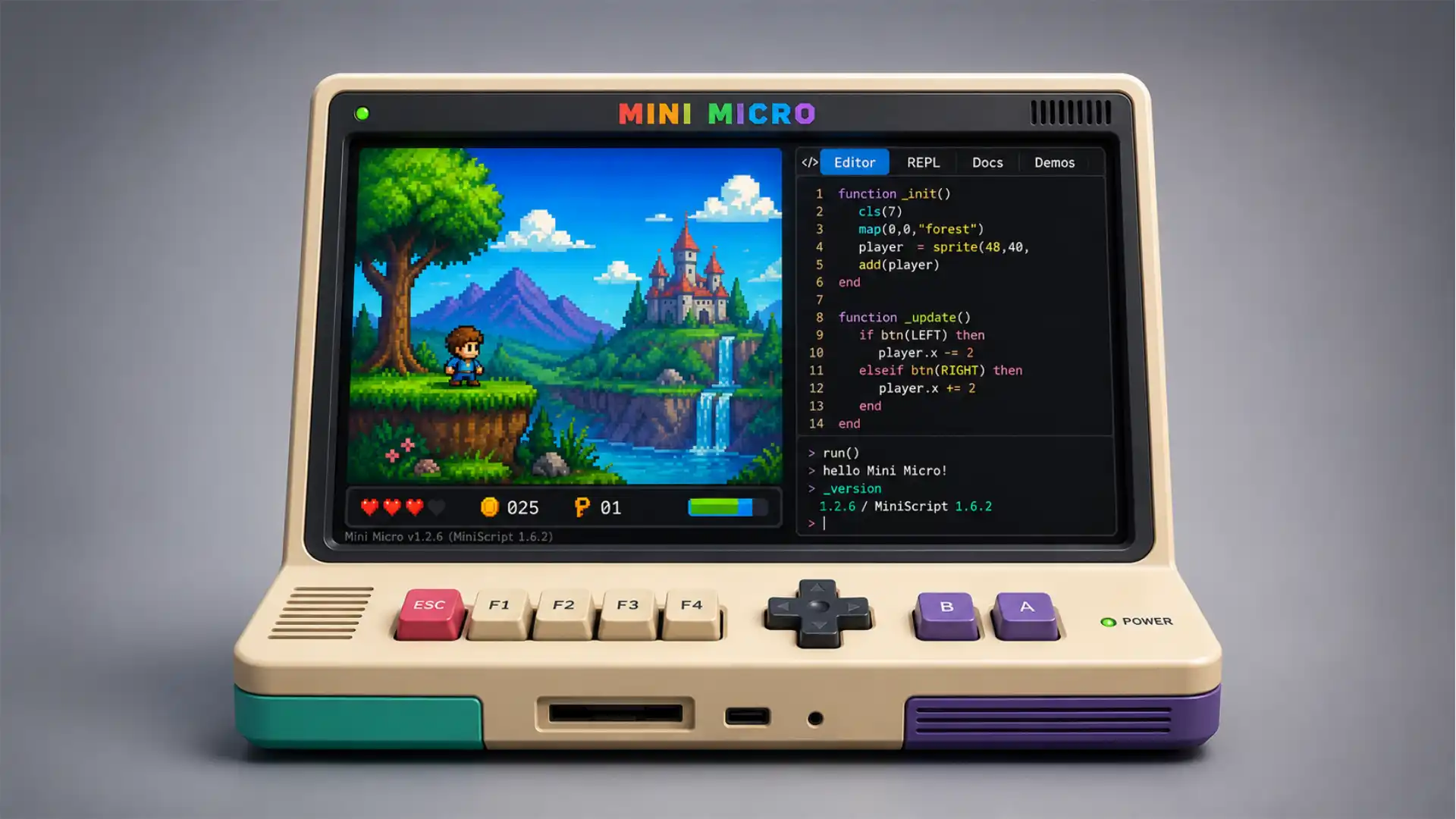
Mini Micro does something quietly rare: it gives you a computer that feels like a place. Not a productivity stack. Not a subscription dashboard. Not a sterile coding sandbox with a “getting started” modal and a dozen tabs of documentation waiting to ambush you. It opens like a small machine from an alternate timeline, one where personal computers kept their playful edges instead of sanding everything down into app stores, cloud accounts, and onboarding flows. The screen is fixed, the prompt is waiting, the system disk is already full of odd little things, and the whole environment suggests that you should poke around before asking permission.
Table of Contents
The project calls itself a neo-retro virtual home computer, which sounds whimsical until you spend a few minutes with it and realize the description is unusually accurate. Mini Micro is not an emulator of a lost machine. It is not pretending to be a Commodore, an Apple II, an Atari, or a BBC Micro. It is a fantasy computer, but not one trapped inside nostalgia as costume. Its display is 960 by 640 pixels in full 32-bit color, its programming language is modern, and it runs as a desktop app or directly in the browser through WebGL. The old-computer feeling comes less from fake beige plastic and more from the relationship it creates between you and the machine. You type. It answers. You edit a program. You run it. You break something. You reboot. The loop is small enough to understand.
That matters because the web has become very good at hiding how things work. A huge amount of modern software is built around polished surfaces with invisible interiors. Mini Micro goes in the opposite direction. It invites you into the interior immediately. The command line is not an admin-only back door. The editor is not an external IDE. The language is not a separate setup step. The shell itself is a MiniScript REPL, and MiniScript is also the language you use to write programs. One syntax, one world, one machine. The result feels closer to sitting down at a fictional home computer than opening a “learn to code” product with achievement badges attached.
Mini Micro is free, runs on macOS, Windows, Linux, and the browser, and as of the current official download page, the latest release is Mini Micro v1.2.6, built on November 7, 2025, using MiniScript 1.6.2. The version is not trivia. It matters because Mini Micro is not abandoned retroware. The release notes show active maintenance, small quality-of-life fixes, editor changes, file dialog improvements, sprite behavior fixes, and platform work. This is a living toy computer, not a frozen demo from a weekend jam.
A fantasy computer that avoids the usual trap
Most fantasy computers announce themselves through limits. The appeal is often in the constraint: tiny screen, tiny palette, tiny cartridges, tiny sound channels, tiny everything. That can be wonderful. PICO-8, TIC-80, and related projects proved that self-contained creative machines can make programming feel approachable again. But Mini Micro takes a slightly different path. It is retro in spirit, not in austerity. It gives you a clean, toy-like computing surface without forcing you to pretend it is 1983.
The 960 by 640 screen is the first clue. That is far larger than the usual fantasy-console postage stamp, and it changes the tone. You are not immediately shoved toward eight-pixel sprites and strict palette discipline. You can make pixel art, sprite games, tile maps, user interfaces, text experiments, simulations, or odd utilities. The display has enough room for retro aesthetics without making retro style mandatory. Joe Strout has even written about the screen choice, explaining the 3:2 aspect ratio as a way to preserve a classic design feel without going as wide as a modern video-first display.
This is why Mini Micro feels less like a fantasy console and more like a fantasy home computer. The distinction matters. A console implies cartridges, game loops, arcade rules, and a narrow purpose. A home computer implies a desk, a prompt, a disk, some demos, a half-finished utility, maybe a game, maybe a weird text generator, maybe a little drawing program you forgot you wrote. Mini Micro leans into that messier identity. It is still excellent for games, but it does not behave as if games are the only possible output worth caring about.
The official MiniScript wiki describes Mini Micro as a desktop application for Windows, macOS, and Linux that simulates a retro-style home computer, built around MiniScript, intended for both beginning programmers and more experienced coders making games or simulations. That dual audience is built into the product idea. It is not a classroom-only environment. It is not a pro engine pretending to be beginner-friendly by hiding most of itself. It sits in the middle, where a curious beginner and a tired experienced developer can both find something to touch.
The trap many educational coding environments fall into is that they feel like education first and computing second. Mini Micro feels like computing first. You learn because the machine is interesting, not because the interface keeps reminding you that you are learning. The difference is subtle, but anyone who fell in love with computers by exploring rather than following a curriculum will recognize it. A system becomes memorable when it seems to contain more than you asked for.
Mini Micro has that quality because it is not just a language prompt. It has demos. It has a system disk. It has graphics layers. It has sound. It has keyboard, mouse, and controller input. It has an editor. It has built-in affordances that make the machine feel stocked rather than empty. You are not looking at a blank web IDE, wondering what toy example to paste. You are inside a small environment with its own habits.
That is also why the “neo-retro” label works. Mini Micro does not merely borrow old visuals; it borrows old immediacy. Early home computers did not make you install a toolchain before your first line of code. You switched them on and landed somewhere programmable. Mini Micro tries to recapture that landing. It does it with a modern language and modern host platforms, but the emotional structure is old: the computer is awake, and it is waiting for you.
A small thing I like: Mini Micro’s browser version is useful for discovery, but the project is honest about its limits. The itch.io page notes that the WebGL build is good for trying the machine and playing built-in demos, while warning that browser limitations affect clipboard exchange and saving data to disk. That honesty preserves the charm. The browser build is a door, not a fake replacement for the desktop experience.
Mini Micro becomes most interesting when you treat it less as a tool and more as a self-contained digital object. It is a computer you visit. That sounds romantic, but it has practical consequences. A visitable computer is easier to return to than a generic coding environment. It leaves a memory. You remember the prompt, the proportions, the disk slots, the little demos. Software with a place-like identity has a better chance of surviving in your mind.
The screen is generous, and that changes the mood
The official specs mention a 960 x 640 full-color display, pixel graphics, sprite graphics, tile graphics, stereo sound, keyboard input, mouse input, and game-controller input. Those features read plainly on a spec sheet, but they say something larger about the project’s taste. Mini Micro is not obsessed with pain as proof of authenticity. It wants the productive feeling of old machines, not all their restrictions.
That 960 x 640 canvas gives Mini Micro a visual personality that is hard to place. It is sharp enough to feel modern and boxed-in enough to feel authored. The screen does not sprawl across your whole desktop like another app window begging to be resized. It has a chosen shape. The moment software has a chosen shape, you start designing for it. You think about composition, not just layout. You imagine what belongs in that frame.
For games, this matters immediately. A 3:2 screen makes side-scrollers, top-down maps, cockpit interfaces, dashboards, text panels, and arcade layouts feel roomy without becoming cinematic. Ultra-wide formats can be awkward for small retro games because they force empty horizontal space or long travel distances. A squarer display keeps action readable. It also leaves room for text, status panels, inventory boxes, or instructional overlays without making everything feel cramped.
For experiments that are not games, the display is even more useful. Mini Micro’s screen is big enough for small tools. You can imagine a pixel editor, a music toy, a classroom simulation, a cellular automata playground, a fake operating system, a tiny database, a typing game, or a visual novel engine. A fantasy computer becomes more inviting when it does not make every idea pass through an arcade filter.
The display system also supports layers. The Fantasy Console Wiki notes that Mini Micro can use up to eight simultaneous display layers, configured as modes such as solid color, text, pixel buffer, tile display, and sprite display. Layering is one of those features that makes a toy computer feel more like a real creative machine. It means you can separate background, tile map, sprites, UI, text, effects, and overlays without smashing everything into one canvas.
The project’s graphics model gives beginners a forgiving path. You can start by printing text, then draw pixels, then move a sprite, then graduate into tile maps. That ladder is important. A lot of game-making environments make the first successful moment too abstract. Mini Micro’s first successful moment can be extremely concrete: something appears on the screen because you told it to. The distance between command and result stays short.
The sound support fits the same pattern. Mini Micro includes synthesized and digitized stereo sound, with controls that support game-like use rather than mere beeps. Sound is part of the machine, not an afterthought. For a tiny home-computer world, that matters. Even a simple demo becomes more alive when it can click, hum, bounce, or play a short tune. The moment you add sound to a moving sprite, the environment stops feeling like a worksheet.
Controller support is another quiet signal. Mini Micro knows that play is a first-class use case. Keyboard and mouse are enough for coding and many experiments, but gamepads make the machine feel less like a classroom window and more like a small arcade cabinet you can program yourself. That shift changes who might care. It opens the door to hobbyists who want to make little games without adopting the whole weight of a professional game engine.
The visual looseness also makes Mini Micro less intimidating than more purist fantasy consoles. A strict 16-color palette can be beautiful, but it can also become a wall for newcomers. Mini Micro’s 32-bit color gives people room to make ugly things first. That is a compliment. Beginners need room to be visually messy before they learn taste. A system that demands pixel-art discipline from line one may accidentally teach anxiety instead of creativity.
The screen’s generosity also means Mini Micro can wear different skins. One demo can feel like a fake retro desktop. Another can feel like an arcade game. Another can look like a sci-fi control panel. Another can be plain text. The machine has a coherent frame without forcing a single visual genre. That is the right kind of constraint: enough to give identity, not so much that every project comes out wearing the same costume.
There is a useful lesson here for product designers, even outside programming tools. Constraints are most interesting when they make choices easier, not when they merely reduce options. Mini Micro’s fixed display and self-contained environment make decisions faster. Its color, layers, and input support keep the ceiling high enough to stay fun. The project respects the old-computer feeling, but it does not confuse friction with authenticity.
MiniScript gives the machine its voice
A fantasy computer lives or dies by its language. If the language feels fussy, the whole machine becomes fussy. Mini Micro uses MiniScript as both its command language and programming language, which is one of its smartest decisions. You do not learn a shell syntax, then a programming syntax, then an API style. You start with the same language that continues to matter.
MiniScript’s own homepage describes it as a clean, simple language for embedding or learning to program. It is modern, easy to learn, and open-source, with development dating back to 2016. That combination explains much of Mini Micro’s tone. The language is not a museum piece. It is not BASIC cosplay. It is a small modern scripting language that happens to fit beautifully inside a retro-flavored machine.
The BASIC comparison is tempting because Mini Micro’s relationship to the user feels like early BASIC machines. You turn it on, type commands, edit a program, run it, and see what happens. But MiniScript is not BASIC. Joe Strout has written that MiniScript was designed from scratch and drew inspiration from languages such as Python, Lua, REALbasic, and C#, while still sharing BASIC’s approachable spirit. That is the right lineage for Mini Micro: old immediacy, modern syntax.
This matters because nostalgia alone is a poor teacher. Old syntax can be charming, but charm fades when punctuation and historical baggage get in the way. MiniScript keeps the programming surface cleaner. A beginner can read code without feeling like every line is a ceremony. An experienced coder can move quickly without constantly translating old idioms into modern thought.
The REPL is part of the magic. A live prompt lowers the emotional cost of experimentation. You can test expressions, inspect values, try commands, and build confidence in tiny increments. Modern software development often begins with project scaffolds, package managers, environment configuration, and a folder full of files you do not yet understand. Mini Micro begins with an object: the computer. Then the language appears as a conversation with that object.
The built-in editor reinforces that feeling. You are not thrown out of the world to write code. Typing edit opens the editor. Running code happens inside the same environment. The project’s official download page points to documentation, a cheat sheet, release notes, DLC, and a WebGL template, but the core experience stays refreshingly compact. Mini Micro is not trying to become a full IDE. It is trying to keep the creative loop near the surface.
For beginners, that compactness is more than convenience. Every separate tool is another chance to lose the thread. If the editor, runtime, documentation, asset handling, and output window all feel unrelated, learning becomes a scavenger hunt. Mini Micro’s unity of place reduces that problem. You still have to learn, but you are learning one machine rather than a pile of disconnected software.
For experienced developers, the same compactness becomes a relief. Mini Micro gives you permission to make something small without turning it into a project management event. There is no pressure to choose a framework, set up build scripts, create a repository, install dependencies, decide on architecture, or justify the work. You can make a toy. Toy-making is underrated. Many serious ideas begin as toys because toys let you move before you overthink.
MiniScript’s role inside Mini Micro also makes the system feel hackable. The language is not merely the thing you use; it is part of the machine’s fabric. The shell being a MiniScript REPL means the boundary between “using” and “programming” gets thin. That is one of the most powerful old-computer feelings: the machine does not seem sealed.
A language also shapes the kind of community a project attracts. MiniScript’s approachable style makes Mini Micro less hostile to casual curiosity. It is easy to imagine someone using it after work, a teenager using it to make a first game, a teacher using it in a programming club, or an experienced programmer using it to prototype a small simulation without mental overhead. The language does not demand a single identity from its users.
There is also a subtle editorial decision in using a custom language instead of JavaScript, Python, or Lua. Mini Micro becomes more itself because MiniScript is not everywhere else. That may sound like a disadvantage, and for adoption at large scale it probably is. But as a discovery object, it is a strength. Opening Mini Micro feels like entering a small culture. The language belongs to the room.
What stands out inside the little machine
Mini Micro is easiest to understand through its texture: not one killer feature, but a cluster of small choices that make it feel coherent. It gives you a fixed screen, a command prompt, a built-in code editor, demos, graphics layers, sprites, tiles, sound, files, and downloadable content. None of those ideas is shocking by itself. Together, they create the sensation of a complete little computer.
Mini Micro at a glance
| Part of Mini Micro | What it gives you | Why it matters |
|---|---|---|
| Display | 960 x 640 full-color screen | A generous retro-feeling canvas |
| Graphics | Pixel, sprite, tile, text, layered displays | Room for games and visual tools |
| Sound | Synthesized and digitized stereo audio | Projects feel alive quickly |
| Input | Keyboard, mouse, game controllers | Works for coding, tools, and games |
| Language | MiniScript in shell and programs | One syntax across the machine |
| Access | Desktop apps and WebGL browser version | Easy to try, better to install |
This table makes Mini Micro look tidy, but the real appeal is less tidy than that. The project feels stocked with invitations. Try a demo. Open the editor. Mount a disk. Read the cheat sheet. Run something in the browser. Download the app. Look at the system disk. Make a sprite move. Break a program. Fix it. The environment nudges you toward exploration without turning exploration into a branded “journey.”
The demos matter because they answer a question every creative tool faces: what can this thing become? A demo is not only proof; it is permission. Mini Micro ships with examples that show games, graphics, sound, and interface ideas. The release notes for earlier 1.2 updates mention demos such as Asteroids-inspired gameplay, GUI shells, tower defense, Breakout, and a sound lab. These are not just toys for users. They are arguments for the machine’s range.
The system disk is another pleasing old-computer idea. A computer with built-in files feels more alive than a naked runtime. The Fantasy Console Wiki notes that Mini Micro includes a system disk with built-in sounds, images, and import libraries. That gives new users raw material to manipulate. It also makes the environment feel less like a blank box and more like a room someone prepared.
Mini Micro’s file model and disk metaphor are important because they preserve a sense of locality. Your work belongs somewhere inside the machine. In modern browser tools, files often feel abstract: cloud documents, downloads, blobs, exports, permissions, tabs. Mini Micro’s disk slots and folders restore a simpler mental model. The computer has storage. You put things there. You mount things. You reboot. It may be virtual, but the metaphor has weight.
The browser version is the easiest way to discover the project. Clicking “Play Now” removes the biggest barrier to curiosity. A strange creative tool benefits enormously from instant access. Nobody wants to install a niche programming environment just to decide whether the vibe is right. Mini Micro’s web build lets the project make its first impression quickly, then the desktop app becomes the place to stay if you want saving, clipboard exchange, and a fuller workflow.
The downloadable content angle is also worth noticing. The MiniScript news page mentions free DLC games, including “Build It,” a puzzle game with 40 levels and a built-in level editor. That is a lovely use of the fantasy-computer premise. It treats Mini Micro not only as a development environment, but as a tiny platform with playable culture around it. A machine becomes more believable when people release things for it.
MiniBASIC adds another layer of charm. It is a BASIC interpreter written in MiniScript for Mini Micro, with support for classic BASIC-style commands and sample programs, including old Creative Computing games. A BASIC interpreter inside a modern fantasy computer written in a beginner-friendly scripting language is delightfully recursive. It proves the machine has enough depth to host another programming culture inside itself.
That recursion is one of the strongest signs that Mini Micro is more than a tutorial shell. When users can build languages, editors, games, demos, and tools inside the system, the system starts behaving like a platform. It may be small, niche, and personal, but platform energy is not only about scale. It is about whether an environment can contain other environments.
The release cadence tells a similar story. Version 1.2.6 added a new custom file dialog, fixed platform issues, improved sprite behavior, and used a Unity version addressing a security flaw. Version 1.2.5 improved web-build sound behavior and sprite texture coordinates. Version 1.2.4 added Breakout, web-build frame-rate improvements, drag-and-drop mounting on Mac and Windows, and a recovery command for confusing console states. These are the updates of someone using and tending the machine, not merely shipping headline features.
That kind of maintenance is part of the appeal. A weird web gem becomes easier to recommend when it is cared for. Mini Micro has the personality of a hobbyist project, but the update notes show practical attention to bugs, platform behavior, documentation, demos, and user experience. The result is less fragile than its whimsy might suggest.
Why it feels better than another coding sandbox
A coding sandbox usually starts from code. Mini Micro starts from the fantasy of owning a small computer. That may sound cosmetic, but it changes the user’s posture. A sandbox asks, “What do you want to build?” A little computer asks, “What happens if you type something?” The second question is warmer, lower-pressure, and more open-ended.
The web is full of coding environments that are technically impressive and emotionally forgettable. They solve access but not attachment. They let you run code without installing anything, but they rarely create a reason to return. Mini Micro’s advantage is that it makes the environment itself memorable. You remember the screen. You remember the prompt. You remember that it is a fake computer, and because it is fake, it feels more available to imagination.
A huge part of programming education has been flattened into exercises. Exercises are useful, but they do not always create affection. People often get hooked on computing through unstructured encounters: changing colors, making a square move, editing someone else’s code, discovering a folder of examples, realizing that a machine will obey a strange command. Mini Micro gives those encounters a stage.
The built-in REPL is central here. A prompt suggests that the machine can be questioned. That is different from a blank code editor, which can feel accusatory. A blank editor asks you to produce. A prompt invites you to try. For beginners, the emotional distinction matters. Trying is easier than producing. Many people need a long period of trying before they can think of themselves as building.
Mini Micro also avoids the infantilizing tone common in some beginner tools. It is playful without talking down. The machine has a mascot-like charm, but the environment does not feel like a children’s app. It has enough depth for serious hobby work. It has a real language, real file handling, graphics, sound, input, demos, downloadable projects, and documentation. It respects beginners by giving them a machine worth growing into.
For experienced coders, the pleasure is different. Mini Micro strips away professional residue. There is no backlog, no deployment pipeline, no cloud bill, no scrum board, no production incident waiting at the edge of the screen. It returns programming to an older and more private feeling: making a small thing because making it is satisfying. That feeling is easy to lose when every tool tries to scale.
The phrase “fantasy computer” can mislead people into thinking Mini Micro is only for retro enthusiasts. The deeper audience is anyone who misses bounded software. Bounded software has edges. It does not pretend to contain every possible workflow. It does not collapse under the weight of plugins and integrations. It gives you a world small enough to map. Mini Micro’s boundaries make it relaxing.
That boundary also makes creativity faster. When the screen size, language, runtime, and basic APIs are already chosen, you start making decisions inside the work instead of around it. Professional tools often sell freedom, but too much freedom at the start produces hesitation. Mini Micro says: here is the machine, here is the language, here is the screen, go. That is not limitation for its own sake. It is momentum.
The project also has a pleasing resistance to the idea that every creative tool must become collaborative, social, cloud-native, AI-assisted, marketplace-enabled, and monetizable. Mini Micro is allowed to be local and modest. You can play with it alone. You can share programs if you want. You can make little games. You can learn. You can ignore the world for an hour. Not every tool needs a growth loop.
The browser version does give Mini Micro web-native reach, but the spirit remains personal-computer rather than platform-as-service. It uses the browser as a doorway, not as an ideology. That is a healthier relationship to the web than many tools have. The web is at its best when it lets strange things become instantly reachable, not when it forces every strange thing to become an account system.
Mini Micro’s design also hints at a broader truth about technical creativity: people like systems they can hold in their head. A modern game engine is powerful, but it is enormous. A modern web framework is powerful, but it is layered. Mini Micro is small enough that you can imagine eventually knowing it. That imagined knowability is a strong motivator. It turns learning from a hopeless chase into a finite adventure.
The browser version makes discovery painless
The WebGL version is one of Mini Micro’s best decisions because a strange tool needs a low-friction first touch. You can read about a fantasy computer all day and still not understand whether it has charm. You need to see it boot, type into it, run a demo, and feel the timing. A browser version lets that happen before commitment.
This matters for Web Radar specifically. Mini Micro is the kind of site that rewards opening immediately. The pitch is not just informational. Screenshots help, but interaction is the proof. A virtual computer either has atmosphere or it does not. Mini Micro has atmosphere, and the fastest way to communicate that is to put the machine under someone’s hands.
The browser build also reveals a smart product instinct: discovery and sustained use are not the same job. The web version is for entry; the desktop version is for staying. The itch.io page makes that clear by pointing out WebGL limitations around clipboard exchange and saving programs or data to disk. That keeps expectations honest. You can sample the machine online, then install it if you want to work seriously.
For a niche programming environment, that path is unusually clean. Try first, install later is obvious in theory but still neglected by many small tools. Mini Micro gets it right because the web build does not feel like a marketing video. It is the thing itself, with caveats. You are not watching someone use the fantasy computer. You are using it.
The web build also helps Mini Micro escape one of the biggest problems in retrocomputing culture: gatekeeping by setup. Old-machine enthusiasm often begins with friction. Which emulator? Which ROM? Which disk image? Which keyboard mapping? Which legal gray area? Mini Micro avoids that because it is not emulating proprietary hardware. It is its own machine. The browser version makes the first step as simple as opening a page.
There is a cultural advantage too. A browser-accessible fantasy computer is shareable in the way the early web was shareable. You can send someone a link not because it solves a workflow, but because it is a neat thing to touch. That kind of link has become rarer. Much of the web is now either content to consume, services to subscribe to, or software that asks you to sign in before it shows its face. Mini Micro still has the old “look at this” energy.
That energy grows when paired with demos and games. The official news page shows ongoing releases and Mini Micro-related content, including free downloadable games. A browser-playable machine with a small library starts to feel like a tiny public arcade and workshop. It is not merely a tool you evaluate. It is a place where things happen.
The desktop availability keeps the project from becoming a browser toy only. Mini Micro runs on macOS, Windows, and Linux, which matters for schools, hobbyists, and developers using different machines. Cross-platform consistency is part of the appeal. The same little computer can live on many host systems, which makes Mini Micro feel more like an independent layer than a platform-specific app.
This also makes Mini Micro a good candidate for informal teaching spaces. A club, class, or workshop can use the browser for first contact and desktop installs for deeper sessions. The shared environment reduces setup drama. Everyone sees the same screen. Everyone uses the same language. Everyone can run demos. The machine becomes the common ground.
The WebGL template mentioned on the download page is another useful piece. It suggests that Mini Micro projects can move back onto the web, not just be born there. That matters for sharing small games or experiments. A tiny creative machine becomes more attractive when its outputs can travel.
None of this means Mini Micro will become mainstream. Its value is not mass adoption. Its value is the fact that it exists as a coherent alternative to bloated creative tooling. The web version ensures that this alternative is discoverable without ceremony. In a healthier web, more strange tools would offer that kind of instant, respectful invitation.
Who should open it
Mini Micro is worth opening if you like software with personality. That is the broadest recommendation. It is not only for programmers, and it is not only for retro fans. It is for people who enjoy the feeling of a small system built with care, especially when that system invites tinkering rather than passive consumption.
Beginners may like it because the path from command to result is short. You can type something and see the machine respond. That loop is still the heart of learning to program. Books, courses, and tutorials all have their place, but the first emotional hook is usually direct control. Mini Micro gives direct control quickly.
Teachers and mentors may like it because it offers a shared, bounded environment. When every student has the same virtual computer, examples become easier to discuss. The screen size is fixed. The language is consistent. The demos exist inside the machine. The browser version lowers the setup barrier. The desktop version supports deeper work. It is not hard to imagine Mini Micro becoming the center of a small programming club.
Game hobbyists may like it because the environment supports sprites, tiles, sound, and controllers without requiring a professional game engine. A full engine is often too much for a tiny idea. Mini Micro is better suited to small games that benefit from constraints but do not need severe fantasy-console limits. If you want to make a single-screen arcade toy, a tile-based puzzle, a text-heavy interface game, or a weird little simulation, the machine feels appropriately sized.
Retrocomputing people may like it because it understands the old appeal without copying one old system too literally. Mini Micro is not trying to win a historical accuracy contest. That frees it from endless comparison. It can borrow the best emotional parts of old home computers: immediacy, locality, discoverability, programmability, and a sense of machine identity.
Experienced developers may like it for a more private reason. It gives programming back its hobby scale. Many developers spend their days inside serious systems with serious consequences. Mini Micro is small enough to be unserious in the best way. You can write code without becoming responsible for a product. You can make a little thing and leave it at that.
Designers may find it interesting as a product case study. Mini Micro shows how taste can matter more than novelty. The ingredients are familiar: a scripting language, a graphics API, a virtual screen, demos, a browser build, downloads, documentation. The experience works because the choices are coherent. It knows what kind of object it wants to be.
There are limits. Mini Micro is not a replacement for Unity, Godot, Python, JavaScript, or a modern IDE. It is not trying to be. If you want large-scale production tooling, platform distribution, 3D pipelines, commercial asset workflows, or mainstream hiring relevance, this is not the point. Mini Micro’s strength is smaller and more specific: it makes programming feel approachable, local, and playful inside a machine with a memorable identity.
That specificity is why it belongs in a Web Radar piece. The web is more interesting when it contains tools that do not chase the center. Mini Micro is not optimized for the usual metrics of digital success. It is not trying to become the default environment for everyone. It is a lovingly made corner of the internet where a virtual computer still waits at a prompt.
The best way to test it is not to read too much about it. Open the browser version, run a demo, type a command, then download the desktop app if the machine sticks in your head. The project is free, alive, and deep enough to reward a weekend of messing around. That is already more than most links offer.
Mini Micro’s quiet triumph is that it makes a computer feel discoverable again. Not powerful in the abstract. Not frictionless in the corporate sense. Discoverable. You can sense that there are folders to inspect, demos to steal from, programs to write, commands to learn, and mistakes worth making. It gives back a small but important feeling: the machine is not finished without you.
Useful notes before you open it
Yes. Mini Micro is free to download and use, with desktop builds available for macOS, Windows, and Linux, plus a browser-based WebGL version for quick testing.
No. Mini Micro is built around MiniScript, a beginner-friendly language, and the built-in editor plus REPL make it easier to experiment without setting up a full coding environment.
Games are a natural fit because Mini Micro supports sprites, tiles, pixel graphics, sound, keyboard, mouse, and controllers, but it is broader than that. It also works well for visual experiments, small tools, simulations, and playful coding sketches.
Yes. The WebGL version lets you try Mini Micro online, which is perfect for discovery. The desktop version is better for longer sessions, saving work, and using the environment more seriously.
Mini Micro feels less like a blank editor and more like a tiny self-contained computer. The screen, prompt, demos, editor, disks, and language all belong to one little world, which makes programming feel more like exploration than setup.
Author:
Jan Bielik
CEO & Founder of Webiano Digital & Marketing Agency
This article is an original analysis supported by the sources cited below
Mini Micro official website
The official Mini Micro page, used for the project’s positioning, main navigation, learning resources, browser access, and general product context.
Mini Micro download page
The official download page, used to verify supported desktop platforms, current release information, Mini Micro v1.2.6, build date, and MiniScript 1.6.2 usage.
Mini Micro release notes
The official release notes, used to confirm recent version changes, maintenance activity, bug fixes, editor improvements, file dialog changes, and MiniScript core updates.
MiniScript official website
The official MiniScript homepage, used for the language description, open-source status, learning purpose, and development background.
Mini Micro on MiniScript Wiki
The MiniScript Wiki entry, used for the description of Mini Micro as a retro-style virtual home computer, its intended users, and its desktop platform context.
Mini Micro on itch.io
The official itch.io project page, used for the browser-playable version, WebGL limitations, platform availability, and community-facing description.
Why Mini Micro’s screen is 960×640
Joe Strout’s explanation of the 960 by 640 display and 3:2 aspect ratio, used to support the article’s discussion of Mini Micro’s screen proportions and design feel.
| Citing this article? Brief excerpts are welcome. Please credit Webiano.digital, name the author where stated, and include a link to https://webiano.digital and to this original article. Full or substantial republication requires prior written permission. Read our Copyright and Content Use Policy. |
This article was prepared with the assistance of artificial intelligence tools. The content underwent expert human review, and Webiano Digital & Marketing Agency assumes editorial responsibility for its final version and publication.